1. Giriş
This manual provides detailed instructions for the setup, operation, and maintenance of your Mitel ShoreTel IP 480 Telephone. The Mitel IP 480 is a Voice over IP (VoIP) phone designed for business communication, featuring a large backlit display, eight line appearances, and dedicated function keys for efficient call handling. Please read this manual thoroughly to ensure proper use and to maximize the functionality of your device.
2. Paket İçeriği
Verify that all items are present in your package. If any items are missing or damaged, please contact your vendor immediately.
- Mitel ShoreTel IP 480 Telephone Unit (5 units)
- Handset (5 units)
- Handset Cord (5 units)
- Ethernet Cable (5 units)
- Desk Stand (5 units)

Resim 2.1: Üzerindeview of the Mitel ShoreTel IP 480 Telephone. This image displays one of the five IP 480 telephone units, including the main phone body, handset, and desk stand, as typically found in the multi-pack.
3. Ürün Bittiview
The Mitel ShoreTel IP 480 is designed for intuitive communication. Key features include:
- Görüntülemek: A large, backlit graphical display for clear visibility of call information, menus, and directories.
- Line Appearances: Eight programmable line appearances for managing multiple calls or lines.
- Sabit Özellik Anahtarları: Dedicated buttons for common functions such as Transfer, Conference, Hold, Call History, Voicemail, and Directory.
- Yazılım Tuşları: Five context-sensitive soft keys located below the display, whose functions change based on the phone's current state.
- Navigasyon Kümesi: A four-way navigation pad with a select button for menu navigation.
- Ses Kontrolü: Dedicated buttons for adjusting handset, headset, and speakerphone volume.

Resim 3.1: Kapatmak view of the Mitel ShoreTel IP 480's keypad and display. This image highlights the backlit display, the fixed feature keys (such as Transfer, Conference, Hold), the numeric keypad, and the context-sensitive soft keys.
4. Kurulum
Follow these steps to set up your Mitel ShoreTel IP 480 Telephone:
- Masa standını takın: Masa standını telefon ünitesinin arkasındaki yuvalarla hizalayın ve yerine oturtun.
- Telefonu bağlayın: Plug one end of the coiled handset cord into the handset and the other end into the handset port on the side of the phone unit.
- Ethernet Kablosunu Bağlayın: Plug one end of the provided Ethernet cable into the LAN port on the back of the phone. Connect the other end to an active network port (e.g., a wall jack or network switch) that provides Power over Ethernet (PoE) or is connected to a power adapter (not included if PoE is used).
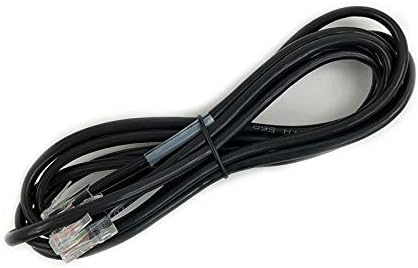
Resim 4.1: Standard Ethernet cable. This cable is used to connect the Mitel IP 480 phone to your network, providing both data connectivity and power if Power over Ethernet (PoE) is available.
- Güç Açık: The phone will automatically power on once connected to a PoE-enabled network port or an external power adapter. The display will illuminate, and the phone will begin its boot-up sequence.
- Başlangıç konfigürasyonu: The phone will attempt to connect to your network and register with your IP PBX system. Follow any on-screen prompts or consult your system administrator for specific network settings if required.
5. Kullanım Talimatları
5.1 Arama Yapma ve Alma
- Telefon çağrısı yapmak: Lift the handset, press a line appearance button, or press the Speaker button. Dial the desired number using the keypad.
- Bir Aramayı Cevaplamak için: Lift the handset, press the flashing line appearance button, or press the Speaker button.
- Aramayı Bitirmek İçin: Replace the handset or press the Speaker button again if using speakerphone.
5.2 Using Fixed Feature Keys
- transferi: Etkin bir çağrı sırasında, Aktarım düğmeye basın, yeni numarayı çevirin ve ardından tuşa basın. Aktarım tamamlamak için tekrar.
- Konferans: Etkin bir çağrı sırasında, Konferans button, dial the number of the third party, and then press Konferans Tüm partilere tekrar katılmak için.
- Tutmak: Basın Tutmak Aktif bir aramayı beklemeye almak için düğmeye basın. Aramayı geri almak için yanıp sönen hat düğmesine basın.
- Sesli mesaj: Basın Sesli mesaj Sesli mesajlarınıza erişmek için düğme.
- Dizin: Basın Dizin button to access your personal or corporate directory.
- Arama geçmişi: Basın Çağrı Geçmişi düğmeye bas view a list of missed, received, and dialed calls.
5.3 Using Soft Keys
The five soft keys below the display provide context-sensitive options. Their labels will change depending on the phone's current state (e.g., idle, on a call, in a menu). Press the corresponding soft key to activate the displayed function.
5.4 Sesi Ayarlama
Kullanın Hacim buttons (up/down arrows) located below the keypad to adjust the volume of the handset, speakerphone, or ringer, depending on the phone's current state.
6. Bakım
Proper care ensures the longevity and optimal performance of your Mitel ShoreTel IP 480 Telephone.
- Temizlik: Yumuşak bir d kullanınamp cloth to clean the phone's surface. Avoid abrasive cleaners, solvents, or harsh chemicals, as these can damage the plastic and display.
- Çevre: Keep the phone away from direct sunlight, excessive heat, moisture, and dust. Ensure adequate ventilation around the device.
- Kordonlar: Periodically check all cords for signs of wear or damage. Replace any damaged cords immediately.
7. Sorun Giderme
If you encounter issues with your Mitel ShoreTel IP 480 Telephone, try the following troubleshooting steps:
- Arama sesi yok/Arama yapılamıyor:
- Check that the Ethernet cable is securely connected to both the phone and the network port.
- Ensure the network port is active and providing PoE (if applicable).
- Restart the phone by disconnecting and reconnecting the Ethernet cable.
- Contact your system administrator to verify network connectivity and phone registration status.
- Display is Blank/Not Working:
- Verify the phone is receiving power (check Ethernet cable connection or power adapter).
- Telefonu yeniden başlatın.
- Kötü Ses Kalitesi:
- Check handset and handset cord connections.
- Ses tuşlarını kullanarak sesi ayarlayın.
- Ensure there is no interference from other electronic devices.
- Contact your system administrator to check network quality.
- Yanıt Vermeyen Düğmeler:
- Telefonu yeniden başlatın.
- Düğmelerin altına herhangi bir yabancı madde sıkışmadığından emin olun.
If these steps do not resolve the issue, please contact your IT department or Mitel support for further assistance.
8. Özellikler
The following are technical specifications for the Mitel ShoreTel IP 480 Telephone:
| Özellik | Şartname |
|---|---|
| Ürün Boyutları (U x G x Y) | 10.3 x 6.7 x 4.7 inç |
| Ürün Ağırlığı | 2.59 pound |
| Malzeme | Plastik |
| Güç Kaynağı | Corded Electric (typically Power over Ethernet) |
| Çevirici Türü | Tek Tuş Takımı |
| Yanıtlama Sistemi Türü | Digital (via connected PBX system) |
| Konferans Görüşmesi Yeteneği | 3 yollu |
| Arayan Kimliği | Evet |
9. Garanti ve Destek
The Mitel ShoreTel IP 480 Telephone is manufactured by Mitel. For information regarding warranty coverage, technical support, or service, please refer to the official Mitel website or contact your authorized Mitel reseller. Keep your purchase receipt and product serial numbers handy when contacting support.


