1. Giriş
Satın aldığınız için teşekkür ederizasing the Mesqool Digital Alarm Clock CR1008. This manual provides detailed instructions to help you set up and operate your new alarm clock, ensuring you can utilize all its features effectively. This clock is designed for ease of use and includes features such as a large display, adjustable brightness, a multi-color night light, and convenient charging ports.
2. Temel Özellikler
- 7.5-inch Large Number Screen: Highly visible time display for easy reading from a distance.
- 5-Level Brightness Dimmer: Adjustable display brightness from very bright to very dim, allowing for comfortable viewgündüz veya gece.
- 7 Renkli Gece Lambası: Integrated night light with 7 color options and adjustable brightness, perfect for ambient lighting.
- Çift USB Şarj Bağlantı Noktaları: Includes one USB-A and one Type-C port for convenient charging of mobile devices.
- Ayarlanabilir Alarm Sesi: Alarm volume can be set to low, medium, or high, with a maximum of 80 dB, suitable for heavy sleepers.
- Gradual Alarm Sound: Alarm starts softly and gradually increases in volume to provide a gentle wake-up experience.
- 9 Dakikalık Erteleme Fonksiyonu: Large, easy-to-press snooze button for an additional 9 minutes of sleep.
- 12H/24H Time Format: Slider switch to easily select between 12-hour and 24-hour time display formats.
- Pil Yedekleme: Requires 2 AAA batteries (not included) to maintain time and alarm settings during a power outage.
- Yaz Saati Uygulaması (DST) Fonksiyonu: Convenient switch for adjusting to Daylight Saving Time.
3. Kurulum
3.1 Güç Bağlantısı
The Mesqool Digital Alarm Clock CR1008 is a plug-in electric alarm clock. For all functions, including time display, alarm, and USB charging, the clock must be connected to a DC wall power outlet using the provided 5V 2A power adapter.
3.2 Yedek Pil Kurulumu
To ensure your time and alarm settings are retained during a power failure, install 2 AAA batteries (not included) into the battery compartment located on the back of the unit. The screen display will not turn on when operating solely on battery backup; batteries are for memory retention only.

Figure 1: Battery backup compartment and power connection. Note: AAA batteries are not included.
3.3 İlk Güç Açma
Once plugged in, the clock display will illuminate. You may then proceed to set the time and alarm as described in the operating instructions.
4. Kullanım Talimatları
4.1 Saati Ayarlama
- Basın AYARLANAN ZAMAN Düğmeye bir kez basın. Saat rakamları yanıp sönmeye başlayacaktır.
- Kullanın SAAT button (left button on top) to adjust the hour.
- Basın AYARLANAN ZAMAN Tekrar düğmeye basın. Dakika rakamları yanıp sönecektir.
- Kullanın DAKİKA button (right button on top) to adjust the minutes.
- Basın AYARLANAN ZAMAN button a third time to confirm and exit time setting mode.
4.2 12H/24H Time Format Selection
Bulun ZAMAN FORMATI slider switch on the back of the clock. Slide it to select either the 12-hour or 24-hour display format according to your preference.

Figure 2: Switching between 12H and 24H time formats.
4.3 Alarmı Ayarlama
- Basın ALARM KURMAK Düğmeye bir kez basın. Alarm saati rakamları yanıp sönmeye başlayacaktır.
- Kullanın SAAT button (left button on top) to adjust the alarm hour.
- Basın ALARM KURMAK Tekrar düğmeye basın. Alarm dakika rakamları yanıp sönecektir.
- Kullanın DAKİKA button (right button on top) to adjust the alarm minutes.
- Basın ALARM KURMAK button a third time to confirm and exit alarm setting mode.
- Alarmı etkinleştirmek veya devre dışı bırakmak için ALARM AÇIK / KAPALI switch located on the back of the clock.
4.4 Alarm Ses Seviyesini Ayarlama
On the back of the clock, locate the ALARM SES slider. Slide it to select your desired alarm volume: DÜŞÜK, MED (Medium), or YÜKSEK. The highest setting provides a loud alarm suitable for heavy sleepers.

Figure 3: Adjustable alarm volume levels.
4.5 Erteleme İşlevi
Alarm çaldığında, büyük düğmeye basın. ERTELEME / IŞIK button on the top of the clock to temporarily silence the alarm for 9 minutes. The alarm will sound again after the snooze period. To turn off the alarm completely, press the ALARM DURAKLATMA arkasındaki düğme.

Figure 4: Utilizing the snooze function for extra rest.
4.6 Gece Lambası Çalıştırma
Tap the large ERTELEME / IŞIK button on the top of the clock to cycle through 7 different night light colors. Continue tapping to change colors. To turn off the night light, cycle through all colors until it switches off, or press and hold the button.
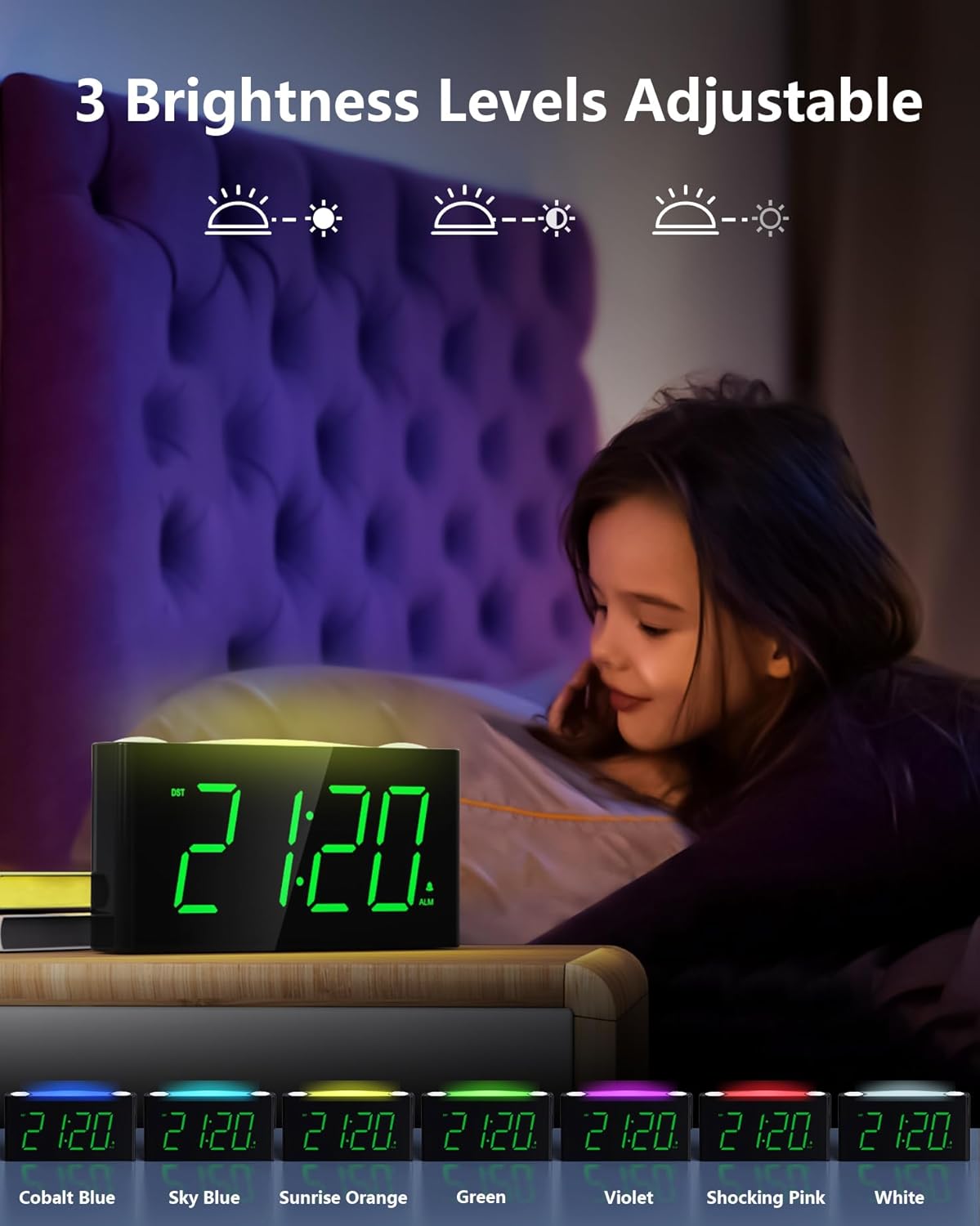
Figure 5: The 7-color night light feature.
Video 1: Demonstration of the 7-color night light and large LED display.
4.7 Adjusting Display Brightness (Dimmer)
On the back of the clock, locate the DİMMER slider. Slide it to adjust the brightness of the time display from its brightest to its dimmest setting. This allows you to customize the display visibility to your comfort level, especially for nighttime use.

Figure 6: Adjusting the 5-level display dimmer.
Video 2: Bittiview of clock features, including dimmer and USB ports.
4.8 USB Şarj Bağlantı Noktalarının Kullanımı
The clock is equipped with a standard USB-A port and a Type-C port on the back. These ports allow you to charge your mobile devices conveniently while the clock is plugged into a wall outlet. This helps reduce the number of power outlets needed in your bedroom.

Figure 7: USB and Type-C charging ports.
4.9 Yaz Saati Uygulaması (DST)
Bulun Yaz saati uygulaması switch on the back of the clock. Slide it to activate or deactivate the Daylight Saving Time adjustment as needed.
Video 3: Detailed look at the clock's features, including time and alarm setting.
5. Bakım
- Temizlik: Wipe the clock with a soft, dry cloth. Avoid using abrasive cleaners or solvents.
- Sıvıya Maruz Kalma: Saati suya veya diğer sıvılara maruz bırakmayın.
- Atama: Place the clock on a stable, flat surface away from direct sunlight, heat sources, and excessive moisture.
- Pil Değişimi: Replace AAA backup batteries annually or when the battery indicator suggests low power to ensure continuous memory retention.
6. Sorun Giderme
- Clock Display is Off: Ensure the power adapter is securely plugged into both the clock and a working wall outlet. If using battery backup, remember the display does not illuminate; batteries only retain settings.
- Alarm Çalmıyor: Check that the ALARM ON/OFF switch on the back is in the 'ON' position. Verify the alarm time is correctly set.
- USB Bağlantı Noktaları Şarj Edilmiyor: Confirm the clock is properly plugged into a wall outlet. Ensure your device's charging cable is functional and correctly connected to the USB or Type-C port.
- Ekran Çok Parlak/Loş: Adjust the DIMMER slider on the back of the clock to your preferred brightness level.
- Night Light Not Changing Colors: Tap the SNOOZE/LIGHT button repeatedly to cycle through all available colors. If it remains stuck, try unplugging and re-plugging the clock to reset it.
7. Özellikler
| Özellik | Detay |
|---|---|
| Marka | meskûl |
| Model Numarası | CR1008 |
| Görüntü Türü | Dijital LED |
| Ekran Rengi | Yeşil Rakamlar |
| Gece Işığı Renkleri | 7 Options (Oyster White, Cobalt Blue, Sky Blue, Green, Beige, Shocking Pink, Violet) |
| Güç Kaynağı | Corded Electric (5V 2A Power Adapter included) |
| Pil Yedekleme | 2 AAA batteries required (not included) for time/alarm memory |
| USB Şarj Portları | 1x USB-A, 1x Type-C (USB Charger: 5V 1000mA) |
| Ürün Boyutları | 6.46 inç (U) x 1.93 inç (G) x 3.39 inç (Y) |
| Malzeme | Akrilonitril Bütadien Stiren (ABS) |
| Özel Özellikler | Adjustable Brightness, Adjustable Volume, Charging Port, Daylight Saving |
8. Garanti ve Destek
The Mesqool Digital Alarm Clock CR1008 comes with a one-year limited warranty. Additionally, Mesqool offers a 30-day money-back guarantee and 24-hour response support. For any inquiries or assistance, please contact support@mesqool.com.


