1. Giriş
The SMARTGEN HMC9000A Marine Engine Controller is an advanced digital, intelligent, and networked solution designed for genset automation and monitoring control systems. It enables automatic start/stop, data measurement, alarm protection, and "three remote" functions: remote control, remote measuring, and remote communication. Featuring a 4.3-inch TFT-LCD display with optional Chinese/English interfaces, the HMC9000A is reliable and user-friendly. Its powerful 32-bit ARM processor ensures precise parameter measurement, fixed value adjustment, and time setting, making it suitable for various diesel engine automation systems, including marine emergency units, main propulsion units, main generator units, and pumping units.
2. Güvenlik Bilgileri
Please read and understand all safety instructions before installing, operating, or maintaining the HMC9000A controller. Failure to follow these instructions may result in personal injury, equipment damage, or improper operation.
- Kurulum veya bakım öncesinde tüm güç kaynaklarının kesildiğinden emin olun.
- Kurulum ve kablolama işlemleri yalnızca yetkili personel tarafından yapılmalıdır.
- Kontrol ünitesini nemden, aşırı sıcaklıklardan ve aşındırıcı ortamlardan koruyun.
- Kumandayı açmayın.asing unless specifically instructed by the manufacturer.
- Use appropriate personal protective equipment (PPE) during installation and servicing.
3. Ürün Bittiview
The HMC9000A controller is built around a 32-bit ARM micro-processor, providing high performance and reliability. It features a clear 4.3-inch TFT-LCD display for easy monitoring and interaction.
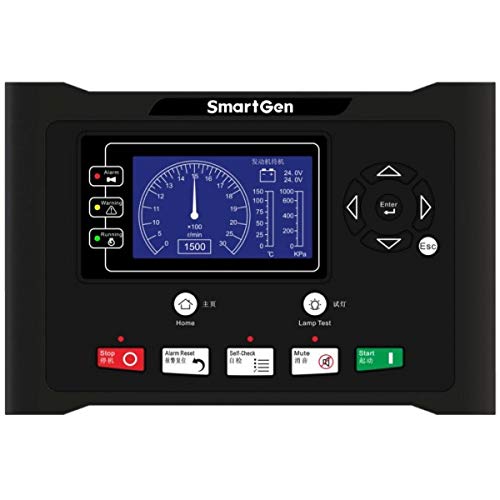
Şekil 1: Ön view of the SMARTGEN HMC9000A Marine Engine Controller, showing the 4.3-inch TFT-LCD display and control buttons.
Temel Özellikler:
- 32-bit ARM Micro-processor: For precision parameter measurement and control.
- 4.3-inch TFT-LCD Display: With backlight and optional Chinese/English interface.
- Otomatik Başlatma/Durdurma: For genset automation.
- Veri Ölçümü: Comprehensive monitoring of engine parameters.
- Alarm Koruması: Integrated system for engine safety.
- "Three Remote" Functions: Remote control, remote measuring, and remote communication.
- SAE J1939 Interface: For communication with ECU engines, reducing wiring complexity.
- RS485 Arayüzü: For communication and module expansion.
4. Kurulum ve Kurulum
The HMC9000A is designed for compact installation and simple connections. Follow these guidelines for proper setup:
4.1 Montaj
Mount the controller in a secure, vibration-free location, protected from direct sunlight and excessive heat. Ensure adequate ventilation around the unit.
4.2 Kablolama
All wiring should comply with local electrical codes and marine standards. Refer to the detailed wiring diagrams provided in the separate installation guide for specific connections.
- Güç Kaynağı: Connect the controller to a stable DC power source within the specified voltage aralığı.
- Engine Sensors: Connect engine sensors (e.g., oil pressure, water temperature, engine speed) to the designated input terminals. For ECU engines, the SAE J1939 interface can transmit these parameters, potentially eliminating the need for additional sensors and complex wiring.
- Aktüatörler: Connect start/stop solenoids, fuel solenoids, and other actuators to the appropriate output terminals.
- İletişim Arayüzleri:
- SAE J1939: Connect to compatible ECU engines for data exchange.
- RS485: Use for PC communication, remote control modules, or other module expansions.
Kısa devreleri veya parazitleri önlemek için tüm bağlantıların güvenli ve uygun şekilde yalıtılmış olduğundan emin olun.
5. Kullanım Talimatları
The HMC9000A controller is operated via its push-button interface and 4.3-inch LCD display.
5.1 Açma/Kapatma
To power on the controller, ensure the DC power supply is connected and switched on. The controller will perform a self-test and display the main interface. To power off, disconnect the DC power supply.
5.2 Arayüzde Gezinme
Use the push-buttons on the front panel to navigate through menus, view parameters, and adjust settings. The LCD display provides clear visual feedback. The interface supports both Chinese and English languages, which can be selected in the system settings.
5.3 Automatic Start/Stop
The controller can be configured for automatic engine start and stop based on predefined conditions or remote commands. Refer to the system settings for configuring auto-start/stop parameters, including crank attempts, cool-down times, and protection delays.
5.4 Veri İzleme
The HMC9000A continuously monitors various engine parameters, including:
- Motor Devri (RPM)
- Su Sıcaklığı
- Yağ Basıncı
- Yağ Sıcaklığı
- Pil Hacmitage
- Çalışma Saatleri
- And other relevant parameters depending on connected sensors and ECU.
These values are displayed on the LCD and can be accessed through the monitoring menus.
5.5 Alarm Protection
The controller provides comprehensive alarm protection for the engine. When an abnormal condition is detected (e.g., low oil pressure, high water temperature), the controller will trigger an alarm, display the fault on the LCD, and may initiate an automatic shutdown sequence to protect the engine. Alarm thresholds can be configured in the settings.
5.6 Uzaktan Kumanda Fonksiyonları
The HMC9000A supports "three remote" functions:
- Uzaktan kumanda: Allows remote start, stop, and other operational commands.
- Remote Measuring: Uzaktan erişimi sağlar viewing of all monitored engine parameters.
- Uzaktan İletişim: Facilitates data exchange and configuration from a remote location, typically via the RS485 interface connected to a PC or a dedicated remote control module.
Configuration for remote functions is done through the communication interface or specific remote module settings.
5.7 Parametre Yapılandırması
Most operational parameters, such as fixed values, time settings, and set values, can be configured directly from the front panel using the push-buttons. For more advanced configuration or bulk parameter adjustments, a PC can be connected via the communication interface (e.g., RS485) using SMARTGEN's proprietary software.
6. Bakım
Regular maintenance ensures the longevity and reliable operation of your HMC9000A controller.
- Temizlik: Keep the controller's display and casing clean using a soft, dry cloth. Do not use abrasive cleaners or solvents.
- Bağlantılar: Periodically check all wiring connections for tightness and signs of corrosion. Re-tighten or clean as necessary.
- Yazılım Güncellemeleri: Check the SMARTGEN webEn iyi performansı ve yeni özelliklere erişimi garantilemek için mevcut tüm yazılım güncellemelerine erişebileceğiniz bir site.
- Çevre Kontrolü: Çalışma ortamının belirtilen sıcaklık ve nem aralıklarında kalmasını sağlayın.
For any internal maintenance or repairs, contact SMARTGEN authorized service personnel.
7. Sorun Giderme
This section provides solutions to common issues you might encounter with the HMC9000A controller.
| Sorun | Olası Neden | Çözüm |
|---|---|---|
| Kumanda açılmıyor. | Elektrik yok; yanlış kablolama; sigorta atmış. | Check DC power supply connection and voltage. Verify wiring. Check and replace fuses if necessary. |
| Engine fails to start automatically. | Auto-start function disabled; low fuel; engine fault; incorrect parameters. | Ensure auto-start is enabled. Check fuel level. Investigate engine fault codes. Verify start parameters. |
| Incorrect sensor readings. | Faulty sensor; loose connection; incorrect sensor type configured. | Check sensor wiring. Test sensor functionality. Verify sensor type in controller settings. |
| Communication error (J1939/RS485). | Incorrect wiring; incompatible device; software issue. | Check communication wiring (A/B lines, termination resistors). Ensure connected device is compatible. Update controller firmware or PC software. |
If the problem persists after attempting these solutions, please contact SMARTGEN technical support.
8. Özellikler
- Modeli: HMC9000A
- İşlemci: 32-bit ARM Micro-processor
- Görüntülemek: 4.3-inch TFT-LCD with backlight
- Interface Languages: Chinese, English (selectable)
- İletişim Arayüzleri: RS485, SAE J1939
- Temel Fonksiyonlar: Automatic Start/Stop, Data Measurement, Alarm Protection, Remote Control, Remote Measuring, Remote Communication
- Parametre Yapılandırması: Via front panel push-buttons or PC software
- Üretici: SMARTGEN
- Ürün Ağırlığı: 1.98 pound (yaklaşık 0.9 kg)
9. Garanti ve Destek
For warranty information, please refer to the warranty card included with your product or visit the official SMARTGEN website. Technical support is available through SMARTGEN's customer service channels. When contacting support, please have your product model (HMC9000A) and any relevant error messages or symptoms ready.
SMARTGEN Official Webalan: www.smartgen.cn


