giriiş
Satın aldığınız için teşekkür ederizasing the Altec Lansing LifeJacket H2O 4 Waterproof Bluetooth Speaker. This manual provides essential information for setting up, operating, maintaining, and troubleshooting your speaker to ensure optimal performance and longevity.

Image: The Altec Lansing LifeJacket H2O 4 speaker, black in color, surrounded by water splashes, highlighting its waterproof capabilities.
Kutuda Neler Var?
- Altec Lansing LifeJacket H2O 4 Portable Bluetooth Speaker
- USB Şarj Kablosu
- Hızlı Başlangıç Kılavuzu
Temel Özellikler
- Everything Proof: Certified IP67 rating ensures the speaker is waterproof, shockproof, snowproof, and dustproof.
- Uzun Pil Ömrü: Tek şarjla 10 saate kadar kesintisiz müzik keyfi yaşayın.
- Impressive Bluetooth Range: Connect and play music from up to 100 feet away with Bluetooth 4.2 technology.
- Sesli Asistan Entegrasyonu: Seamlessly use Siri or Google Assistant through the speakerphone.
- Dayanıklı Tasarım: Rugged construction built to withstand various outdoor and indoor environments.
- Net Ses: Delivers breathtaking stereo sound with deep bass and exceptional clarity.
Kurmak
1. Hoparlörü Şarj Etme
Before first use, fully charge your LifeJacket H2O 4 speaker.
- Hoparlör üzerindeki şarj portunu bulun; bu port genellikle kauçuk bir kapakla korunmaktadır.
- Open the rubber flap and insert the small end of the provided USB charging cable into the speaker's charging port.
- USB kablosunun büyük ucunu bir USB güç adaptörüne (dahil değildir) veya bir bilgisayarın USB portuna bağlayın.
- The charging indicator light will illuminate. Once fully charged, the light will change or turn off (refer to specific light behavior in the Quick Start Guide).
2. Açma/Kapama
- To power on, press and hold the Power button until you hear an audible prompt and the indicator light turns on.
- To power off, press and hold the Power button again until you hear an audible prompt and the indicator light turns off.
Hoparlörü Çalıştırma
1. Bluetooth Eşleştirme
Pair your speaker with a Bluetooth-enabled device (smartphone, tablet, laptop) to stream audio wirelessly.
- Hoparlörün açık olduğundan ve cihazınızdan 9 metre (100 fit) mesafede bulunduğundan emin olun.
- The speaker will automatically enter pairing mode when powered on for the first time, or if no device is connected. The Bluetooth indicator light will flash.
- Cihazınızda Bluetooth ayarlarına gidin ve mevcut cihazları arayın.
- Select "LifeJacket H2O 4" from the list.
- Eşleştirme tamamlandığında hoparlördeki Bluetooth gösterge ışığı sabit yanacak ve bir onay sesi duyacaksınız.
- Şifre sorulursa "0000" girin.

Image: The Altec Lansing LifeJacket H2O 4 speaker resting on a wooden bench, demonstrating its portability and suitability for outdoor use.
2. Ses Kontrolü
- Basın + Sesi artırmak için düğmesine basın.
- Basın - Sesi azaltmak için düğmeye basın.
3. Oynatma Kontrolü
- Press the Play/Pause button to play or pause audio.
- Sonraki parçaya geçmek için Oynat/Duraklat düğmesine iki kez basın.
- Triple-press the Play/Pause button to go to the previous track.
4. Sesli Asistan
Activate your device's voice assistant (Siri or Google Assistant) through the speaker.
- Press the Voice Assistant button (often indicated by a microphone icon) to activate Siri or Google Assistant on your paired device.
- Komutunuzu hoparlörün mikrofonuna net bir şekilde söyleyin.
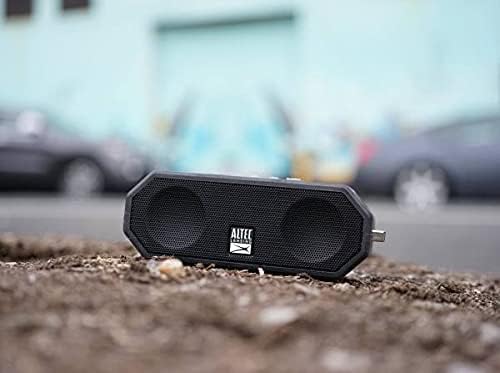
Image: The Altec Lansing LifeJacket H2O 4 speaker placed on rough ground, showcasing its durable and rugged design suitable for various environments.
Bakım
- Temizlik: Yumuşak bir d kullanınamp cloth to clean the speaker. Avoid harsh chemicals or abrasive cleaners.
- Suya Maruz Kalma: While waterproof, ensure the charging port cover is securely closed before exposing the speaker to water. After water exposure, dry the speaker thoroughly, especially the charging port, before charging.
- Depolamak: Hoparlörü kullanmadığınız zamanlarda serin ve kuru bir yerde saklayın. Aşırı sıcaklıklardan kaçının.
- Pil Bakım: Pil ömrünü uzatmak için pili sık sık tamamen boşaltmaktan kaçının. Hoparlörü sürekli kullanılmasa bile düzenli olarak şarj edin.
Sorun giderme
| Sorun | Çözüm |
|---|---|
| Hoparlör açılmıyor. | Pilin şarjlı olduğundan emin olun. Hoparlörü USB kablosuyla bir güç kaynağına bağlayın. |
| Bluetooth cihazıyla eşleştirilemiyor. |
|
| Ses yok veya ses seviyesi düşük. |
|
| Ses kesintiye uğruyor veya bozuluyor. |
|
Özellikler
| Özellik | Detay |
|---|---|
| Model Adı | Jacket H2O 4 Rugged Floating Ultra Portable Bluetooth |
| Model Numarası | IMW449-BLKC |
| Hoparlör Tipi | Açık Hava, Taşınabilir |
| Bağlantı | Bluetooth 4.2 |
| Bluetooth Menzili | 100 feet'e (30 metre) kadar |
| Suya Dayanıklılık | IP67 (Waterproof, Shockproof, Snowproof, Dustproof) |
| Pil Ömrü | 10 saate kadar |
| Güç Çıkışı | 10 Watt |
| Boyutlar (U x G x Y) | 7.1" x 2.9" x 4.2" (18.03 cm x 7.37 cm x 10.67 cm) |
| Ağırlık | 1.3 pound (0.59 kg) |
| Uyumlu Sesli Asistanlar | Siri, Google Asistan |

Image: The Altec Lansing LifeJacket H2O 4 speaker shown with its approximate dimensions: 7.1 inches in length, 2.9 inches in width, and 4.2 inches in height.
Garanti ve Destek
Your Altec Lansing LifeJacket H2O 4 speaker comes with a limited warranty. For detailed warranty information, product registration, and technical support, please visit the official Altec Lansing websitesine gidin veya müşteri hizmetleriyle iletişime geçin.
Resmi Webalan: www.alteclansing.com


