1. Giriş
Satın aldığınız için teşekkür ederizasing the sainlogic GBlife PT3378 Wireless Weather Forecast Station. This device provides accurate indoor and outdoor temperature and humidity readings, weather forecasts, moon phases, and atmospheric pressure. It features a clear display, a wireless outdoor sensor, and a convenient USB charging port. Please read this manual carefully to ensure proper setup and operation.
2. Paket İçeriği ve Ürün Hakkındaview
2.1 Paket İçeriği
- GBlife PT3378 Main Unit (Weather Station Display)
- Kablosuz açık sensörü
- Power Adapter for Main Unit
- Kullanıcı Kılavuzu
2.2 Ürün Üzeriview
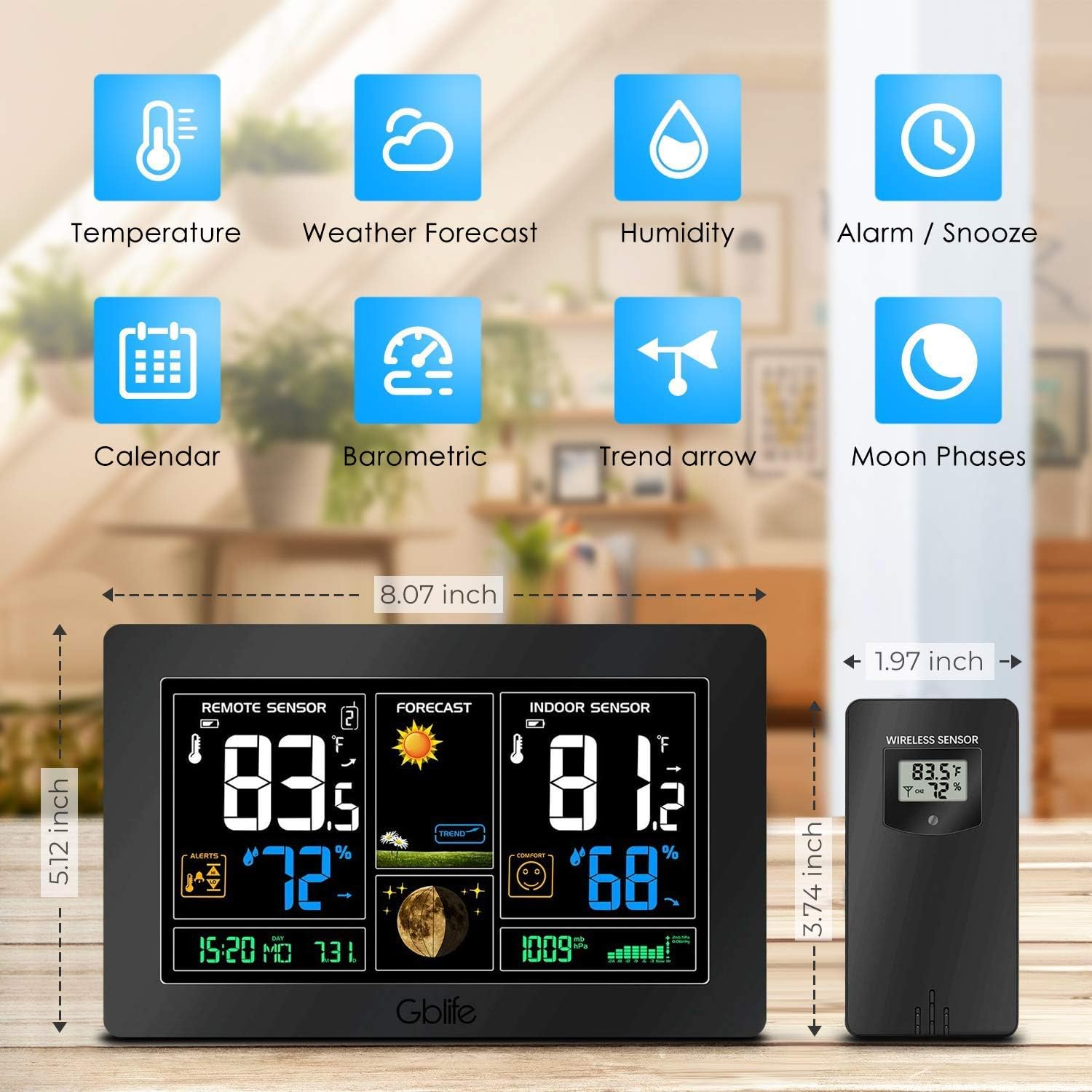
Resim 2.1: Üzerindeview of the GBlife PT3378 Weather Station highlighting its main features including temperature, weather forecast, humidity, alarm/snooze, calendar, barometric pressure, trend arrow, and moon phases.

Resim 2.2: Ayrıntılı view of the GBlife PT3378 display showing remote temperature, remote humidity, time/date, weather forecast, weather trend, moon phase, indoor temperature, indoor humidity, comfort level, and atmospheric pressure. The image also labels the side buttons for time setting, alarm clock, up/down, alert setting, brightness adjustment, max/min value, and mute.
3. Kurulum Kılavuzu
3.1 Ana Ünitenin Çalıştırılması
- Ürünle birlikte verilen güç adaptörünü ana ünitenin arkasındaki DC 5V portuna bağlayın.
- Adaptörü standart bir duvar prizine takın. Ekran yanacaktır.
- Optionally, insert 3 x AAA batteries (not included) into the battery compartment for backup power in case of power outage.
3.2 Installing Batteries in the Wireless Outdoor Sensor
- Kablosuz sensörün arkasındaki pil bölmesini açın.
- 2 adet AA pil (dahil değildir) takın ve kutupların doğru olmasına (+/-) dikkat edin.
- Pil bölmesini sıkıca kapatın.
3.3 Sensörün Eşleştirilmesi
The main unit and wireless sensor should automatically pair upon initial power-up. If pairing does not occur:
- Ensure both the main unit and sensor have power.
- Press and hold the 'CH' button on the main unit for 3 seconds to initiate a search for the outdoor sensor.
- The outdoor temperature and humidity should appear on the main unit's display.
3.4 Sensör Yerleştirme

Resim 3.1: Illustration of wireless data transmission between the indoor receiver (main unit) and the remote outdoor sensor. The sensor should be placed outdoors within range of the main unit.

Resim 3.2: The main unit can be placed on a table or mounted on a wall. The outdoor sensor is shown mounted on an exterior wall, indicating suitable placement for outdoor readings.
Place the wireless outdoor sensor in a dry, shaded location away from direct sunlight and precipitation to ensure accurate readings. The transmission range is up to 50 meters (150 feet) in an open area. The main unit can be placed on a tabletop using its integrated stand or mounted on a wall.
4. Kullanım Talimatları
4.1 Ekran Bilgileri
The main unit's display provides a comprehensive overview of weather conditions:
- Uzak Sensör: Dış ortam sıcaklığını ve nemini gösterir.
- Tahmin etmek: Shows weather forecast icons (sunny, cloudy, rainy, etc.) and weather trend.
- İç Mekan Sensörü: Displays indoor temperature and humidity, along with a comfort level indicator.
- Zaman / Tarih: Geçerli saat ve tarih.
- Ay evreleri: Ayın mevcut evresi.
- Atmosferik basınç: Mevcut atmosfer basıncı değeri.
Video 4.1: A short demonstration of the GBlife PT3378 Weather Station's display features, including outdoor temperature/humidity, weather forecasts, moon phase, comfort level, and atmospheric pressure. This video provides a visual guide to the station's various readings.
4.2 Saat ve Tarihin Ayarlanması
Refer to the 'Time Setting' button (labeled '1' in Image 2.2) on the side of the main unit. Press this button to enter time/date setting mode. Use the 'Up' and 'Down' buttons to adjust values and the 'Time Setting' button again to confirm and move to the next setting.
4.3 Çalar Saat Fonksiyonu
Use the 'Alarm Clock' button (labeled '2' in Image 2.2) to set and activate alarms. Follow similar steps as time setting to adjust alarm time.
4.4 Parlaklık Ayarı

Resim 4.1: The weather station display showing adjustable backlight brightness. High brightness is suitable for daytime viewing, while low brightness is ideal for night to avoid dazzling.
The display features adjustable backlight brightness. Use the 'Brightness Adjustment' button (labeled '6' in Image 2.2) to cycle through different brightness levels to suit your environment, from bright daytime viewing to a dimmer setting for night.
4.5 USB Şarj Portu

Resim 4.2: The GBlife PT3378 weather station with a smartphone connected to its USB output port for charging. The station provides 5V, 1A output for charging compatible devices.
The main unit includes a USB output port (5V, 1A) for charging compatible devices such as smartphones. Connect your device's USB charging cable to this port.
5. Özellikler
| Özellik | Detay |
|---|---|
| Ürün Boyutları | 20.5x13x3 cm |
| Ağırlık | 600 gram |
| Güç Kaynağı (Ana Ünite) | AC Adapter (included), 3x AAA batteries (backup, not included) |
| Güç Kaynağı (Dış Mekan Sensörü) | 2x AA pil (dahil değil) |
| İç Sıcaklık Aralığı | 0°C – 60°C |
| Dış Sıcaklık Aralığı | -40°C – 60°C |
| Sıcaklık Doğruluğu | ± 1°C |
| Kablosuz İletim Menzili | Açık alanda 50 metreye (150 fit) kadar |
| Bağlantı Teknolojisi | USB, Kablosuz |
| Özel Özellikler | Indoor/Outdoor Sensor, Waterproof (sensor), USB Charging Port |
6. Bakım
- Ekranı ve cihazı yumuşak, kuru bir bezle temizleyin. Aşındırıcı temizleyiciler veya çözücüler kullanmayın.
- Ensure the outdoor sensor is kept in a dry, shaded location to prolong its lifespan and maintain accuracy.
- Replace batteries in the outdoor sensor and main unit (if using backup) when the low battery indicator appears on the display.
7. Sorun Giderme
- Dış ortam sıcaklığı/nem değeri ölçülmedi:
- Ensure the outdoor sensor has fresh batteries and is within range of the main unit.
- Press and hold the 'CH' button on the main unit to re-establish connection.
- Check for any obstructions between the sensor and the main unit.
- Yanlış sıcaklık ölçümleri:
- Ensure the outdoor sensor is not in direct sunlight or exposed to extreme weather conditions.
- Verify that the main unit is not placed near heat sources or air conditioning vents.
- Ekran loş veya boş:
- Check if the power adapter is securely connected.
- If using backup batteries, ensure they are fresh.
- Adjust the backlight brightness using the dedicated button.
8. Garanti ve Destek
The sainlogic GBlife PT3378 Wireless Weather Forecast Station includes a 45-day money-back guarantee and an 18-month customer service warranty. For any questions or support needs, please contact sainlogic customer service.