1. Giriş
Thank you for choosing the MOZA HGP Shifter. This manual provides essential information for the proper setup, operation, and maintenance of your new H-pattern shifter. Please read this manual thoroughly before use to ensure optimal performance and longevity of the product.
2. Güvenlik Bilgileri
- Cihazınızı su ve diğer sıvılardan uzak tutunuz.
- Cihazı aşırı sıcaklıklara veya doğrudan güneş ışığına maruz bırakmayın.
- Cihazı düşürmemek veya darbe almamak için dikkatli kullanın.
- İşlemden önce tüm bağlantıların güvenli olduğundan emin olun.
3. Paket İçeriği
The MOZA HGP Shifter package typically includes:
- MOZA HGP Shifter Unit
- USB Bağlantı Kablosu
- Montaj Donanımı (vidalar, braketler)
- Kullanım Kılavuzu (bu belge)
4. Kurulum
Follow these steps to set up your MOZA HGP Shifter:
- Mounting the Shifter: Secure the MOZA HGP Shifter to your sim racing rig using the provided mounting hardware. Ensure it is firmly attached to prevent movement during use. The shifter features multiple mounting points on its base for versatile installation.

Resim: Alt view of the MOZA HGP Shifter, highlighting the various mounting points for secure attachment to a sim racing rig.
- PC'ye bağlanma: Locate the USB port on the back of the shifter. Connect one end of the supplied USB cable to the shifter and the other end to an available USB port on your PC.

Resim: Arka view of the MOZA HGP Shifter, displaying the USB port for PC connection and other potential ports.
- Sürücü Kurulumu: Your PC should automatically detect the shifter. If not, please visit the official MOZA Racing webalan (mozaracing.com) to download and install the latest drivers and software for the MOZA HGP Shifter.
- Kalibrasyon: Follow the instructions in the MOZA Pit House software (or your sim racing software) to calibrate the shifter. This ensures accurate gear detection.
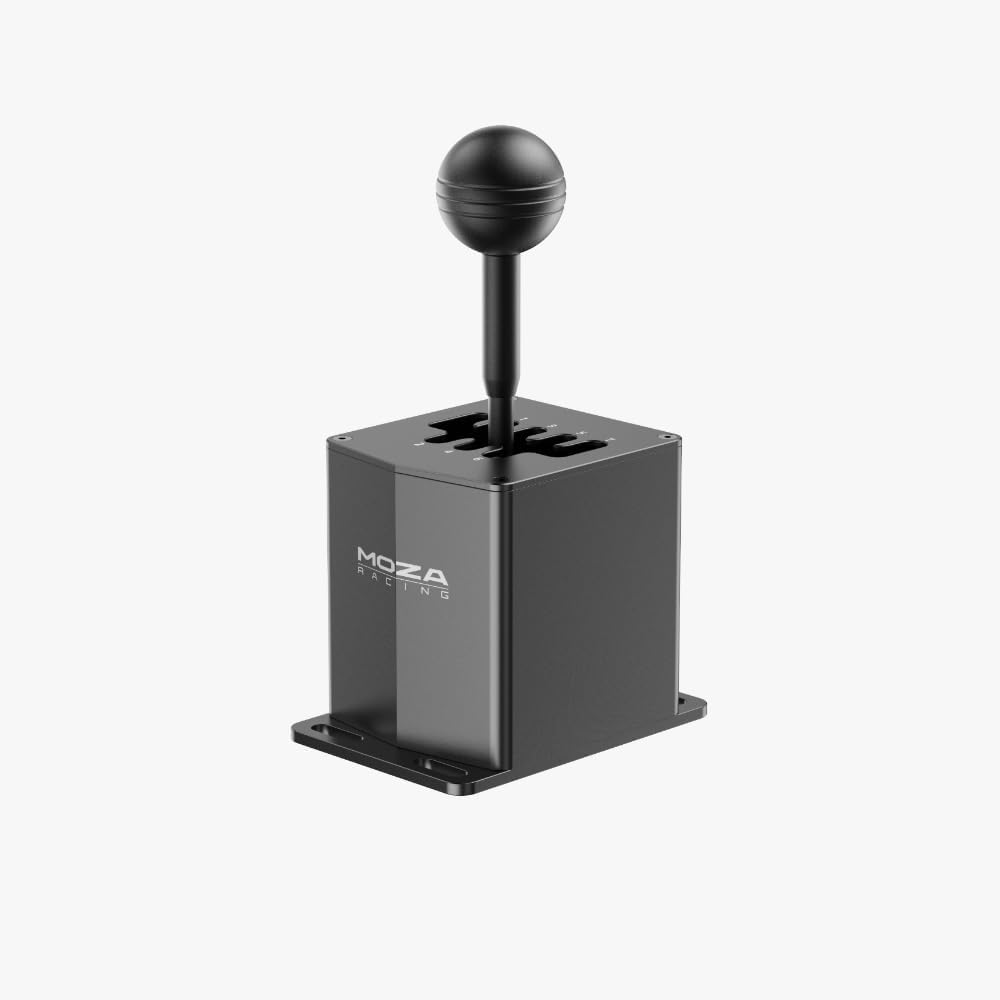
Resim: Ön açılı view of the MOZA HGP Shifter, showcasing its robust design and gear stick.
5. Kullanım Talimatları
The MOZA HGP Shifter is designed for realistic H-pattern gear shifting in sim racing. It features a 7+R (7 forward gears plus Reverse) configuration.
- Gear Engagement: To engage a gear, firmly push the gear stick into the desired gate. The shifter provides tactile feedback for precise engagement.
- Geri Vites: To engage Reverse, typically you will need to push down on the shifter knob while moving it into the Reverse (R) gate. Refer to your specific sim racing game settings for exact reverse engagement mechanics.
- Uyumluluk: The shifter is compatible with most major sim racing titles that support H-pattern shifters. Ensure your game's control settings are configured to recognize the MOZA HGP Shifter.

Resim: Yukarıdan aşağıya view of the MOZA HGP Shifter, clearly showing the engraved 7-speed plus Reverse (7+R) gear layout.
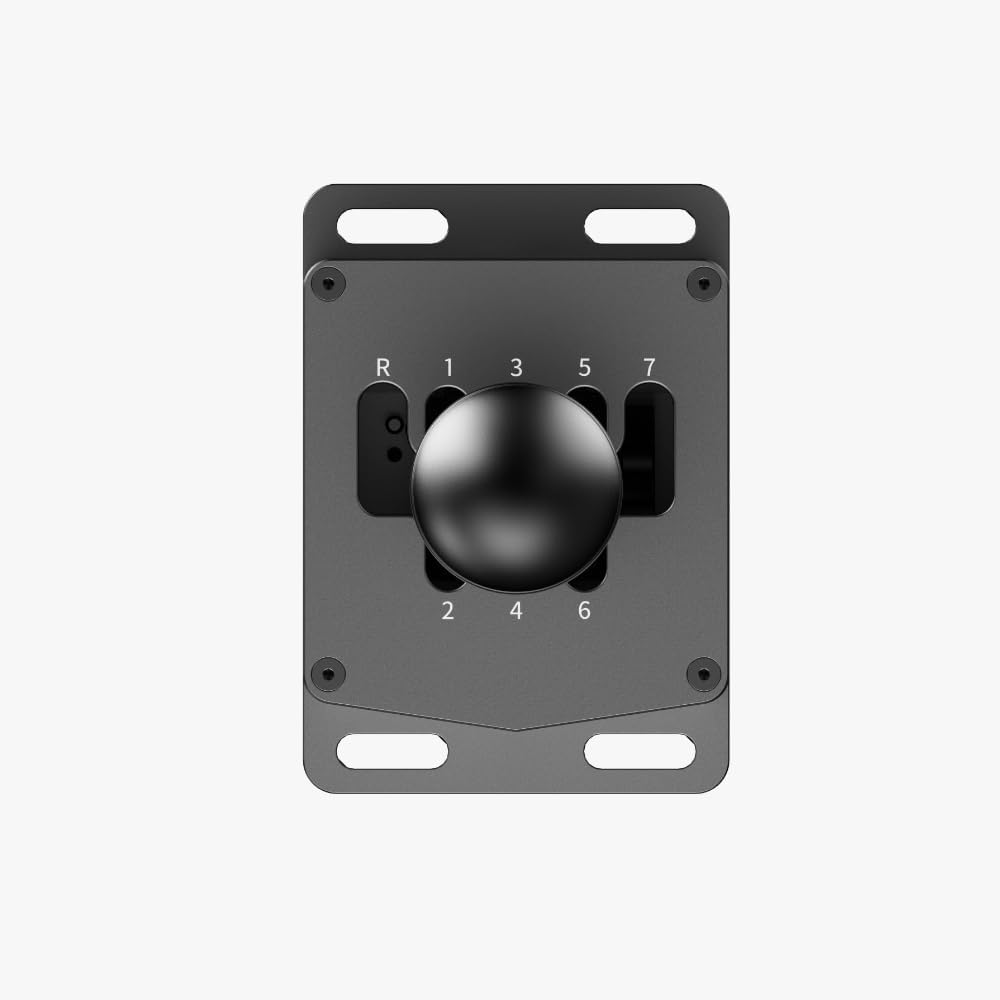
Görüntü: Üstten yakın çekim view of the MOZA HGP Shifter's gear plate, highlighting the detailed numbering and gate design.
6. Bakım
To ensure the longevity and performance of your shifter:
- Temizlik: Use a soft, dry cloth to wipe down the shifter. Avoid abrasive cleaners or solvents.
- Depolamak: When not in use for extended periods, store the shifter in a clean, dry environment, away from direct sunlight and extreme temperatures.
- Denetleme: Montaj vidalarının ve bağlantılarının sıkı ve güvenli kaldığından emin olmak için periyodik olarak kontrol edin.
7. Sorun Giderme
If you encounter issues with your MOZA HGP Shifter, try the following:
- Shifter Not Detected:
- Ensure the USB cable is securely connected to both the shifter and your PC.
- Bilgisayarınızdaki farklı bir USB bağlantı noktasını deneyin.
- Bilgisayarınızı yeniden başlatın.
- Reinstall the MOZA drivers from the official webalan.
- Incorrect Gear Detection:
- Recalibrate the shifter using the MOZA Pit House software or your sim racing game's calibration utility.
- Check for any physical obstructions preventing full gear engagement.
- Loose Gear Stick:
- Check if the screws securing the gear stick to the base are tight.
If these steps do not resolve the issue, please contact MOZA Racing customer support.
8. Özellikler
| Marka | MOZA |
| Model Numarası | MOZA-HGP |
| Ürün Ağırlığı | 3.69 pound |
| Ürün Boyutları | 19.69 x 19.69 x 11.02 inç |
| Renk | Siyah |
| Bağlantı | USB |
| Gear Layout | 7+R (H-pattern) |
9. Garanti ve Destek
For detailed warranty information and customer support, please refer to the warranty card included with your product or visit the official MOZA Racing webalan:
The website provides access to FAQs, driver downloads, and contact information for technical assistance.


