1. Ürün Bittiview
The Integra DTM-7 is a Network A/V Stereo Receiver designed to integrate modern digital audio and video technologies with traditional stereo sound. It supports advanced HDMI switching for 4K and HDR10 content, offers robust network connectivity for streaming services, and includes wireless audio capabilities. The receiver is built with a focus on sound quality and versatile control options.
Şekil 1.1: Ön view of the Integra DTM-7 Network A/V Stereo Receiver. This image displays the front panel controls, display, and input jacks.
Temel Özellikler:
- Yüksek Güç Çıkışı: Delivers 100 Watts per channel (8 Ohms, 20 Hz-20 kHz, 0.08% THD, 2 Channels Driven, FTC) with 4-ohm stability, housed in an anti-resonant steel chassis and audiophile-grade aluminum front panel.
- Advanced HDMI Connectivity: Features 4 HDMI inputs and 1 HDMI output, supporting 4K/60 Hz, HDR10, HLG (Hybrid Log-Gamma), Dolby Vision, and BT.2020 Pass-thru with HDCP 2.2, 4:4:4 Color Space, and WCG (Wide Color Gamut).
- Sonos Entegrasyonu: Compatible with existing Sonos Home Sound Systems or as a starting point for a new one, allowing for music streaming capability with Sonos Connect and a firmware update.
- Extensive Network and Wireless Audio: Includes Wi-Fi and Bluetooth compatibility, providing access to internet radio sources such as Tidal, Pandora, Spotify, Deezer, and TuneIn. Supports Chromecast Built-In, DTS Play-Fi technology, and AirPlay for wireless audio streaming.
- Analog Connectivity: Features a built-in phono preamp for turntable connection.
- Esnek Kontrol Seçenekleri: Controllable via the included IR remote, the Integra Control Pro app (for iOS and Android devices), or through 3rd party control systems utilizing IP or RS232C.
2. Kutuda Neler Var?
Aşağıda listelenen tüm öğelerin paket içeriğinde bulunduğunu doğrulayın:
- Integra DTM-7 Network A/V Stereo Receiver
- Güç kablosu
- İç mekan FM anteni
- AM döngü anteni
- Hoparlör kurulum mikrofonu
- Basic manual (this document provides detailed instructions)
- Uzaktan kumanda
- 2 AAA Pil (uzaktan kumanda için)
3. Kurulum
3.1 Bileşenlerinizi Bağlama
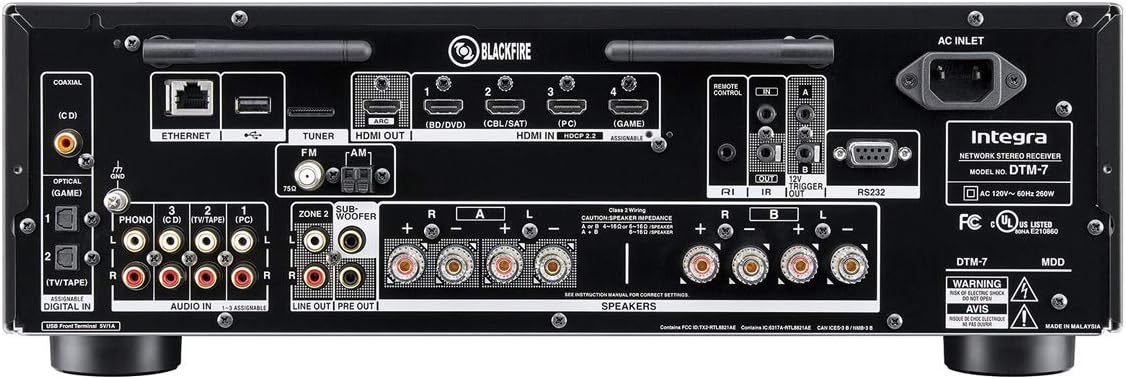
Before making any connections, ensure the receiver and all components are powered off and unplugged from the wall outlet. Refer to the rear panel diagram for connection points.

Şekil 3.1: Rear panel connections of the Integra DTM-7. This image illustrates the various input and output ports for audio, video, and network connections.
- Hoparlör Bağlantıları: Connect your passive speakers to the SPEAKER terminals on the rear panel. Ensure correct polarity (+ to + and - to -) for each speaker. The DTM-7 supports 4-ohm compatible speakers. For optimal performance, use high-quality speaker cables.
- HDMI Bağlantıları: Connect your video sources (e.g., Blu-ray player, game console, streaming device) to the HDMI IN ports. Connect your TV or projector to the HDMI OUT port. The HDMI ports support 4K/60 Hz, HDR10, Dolby Vision, and HDCP 2.2.
- Ağ bağlantısı: For wired network access, connect an Ethernet cable from your router to the ETHERNET port. For wireless network access, ensure the Wi-Fi antennas are properly attached and positioned.
- Analog Ses Bağlantıları: Connect analog audio sources (e.g., CD player, cassette deck) to the AUDIO IN ports. For turntables, connect to the PHONO input, which includes a built-in preampcankurtaran.
- Anten Bağlantıları: Connect the supplied FM and AM antennas to their respective terminals for radio reception.
- Güç Bağlantısı: After all other connections are made, connect the power cord to the AC INLET on the receiver and then to a wall outlet.
3.2 İlk Kurulum ve Kalibrasyon
After connecting your components, perform the initial setup:
- Güç Açık: Basın BEKLEMEDE button on the front panel or remote control to power on the receiver.
- On-Screen Setup Guide: Follow the on-screen instructions displayed on your TV for initial configuration, including language selection and network settings.
- Hoparlör Kalibrasyonu: Use the supplied speaker setup microphone. Connect it to the dedicated port on the front panel. Place the microphone at your primary listening position and follow the on-screen prompts to automatically calibrate your speakers for optimal sound.
4. Kullanım Talimatları
4.1 Temel İşlemler
- Güç Açma/Kapatma: Basın BEKLEMEDE Ön paneldeki veya uzaktan kumandadaki düğme.
- Giriş Seçimi: Kullanın GİRİŞ selector buttons on the front panel or the remote control to choose your desired audio/video source (e.g., HDMI 1, CD, NET).
- Ses Kontrolü: Ayarla ANA SES ön paneldeki düğme veya HACİM +/- Uzaktan kumandadaki düğmeler.
- Ton Kontrolü: Kullanın BAS Ve TİZ knobs on the front panel to adjust the sound characteristics to your preference.
4.2 Network and Wireless Features
The DTM-7 offers a range of network and wireless audio capabilities:
- Yayın Hizmetleri: Access integrated streaming services such as Tidal, Pandora, Spotify, Deezer, and TuneIn directly from the receiver's menu. A stable internet connection is required.
- Chromecast Yerleşik: Cast audio from compatible apps on your smartphone, tablet, or computer directly to the receiver.
- DTS Play-Fi: Enjoy high-quality wireless audio from your mobile device or PC to the receiver and other DTS Play-Fi enabled products.
- Hava Oynatımı: Stream audio from your Apple devices (iPhone, iPad, Mac) to the receiver over your home network.
- Bluetooth: Bluetooth özellikli cihazlarınızı eşleştirerek sesi kablosuz olarak alıcıya aktarabilirsiniz.
4.3 Kontrol Seçenekleri
- IR Uzaktan Kumanda: Use the included remote for direct control of all receiver functions. Ensure line of sight to the receiver's IR sensor.
- Integra Control Pro App: Download the free Integra Control Pro app for iOS and Android devices. This app provides comprehensive control over the receiver's functions, including input selection, volume, network features, and settings.
- 3rd Party Control: The DTM-7 supports integration with custom installation systems via IP control or RS232C for advanced home automation.
5. Bakım
To ensure the longevity and optimal performance of your Integra DTM-7 receiver, follow these maintenance guidelines:
- Temizlik: Gently wipe the exterior surfaces with a soft, dry cloth. Do not use abrasive cleaners, waxes, or solvents, as they can damage the finish.
- Havalandırma: Ensure adequate ventilation around the receiver. Do not block the ventilation openings on the top or sides. Avoid placing the unit in an enclosed cabinet without proper airflow.
- Toz Giderimi: Periodically use a soft brush or a vacuum cleaner with a brush attachment to remove dust from the ventilation grilles.
- Güç Kablosu: Regularly check the power cord for any signs of damage. If damaged, discontinue use and contact customer support for a replacement.
6. Sorun Giderme
If you encounter issues with your DTM-7 receiver, refer to the following common troubleshooting steps:
- Güç Yok:
- Güç kablosunun hem alıcıya hem de çalışan bir duvar prizine güvenli bir şekilde takılı olduğundan emin olun.
- Duvar prizinin çalışıp çalışmadığını başka bir cihaz takarak kontrol edin.
- Ses Yok:
- Doğru giriş kaynağının seçildiğinden emin olun.
- Check all speaker connections for proper polarity and secure fit.
- Ses seviyesinin minimuma veya tamamen sessize alınmadığından emin olun.
- Confirm that your speakers are functional.
- Video Yok:
- Ensure the HDMI cables are securely connected to both the source device, the receiver's HDMI IN, and the TV's HDMI OUT.
- Verify that the correct HDMI input is selected on the receiver and the correct HDMI input is selected on your TV.
- Farklı bir HDMI kablosu veya bağlantı noktası deneyin.
- Ağ Bağlantı Sorunları:
- For wired connections, ensure the Ethernet cable is properly connected to the receiver and your router.
- For Wi-Fi, check your router's status and ensure the receiver is within range. Re-enter Wi-Fi credentials if necessary.
- Yönlendiricinizi ve alıcınızı yeniden başlatın.
- Uzaktan Kumanda Çalışmıyor:
- Uzaktan kumandanın pillerini değiştirin.
- Uzaktan kumanda ile alıcının kızılötesi sensörü arasında herhangi bir engel bulunmadığından emin olun.
If the problem persists after trying these steps, please refer to the Integra support website veya müşteri hizmetleriyle iletişime geçin.
7. Özellikler
| Özellik | Şartname |
|---|---|
| Güç Çıkışı | 100 W/Ch. (8 Ohms, 20 Hz-20 kHz, 0.08% THD, 2 Channels Driven, FTC) |
| HDMI Girişleri/Çıkışları | 4 Giriş / 1 Çıkış |
| HDMI Özellikleri | 4K/60 Hz, HDR10, HLG, Dolby Vision, BT.2020 Pass-thru, HDCP 2.2, 4:4:4 Color Space, WCG |
| Bağlantı Teknolojisi | AirPlay, Bluetooth, HDMI, Wi-Fi, Ethernet |
| Wireless Audio Features | Chromecast Built-In, DTS Play-Fi, AirPlay, Spotify, Pandora, Tidal, Deezer, TuneIn |
| Ses Çıkışı Modu | Stereo |
| Çevresel Ses Kanalı Yapılandırması | 2.1 |
| Fono Girişi | Yes (Built-in phono preamp) |
| Kontrol Türü | IR Remote, Android/iOS App (Integra Control Pro), IP, RS232C |
| Ürün Boyutları (G x Y x D) | 17.1 x 5.9 x 12.9 inç (yaklaşık) |
| Ürün Ağırlığı | 18.7 pound |
| Üretici | Onkyo |
8. Garanti ve Destek
For detailed warranty information, please refer to the warranty card included with your product or visit the official Integra website. For technical support, product registration, or service inquiries, please contact Integra customer support or visit their official weben güncel bilgiler için site.
Manufacturer: Onkyo


