giriiş
The Mitel 6920W is a powerful, feature-rich IP phone designed for business communication. Equipped with Wi-Fi connectivity, it offers flexibility in deployment and ensures reliable voice communication. This manual provides comprehensive instructions for setting up, operating, maintaining, and troubleshooting your Mitel 6920W IP Phone.
Paket İçeriği
Başlamadan önce lütfen paketinizin aşağıdaki öğeleri içerdiğinden emin olun:
- Mitel 6920W IP Phone Unit
- El cihazı
- Ahize Kablosu
- Telefon Standı
- Ethernet kablosu
- Güç Adaptörü (Ethernet Üzerinden Güç - PoE kullanılmıyorsa)
- Hızlı Başlangıç Kılavuzu (eğer dahilse)
Kurmak
1. Telefon Standının Takılması
The phone stand allows you to position your phone at an optimal viewing angle. Align the tabs on the stand with the slots on the back of the phone and push firmly until it clicks into place.
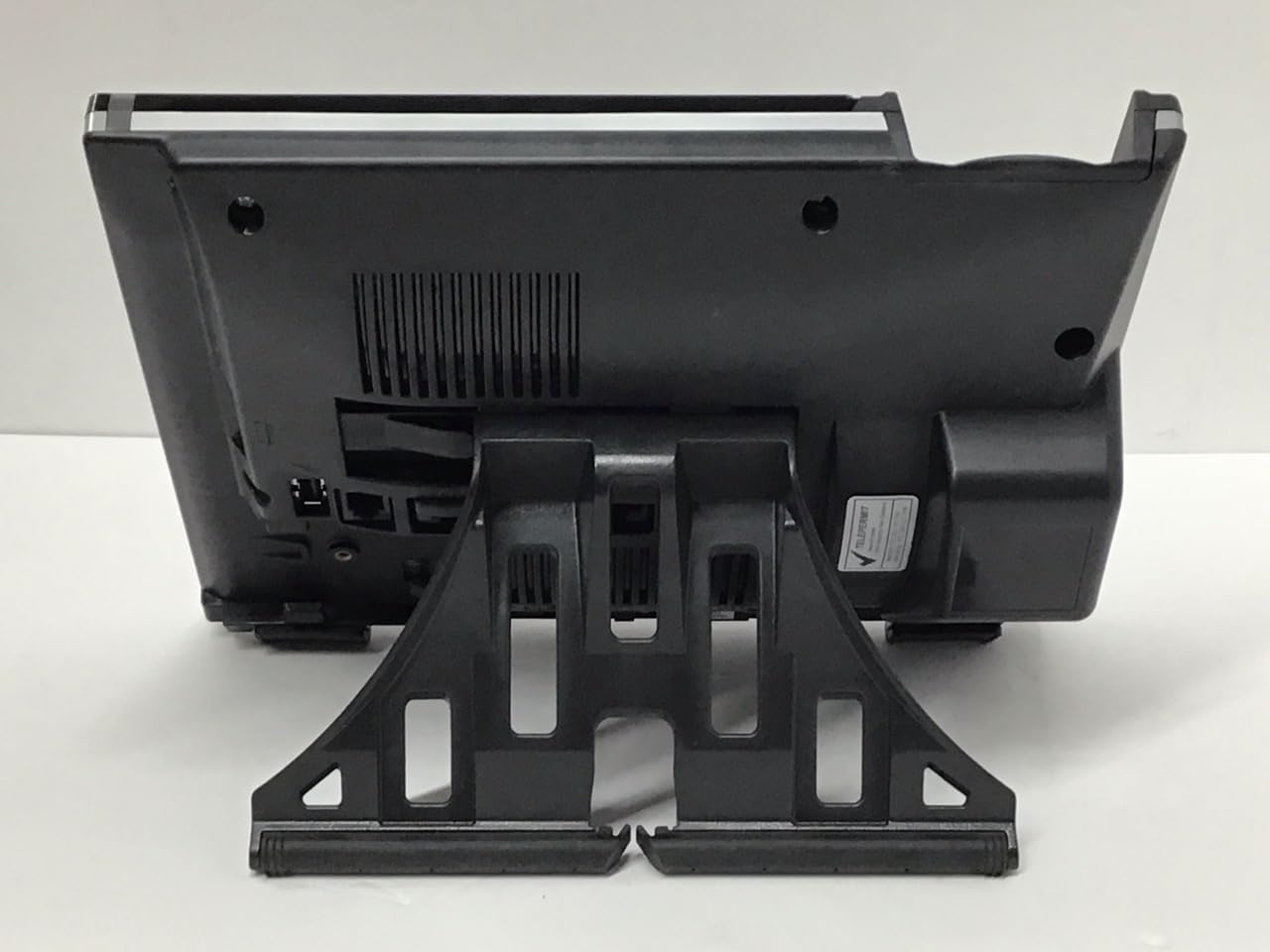
Resim: Geri view of the Mitel 6920W IP Phone with its stand attached, showing the connection points and the angled support.
2. Telefon ve Kulaklığın Bağlanması
- Connect one end of the coiled handset cord to the handset and the other end to the handset port on the back of the phone (usually marked with a handset icon).
- If using a headset, connect it to the dedicated headset port (usually marked with a headset icon).
3. Connecting to the Network and Power
- Ethernet Bağlantısı: Connect one end of the Ethernet cable to the LAN port on the back of the phone and the other end to your network switch or router. If your network provides Power over Ethernet (PoE), the phone will power on automatically.
- Güç Adaptörü (PoE yoksa): If PoE is not available, connect the power adapter to the power port on the back of the phone and then plug it into a wall outlet.

Resim: Ön view of the Mitel 6920W IP Phone, displaying its screen, physical keypad, and programmable soft keys.
4. İlk Açılış ve Yapılandırma
Once powered on, the phone will boot up and attempt to connect to your network. It may automatically download configuration settings from your VoIP system. Follow any on-screen prompts for initial setup, such as language selection or time zone.
5. Wi-Fi Bağlantı Kurulumu
To connect your 6920W to a Wi-Fi network:
- Basın Ayarlar button (gear icon) on the phone.
- Şuraya git: Ağ Ayarları or Wi-Fi Ayarları.
- Enable Wi-Fi and select your desired network from the list of available networks.
- Enter the Wi-Fi password (if required) using the keypad and on-screen prompts.
- Confirm the connection. The phone should display a Wi-Fi icon indicating a successful connection.
Operating Your Mitel 6920W IP Phone
Temel Çağrı Fonksiyonları
- Arama yapmak: Ahizeyi kaldırın veya Hoparlör Düğmeyi çevirin. Numarayı çevirin ve basın. Aramak or Göndermek yazılım tuşu.
- Bir Aramayı Cevaplama: Ahizeyi kaldırın, tuşuna basın. Hoparlör düğmesine basın veya Cevap yazılım tuşu.
- Aramayı Bitirme: Ahizeyi kapatın veya tuşuna basın. Çağrı Sonu yazılım tuşu.
Tuş takımı ve Navigasyon
The phone features a standard 12-button dial pad. Use the navigation cluster (up, down, left, right arrows, and select button) to move through menus and options on the display.
Ekran ve Yumuşak Tuşlar
The phone's display shows call information, menus, and status indicators. The soft keys located directly below the display change their function based on the current context (e.g., during a call, in a menu). Their current function is indicated on the display above each key.
Sesli Mesaj Erişimi
Sesli mesajınıza erişmek için şu tuşa basın: Sesli mesaj button (envelope icon) and follow the audio prompts.
Gelişmiş Arama Özellikleri
- Tutmak: Etkin bir çağrı sırasında, Tutmak Tuşa tekrar basarak aramayı devam ettirebilirsiniz.
- transferi: Etkin bir çağrı sırasında, Aktarım soft key. Dial the number to transfer to, and once connected, press Aktarım again (consultative transfer) or hang up (blind transfer).
- Konferans: Etkin bir çağrı sırasında, Konferans soft key. Dial the number of the third party, and once connected, press Konferans Tüm partilere tekrar katılmak için.
- Hoparlör: Basın Hoparlör button to toggle speakerphone mode on or off.
- Sesini kapatmak: Basın Sesini kapatmak button to mute your microphone during a call. Press it again to unmute.
Bakım
Telefonu Temizleme
To keep your phone clean, gently wipe the surfaces with a soft, damp, lint-free cloth. Avoid using abrasive cleaners, solvents, or aerosol sprays, as these can damage the phone's finish and internal components.
Yazılım Güncellemeleri
Your Mitel 6920W IP Phone may receive software updates periodically to improve performance and add new features. These updates are typically managed by your system administrator. Do not attempt to manually update the firmware unless instructed by your IT department or Mitel support.
Sorun giderme
Yaygın Sorunlar ve Çözümleri
| Sorun | Olası Çözüm |
|---|---|
| Çevir Sesi Yok | Check all cable connections (Ethernet, power, handset). Ensure the phone is powered on. Contact your system administrator if the issue persists. |
| Wi-Fi'ye bağlanılamıyor | Verify Wi-Fi password. Ensure the phone is within range of the Wi-Fi access point. Restart the phone and try again. Check network settings. |
| Ekran Çalışmıyor | Check power connection. Restart the phone. If the display remains blank or faulty, contact support. |
| Zayıf Çağrı Kalitesi | Check network connection stability (wired or Wi-Fi signal strength). Ensure no other devices are heavily using network bandwidth. |
Fabrika Ayarlarına Sıfırlama
A factory reset will erase all custom settings and return the phone to its default state. This should only be performed as a last resort and typically under the guidance of your system administrator or Mitel support. Consult your system administrator for the specific procedure for your deployment.
Özellikler
| Özellik | Detay |
|---|---|
| Marka | Mitel |
| Örnek | 6920W |
| ASIN | B07DD9BW2Z |
| Renk | Siyah |
| Telefon Türü | fitilli |
| Malzeme | Plastik |
| Güç Kaynağı | Kablolu Elektrik |
| Çevirici Türü | Tek Tuş Takımı |
| Yanıtlama Sistemi Türü | Dijital |
| Uyumlu Cihazlar | Computer Systems, VoIP Services, Telephone Networks |
| Çoklu Hat İşlemi | Çok Hatlı İşletme |
| Arayan Kimliği | Evet |
| Paket Boyutları | 10.71 x 7.91 x 3.66 inç |
| Ürün Ağırlığı | 2.38 pound |
| Üretici | Mitel |
| İlk Mevcut Tarih | 20 Aralık 2022 |
Garanti ve Destek
The Mitel 6920W IP Phone comes with a standard manufacturer's warranty. For specific warranty terms and conditions, please refer to the documentation provided with your purchase or visit the official Mitel webalan.
For technical support, troubleshooting assistance, or warranty claims, please contact your system administrator or authorized Mitel reseller. You can also find additional resources and contact information on the official Mitel support webalan: www.mitel.com/destek


