1. Giriş
The Launch Creader 6011 is a versatile diagnostic tool designed for automotive enthusiasts and professional technicians. It offers comprehensive OBDII/EOBD diagnostic capabilities, alongside specialized functions for Anti-lock Braking System (ABS) and Supplemental Restraint System (SRS) diagnostics. This manual provides detailed instructions for the proper use, setup, and maintenance of your Creader 6011 device.
2. Ürün Bittiview
The Creader 6011 features a large color display and an intuitive interface for easy navigation and data interpretation. Its robust design ensures durability for use in various automotive environments.

Şekil 2.1: The Launch Creader 6011 diagnostic scanner with its main menu displayed.

Şekil 2.2: Ayrıntılı views of the Creader 6011, showing its various ports and control layout.
3. Özellikler
| Özellik | Şartname |
|---|---|
| Ekran | 4.0" TFT 320*480 dpi |
| Cilttage Aralık | 9-18V |
| Çalışma Sıcaklığı | 0℃ ~ 50℃ |
| Çevre Sıcaklığı | -20℃ ~ 70℃ |
| Boyutlar | Xnumxmm x xnumxmm x xnumxmm (xnumx "x xnumx" x xnumx ") |
| Ağırlık | 460g (1.01 lbs) |
| Güç Kaynağı | Corded Electric (via OBD II port) |
| Ürün Model Numarası | Launch-IV06 |
| UPC | 680666198909 |
4. Kurulum
The Creader 6011 is designed for ease of use and requires no external power source or batteries. It draws power directly from the vehicle's OBD II port.
- OBD II bağlantı noktasını bulun: The OBD II port is typically located under the dashboard on the driver's side of the vehicle. Refer to your vehicle's owner's manual if you cannot find it.
- Tarayıcıyı Bağlayın: Plug the diagnostic cable of the Creader 6011 into the vehicle's OBD II port. Ensure a secure connection.
- Güç Açık: Once connected, the scanner will automatically power on and display the main menu. If it does not power on, check the vehicle's ignition status and the connection.
5. Kullanım Talimatları
Navigate the menu using the directional buttons and confirm selections with the OK düğme. ESC butonu bir önceki ekrana geri dönmeyi sağlar.

Şekil 5.1: Key components and button functions of the Creader 6011.
5.1. Full OBDII/EOBD Functions
The Creader 6011 supports all 10 modes of OBDII/EOBD diagnostics:
- Kodları Okuyun: Araç bilgisayarından Arıza Teşhis Kodlarını (DTC'ler) alır.
- Kodları Sil: Arıza kodlarını siler ve Arıza Göstergesi L'yi kapatır.amp (MİL).
- I/M Hazırlık: Emisyon izleme sistemlerinin hazır olup olmadığını kontrol eder.
- Veri akışı: Aracın sensörlerinden gelen canlı veri parametrelerini görüntüler.
- Çerçeveyi Dondur: Shows a snapshot of operating conditions at the time a fault occurred.
- O2 Sensör Testi: Oksijen sensörü izleme testi sonuçlarını alır.
- Yerleşik İzleme Testi: Emisyonla ilgili güç aktarma sistemi bileşenleri ve sistemleri için sonuçları getirir.
- EVAP Sistem Testi: Initiates a test of the Evaporative Emission System.
- Araç bilgisi: Araç tanımlama numarasını (VIN), kalibrasyon kimliğini ve kalibrasyon doğrulama numarasını (CVN) alır.
- Bileşen Testi: Allows bi-directional control of certain components (if supported by vehicle).

Şekil 5.2: Example of the I/M Readiness screen, showing emission monitor status.
5.2. ABS and SRS System Diagnostic Functions
In addition to standard OBDII functions, the Creader 6011 provides specialized diagnostic capabilities for the Anti-lock Braking System (ABS) and Supplemental Restraint System (SRS).
- Read ABS/SRS DTCs: Retrieves specific trouble codes related to the ABS and SRS systems.
- Clear ABS/SRS DTCs: Erases fault codes from the ABS and SRS modules.
- Data Streams for ABS/SRS: Views live data parameters from ABS and SRS sensors, aiding in diagnosis.
6. Yazılım güncellemesi
The Creader 6011 supports lifetime free online updates to ensure compatibility with new vehicle models and to receive software enhancements. Follow these steps to update your device:
- Güncelleme Aracını İndir: Resmi lansmanı ziyaret edin webalan (www.dbscar.com). Navigate to 'Products' > 'creader 4001~9081', find 'creader 6011', and download the update tool to your computer.
- Install Update Tool: Install the downloaded update tool software on your computer.
- Cihazı Bağla: Connect your Creader 6011 to your computer using the provided USB data cable.
- Güncelleme Aracını Çalıştır: Launch the update tool software. You will be prompted to enter the serial number and register code of your Creader 6011. These details will be displayed on the scanner's screen when it is connected to your PC.
- Güncellemeyi Başlat: Click the 'Update' button within the software. Ensure the device remains connected and your internet connection is stable throughout the update process.
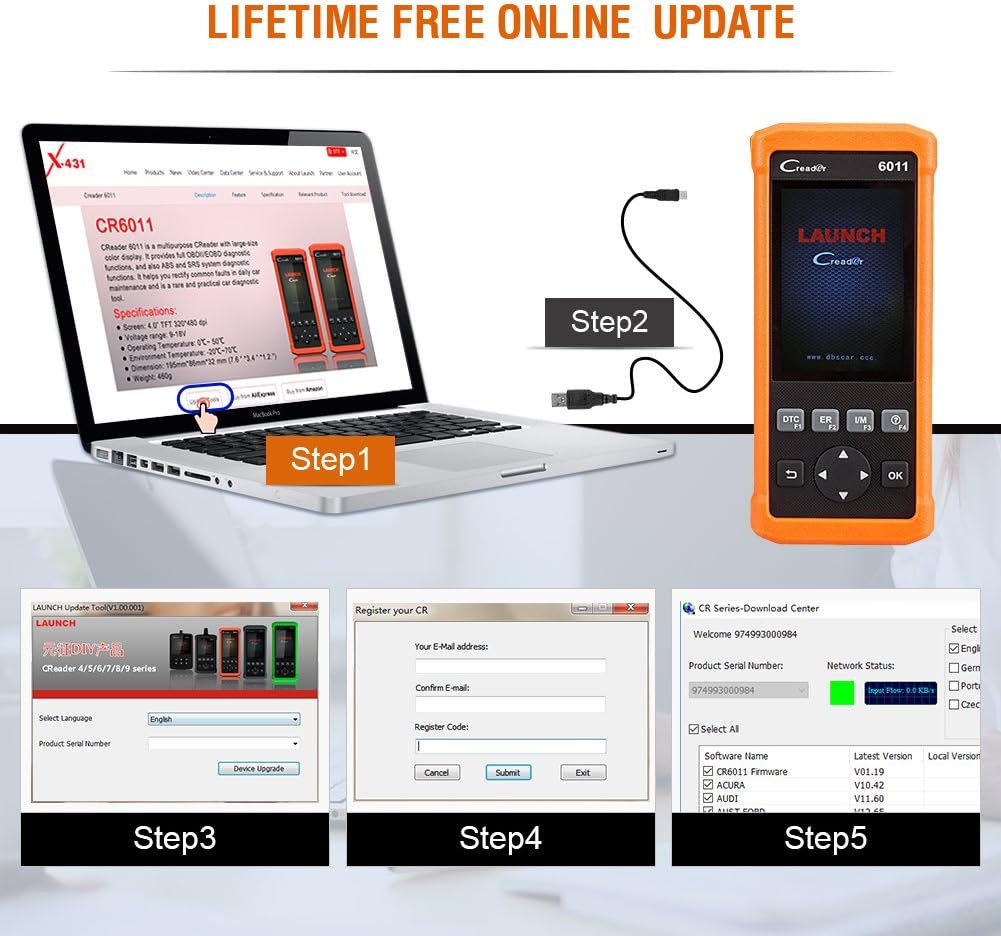
Şekil 6.1: Visual guide for the software update process.
7. Araç Kapsamı
The Creader 6011 is compatible with most post-1996 vehicles (OBD II & CAN compliant), including domestic and imported 12V petrol vehicles. Below is a general list of supported car brands (2006-present):

Şekil 7.1: Partial list of car brands supported by the Creader 6011.
For a comprehensive and up-to-date list, please refer to the official LAUNCH website or the update tool software.
8. Bakım
To ensure the longevity and optimal performance of your Creader 6011, follow these maintenance guidelines:
- Temizlik: Cihazı temizlemek için yumuşak ve kuru bir bez kullanın. Aşındırıcı temizleyiciler veya çözücüler kullanmaktan kaçının.
- Depolamak: Cihazı kuru, serin bir ortamda, doğrudan güneş ışığından ve aşırı sıcaklıklardan uzakta saklayın.
- Kablo Bakımı: Handle the diagnostic cable carefully. Avoid bending or twisting it excessively, which can damage internal wires.
- Yazılım Güncellemeleri: Regularly perform software updates as described in Section 6 to maintain compatibility and access new features.
9. Sorun Giderme
If you encounter issues with your Creader 6011, consider the following common troubleshooting steps:
- Cihaz Açılmıyor: Ensure the diagnostic cable is securely connected to the vehicle's OBD II port. Verify the vehicle's ignition is on. Check for any blown fuses in the vehicle's OBD II circuit.
- İletişim Hatası: Confirm the vehicle is OBD II compliant. Check for a stable connection between the scanner and the vehicle. Try the scanner on a different OBD II compliant vehicle to rule out vehicle-specific issues.
- Ekran Donuyor/Yanıt Vermiyor: Disconnect the device from the vehicle and reconnect it. If the issue persists, perform a software update.
- Güncelleme Hatası: Ensure a stable internet connection during the update process. Verify the serial number and register code are entered correctly. Temporarily disable any firewall or antivirus software that might interfere with the update tool.
For persistent issues, contact LAUNCH technical support.
10. Paket İçeriği
Upon opening your Launch Creader 6011 package, you should find the following items:
- 1x Launch CReader 6011 OBD2/EOBD Diagnostic Scanner
- 1x USB Veri Kablosu
- 1x Kullanım Kılavuzu (bu belge)
- 1x Carrying Pouch (may vary by region/package)

Şekil 10.1: The typical contents included in the Creader 6011 package.
11. Garanti ve Destek
The Launch Creader 6011 comes with a standard manufacturer's warranty. For specific warranty terms and conditions, please refer to the documentation included with your purchase or visit the official LAUNCH website. For technical support, product inquiries, or warranty claims, please contact LAUNCH customer service through their official channels.


