Waveshare 7inch HDMI LCD (H)

Waveshare 7 inç HDMI Kapasitif Dokunmatik Ekran LCD Kullanıcı Kılavuzu

Model: 7 inç HDMI LCD (H)

giriiş

This manual provides detailed instructions for setting up, operating, and maintaining your Waveshare 7-inch HDMI Capacitive Touch Screen LCD. This display features a 1024x600 resolution IPS panel, capacitive touch functionality, and broad compatibility with various single-board computers and PCs.

Paket İçeriği

Aşağıda listelenen tüm öğelerin paketinizde bulunduğunu doğrulayın:

Waveshare 7-inch HDMI LCD Package Contents

Image: Contents of the Waveshare 7-inch HDMI LCD package, including the display, HDMI cable, USB cable, HDMI adapter, and mounting hardware.

Ürün Özellikleri

Waveshare 7-inch HDMI LCD Features Overview

Resim: Üzeriview of the 7-inch HDMI Touch Display's key specifications including size, resolution, display interface, panel type, viewing angle, touch type, touch points, touch port, OSD menu, and audio outputs.

Kurulum Talimatları

1. Raspberry Pi'ye Bağlanma

  1. Connect the HDMI port of the Raspberry Pi to the HDMI port of the display using the provided HDMI cable.
  2. Connect the USB port of the Raspberry Pi to the Micro-B USB port labeled "Touch" on the display using the provided USB A to Micro-B cable. This provides power to the display and enables touch functionality.
  3. For Raspberry Pi Zero series, use the included HDMI to Micro HDMI adapter.
  4. Ensure the Raspberry Pi is powered by a suitable 5V/3A (or higher, depending on Pi model) power supply. The display can draw power from the USB connection, but an external power supply for the Pi is essential.

2. Connecting to PC (Windows)

  1. Connect the HDMI output of your PC to the HDMI input of the display.
  2. Connect a USB port on your PC to the Micro-B USB port labeled "Touch" on the display. This provides power and enables 5-point touch functionality.
  3. The display is driver-free for Windows 11/10/8.1/8/7.

3. Jetson Nano'ya Bağlanma

  1. Connect the HDMI output of the Jetson Nano to the HDMI input of the display.
  2. Connect a USB port on the Jetson Nano to the Micro-B USB port labeled "Touch" on the display. This provides power and enables single-point touch functionality.
  3. Ensure the Jetson Nano is powered by a suitable 5V/4A power supply.
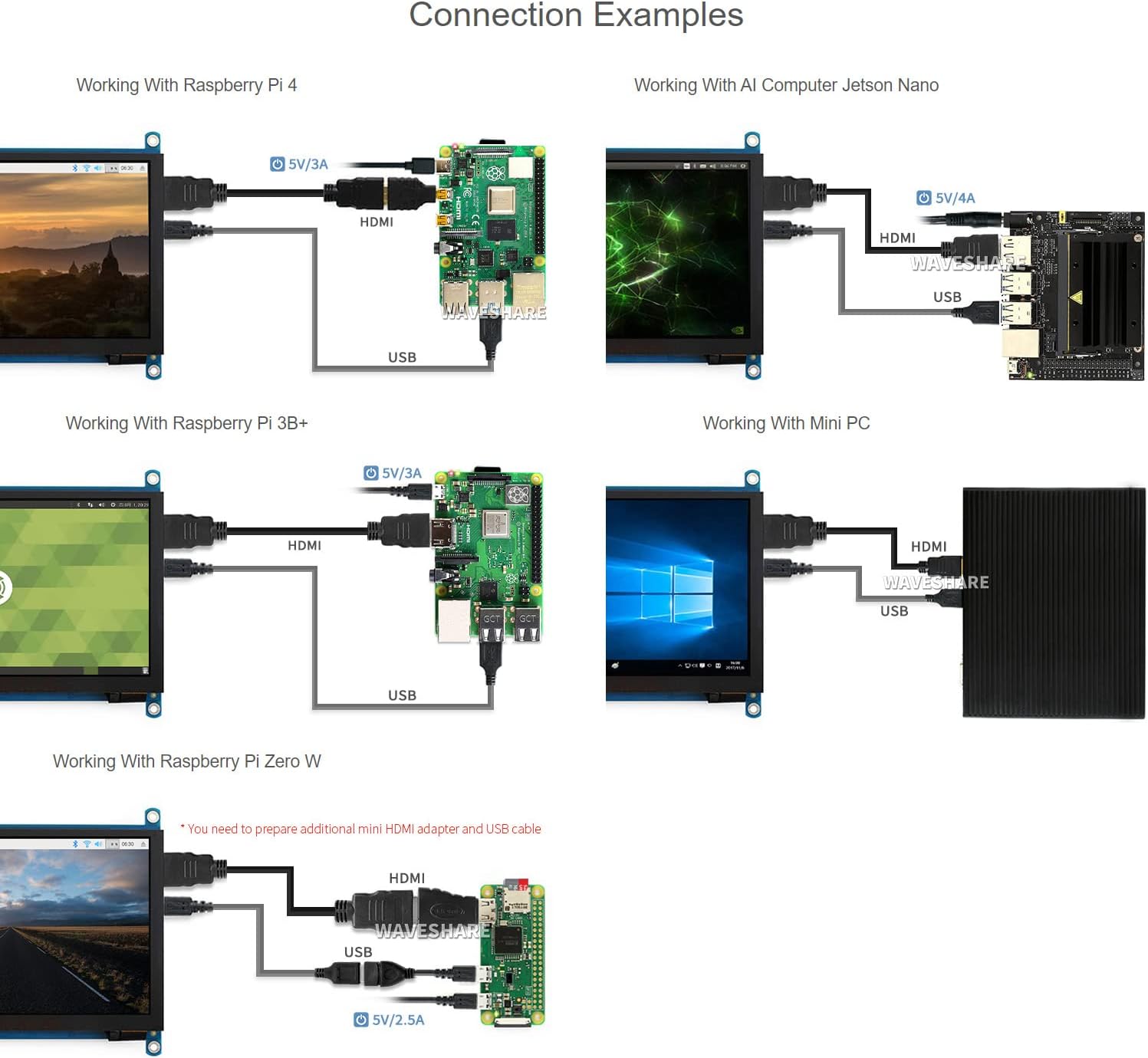
Waveshare 7-inch HDMI LCD Connection Examples

Image: Diagrams illustrating various connection examples for the 7-inch HDMI LCD with Raspberry Pi 4, Jetson Nano, Raspberry Pi 3B+, Raspberry Pi Zero W, and a Mini PC, showing HDMI and USB cable connections.

Kullanım Talimatları

1. Açma/Kapama

The display powers on automatically when connected to a powered device via HDMI and USB. To power off, disconnect the power source from the connected device or the display's USB power input.

2. OSD Menü Gezintisi

The display features an On-Screen Display (OSD) menu for various settings. Use the physical buttons on the side of the display to navigate and adjust settings such as brightness, contrast, and power management. Refer to the "Appearance and Dimensions" section for button identification.

3. Dokunmatik Kontrol

The display supports capacitive touch input. When connected via USB to a compatible operating system (Raspberry Pi OS, Ubuntu, Kali, Windows), the touch functionality will be recognized automatically without additional drivers. The number of touch points supported depends on the operating system (e.g., 5-point touch on Windows, single-point on Jetson Nano Ubuntu).

Waveshare 7-inch HDMI LCD Touch Control and Gaming

Image: Demonstrates the capacitive touch control functionality on the 7-inch HDMI LCD, showing a hand interacting with a web browser interface. Also shows the display connected to a game console, indicating support for gaming display.

4. Ses Çıkışı

Audio can be output through the 3.5mm audio jack or the 4PIN header for external speakers. Ensure your connected device is configured to output audio via HDMI.

Bakım

Sorun giderme

Özellikler

Ekran Boyutu7 inç
Çözünürlük1024 x 600 (Hardware), up to 1920x1080 (Software)
Panel TipiIPS
ViewAçı170°
Dokunmatik TipKapasitif
Dokunma Noktaları5-point (Windows), Single-point (Jetson Nano), 5-point (Raspberry Pi OS)
Ekran ArayüzüHDMI, VGA (ayrı kablo gerektirir)
Ses Çıkışı3.5mm Jack, 4PIN Header
Güç Girişi5V DC (USB üzerinden)
Ürün Boyutları7.09 x 5.51 x 1.97 inç (yaklaşık 180 x 140 x 50 mm)
Ürün Ağırlığı0.352 ons (yaklaşık 10 gram)

Cihaz ve Sistem Desteği

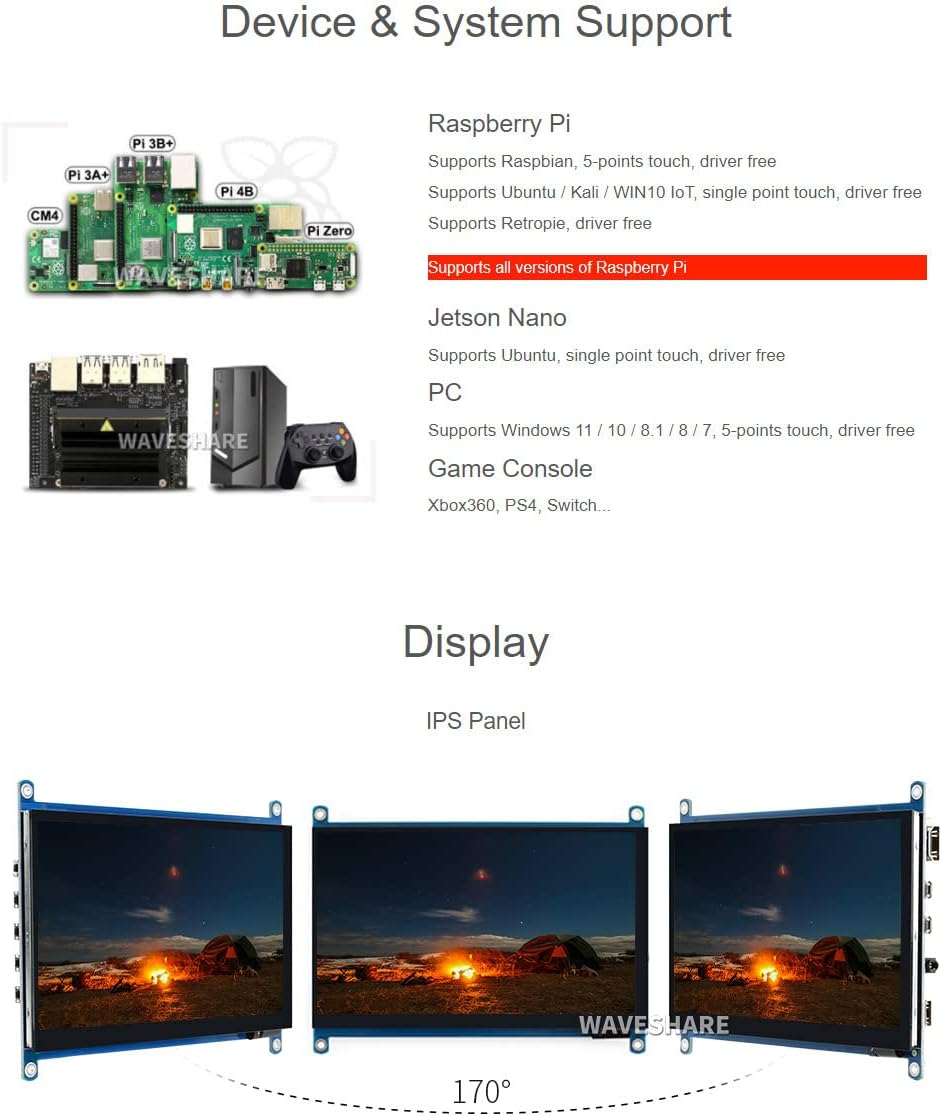
Waveshare 7-inch HDMI LCD Device and System Support

Image: Illustrates various compatible devices including Raspberry Pi models (Pi 3A+, Pi 3B+, Pi 4B, CM4, Pi Zero), Jetson Nano, and a generic PC setup, along with a list of supported operating systems and touch capabilities.
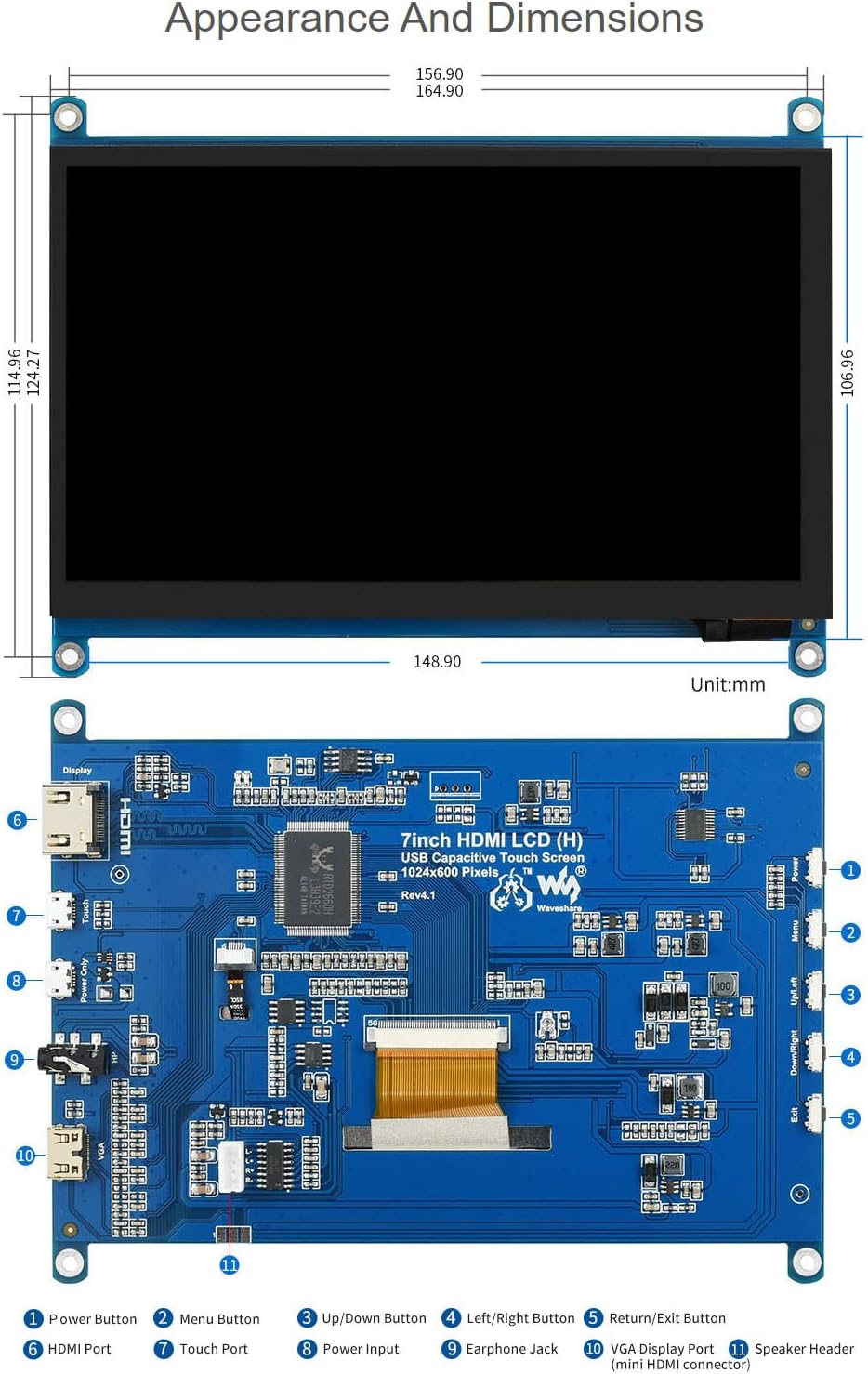
Waveshare 7-inch HDMI LCD Appearance and Dimensions

Image: Technical drawing showing the physical dimensions of the 7-inch HDMI LCD in millimeters, along with a detailed diagram identifying various ports and buttons on the display's circuit board, such as HDMI port, touch port, power input, earphone jack, VGA display port, and OSD menu buttons.

Garanti ve Destek

Waveshare is committed to providing high-quality products and customer service.

For technical assistance or warranty claims, please contact Waveshare customer support through their official channels.

Waveshare Support and Service Information

Image: Details Waveshare's commitment to support and service, including rigorous testing, one-to-one technical service, 24-hour response, 30-day free replacement, 365-day free repair, and lifetime technical service.

Sertifikalar

This product holds the following certifications:

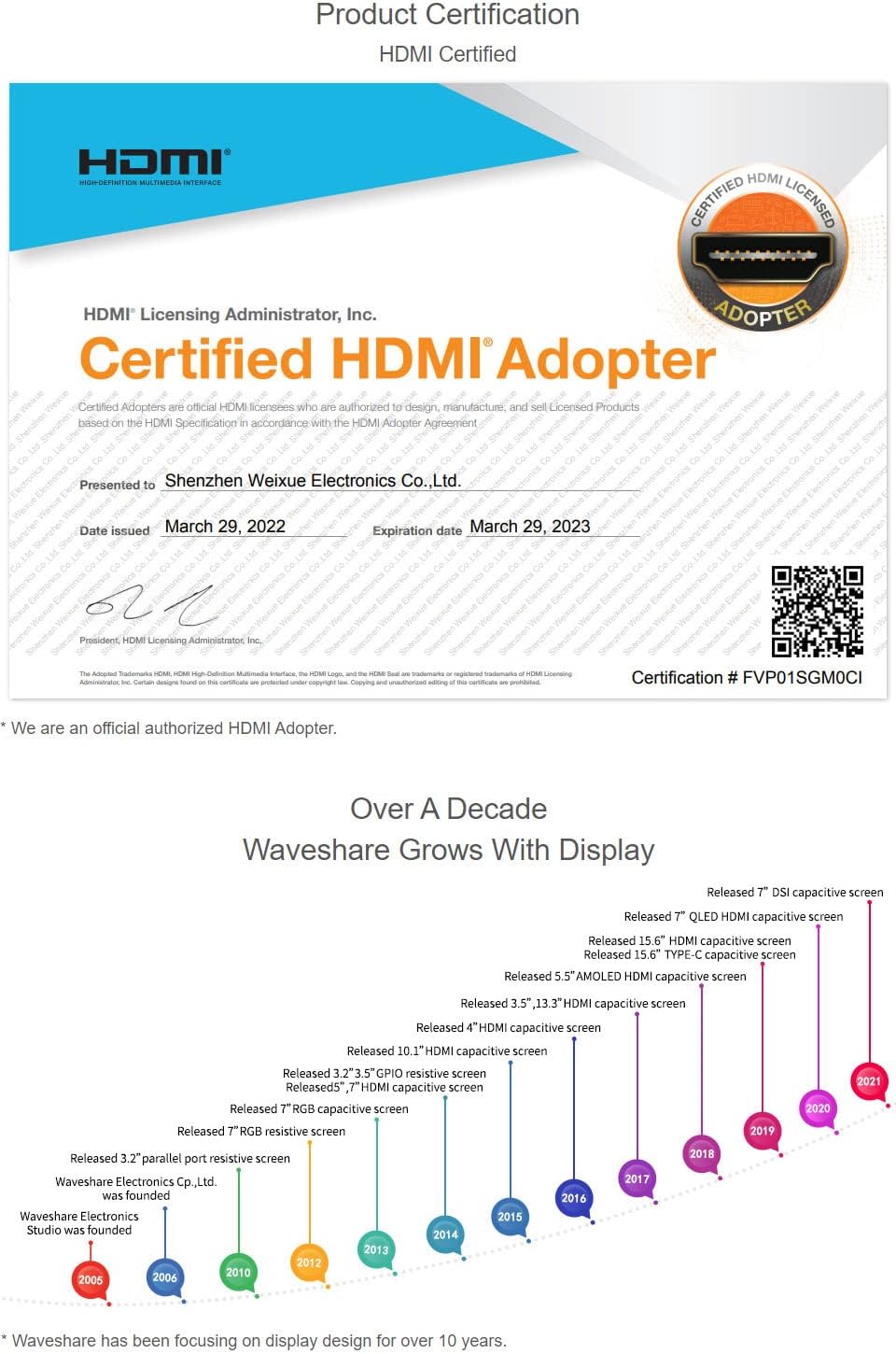
HDMI Certified Adapter Certificate

Image: A certificate indicating that Waveshare is an officially authorized HDMI adopter, ensuring compliance with HDMI standards for quality and reliability.

RoHS and CE Certifications

Image: Displays certificates for RoHS compliance and CE marking, indicating the product meets relevant environmental and safety standards.

İlgili Belgeler - 7 inç HDMI LCD (H)

Önview Waveshare 7 inç HDMI LCD (C) Kullanıcı Kılavuzu: Kurulum ve Kullanım Kılavuzu
Bu kullanıcı kılavuzu, Waveshare 7 inç HDMI LCD (C) ekranının kurulumu ve çalıştırılması konusunda kullanıcılara rehberlik etmekte, özelliklerini, Raspberry Pi ve PC'ler için bağlantı yöntemlerini ve optimum performans için temel kullanım ipuçlarını ayrıntılı olarak açıklamaktadır.
Önview Waveshare 10.1 inç HDMI LCD (G) Kullanıcı Kılavuzu: Kurulum, Özellikler ve Bağlantılar
Waveshare 10.1 inç HDMI LCD (G) ve Kılıfını keşfedin. Bu kullanım kılavuzu, Raspberry Pi, Jetson Nano ve PC'ler için temel teknik özellikleri, güvenlik uyarılarını, bağlantı kılavuzlarını ve sık sorulan soruları ele almaktadır.
Önview Raspberry Pi için Waveshare 4 inç DSI LCD Ekran: Kurulum ve Kılavuz
Waveshare 4 inç DSI LCD ekranına ait özellikleri, donanım bağlantısını, yazılım kurulumunu, ekran döndürmeyi, arka ışık kontrolünü ve Raspberry Pi için sorun gidermeyi kapsayan detaylı kılavuz.
Önview Waveshare 7 inç HDMI LCD: Raspberry Pi Dokunmatik Ekran Rehberi
Waveshare 7 inç HDMI LCD için kurulum, sürücü kurulumu, dokunmatik kalibrasyonu ve Raspberry Pi ile kullanımını kapsayan kapsamlı kullanıcı kılavuzu.
Önview Waveshare 5 inç 1080x1080 Yuvarlak IPS LCD Ekran - Kullanıcı Kılavuzu
Waveshare 5 inç 1080x1080 yuvarlak IPS LCD ekranı keşfedin. Bu kılavuz, dokunmatik kalibrasyon ve bağlantı da dahil olmak üzere özelliklerini, teknik özelliklerini ve Raspberry Pi ve Windows PC'ler için kurulumunu ayrıntılı olarak açıklamaktadır.
Önview Waveshare 4.3 inç DSI LCD: Raspberry Pi için Kapasitif Dokunmatik Ekran
Raspberry Pi için tasarlanmış 800x480 IPS kapasitif dokunmatik ekran olan Waveshare 4.3 inç DSI LCD'yi keşfedin. MIPI DSI arayüzü, sürücüsüz kurulum ve yazılım kontrollü arka aydınlatma özelliklerine sahiptir.