1. Giriş
This manual provides detailed instructions for the installation, operation, and maintenance of your Thomson SB260IBT 2.1 Channel Soundbar. Please read this manual thoroughly before using the product and retain it for future reference.
1.1 Güvenlik Bilgileri
- Güç kaynağı hacmini sağlayıntage, ürün etiketinde belirtilen gereksinimleri karşılamaktadır.
- Do not expose the soundbar or subwoofer to rain, moisture, or extreme temperatures.
- Üniteyi ısı kaynaklarının yakınına veya doğrudan güneş ışığına maruz bırakmayın.
- Aşırı ısınmayı önlemek için ünite çevresinde uygun havalandırma olduğundan emin olun.
- C'yi açmayınasing; tüm servis işlemlerini kalifiye personele yaptırın.
- Üniteyi yalnızca yumuşak ve kuru bir bezle temizleyin.
2. Paket İçeriği
Paketin içinde tüm öğelerin mevcut olduğundan emin olun:
- Thomson SB260IBT Soundbar
- Subwoofer
- Uzaktan kumanda
- Güç kablosu
- Audio Cables (e.g., Optical, AUX - may vary by region)
- Kullanıcı Kılavuzu
3. Ürün Bittiview
3.1 Ses Çubuğu ve Subwoofer

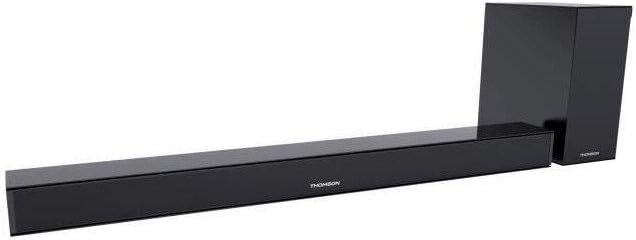
This image displays the Thomson SB260IBT soundbar unit alongside its accompanying subwoofer. The soundbar is a long, slender black unit, and the subwoofer is a compact black cube, both designed to complement modern home entertainment systems.
3.2 Kontrol Paneli ve Bağlantı Noktaları
This image shows a close-up of the soundbar's side panel, revealing various control buttons and input/output ports. These include buttons for power, mode selection, volume control, and ports such as USB, SD card slot, and auxiliary input.
3.2.1 Ön Panel
- LED Göstergesi: Geçerli modu veya durumu görüntüler.
- IR Alıcı: Uzaktan kumanda sinyalleri için.
3.2.2 Arka Panel
- Güç Girişi: Connects to the AC power cable.
- OPTİK Giriş: Televizyondan veya başka bir cihazdan dijital ses bağlantısı için.
- AUX Girişi: 3.5 mm kablo kullanarak analog ses bağlantısı için.
3.2.3 Yan Panel
- USB Bağlantı Noktası: Ses oynatmak için files bir USB sürücüsünden.
- SD Kart Yuvası: Ses oynatmak için filebir SD karttan geliyor.
- Kontrol Düğmeleri: Power, Mode, Volume Up/Down.
3.2.4 Uzaktan Kumanda
The remote control provides full functionality for power, input selection, volume adjustment, and playback controls.
4. Kurulum
4.1 Yerleştirme
Place the soundbar on a stable, flat surface directly in front of your television. Position the subwoofer on the floor near the soundbar for optimal bass response. Ensure adequate ventilation around both units.
4.2 Güce Bağlama
- Güç kablosunu ses çubuğunun güç girişine bağlayın.
- Güç kablosunun diğer ucunu duvardaki prize takın.
- Connect the subwoofer to its power source (if separate).
4.3 Ses Bağlantıları
4.3.1 Optik Bağlantı
For high-quality digital audio, connect an optical cable from your TV's optical output to the soundbar's OPTICAL input. Select 'Optical' mode on the soundbar.
4.3.2 AUX Bağlantısı
Use a 3.5mm audio cable to connect your device's audio output (e.g., smartphone, MP3 player) to the soundbar's AUX input. Select 'AUX' mode on the soundbar.
4.3.3 Bluetooth Bağlantısı
For wireless audio, select 'Bluetooth' mode on the soundbar. Refer to section 5.4 for detailed pairing instructions.
5. Kullanım Talimatları
5.1 Güç Açma/Kapatma
Basın Güç Ses çubuğundaki veya uzaktan kumandadaki düğmeyi kullanarak cihazı açıp kapatabilirsiniz.
5.2 Giriş Seçimi
Basın Mod button on the soundbar or remote control to cycle through available input sources: Bluetooth, Optical, AUX, USB, SD Card. The LED indicator will show the selected mode.
5.3 Ses Kontrolü
Kullanın Cilt + Ve Hacim - buttons on the soundbar or remote control to adjust the master volume level.
5.4 Bluetooth Eşleştirme
- Soundbar'ı açın ve tuşuna basın. Mod button to select Bluetooth mode. The LED indicator will flash, indicating it is in pairing mode.
- Bluetooth özellikli cihazınızda (örneğin, akıllı telefon, tablet) Bluetooth'u etkinleştirin ve kullanılabilir cihazları arayın.
- Select "SB260IBT" from the list of found devices to pair.
- Once successfully paired, the soundbar's LED indicator will stop flashing and remain solid. You can now play audio from your device through the soundbar.
5.5 USB/SD Kart Oynatma
Insert a USB drive or SD card (containing compatible audio files) into the corresponding port on the soundbar's side panel. The soundbar will automatically switch to USB/SD mode and begin playback. Use the remote control for playback functions such as Play/Pause, Next Track, and Previous Track.
6. Bakım
6.1 Temizlik
Disconnect the soundbar from the power supply before cleaning. Use a soft, dry cloth to gently wipe the surfaces. Do not use liquid cleaners, abrasive materials, or chemical solvents, as these may damage the finish.
6.2 Depolama
If storing the unit for an extended period, disconnect it from power and store it in a cool, dry place, away from direct sunlight and extreme temperatures. It is recommended to keep the original packaging for storage.
7. Sorun Giderme
| Sorun | Çözüm |
|---|---|
| Güç Yok | Check if the power cable is securely connected to the soundbar and the wall outlet. Ensure the wall outlet is functional. |
| Ses Yok | Ensure the correct input source (e.g., Optical, AUX, Bluetooth) is selected. Check all audio cable connections. Increase the volume on both the soundbar and the connected device. |
| Bluetooth Disconnection or Failure to Pair | Ensure the device is within the Bluetooth operating range (approximately 10 meters). Turn off and on Bluetooth on your device, then try re-pairing. Ensure no other devices are actively connected to the soundbar. |
| Uzaktan Kumanda Çalışmıyor | Check the battery in the remote control and replace if necessary. Ensure there are no obstacles between the remote control and the soundbar's IR receiver. |
8. Özellikler
- Model Adı: SB260IBT
- Marka: Thomson
- Kanal Yapılandırması: 2.1 Kanal
- Maksimum Çıkış Gücü: 200 Watt
- Bağlantı Teknolojisi: Bluetooth, Wired/Wireless
- Giriş tipi: Multiple (Optical, AUX, USB, SD Card)
- Güç Kaynağı: Kablolu Elektrik
- Kontrol Yöntemi: Via App, Remote Control, On-unit Buttons
- Özel Özellikler: Bluetooth
- Önerilen Kullanımlar: For Computers, Gaming Consoles, Music Players, Smartphones or Tablets, Televisions
- Ürün Ölçüleri: 100 x 15 x 7 cm (Ses çubuğu)
- Ürün Ağırlığı: Approximately 3 kg (Soundbar and Subwoofer combined)
- Birim Sayısı: 2 (Ses çubuğu ve Subwoofer)
- Su geçirmez: HAYIR
- Montaj Tipi: Masaüstü
9. Garanti ve Destek
9.1 Garanti Bilgileri
This product comes with a limited warranty. Please refer to the warranty card included in your package for specific terms and conditions, including the warranty period and coverage details. Retain your proof of purchase for warranty claims.
9.2 Müşteri Desteği
For technical assistance, troubleshooting, or service inquiries, please contact Thomson customer support. Contact details can typically be found on the manufacturer's official website or in your product documentation. Please have your model number (SB260IBT) and purchase information ready when contacting support.