1. Giriş
The VisionTek VT1000 Universal Dual Full HD USB 3.0 Laptop Monitor Docking Station is designed to expand the connectivity of your laptop, whether it runs Windows, macOS, or Chrome OS. This docking station allows you to connect to dual displays and a variety of peripherals through a single USB connection, transforming your laptop into a complete workstation.
Ürün Bittiview
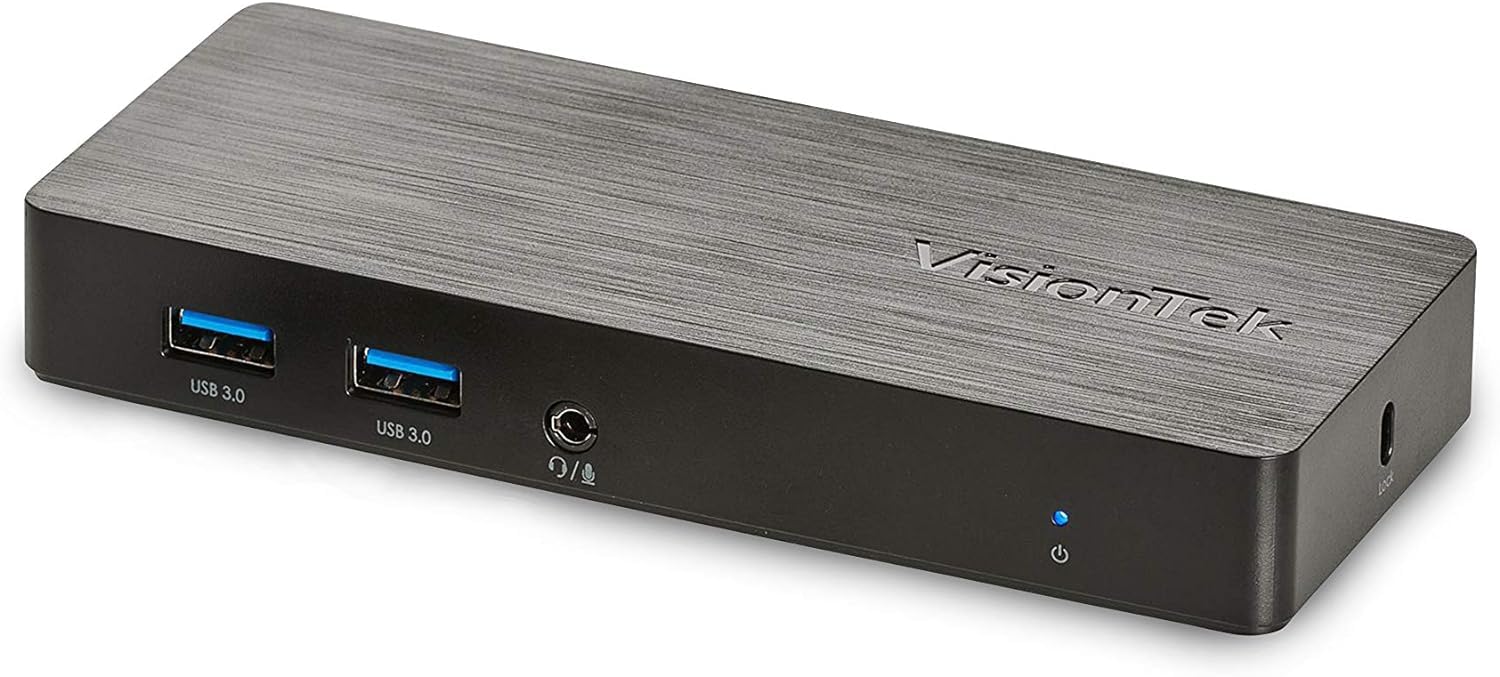
Resim: Ön view of the VisionTek VT1000 docking station.
Kutuda Neler Var?
- VT1000 Çift Ekranlı Evrensel USB 3.0 Bağlantı İstasyonu
- USB 3.0 Kablosu
- User Manual (Quick Installation Guide)
- Güç Adaptörü

Image: The VisionTek VT1000 docking station and its included accessories.
2. Temel Özellikler
- Dual Full HD Displays: Connect two monitors to your laptop with full HD resolution (1920 x 1080 @ 60Hz) via 1x DisplayPort, 1x HDMI, and 1x 1080P VGA.
- Genişletilmiş Bağlantı: Features 3x USB 3.0 ports (5 Gbps transfer speed), 1x RJ45 (10/100/1000) Gigabit Ethernet port, and a headphone audio line in/out jack.
- Plug and Display: Utilizes DisplayLink drivers for plug-and-play functionality, simplifying setup for various workspaces.
- Geniş İşletim Sistemi Uyumluluğu: Compatible with Ultrabook, MacBook, Microsoft Surface Pro, Chromebook, Windows 11, Windows 10, Windows 8.1, Windows 7, and Mac OS 10.13 and up operating systems.
- Kompakt Tasarım: Designed to be compact, taking up minimal desk space while providing extensive functionality.
3. Bağlantı Noktaları ve Göstergeler
The VT1000 docking station provides a comprehensive set of ports for various connectivity needs. Refer to the video below for a visual guide to the ports.
Ön Panel
- 2x USB 3.0 Portu: Yüksek hızlı USB cihazlarını bağlamak için.
- Ses Çıkışı (Kulaklık Girişi): Kulaklık veya harici hoparlör bağlamak için.
- Mikrofon girişi: Bir mikrofon bağlamak için.
- Güç Gösterge LED'i: Illuminates when the dock is powered on.
Arka Panel
- 1 adet VGA bağlantı noktası: For connecting a VGA monitor.
- 1x HDMI Port: For connecting an HDMI monitor.
- 1x DisplayPort: For connecting a DisplayPort monitor.
- 1x RJ45 Gigabit Ethernet Bağlantı Noktası: Kablolu ağ bağlantısı için.
- 1x USB 3.0 Bağlantı Noktası: Yüksek hızlı USB cihazlarını bağlamak için.
- USB-B Port (Upstream): For connecting the dock to your laptop via the included USB 3.0 cable.
- DC 5V Güç Girişi: Güç adaptörünü bağlamak için.
- Güvenlik Kilidi Yuvası: Bağlantı istasyonunu sabitlemek için.
Official Product Video: VisionTek VT1000 Universal Dual Display USB 3.0 Dock
Video: This official VisionTek video provides a visual overview of the VT1000 docking station, highlighting its features, ports, and connectivity options. It demonstrates how the dock can expand your laptop's capabilities into a full workstation.
4. Kurulum Talimatları
- Gücü bağlayın: Plug the included power adapter into the DC 5V input port on the rear of the VT1000 docking station, then plug the adapter into a power outlet. The power indicator LED on the front of the dock should illuminate.
- Dizüstü Bilgisayara Bağlan: Use the provided USB 3.0 cable to connect the USB-B port on the rear of the docking station to an available USB 3.0 port on your laptop.
- Monitörleri Bağlayın: Connect your external monitors to the desired video output ports on the rear of the docking station (HDMI, DisplayPort, or VGA). The VT1000 supports dual displays.
- Çevre Birimlerini Bağlayın: Connect your keyboard, mouse, external hard drives, printers, webcams, or other USB devices to the USB 3.0 ports on the front and rear of the docking station.
- Ağ Bağlantısı (İsteğe bağlı): For a wired internet connection, connect an Ethernet cable from your router or network switch to the RJ45 Gigabit Ethernet port on the rear of the docking station.
- Ses Bağlantısı (İsteğe bağlı): If desired, connect headphones or speakers to the audio out jack and a microphone to the mic in jack on the front of the docking station.
- Sürücü Kurulumu: The VT1000 features DisplayLink Plug and Play technology, typically requiring no manual driver installation on compatible operating systems. If prompted, follow on-screen instructions or visit the VisionTek support website for the latest DisplayLink drivers.
5. Kullanım Talimatları
Once the VT1000 docking station is set up, it operates seamlessly with your connected laptop.
- Ekran Yapılandırması: After connecting your monitors, your operating system should automatically detect them. You can configure display settings (e.g., extend, duplicate, primary display) through your computer's display settings.
- USB Aygıt Kullanımı: Connected USB devices will function as if directly connected to your laptop.
- Ağ Erişimi: Gigabit Ethernet portu, istikrarlı ve hızlı kablolu ağ bağlantısı sağlar.
- Ses İşlevselliği: The audio ports allow for external audio output and microphone input. Ensure your operating system's sound settings are configured to use the docking station's audio device.
- Güç yönetimi: The docking station requires external power and does not supply power to your laptop. Ensure your laptop's power adapter is connected for charging.
6. Özellikler
| Özellik | Detay |
|---|---|
| Marka | VisionTek |
| Model Numarası | 901147 (VT1000 Series) |
| İşletim Sistemi Uyumluluğu | Windows 11, Windows 10, Windows 8.1, Windows 7, macOS 10.13 and later, Chrome OS |
| Ürün Ağırlığı | 8 ons |
| Ürün Boyutları (UxGxY) | 5.95 x 2.8 x 0.8 inç |
| Donanım Arayüzü | DisplayPort, Ethernet, HDMI, USB, USB 3.0, VGA |
| Uyumlu Cihazlar | Dizüstü bilgisayar |
| Toplam USB Bağlantı Noktaları | 3 (USB 3.0) |
| Toplam HDMI Bağlantı Noktaları | 1 |
| Netage | 20 Watt |
7. Sorun Giderme
- Görüntü Çıkışı Yok:
- Ensure the docking station's power adapter is securely connected and the power indicator LED is on.
- Verify that the USB 3.0 cable connecting the dock to your laptop is firmly seated at both ends.
- Monitör kablolarının (HDMI, DisplayPort, VGA) hem bağlantı istasyonuna hem de monitörlere güvenli bir şekilde bağlı olduğundan emin olun.
- Confirm that your monitors are powered on and set to the correct input source.
- Dizüstü bilgisayarınızı ve yerleştirme istasyonunu yeniden başlatın.
- Ensure DisplayLink drivers are installed and up-to-date, if necessary. Although typically plug-and-play, some systems may benefit from manual driver installation from the DisplayLink webalan.
- USB Aygıtları Çalışmıyor:
- Ensure the docking station is powered on and connected to your laptop.
- Try connecting the USB device to a different USB port on the dock or directly to your laptop to rule out device issues.
- Some high-power USB devices may require their own external power supply.
- Ağ Bağlantı Sorunları:
- Verify the Ethernet cable is securely connected to both the dock and your network.
- Check your laptop's network settings to ensure the Ethernet adapter is enabled.
- Restart your router/modem, the docking station, and your laptop.
- Ses Çalışmıyor:
- Check your laptop's sound settings to ensure the docking station's audio output is selected as the default playback device.
- Ensure headphones/speakers are properly connected to the audio out jack.
- Adjust volume levels on both your laptop and the connected audio device.
8. Bakım
- Temizlik: Şarj istasyonunun dış yüzeyini temizlemek için yumuşak, kuru bir bez kullanın. Sıvı temizleyiciler veya çözücüler kullanmaktan kaçının.
- Depolamak: Store the docking station in a cool, dry place away from direct sunlight and extreme temperatures when not in use for extended periods.
- Kablo yönetimi: Hasar oluşmasını önlemek için kabloların aşırı bükülmemesine veya birbirine dolanmamasına dikkat edin.
9. Garanti ve Destek
The VisionTek VT1000 Universal Dual Full HD USB 3.0 Laptop Monitor Docking Station comes with a 2 yıllık sınırlı garanti. To ensure coverage, register your product with VisionTek within 30 days of purchase.
VisionTek offers excellent US-based customer support for any technical assistance or inquiries you may have. For support, please visit the official VisionTek websiteye gidin veya ürün ambalajınızda bulunan iletişim bilgilerine başvurun.
For further information and driver downloads, please visit: VisionTek Desteği


