1. Giriş
Thank you for choosing the Baseus Encok S06 Magnetic Bluetooth In-Ear Earphones. This manual provides essential information for the proper setup, operation, maintenance, and troubleshooting of your new earphones. Please read this manual thoroughly before use to ensure optimal performance and longevity of the product.
The Baseus Encok S06 features a dual battery design for extended playback, Bluetooth 4.1 for stable connectivity, and a magnetic design for convenient storage. It includes an in-built microphone with CVC Noise Suppression and a 3-button remote for easy control of music and calls.

Resim 1.1: Üzeriview of the Baseus Encok S06 Earphones.
This image displays the complete Baseus Encok S06 earphones, highlighting their in-ear design, magnetic earbuds, and the inline control module. The black color and sleek design are visible.
2. Kutuda Neler Var?
Upon unboxing your Baseus Encok S06 earphones, please verify that all the following components are present:
- Baseus Encok S06 Earphones
- Ear-hooks (various sizes)
- Ear-muffs (small and big sizes)
- Şarj Kablosu (Micro USB)

Resim 2.1: Ürün paketinin içeriği.
This image shows all items included in the Baseus Encok S06 package: the earphones themselves, two pairs of ear-hooks, two pairs of ear-muffs (small and large), and a Micro USB charging cable.
3. Kurulum
3.1 Kulaklıkların Şarj Edilmesi
İlk kullanımdan önce kulaklıklarınızı tamamen şarj edin.
- Hat içi kontrol modülündeki şarj portunu bulun.
- Connect the provided Micro USB charging cable to the port.
- Kablonun diğer ucunu bir USB güç kaynağına (örneğin, bilgisayarın USB portu, duvar adaptörü) bağlayın.
- The indicator light will show charging status (refer to product specific LED behavior, typically red for charging, blue/off for fully charged).
- Tam şarj için genellikle yaklaşık 1-2 saat sürer.
3.2 Bluetooth Cihazıyla Eşleştirme
To connect your earphones to a smartphone, tablet, or other Bluetooth-enabled device:
- Kulaklıkların kapalı olduğundan emin olun.
- Press and hold the multi-function button (usually the center button on the inline remote) for approximately 5-7 seconds until the indicator light flashes red and blue alternately. This indicates pairing mode.
- Cihazınızda Bluetooth'u etkinleştirin ve yeni cihazları arayın.
- Select "Baseus Encok S06" (or similar name) from the list of available devices.
- Once connected, the indicator light on the earphones will typically flash blue slowly or turn off.
- Şifre sorulursa "0000" girin.
Kulaklık açıldığında son eşleştirilen cihaza otomatik olarak yeniden bağlanmaya çalışacaktır.
4. Kullanım Talimatları
The Baseus Encok S06 features an intuitive 3-button inline remote for easy control.
| Düğme/İşlem | İşlev |
|---|---|
| Çok Fonksiyonlu Düğme (Orta) |
|
| Sesi Açma (+) Düğmesi |
|
| Sesi Azaltma (-) Düğmesi |
|
The magnetic design allows the earbuds to snap together when not in use, preventing tangles and making them easy to wear around your neck.
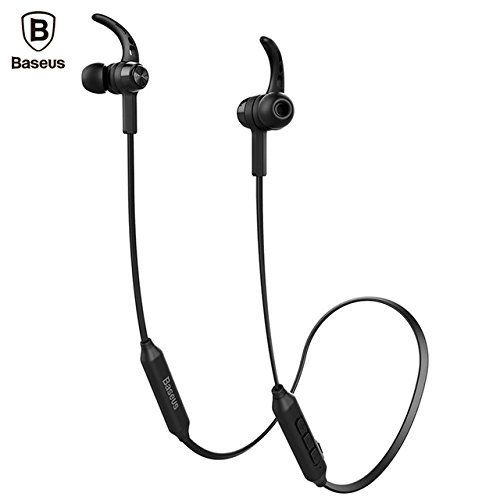
Image 4.1: Close-up of the inline control module.
Bu görüntü ayrıntılı bir bilgi sağlar view of the Baseus Encok S06 earphones, specifically highlighting the inline control module with its three buttons and the magnetic earbuds.
5. Bakım
Doğru bakım, kulaklığınızın uzun ömürlü olmasını ve optimum performans göstermesini sağlar.
- Temizlik: Use a soft, dry, lint-free cloth to clean the earphones. Do not use harsh chemicals, cleaning solvents, or strong detergents. For ear tips, remove them and clean with a mild soap solution, then rinse thoroughly and dry completely before reattaching.
- Depolamak: When not in use, store the earphones in a cool, dry place, away from direct sunlight and extreme temperatures. The magnetic design helps keep the cables tangle-free.
- Nemden Kaçının: Do not expose the earphones to water or excessive moisture. While designed for daily use, they are not waterproof.
- Dikkatli Kullanın: Avoid dropping the earphones or subjecting them to strong impacts. Do not pull on the cable excessively.
6. Sorun Giderme
If you encounter issues with your Baseus Encok S06 earphones, refer to the following common solutions:
| Sorun | Olası Neden / Çözüm |
|---|---|
| Kulaklıklar açılmıyor. |
|
| Cihazla eşleştirilemiyor. |
|
| Ses yok veya ses seviyesi düşük. |
|
| Çağrı kalitesi düşük. |
|
7. Özellikler
| Özellik | Detay |
|---|---|
| Model Adı | ENCKS6 |
| Marka | Bazus |
| Bağlantı Teknolojisi | Kablosuz (Bluetooth) |
| Kablosuz İletişim Teknolojisi | Bluetooth 4.1 |
| Kulak Yerleşimi | Kulakta |
| Form Faktörü | Kulakta |
| Kontrol Yöntemi | Button (3-button inline remote) |
| Özel Özellikler | Magnetic design, Built-in microphone with CVC Noise Suppression, Dual Battery |
| Ürün Ağırlığı | 60 Gram |
8. Garanti ve Destek
8.1 Garanti Bilgileri
Bu ürün bir 6 ay garanti provided by the manufacturer from the date of purchase. Please retain your proof of purchase for warranty claims. The warranty covers manufacturing defects and malfunctions under normal use. It does not cover damage caused by misuse, accidents, unauthorized modifications, or normal wear and tear.
8.2 Müşteri Desteği
For further assistance, technical support, or warranty inquiries, please contact Baseus customer service through their official webÜrünü satın aldığınız site veya perakendeci.
Önemli: Do not attempt to disassemble or repair the earphones yourself, as this will void the warranty.


