giriiş
This manual provides essential instructions for the Jam Audio Out There Active Noise Cancelling On-Ear Bluetooth Headphones. Please read this guide thoroughly to ensure proper use, maintenance, and to maximize your listening experience. These headphones offer active noise cancellation, Bluetooth connectivity, hands-free calling, and a comfortable on-ear design.
Kutuda Neler Var?
Tüm öğelerin ambalajda mevcut olduğunu doğrulayın:
- Out There Headphones
- AUX Kablosu (3.5 mm)
- USB Şarj Kablosu
- Hızlı Başlangıç Kılavuzu (ayrıntılı talimatlar için bu kılavuza bakın)

Image: Contents of the Jam Audio Out There headphone package, including the headphones, AUX cable, and USB charging cable.
Ürün Bittiview ve Kontroller
Familiarize yourself with the headphone's layout and controls for optimal use.
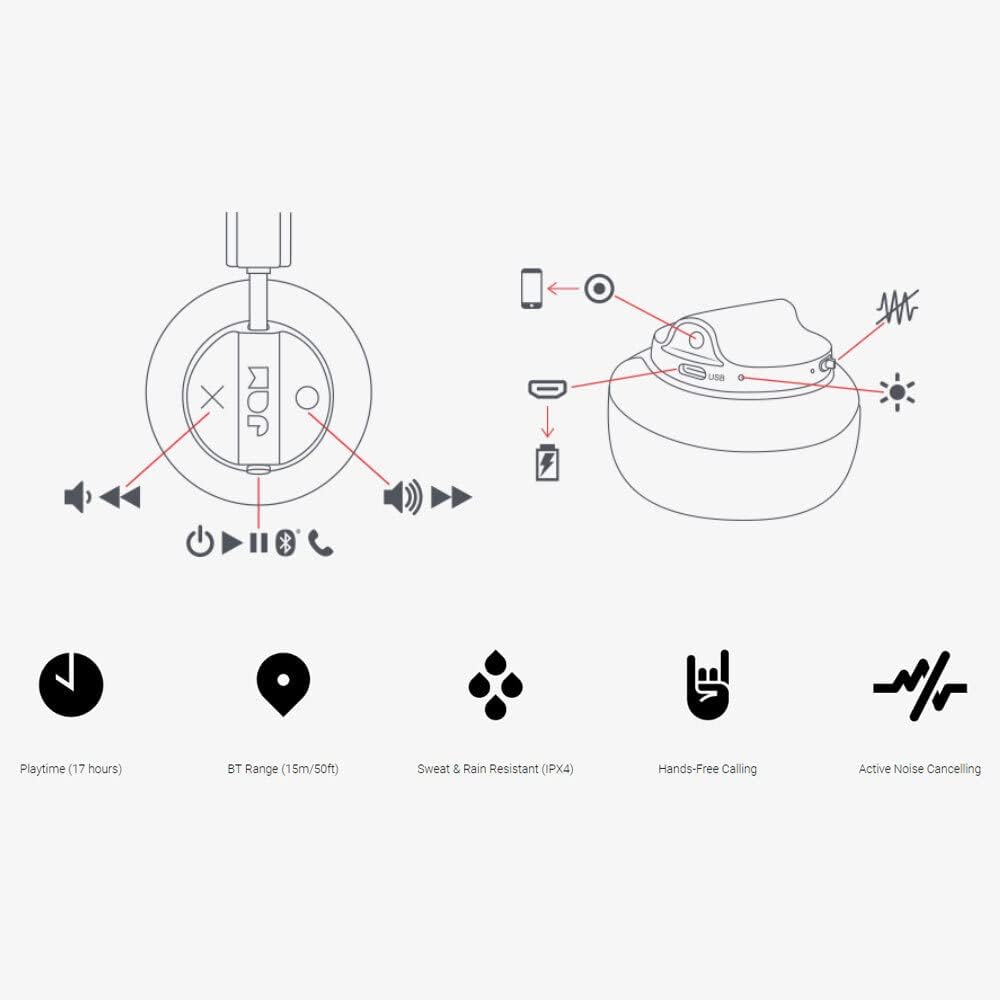
Image: Detailed diagram illustrating the control buttons and ports on the Jam Audio Out There headphones, including power, volume, track navigation, call management, and the charging port.
- Güç Düğmesi: Açmak/kapatmak için basılı tutun.
- Sesi Aç/Sonraki Parça: Kısa basışla sesi açabilir, uzun basışla bir sonraki parçaya geçebilirsin.
- Sesi Kısma/Önceki Parça: Kısa basışta ses kısılır, uzun basışta önceki parçaya geçilir.
- Oynat/Duraklat/Aramayı Cevapla: Single press to play/pause music or answer/end a call.
- Active Noise Cancelling (ANC) Switch: Toggle to activate or deactivate noise cancellation.
- Şarj Portu: Şarj için mikro USB bağlantı noktası.
- AUX-in Portu: Kablolu ses bağlantısı için 3.5 mm jak.
Kurmak
1. Kulaklıkları Şarj Etme
Before first use, fully charge your headphones. Connect the provided USB charging cable to the charging port on the headphones and the other end to a USB power source. The LED indicator will show charging status and turn off when fully charged. A full charge takes approximately 2 hours and provides up to 17 hours of playtime.

Image: The Jam Audio Out There headphones provide up to 17 hours of playtime on a single charge.
2. Açma/Kapama
- To power on: Press and hold the Power button for 3 seconds. The LED indicator will flash.
- Kapatmak için: Güç düğmesini 3 saniye basılı tutun. LED göstergesi sönecektir.
3. Bluetooth Eşleştirme
- Kulaklıkların kapalı olduğundan emin olun.
- Press and hold the Power button for 5 seconds until the LED indicator flashes red and blue, indicating pairing mode.
- Cihazınızda (akıllı telefon, tablet, bilgisayar) Bluetooth'u etkinleştirin ve kullanılabilir cihazları arayın.
- Select "JAM Out There" from the list of devices.
- Once paired, the LED indicator on the headphones will turn solid blue.
- Kulaklıkların Bluetooth menzili 15 metreye (50 fit) kadar çıkmaktadır.

Image: The Jam Audio Out There headphones offer Bluetooth compatibility, allowing a range of up to 15 meters or 50 feet from your connected device.
Kullanım Talimatları
Müzik Çalma
- Oynat/Duraklat: Oynat/Duraklat düğmesine bir kez basın.
- Sonraki Parça: Sesi Açma tuşuna uzun basın.
- Önceki parça: Sesi Azaltma düğmesine uzun basın.
- Ses Ayarı: Short press the Volume Up or Volume Down buttons.
Eller Serbest Arama
- Çağrıyı Cevapla/Sonlandır: Oynat/Duraklat düğmesine bir kez basın.
- Çağrıyı Reddet: Oynat/Duraklat düğmesini 2 saniye basılı tutun.
- Arama yap: Initiate the call from your connected device. The audio will automatically transfer to the headphones.
- Music will automatically pause during a call and resume after the call ends.
Aktif Gürültü Önleme (ANC)
- To activate ANC: Slide the ANC switch to the ON position. The ANC indicator light will illuminate.
- To deactivate ANC: Slide the ANC switch to the OFF position. The ANC indicator light will turn off.
- Using ANC can reduce ambient noise, enhancing your listening experience. Note that ANC can be used independently or with Bluetooth audio.
Wired Connection (AUX-in)
For a wired connection, use the provided 3.5mm AUX cable. Plug one end into the headphone's AUX-in port and the other into your audio device. This allows you to continue listening even if the headphone battery is depleted or if Bluetooth is not available.
Bakım
- Temizlik: Kulaklığınızı yumuşak ve kuru bir bezle silin. Sert kimyasallar veya aşındırıcı malzemeler kullanmayın.
- Depolamak: Kulaklıklarınızı aşırı sıcaklıklardan uzak, serin ve kuru bir yerde saklayın.
- Suya Dayanıklılık: These headphones are IPX4 rated, meaning they are resistant to sweat and light splashes of water. Do not submerge them in water or expose them to heavy rain. Ensure the charging port cover is securely closed when not charging to maintain water resistance.
- Pil Bakım: Pil ömrünü uzatmak için kulaklıkların pilini sık sık tamamen boşaltmaktan kaçının. Uzun süre kullanılmasa bile düzenli olarak şarj edin.
Sorun giderme
| Sorun | Çözüm |
|---|---|
| Kulaklıklar açılmıyor | Kulaklıkların şarjının dolu olduğundan emin olun. USB kablosunu kullanarak bir güç kaynağına bağlayın. |
| Bluetooth üzerinden eşleştirme yapılamıyor. |
|
| Ses yok veya düşük ses seviyesi |
|
| Active Noise Cancelling not working | Ensure the ANC switch is in the ON position and the ANC indicator light is illuminated. |
| Headphones falling apart or breaking | While the product is designed for durability, excessive force or improper handling can cause damage. Handle with care. If issues persist, refer to warranty information. |
Özellikler
- Model Adı: Dışarıda
- Model Numarası: HX-HP303BK
- Bağlantı: Bluetooth, 3.5 mm Jack (AUX-in)
- Kablosuz Menzili: 15 metreye (50 feet) kadar
- Pil Ömrü: 17 saate kadar
- Gürültü kontrolü: Aktif Gürültü Önleme
- Suya Dayanıklılık: IPX4 Rated (Sweat and Rain Resistant)
- Kulak Yerleşimi: Kulakta
- Malzeme: Kauçuk, Silikon
- Ürün Ağırlığı: 5.1 ons (0.32 Pound)
- Ürün Ölçüleri: 8.58 x 3.19 x 8.66 inç
- Dahil Bileşenler: Headphones, Charging Cord, AUX Cable
Ürün Videosu Bittiview
Görsel bir açıklama için bu resmi ürün videosunu izleyinview of the Jam Audio product line, including the Out There headphones.
Video: An official Jam Audio sizzle video showcasing various products, including the Out There headphones, highlighting their design and features.
Garanti ve Destek
For warranty information, product registration, or technical support, please refer to the official Jam Audio webSiteyi ziyaret edin veya müşteri hizmetleriyle iletişime geçin. Satın alma belgenizi garanti talepleriniz için saklayın.