giriiş
The beyerdynamic Amiron Wireless headphones are designed to provide a high-end audio experience with the freedom of wireless connectivity. These headphones integrate innovative sound personalization and Tesla technology for optimal sound quality. They are crafted with high-quality materials in Germany, ensuring durability and a comfortable fit for extended listening sessions.
Kutuda Neler Var?
Your beyerdynamic Amiron Wireless headphones package includes the following items:
- Amiron Wireless headphones
- Optional wired connection cable with remote control (Mini Jack 3.5 mm, 1.2 m long, detachable, 4-pole)
- Şarj kablosu USB-A - USB-C
- Sert vaka
- Garanti kitapçığı
- Hızlı başlangıç kılavuzu

Image: The Amiron Wireless headphones, charging cable, audio cable, and hard case.
Ürün Bittiview
The Amiron Wireless headphones are designed for an immersive audio experience, combining advanced technology with user comfort.
Temel Özellikler:
- High-end Bluetooth Connectivity: Features optimum sound quality thanks to Tesla technology and top-class Bluetooth transmission (Qualcomm aptX HD and AAC). Operating range up to 10 meters.
- Ses Kişiselleştirme: Adapts acoustically to the user's hearing through an integrated sound personalization feature, ensuring a tailored audio experience.
- Konfor: Unique wearing comfort achieved through masterfully balanced contact pressure and a perfect fit, ideal for long listening sessions.
- Premium Yapı: Made in Germany with high-quality materials, offering durability and flawless workmanship.
- Dokunmatik Kontrol: Intuitive touch controls on the earcup for easy management of playback and calls.
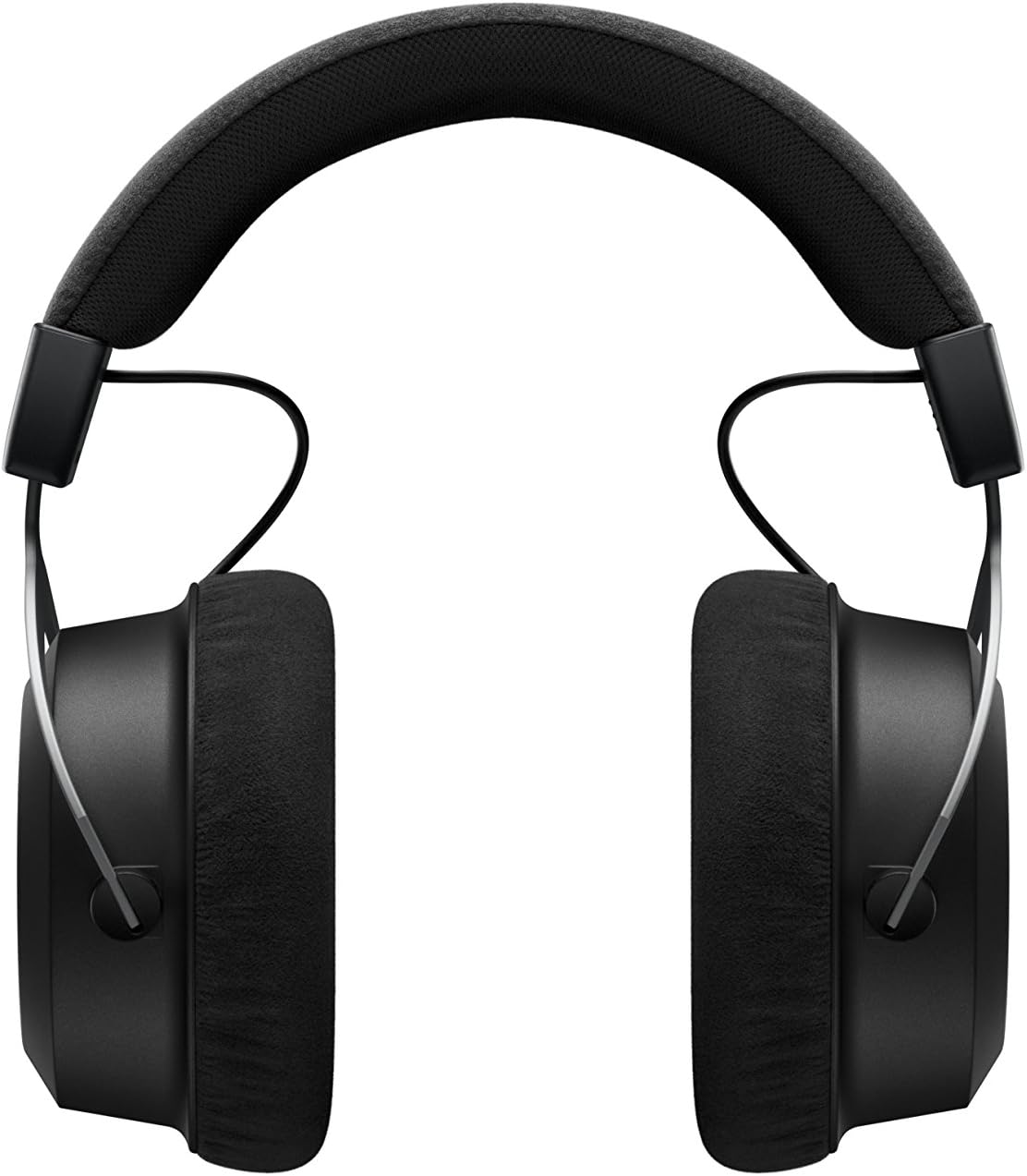
Resim: Yan view of the Amiron Wireless headphones, highlighting the earcup design and headband.
Kurmak
1. Kulaklıkları Şarj Etme
Before first use, ensure your Amiron Wireless headphones are fully charged. Connect the provided USB-A to USB-C charging cable to the USB-C port on the headphone and a suitable USB power source. A full charge takes approximately 2 hours and provides over 30 hours of battery life.
2. Bluetooth Eşleştirme
Kulaklığınızı Bluetooth özellikli bir cihazla eşleştirmek için:
- Kulaklığınızın şarjlı ve kapalı olduğundan emin olun.
- Press and hold the power button on the headphone until the LED indicator flashes blue and red, indicating pairing mode.
- On your device (smartphone, tablet, etc.), go to Bluetooth settings and select "Amiron Wireless" from the list of available devices.
- Once connected, the LED indicator will show a steady blue light.
3. Sound Personalization (MIY App)
For an optimized listening experience, download the beyerdynamic MIY app from the Google Play Store or Apple App Store. The app allows you to perform a hearing test and create a personalized sound profile that adapts the audio output to your individual hearing. This profile is then stored directly on the headphones.
Video: Bir fazlaview of the beyerdynamic Amiron Wireless headphones, including unboxing and features like sound personalization and touch controls.
Kullanım Talimatları
Dokunmatik Yüzey Kontrolleri
The right earcup features an integrated touchpad for intuitive control of various functions:
- Ses Kontrolü: Swipe up or down on the touchpad.
- Navigasyonu İzle: Swipe forward for the next track, backward for the previous track.
- Oynat/Duraklat: Dokunmatik yüzeyin ortasına dokunun.
- Çağrı Yönetimi: Tap to answer/end calls, push and hold for voice commands (Siri, Google Assistant).
The sensitivity of these touch controls can be customized via the MIY app.
Kablolu Çalışma
For a wired connection, plug the provided 3.5 mm audio cable into the headphone's audio jack and your audio source. This allows for passive use even if the battery is depleted or while charging. The inline remote on the cable provides basic playback and call controls.

Image: A user enjoying music with the Amiron Wireless headphones, demonstrating the touch controls on the earcup.
Ses Kalitesi
The Amiron Wireless headphones deliver a dynamic and detailed sound profile, characterized by:
- Bas: Powerful and precise low-end with good impact, without overpowering other frequencies.
- Orta seviye: Natural and clear, providing excellent reproduction of vocals and instruments.
- tiz: Detailed and smooth high-end, avoiding harshness even at higher frequencies, contributing to an airy sound.
- Seslertage: Offers impressive depth and precise instrument placement, creating a spacious and immersive listening experience.
The sound personalization feature via the MIY app further enhances the audio quality by tailoring it to your unique hearing profile.
Konfor ve Tasarım
The Amiron Wireless headphones prioritize comfort and a robust build:
- Kulak yastıkları: Equipped with soft, velour earpads that provide a comfortable fit and contribute to sound isolation.
- Kafa bandı: Features a leatherette headband with ample padding for reduced pressure during prolonged use.
- Malzemeler: Constructed with high-quality materials, including metal components, ensuring durability and a premium feel.
- Yerleştirmek: Designed for a balanced contact pressure and secure fit, making them suitable for home listening.

Image: A user enjoying music with the Amiron Wireless headphones in a relaxed setting, showcasing their comfortable design.
Özellikler
| Özellik | Detay |
|---|---|
| Model Adı | Amiron Wireless |
| Bağlantı Teknolojisi | Wireless Version (Bluetooth 4.0) |
| Kablosuz İletişim Teknolojisi | Bluetooth |
| Frekans Tepkisi | 5 - 40,000 Hz |
| Empedans | 32 Ohm |
| Hassasiyet | 100 dB |
| Pil Ömrü | 30 Saat |
| Şarj Süresi | 2 Hours (for 30 hours playback) |
| Bluetooth Menzili | 10 Metre |
| Kontrol Yöntemi | Dokunmatik (Medya Kontrolü) |
| Gürültü Kontrolü | Ses Yalıtımı |
| Ürün Ağırlığı | 13.4 ons |
| Ürün Boyutları | 8.07 x 4.13 x 5.9 inç |
| Üretici | Beyerdynamic, Inc. |
Bakım
To ensure the longevity and optimal performance of your beyerdynamic Amiron Wireless headphones, follow these maintenance guidelines:
- Temizlik: Kulaklıkların iç ve dış kısımlarını temizlemek için yumuşak, kuru bir bez kullanın. Sert kimyasallar veya aşındırıcı malzemeler kullanmaktan kaçının.
- Depolamak: When not in use, store the headphones in their provided hard case to protect them from dust, scratches, and impacts.
- Pil Bakım: Pili sık sık tamamen boşaltmaktan kaçının. Uzun süreli saklama için, pilin ömrünü uzatmak amacıyla yaklaşık %50'ye kadar şarj edin.
- Nem: Kulaklıkları nemden ve aşırı sıcaklıklardan uzak tutun.
Sorun giderme
If you encounter issues with your Amiron Wireless headphones, try the following solutions:
- Güç Yok: Kulaklıkların kutu içeriğinde bulunan USB-C kablosu kullanılarak tamamen şarj edildiğinden emin olun.
- Bluetooth ile Eşleştirilemiyor:
- Kulaklığın eşleştirme modunda olduğundan emin olun (LED mavi ve kırmızı renkte yanıp sönüyor).
- Cihazınızda Bluetooth'un etkin olduğundan emin olun.
- Kulaklıkları cihazınıza daha yakın bir mesafeye (10 metre içinde) getirin.
- Cihazınızın Bluetooth ayarlarından kulaklıkların eşleştirmesini kaldırıp tekrar eşleştirmeyi deneyin.
- Ses Yok/Düşük Ses:
- Check the volume levels on both the headphones (via touchpad) and your connected device.
- Kulaklıkların doğru şekilde eşleştirildiğinden emin olun.
- If using the wired connection, ensure the cable is securely plugged into both the headphones and the audio source.
- Ses Bozulması:
- Reduce the volume on your device and/or headphones.
- Kulaklıklarınız ve Bluetooth cihazınız arasında herhangi bir engel olmadığından emin olun.
Garanti ve Destek
The beyerdynamic Amiron Wireless headphones are manufactured in Germany using high-quality materials, offering durability and flawless workmanship. Please refer to the included warranty booklet for detailed information regarding your product's warranty coverage.
For further assistance, technical support, or service inquiries, please visit the official beyerdynamic websitesine bakın veya müşteri hizmetleri departmanıyla iletişime geçin.
Ayrıca ziyaret edebilirsiniz beyerdynamic Store on Amazon Ek ürün bilgileri ve destek kaynakları için.


