giriiş
Satın aldığınız için teşekkür ederizasing the VONYX SPX-PA9210 Portable PA System. This manual provides essential information for the safe and efficient operation of your device. Please read it thoroughly before use and retain it for future reference.
Güvenlik Talimatları
- Cihazı çalıştırmadan önce tüm talimatları dikkatlice okuyunuz.
- Cihazı sudan, nemden ve aşırı sıcaklıklardan uzak tutun.
- C'yi açmayınasing; tüm servis işlemlerini kalifiye personele yaptırın.
- Şarj işlemi için yalnızca belirtilen güç adaptörünü kullanın.
- Aşırı ısınmayı önlemek için yeterli havalandırmayı sağlayın.
- İşitme hasarını önlemek için yüksek ses seviyelerine uzun süre maruz kalmaktan kaçının.
Paket İçeriği
Paketin içinde tüm öğelerin mevcut olduğundan emin olun:
- VONYX SPX-PA9210 Portable PA System Unit
- 2 x UHF Wireless Microphones
- Güç Adaptörü/Şarj Kablosu
- Kullanım Kılavuzu (bu belge)
Ürün Bittiview
The VONYX SPX-PA9210 is a portable PA system designed for various audio applications. It features integrated speakers, media playback options, and wireless microphones for versatile use.
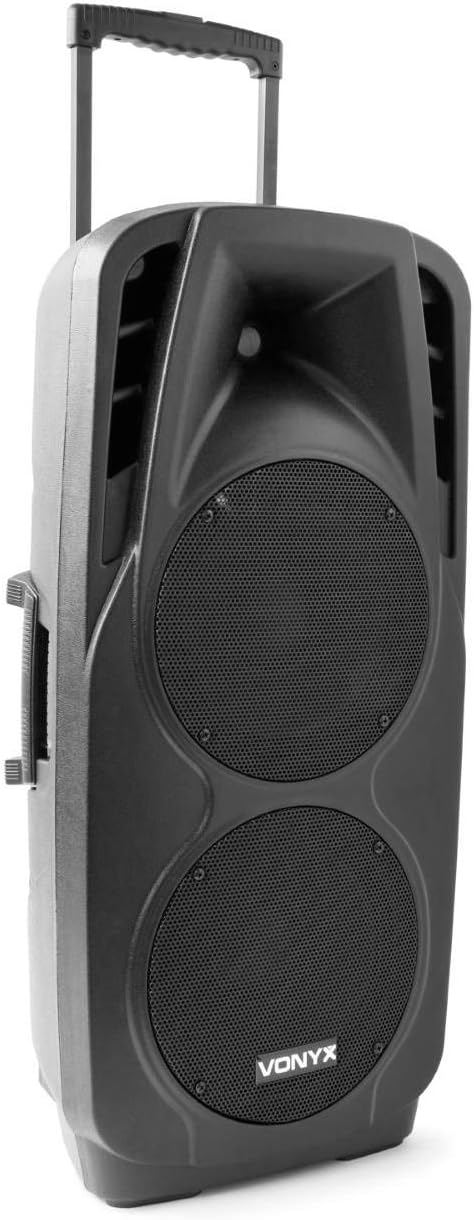
An image showing the VONYX SPX-PA9210 portable PA system. It features a black casing, two large speaker grilles on the front, and a retractable handle at the top for easy transport. A side handle is also visible.
Temel Özellikler:
- Integrated 2x 10-inch speakers with titanium tweeter controller.
- Built-in media player with USB and SD/MMC card slots.
- Kablosuz ses akışı için Bluetooth bağlantısı.
- High-performance 12V/7A rechargeable battery for 4-6 hours of autonomy.
- Two UHF wireless microphones with up to 50m range.
- Integrated trolley with telescopic handle and wheels for portability.
- LCD screen for media information display.
Kurmak
1. İlk Şarj
Before first use, fully charge the internal 12V/7A battery. Connect the provided power adapter to the charging port on the PA system and then to a suitable power outlet. The charging indicator will show the charging status. A full charge typically provides 4-6 hours of operation.
2. Açma/Kapama
- To power on the unit, locate the power switch (usually on the rear or control panel) and set it to the "ON" position.
- To power off, set the switch to the "OFF" position.
3. Mikrofon Kurulumu
- Insert fresh batteries into the two UHF wireless microphones.
- Turn on the microphones. They should automatically connect to the PA system.
- Adjust the microphone volume on the PA system's control panel. The wireless range is up to 50 meters.
Kullanım Talimatları
1. Media Playback (USB/SD/MMC)
- Insert a USB flash drive or an SD/MMC card into the corresponding slot on the control panel.
- The system will automatically detect the media and begin playback, or you may need to select the input source using the "Mode" button.
- Use the playback controls (Play/Pause, Next, Previous) on the control panel to manage your music.
- The LCD screen will display track information.
2. Bluetooth Eşleştirme
- Press the "Mode" button on the PA system until "Mode" button on the PA system until "Bluetooth" is selected.
- Akıllı telefonunuzda, tabletinizde veya Bluetooth özellikli diğer cihazınızda Bluetooth'u etkinleştirin ve kullanılabilir cihazları arayın.
- Select "VONYX SPX-PA9210" (or similar name) from the list to pair.
- Once paired, you can stream audio wirelessly from your device to the PA system.
3. Volume and Tone Controls
- Adjust the master volume knob to control the overall sound output.
- Separate volume controls are available for microphones and media playback.
- Use the bass and treble controls (if available) to adjust the tone of the audio.
Bakım
1. Temizlik
Wipe the exterior of the unit with a soft, dry cloth. Do not use abrasive cleaners or solvents. Ensure no liquids enter the device.
2. Pil Bakımı
- Pil ömrünü uzatmak için pili sık sık tamamen boşaltmaktan kaçının.
- Pil ömrünü korumak için, cihaz kullanılmadığı zamanlarda bile düzenli olarak şarj edin.
- Cihazı uzun süre kullanmadığınız zamanlarda serin ve kuru bir yerde saklayın.
Sorun giderme
- Güç Yok: Ensure the unit is charged or connected to a power source, and the power switch is in the "ON" position.
- Ses Yok: Check all volume controls (master, microphone, media player). Ensure the correct input source is selected. Verify microphone batteries.
- Bluetooth Bağlanmıyor: Ensure the PA system is in Bluetooth mode and discoverable. Turn off and on Bluetooth on your device and try pairing again. Move closer to the PA system.
- Bozuk Ses: Reduce the volume. Check audio cables if using wired inputs. Ensure microphones are not too close to the speakers (feedback).
Özellikler
| Marka | VONİKS |
| Model Numarası | Sky-170.082 (SPX-PA9210) |
| Boyutlar (U x G x Y) | 27x38.5x81 cm |
| Ağırlık | 16.25 kilo |
| Bağlantı Teknolojisi | Bluetooth, USB |
| Önerilen Ürün Kullanımı | Akıllı Telefonlar veya Tabletler |
| Özel Özellikler | Bluetooth, USB Port, Portable, LCD Screen |
| Güç Kaynağı | Wireless (Internal Battery) |
| Pil | 12V/7A, 4-6 hours autonomy |
| Malzeme | Akrilonitril Bütadien Stiren (ABS) |
| Kanal Sayısı | 5 |
| Konuşmacılar | 2x 10-inch woofers, Titanium tweeter controller |
| Mikrofonlar | 2x UHF Wireless Microphones (up to 50m range) |
Garanti ve Destek
For warranty information and technical support, please refer to the documentation provided with your purchase or contact VONYX customer service directly.
Yedek Parça Bulunabilirliği: Bu ürün için yedek parça bulunabilirliğine ilişkin bilgi şu anda mevcut değil.
Yazılım Güncellemeleri: Bu ürün için garantili yazılım güncellemelerine ilişkin bilgiler şu anda mevcut değil.


