1. Giriş
This manual provides essential information for the safe and efficient operation of your AUXUS iRis AX32LSP01-SM 32-inch Smart Android LED TV. Please read these instructions thoroughly before using the product and retain them for future reference.
The AUXUS iRis AX32LSP01-SM features a 32-inch HD Ready LED display, integrated Android operating system for smart functionality, wireless display capabilities, and multiple connectivity options. It is designed to provide an immersive viewing and interactive experience.

Şekil 1.1: Ön view of the AUXUS iRis 32-inch Smart Android LED TV, showcasing ekranı.
2. Güvenlik Bilgileri
Televizyonun hasar görmesini önlemek ve kişisel güvenliğinizi sağlamak için aşağıdaki güvenlik önlemlerine uyun:
- Yangın veya elektrik çarpmasını önlemek için televizyonu yağmur veya neme maruz bırakmayın.
- Televizyonun kapağını açmayınasing. Tüm servis işlemlerini yetkili personele yaptırın.
- Uygun havalandırmayı sağlayın. Havalandırma açıklıklarını kapatmayın.
- Televizyonu düşmesini önlemek için sağlam ve düz bir yüzeye yerleştirin.
- Güç kablosunun üzerine basılmasını veya sıkışmasını önleyin.
- Yıldırımlı havalarda veya uzun süre kullanılmayacaksa televizyonun fişini çekin.
3. Paket İçeriği
Paketin içinde tüm öğelerin mevcut olduğundan emin olun:
- 1 x AUXUS iRis 32-inch LED TV
- 1 x Table Top Stand (set)
- 1 x Kullanım Kılavuzu (bu belge)
- 1 x Garanti Kartı
- 1 x Uzaktan Kumanda
4. Kurulum
4.1 Paketin açılması
Televizyonu ve tüm aksesuarlarını ambalajından dikkatlice çıkarın. İlerideki taşıma veya servis işlemleri için ambalaj malzemelerini saklayın.
4.2 Stand Kurulumu
If using the table-top stand, attach the stand bases to the bottom of the TV using the provided screws. Ensure the stand is securely fastened before placing the TV on a flat, stable surface.
4.3 Duvara Montaj
The TV supports VESA-compatible wall mounts (not included). Consult a professional for wall mounting to ensure proper installation and safety.
4.4 Çevre Birimlerini Bağlama
Refer to the back panel diagram for port locations. Ensure the TV is powered off before making any connections.
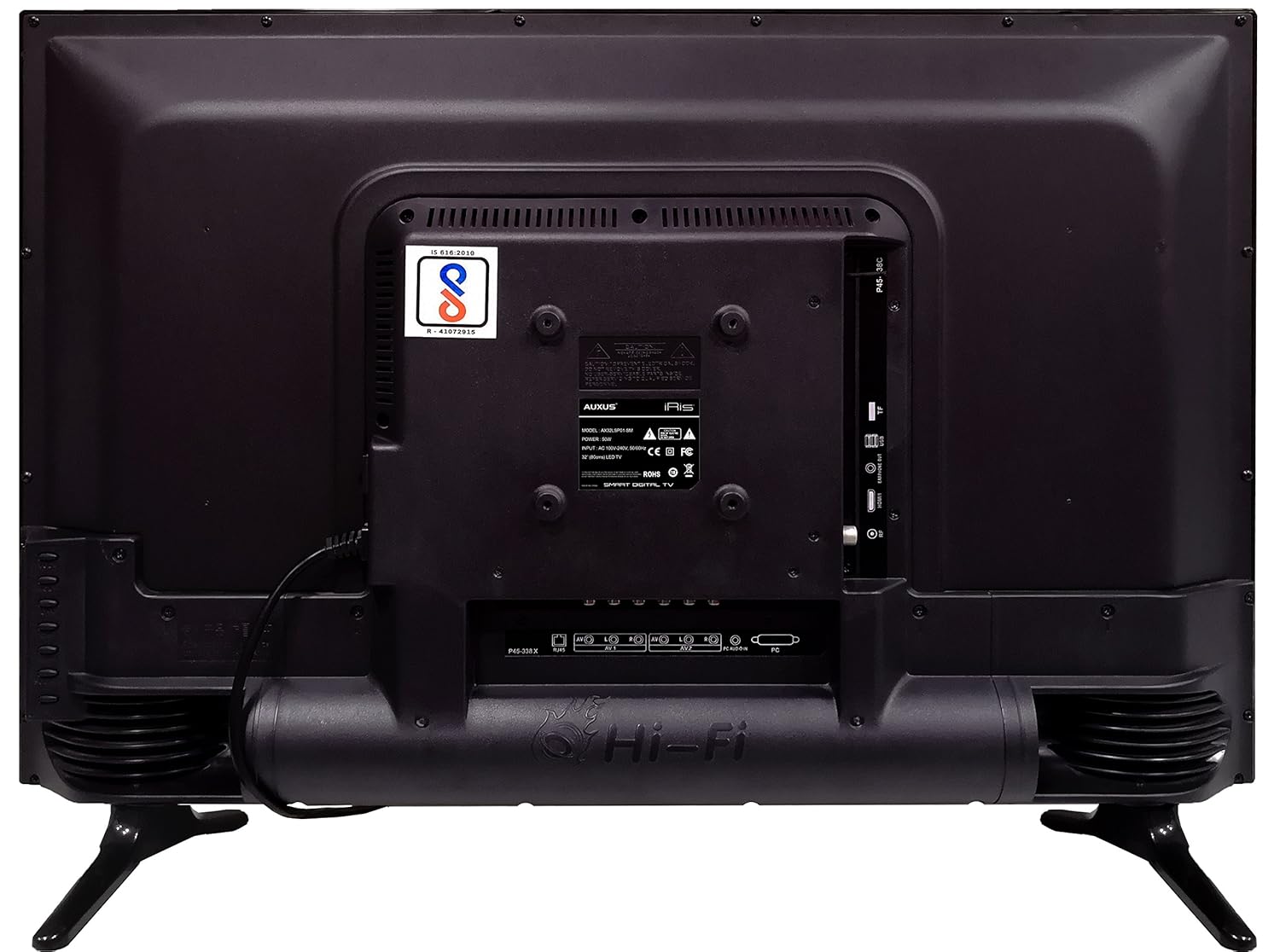
Şekil 4.1: Çeşitli giriş/çıkış portlarını gösteren TV'nin arka paneli.

Şekil 4.2: Ayrıntılı view of the bottom interface ports.

Figure 4.3: Icons representing multiple connectivity options.
- Güç: Güç kablosunu televizyona ve ardından duvardaki prize bağlayın.
- Anten/Kablo: Connect an antenna or cable TV signal to the RF port.
- USB BAĞLANTI: Insert USB drives for media playback or software updates into the USB ports. The TV has 2 USB ports.
- Ethernet (RJ45): Kablolu internet bağlantısı için bir Ethernet kablosu bağlayın.
- AV (Ses/Video): Use RCA cables for older devices. The TV has AV1 and AV2 inputs.
- PC IN (VGA): Connect a computer using a VGA cable for video and a 3.5mm audio cable for sound (PC AUDIO IN).
- Kulaklık: Connect headphones to the 3.5mm jack for private listening.
5. TV'nin çalıştırılması
5.1 İlk Kurulum
- After connecting the power, press the Power button on the remote control or TV.
- Ekranda beliren yönergeleri izleyerek dilinizi, ülkenizi ve saat diliminizi seçin.
- Connect to your network: Choose Wi-Fi and enter your password, or ensure an Ethernet cable is connected.
- Complete the channel scan if connecting an antenna/cable.
5.2 Uzaktan Kumanda
The remote control allows you to navigate menus, adjust volume, change channels, and access smart features. Familiarize yourself with its buttons for optimal use.
5.3 Akıllı TV Özellikleri (Android İşletim Sistemi)
Your TV runs on the Android operating system, providing access to a variety of applications and internet services.

Figure 5.1: TV displaying a smart interface, such as Netflix.
- Navigasyon: Use the directional pad and 'OK' button on the remote to browse the Android interface.
- Kablosuz Ekran: Utilize the built-in wireless display feature to mirror content from compatible smartphones or tablets to your TV.
- Internet Browsing & Apps: Connect to the internet to browse websites or download and use applications from the app store.
- Oyun: The Android platform supports various games, offering an adrenaline-pumping gaming experience.
5.4 Görüntü ve Ses Ayarları
Görüntü ve ses tercihlerini özelleştirmek için televizyonun ayarlar menüsüne erişin.
- Resim: Adjust brightness, contrast, color, sharpness, and select picture modes (e.g., Standard, Dynamic, Movie).
- Ses: Optimize audio with settings for volume, balance, equalizer, and sound modes. The TV features 'Boomr Speakers' for enhanced audio output.
5.5 Giriş Kaynağı Seçimi
Press the 'Source' or 'Input' button on your remote to switch between connected devices (HDMI 1, HDMI 2, AV 1, AV 2, PC, TV).
6. Bakım
6.1 TV'nin temizlenmesi
- Televizyonu temizlemeden önce mutlaka fişini çekin.
- Use a soft, dry cloth to wipe the screen and TV casing.
- For stubborn marks on the screen, use a screen cleaner specifically designed for LED displays, applied to the cloth, not directly to the screen.
- Aşındırıcı temizleyiciler, cilalar veya çözücüler kullanmaktan kaçının.
6.2 Yazılım Güncellemeleri
En iyi performansı sağlamak ve en yeni özelliklere erişmek için TV'nin ayarlar menüsünden düzenli olarak yazılım güncellemelerini kontrol edin.
7. Sorun Giderme
Televizyonunuzda sorunlarla karşılaşırsanız, aşağıdaki yaygın sorunlara ve çözümlere bakın:
| Sorun | Olası Çözüm |
|---|---|
| Güç yok | Check if the power cord is securely connected and the power outlet is working. |
| Görüntü yok, ancak ses mevcut | Doğru giriş kaynağının seçildiğinden emin olun. Harici cihazlara olan kablo bağlantılarını kontrol edin. |
| Ses yok ama görüntü var | Ses seviyesini ve sessize alma durumunu kontrol edin. Ses kablosu bağlantılarını doğrulayın. |
| Uzaktan kumanda çalışmıyor | Pilleri değiştirin. Kumanda ile televizyon arasında herhangi bir engel olmadığından emin olun. |
| Android system hangs or is slow | Restart the TV by unplugging it for a few minutes. Close unused applications. |
| Ağ bağlantı sorunları | Check Wi-Fi password or Ethernet cable connection. Restart your router. |
8. Özellikler
| Özellik | Şartname |
|---|---|
| Marka | AUXUS |
| Model Adı | AX32LSP01-SM |
| Ekran Boyutu | 32 İnç (82 cm) |
| Ekran Teknolojisi | LED, IPS Panel |
| Çözünürlük | HD Ready (1366 x 768p) |
| ViewAçı | 178 Derece |
| İşletim Sistemi | Android |
| Dijital Depolama Kapasitesi | 8 GB |
| Veri deposu | 1 GB |
| Ses Çıkışı Modu | Surround (Boomr Speakers) |
| HDMI Bağlantı Noktaları | Çoklu |
| USB Bağlantı Noktaları | 2 |
| Bağlantı Teknolojisi | Ethernet, Wi-Fi (Wireless Display) |
| Diğer Limanlar | AV (RCA), PC IN (VGA), PC Audio In, Headphone (3.5mm), RF (Antenna) |
| Montaj Tipi | Wall Mount / Table Top Stand |
| Ürün Boyutları (UxGxY) | 84x13x59 cm |
| Ürün Ağırlığı | 6.5 kilo |
9. Garanti ve Destek
Your AUXUS iRis AX32LSP01-SM TV comes with a warranty. Please refer to the included Warranty Card for specific terms, conditions, and duration of the warranty coverage.
For technical support, service requests, or further inquiries, please contact AUXUS customer service. Contact details can typically be found on the warranty card or the official AUXUS webalan.


