1. Giriş
MOOER Mikro Önamp M013 Matchbox is a compact digital preamp pedal designed to accurately recreate the sound and feel of a Matchless amplifier. It features dual channels (Clean and Gain), a 3-band EQ, and an integrated cabinet simulator, making it suitable for direct recording, practice, or integration into a pedalboard setup.
2. Güvenlik Bilgileri
- Use only the specified 9V DC power adapter (center negative).
- Cihazı suya, neme veya aşırı sıcaklıklara maruz bırakmayın.
- Pedalı düşürmekten veya sert darbelere maruz bırakmaktan kaçının.
- Üniteyi sökmeye veya üzerinde değişiklik yapmaya çalışmayın.
- Çocukların erişemeyeceği yerde saklayınız.
3. Ürün Bittiview
The M013 Matchbox pedal features a robust metal casing and intuitive controls for shaping your tone.

Şekil 1: Yukarıdan aşağıya view MOOER Mikro Ön Hazırlayıcısınınamp M013 Matchbox pedal, illustrating the layout of controls and jacks.
Kontroller:
- VOL (Hacim): Seçilen kanalın genel çıkış seviyesini ayarlar.
- TRE (Tiz): Yüksek frekans tepkisini kontrol eder.
- ORTA (Orta): Orta frekans tepkisini kontrol eder.
- BAS (Bas): Düşük frekans tepkisini kontrol eder.
- KAZANÇ: Adjusts the amount of overdrive/distortion for the selected channel.
- CH/CAB Switch: This toggle switch has two functions:
- In normal operation, it switches between the Clean and Gain channels.
- When holding down the footswitch, it toggles the cabinet simulator on/off.
- Ayak pedalı: Toggles between the two channels (Clean/Gain) or bypasses the pedal.
Bağlantılar:

Figure 2: Input Jack (left side)

Figure 3: Output Jack (right side)
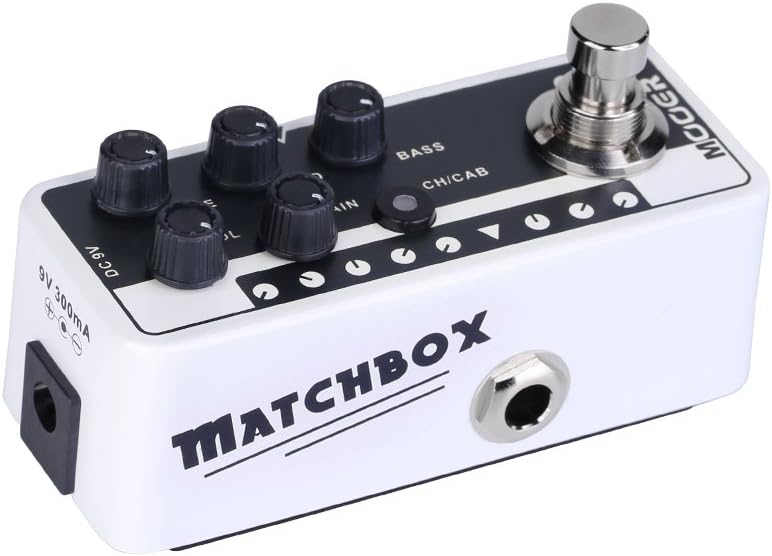
Figure 4: DC 9V Power Input
- Giriş jakı: Connect your guitar or other instrument here.
- Çıkış Jakı: Bağlanın amplifier, mikser veya ses arabirimi.
- DC 9V: Power input for a 9V DC (center negative) power supply.
4. Kurulum
- Gitarınızı ağa bağlayın Giriş Jakı on the right side of the pedal.
- Bağlan Çıkış Jacki on the left side of the pedal to your amplifier's input, a mixer, or an audio interface.
- 9V DC (ortası negatif) güç adaptörünü bağlayın. Doğru Akım 9V giriş.
- Cihazı çalıştırmadan önce tüm bağlantıların güvenli olduğundan emin olun. ampLifier veya ses sistemi.
5. Kullanım Talimatları
Kanal Seçimi:
The M013 Matchbox offers two distinct channels: Clean and Gain. Use the CH/CAB switch to toggle between these channels. The LED indicator will change color to show the active channel (typically blue for Clean, red for Gain).
Cabinet Simulator:
The integrated cabinet simulator can be toggled on or off. To activate or deactivate the cabinet simulator, press and hold the Ayak anahtarı for approximately 1 second. The LED will flash to indicate the change in status.
Ton Şekillendirme:
Ayarla CİLT, ÜÇ, ORTA, BAS, Ve KAZANMAK knobs to achieve your desired tone for each channel. Experiment with different settings to explore the full range of sounds this pedal can produce.
Footswitch Functionality:
A quick press of the Ayak anahtarı will toggle between the currently selected channel and bypass mode. The LED will indicate whether the pedal is active or bypassed.
Tanıtım Videosu:
Video 1: Official MOOER demonstration of the Micro Preamp M013 Matchbox, showcasing both Clean and Gain channels with and without cabinet simulation. This video provides examples of the pedal's tonal capabilities.
6. Bakım
- Clean the pedal with a soft, dry cloth. Do not use abrasive cleaners or solvents.
- Store the pedal in a dry environment away from direct sunlight and extreme temperatures.
- Kablo bağlantılarında aşınma ve yıpranmayı düzenli olarak kontrol edin.
7. Sorun Giderme
Güç Yok:
- 9V DC güç adaptörünün doğru şekilde bağlandığından ve çalıştığından emin olun.
- Elektrik prizinin etkin olduğunu doğrulayın.
Ses Yok:
- Tüm kablo bağlantılarını kontrol edin (gitar girişe, çıkış da...) amp/mixer).
- Ensure the pedal is not in bypass mode (check LED indicator).
- Verify that the volume knobs on the pedal and your ampAmperlerin ayarları yükseltildi.
- Test with different cables and a different power supply if possible.
İstenmeyen Gürültü/Uğultu:
- Ensure you are using a regulated 9V DC (center negative) power supply. Unregulated power supplies can introduce noise.
- Check for ground loops by trying different power outlets or isolating the pedal's power.
- Keep the pedal away from other electronic devices that may cause interference.
8. Özellikler
- Ürün Ağırlığı: 5.8 ons (165 Gram)
- Ürün Ölçüleri: 3.58 x 1.26 x 1.42 inç
- Güç Kaynağı: Kablolu Elektrik
- Cilttage: 9 Volt Doğru Akım
- Çıkış Watttage: 30 Watts (referring to the amp model it simulates, not the pedal's power output)
- Bağlantı Tipi: 6.35 mm jak
- Uyumlu Cihazlar: Gitar
- Renk: Siyah
9. Garanti ve Destek
Garanti bilgileri ve teknik destek için lütfen resmi MOOER web sitesine başvurun. website or contact your local dealer. Keep your purchase receipt as proof of purchase for any warranty claims.


