1. Giriş ve Üzeriview
The GoHawk RD8 Gen.2 is a robust and versatile audio system designed for motorcycles, scooters, ATVs, and electric bikes. It features a waterproof aluminum housing, high-performance built-in amplifier, and superb crystal sound quality, making it ideal for outdoor use. This second-generation model includes updated mounting clamps supporting 7/8” to 1 1/4” handlebars, optional stainless steel extension mounting brackets for custom installation, and an 80” battery cable harness with ring terminal connectors for easy setup.
Enjoy your favorite music and radio channels via Bluetooth wireless streaming, 3.5mm AUX input, or USB drive playback. The system also includes an FM radio and a digital clock display.

GoHawk RD8 Gen.2 Motorcycle Stereo Speakers
2. Kutuda Neler Var?
Upon opening your GoHawk RD8 Gen.2 package, you will find the following components:
- 1 x Speaker Stereo Main Unit (Soundbar)
- 2 x Montaj Clamps (supports 7/8” to 1 1/4” handlebars)
- 2 x Stainless Steel Extension Brackets
- 1 x Power Harness (80” long SAE power cord with ring terminal connector)
- 1 x Kullanım Kılavuzu
- 1 x 3.5mm Audio Jack AUX Cable
- Kablo yönetimi için Fermuar Bağları
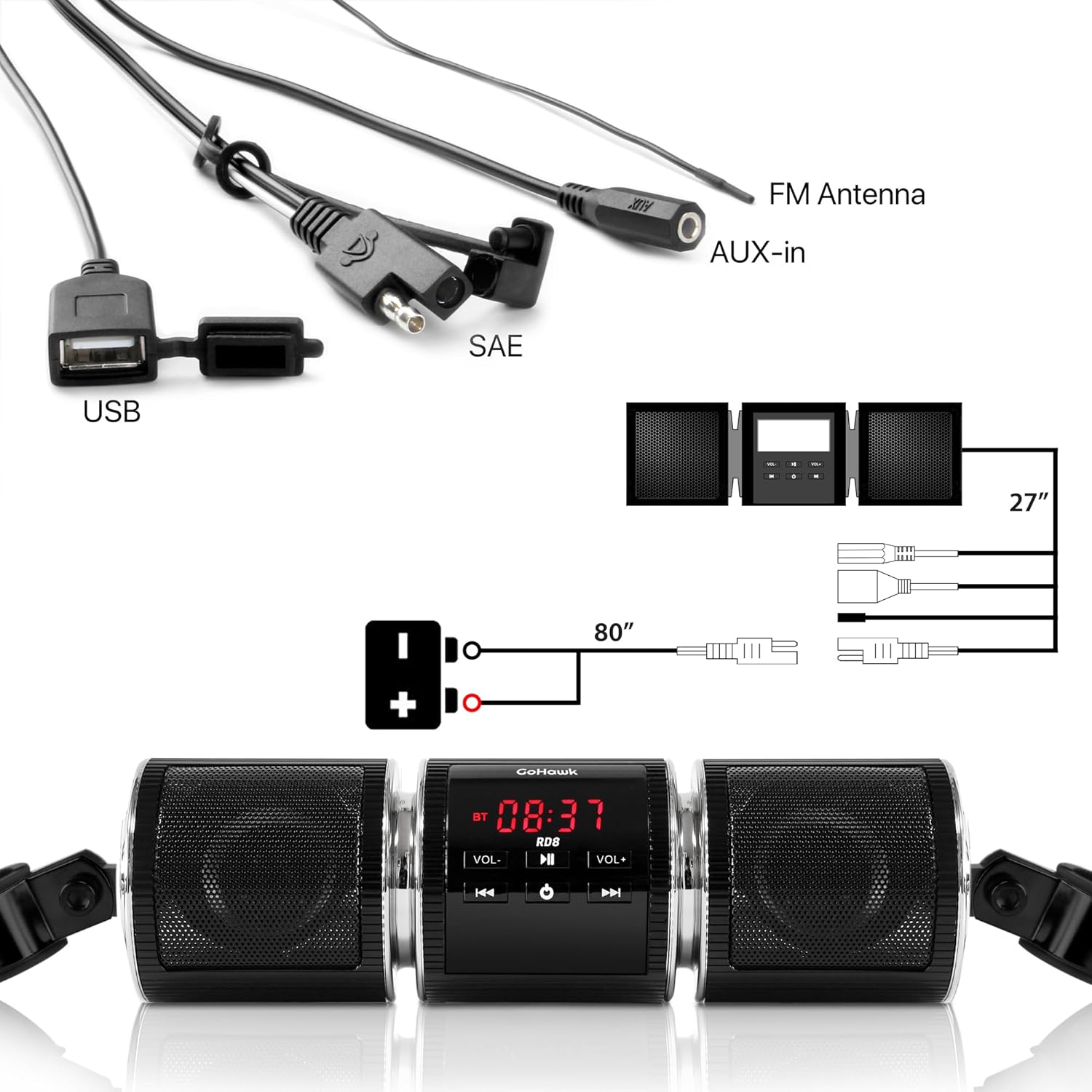
Included components of the GoHawk RD8 Gen.2 system.
3. Özellikler
The GoHawk RD8 Gen.2 offers a range of features for an enhanced audio experience on your ride:
- Bluetooth Kablosuz: Seamlessly stream music and radio from your smartphone (compatible with various iPhone and Android models). Supports connection up to 15 meters.
- 3.5mm Audio Jack AUX IN: Connect external audio devices directly.
- USB 2.0 Bağlantı Noktası: MP3'ü oynat files directly from a USB drive. (Note: USB charging is NOT supported).
- FM Radyo: En sevdiğiniz radyo istasyonlarının keyfini hareket halindeyken çıkarın.
- Dijital Saat Göstergesi: Convenient time display.
- Suya Dayanıklı Tasarım: Advanced waterproof construction for durability in various weather conditions.
- Alüminyum Muhafaza: Dayanıklı ve sağlam yapı.
- Yüksek Performans Ampkaldırıcı: Dahili amplifier for superb crystal sound quality.
- Çok Yönlü Montaj: New mounting clamps support 7/8” to 1 1/4” handlebars, with optional stainless steel extension brackets for custom installation.
- Kolay Kurulum: Comes with all necessary hardware and wiring for a plug-and-play setup.
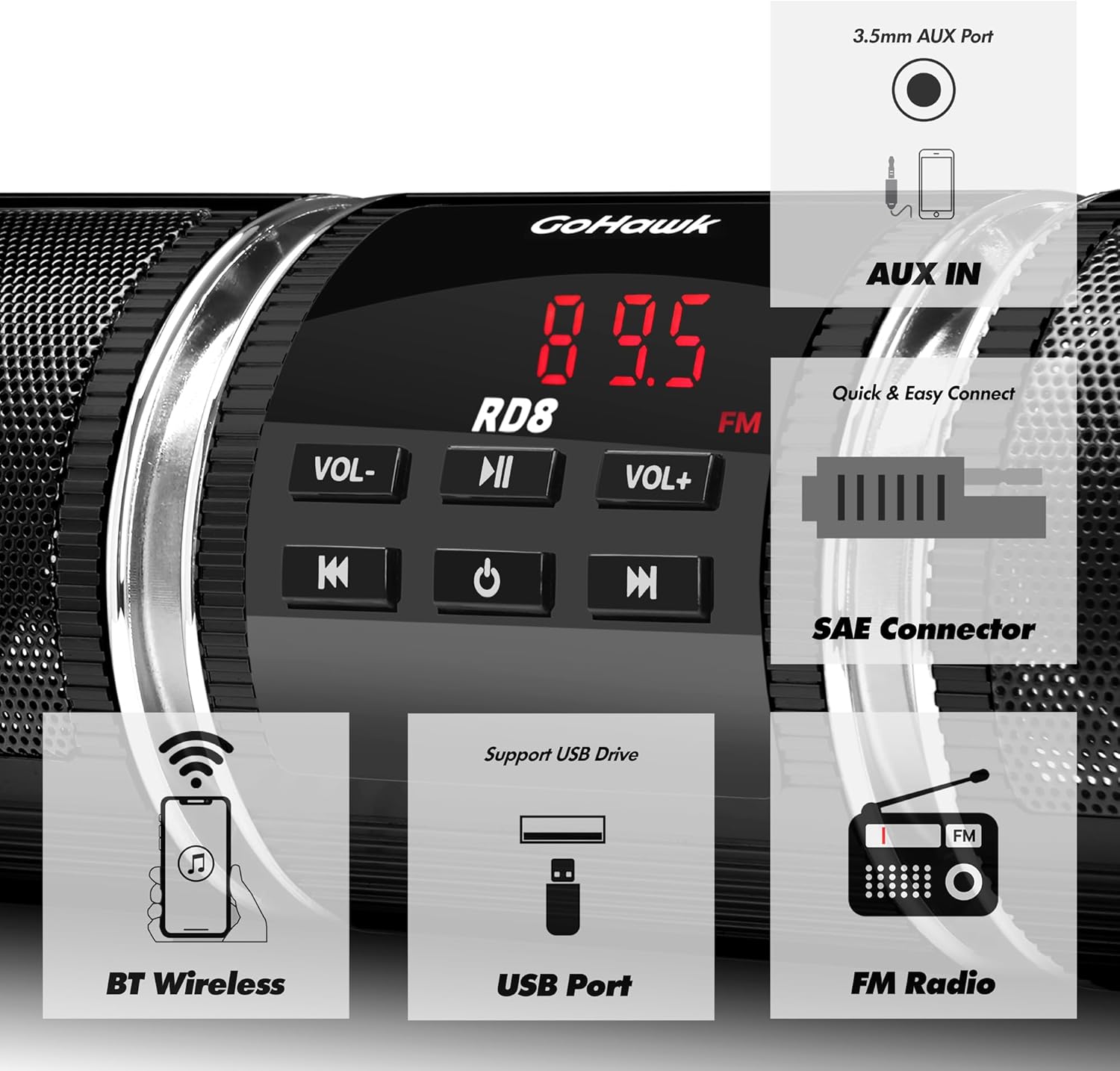
Key features of the GoHawk RD8 Gen.2 system.
4. Özellikler
| Şartname | Değer |
|---|---|
| Model Adı | RD8 Gen. 2 |
| Renk | RD8 Black |
| Anma Hacmitage | 12V doğru akım |
| Maksimum Giriş Gücü | 7W x 2 |
| Anma Empedans | 4 - 8Ω |
| Bluetooth Sürümü | 2.1+EDR |
| Kablosuz İletim Menzili | > 15m |
| Frekans Aralığı | 20Hz - 20KHz |
| FM Cover | 87.5 - 108 MHz |
| FM Hassasiyeti | ≤37dB |
| FM Bozulması | ≤0.5% |
| FM SNR | ≥40dB |
| Hoparlör Boyutları | 8.25x2.5 inç. |
| Gidon Clamp Boyut | 7/8 to 1 1/4 in. |
| Malzeme | Alüminyum |
| Ürün Ağırlığı | 1.5 pound |
| Su Geçirmez | DOĞRU |
5. Kurulum ve Kurulum
The GoHawk RD8 Gen.2 is designed for easy installation. Follow these steps to set up your system:
5.1. Mounting the Soundbar
- Montaj cl'yi takınamps to your motorcycle's handlebar. The clamps support handlebar sizes from 7/8” to 1 1/4”.
- If needed, use the included stainless steel extension brackets for more custom installation or to extend the mounting reach.
- Securely fasten the soundbar to the mounting clamps using the provided hardware. Ensure the soundbar is positioned for optimal sound projection and visibility of the display.

Gen.2 mounting clamp and optional extension bracket.
5.2. Kablolama Talimatları
The system uses a standard 12V power connection. The 80” long SAE power cord with ring terminal connectors simplifies wiring.
- Connect the RED wire to the positive (+) terminal of your motorcycle's 12V battery.
- Connect the BLACK wire to the negative (-) terminal of your motorcycle's 12V battery.
- Use the provided zip ties to secure any loose wiring, ensuring it is clear of moving parts and heat sources.

Wiring diagram for the GoHawk RD8 Gen.2 system.
5.3. Kurulum Videosu Rehberi
For a visual guide on unboxing and installation, please refer to the official GoHawk video below:
Official GoHawk RD8 Gen.2 Motorcycle Speakers Soundbar Open Box and Installation Video. This video demonstrates the unboxing process, how to set up the extension brackets, and the wiring connections for the soundbar.
6. Kullanım Talimatları
Once installed and powered, operate your GoHawk RD8 Gen.2 using the control panel on the main unit:
6.1. Güç Açma/Kapatma
- Basılı tutun PWR Üniteyi AÇMAK veya KAPATMAK için kullanılan düğme.
6.2. Mod Seçimi
- Basın MOD button to cycle through available modes: FM Radio, Bluetooth, and AUX.
6.3. Ses Kontrolü
- Basmak HACİM+ sesi yükseltmek.
- Basmak cilt sesi azaltmak için.
6.4. FM Radyonun Çalıştırılması
- FM Radyo modunda, şunu kullanın: |< Ve >>| buttons to change radio stations.
6.5. Bluetooth Eşleştirme
- Switch the soundbar to Bluetooth mode. The display will indicate it's ready for pairing.
- On your smartphone or Bluetooth device, search for available devices and select “GoHawk” to pair.
- Eşleştirme işlemi tamamlandıktan sonra, cihazınızdan kablosuz olarak ses akışı yapabilirsiniz.
6.6. USB Oynatma
- MP3 içeren bir USB sürücüsü takın files into the USB port. The unit will automatically switch to USB mode and begin playback.
- Kullanın |< Ve >>| Parçaları atlamak için düğmeler.
6.7. AUX Girişi
- Connect your external audio device (e.g., MP3 player) to the 3.5mm AUX IN jack using the provided AUX cable.
- Switch the soundbar to AUX mode. Audio will play from your connected device.
7. Bakım
To ensure the longevity and optimal performance of your GoHawk RD8 Gen.2 system, follow these maintenance guidelines:
- Temizlik: Üniteyi düzenli olarak yumuşak bir bezle silin.amp tozu ve kiri temizlemek için bez. Sert kimyasallar veya aşındırıcı temizleyiciler kullanmaktan kaçının.
- Suya Maruz Kalma: While the unit is waterproof, avoid prolonged submersion. Ensure all port covers are securely closed when not in use, especially during rain or washing.
- Bağlantılar: Tüm kablo bağlantılarının güvenli ve korozyondan arınmış olduğundan emin olmak için düzenli olarak kontrol edin.
- Depolamak: If storing the motorcycle for an extended period, consider disconnecting the power to the unit to prevent battery drain.
8. Sorun Giderme
If you encounter any issues with your GoHawk RD8 Gen.2, refer to the following common troubleshooting tips:
- Güç Yok:
- Check all power connections (RED to positive, BLACK to negative) to ensure they are secure.
- Verify your motorcycle's battery has sufficient charge.
- Inspect the power harness for any visible damage or frayed wires.
- Ses Yok:
- Ensure the volume is turned up on both the soundbar and your connected device (if using Bluetooth or AUX).
- Confirm the correct mode (FM, Bluetooth, AUX, USB) is selected.
- AUX kullanıyorsanız, kablonun tam olarak takılı olduğundan ve hasarlı olmadığından emin olun.
- If using USB, ensure the USB drive is formatted correctly and contains compatible MP3 files.
- Bluetooth Eşleştirme Sorunları:
- Ses çubuğunun Bluetooth eşleştirme modunda olduğundan emin olun.
- Cihazınızın Bluetooth'unu kapatıp açın, ardından tekrar eşleştirmeyi deneyin.
- Ensure your device is within the 15-meter wireless transmission range.
- Cihazınızda çok fazla kayıtlı Bluetooth bağlantısı varsa, bunları silin.
- Zayıf FM Radyo Alımı:
- Ensure the FM antenna wire is properly extended and positioned for best reception.
- Avoid routing the antenna wire near other electrical wires that may cause interference.
If these steps do not resolve your issue, please contact GoHawk customer support for further assistance.
9. Garanti ve Destek
The GoHawk RD8 Gen.2 comes with a Limited Warranty. Please refer to the warranty card included in your package for specific terms and conditions.
For any questions, technical support, or warranty claims, please contact GoHawk customer service:
- Webalan: GoldenHawkUSA.com
- Refer to your user manual for additional contact information.


