giriiş
This manual provides comprehensive instructions for the installation, operation, and maintenance of your Micro Deluxe 1-Way Car Keyless Entry System. Please read this manual thoroughly before installation and use to ensure proper function and to maximize the lifespan of your device. This system is designed to provide convenient remote locking and unlocking for your vehicle.
Temel Özellikler
- Two 4-button remote controls for convenient access.
- Remote door lock and unlock functionality.
- Programmable double lock/unlock pulse for enhanced security.
- Plug-in system status LED for visual indication of system status.
- Plug-in override switch for manual system control.
Paket İçeriği
Paketi açtığınızda tüm bileşenlerin mevcut ve hasarsız olduğundan emin olun:

Resim Açıklaması: This image displays the complete contents of the Micro Deluxe 1-Way Car Keyless Entry System. It includes the main control unit (black box with connectors), two distinct 4-button remote key fobs (one with a carbon fiber pattern, one plain black), and multiple bundles of color-coded wiring harnesses with various connectors and fuses. These components are laid out on a white background.
- 1 x Ana Kontrol Ünitesi
- 2 x 4 Düğmeli Uzaktan Kumanda
- 1 x Wiring Harness Set
- 1 x System Status LED
- 1 x Override Switch
- 1 x Kullanım Kılavuzu (bu belge)
Kurulum ve Yükleme
Installation of this keyless entry system requires basic automotive electrical knowledge. If you are not comfortable with vehicle wiring, it is recommended to seek professional installation.
Kontrol Ünitesi Bittiview

Resim Açıklaması: This close-up image shows the main control unit of the keyless entry system. It is a black rectangular box with several ports for wiring harnesses on one side. A label with "Made in China" and a numerical code "28428" is visible on the side. A black wire extends from the unit, likely for the antenna.

Resim Açıklaması: Bu görüntü ayrıntılı bir bilgi sağlar view of the wiring ports on the side of the keyless entry control unit. Two distinct multi-pin connectors, one blue and one red, are shown plugged into their respective receptacles on the black control unit. A "QC PASS" sticker is also visible next to the ports, indicating quality control approval.
Genel Kurulum Adımları:
- Pilin Bağlantısını Kes: Before beginning any wiring, disconnect the vehicle's negative battery terminal to prevent electrical shorts.
- Montaj Kontrol Ünitesi: Choose a secure, hidden location inside the vehicle (e.g., under the dashboard) for the main control unit. Ensure it is away from excessive heat, moisture, and moving parts.
- Kablo Bağlantıları: Carefully follow the included wiring diagram (not provided in this manual, typically included with the product) to connect the control unit to your vehicle's electrical system. This includes power, ground, door lock/unlock wires, and accessory wires. Pay close attention to polarity.
- Connect LED and Override Switch: Install the system status LED in a visible location on the dashboard and the override switch in an accessible but discreet location. Connect them to the control unit using their dedicated plug-in ports.
- Pili Yeniden Bağlayın: Tüm kablolama işlemleri tamamlanıp sabitlendikten sonra, aracın negatif akü kutbunu yeniden bağlayın.
- Deneme sistemi: Proceed to the "Operation" section to test all functions of the keyless entry system.
Note: Specific wiring colors and locations vary by vehicle make and model. Always consult your vehicle's service manual or a professional installer for detailed wiring information.
Operasyon
Your Micro Keyless Entry System comes with two 4-button remote controls. Familiarize yourself with the buttons and their functions.
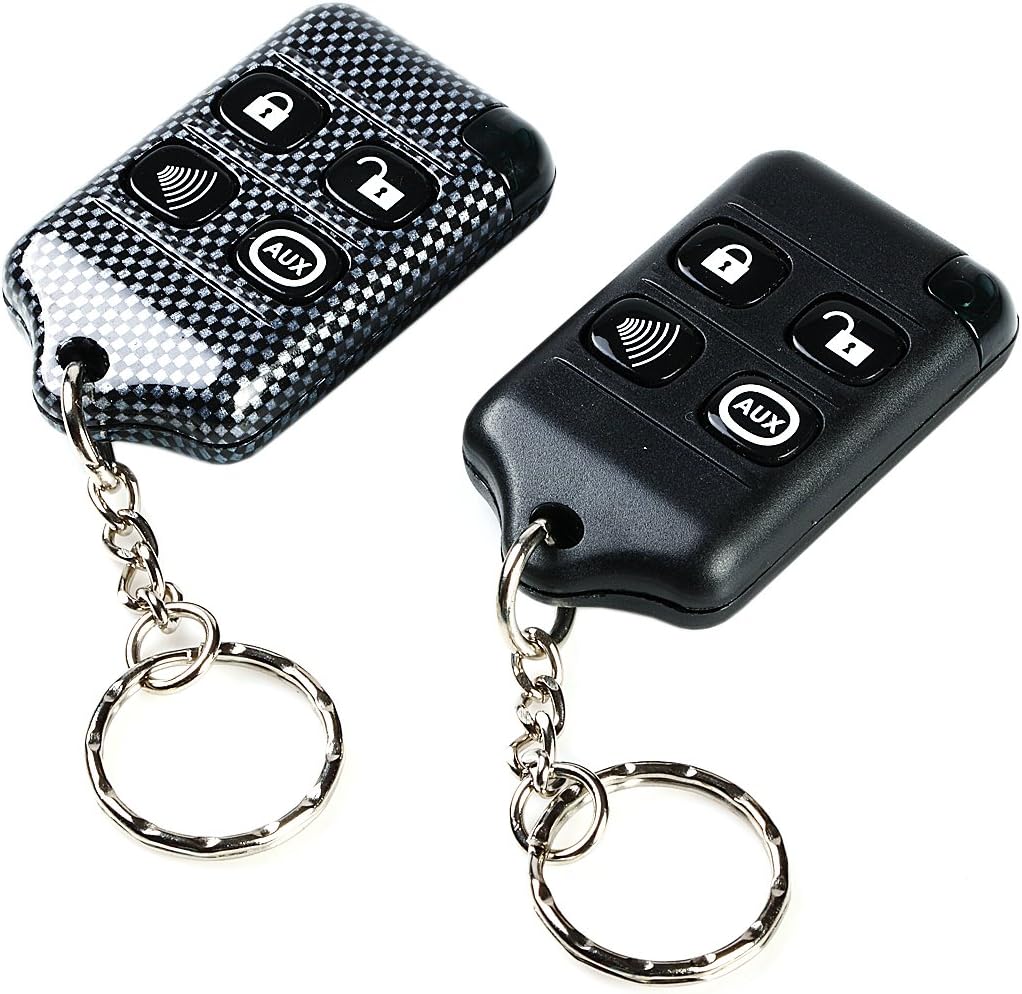
Resim Açıklaması: This image shows the two 4-button remote controls included with the keyless entry system. One remote has a black carbon fiber textured finish, and the other is plain black. Both remotes feature four buttons: a lock icon, an unlock icon, a speaker/horn icon (likely for panic or car finder), and an "AUX" button. Each remote has a metal keyring attached.
Uzaktan Kumanda Fonksiyonları:
- Kilit Düğmesi (🔒): Press once to lock all vehicle doors. The vehicle's lights may flash once, and the horn may chirp once (if connected).
- Kilidi Açma Düğmesi (🔓): Press once to unlock all vehicle doors. The vehicle's lights may flash twice, and the horn may chirp twice (if connected).
- Panic/Car Finder Button (🔊): Press and hold for approximately 3 seconds to activate the panic alarm (horn and lights). Release the button to stop. A quick press may activate a car finder feature (short horn chirp/light flash).
- AUX Düğmesi (AUX): This button is typically programmable for an auxiliary function, such as trunk release or remote start (if supported by your vehicle and additional modules). Refer to your specific installation diagram for AUX function details.
Programmable Double Lock/Unlock Pulse:
This feature allows the system to send two consecutive lock or unlock pulses to the vehicle's door actuators. This can be useful for vehicles that require a double pulse for reliable operation. Consult your installer or the detailed wiring diagram for instructions on how to enable or disable this feature, as it typically involves a jumper setting on the control unit or a specific programming sequence.
Sistem Durumu LED'i:
The plug-in LED provides visual feedback on the system's status. Common indications include:
- Yavaş Flaş: System armed.
- Hızlı Flaş: System disarmed (or other specific status, refer to full wiring diagram).
- Solid On/Off: May indicate programming mode or system fault.
Geçersiz Kılma Anahtarı:
The override switch is a safety feature that allows you to manually disarm the system in case of remote control loss or malfunction. The exact procedure for using the override switch varies, but typically involves turning the ignition to a specific position and pressing the switch within a certain timeframe. Consult your installer or the full wiring diagram for the specific override procedure for your system.
Bakım
The Micro Keyless Entry System is designed for low maintenance. Follow these guidelines to ensure optimal performance:
- Uzaktan Pil Değiştirme: If the remote control range decreases or the LED on the remote does not light up, the battery may need replacement. Refer to the remote's casing for battery type (typically a coin cell battery like CR2032). Carefully open the remote, replace the battery with the correct polarity, and reassemble.
- Kuru Tutun: Protect the control unit and remotes from water and excessive moisture.
- Aşırı Sıcaklıklardan Kaçının: Do not expose the system components to extreme heat or cold for prolonged periods.
- Nazikçe Temizleyin: Clean the exterior of the remotes and control unit with a soft, dry cloth. Avoid harsh chemicals.
Sorun giderme
If you experience issues with your keyless entry system, refer to the following common problems and solutions:
| Sorun | Olası Neden | Çözüm |
|---|---|---|
| Remote not working / Short range | Low or dead remote battery. Interference. Remote out of range. | Replace remote battery. Move away from sources of interference (e.g., power lines, radio towers). Ensure you are within effective range of the vehicle. |
| Doors do not lock/unlock | Incorrect wiring. Blown fuse. Vehicle's door lock actuators malfunctioning. System in valet/override mode. | Check all wiring connections. Inspect and replace any blown fuses. Test vehicle's factory door locks. Check if the override switch is engaged. |
| System LED not lighting up | LED not connected properly. Faulty LED. No power to control unit. | Verify LED connection to the control unit. Check power and ground connections to the main unit. |
| Panic alarm activates randomly | Remote button accidentally pressed. Faulty remote. | Ensure remote buttons are not being pressed by objects in pockets/bags. Test with the second remote. |
If problems persist after attempting these solutions, it is recommended to consult a professional automotive electronics technician.
Özellikler
- Modeli: B078P6XQL9
- Marka: Mikro
- Tip: 1-Way Car Keyless Entry System
- Uzaktan Kumandalar: Two 4-button wireless remotes included
- Özellikler: Door lock/unlock, programmable double pulse, system status LED, override switch
- UPC: 716253444224
- İlk Kullanılabilirlik Tarihi: 28 Aralık 2017
Destek
For further assistance, technical support, or warranty inquiries, please contact Micro customer service. Refer to the product packaging or the manufacturer's webiletişim bilgileri için site.
Ayrıca ziyaret edebilirsiniz Micro Store on Amazon Daha fazla ürün bilgisi için.


