giriiş
This manual provides detailed instructions for the setup, operation, and maintenance of your Digoo DG-C3 Wireless Weather Station. This device integrates a hygrometer, thermometer, weather forecast station, and alarm clock functions, offering comprehensive environmental monitoring and timekeeping capabilities. Please read this manual thoroughly before using the product to ensure correct operation and to maximize its features.
Paket İçeriği
- Digoo DG-C3 Wireless Weather Station Unit
- USB Güç Kablosu
- Kullanım Kılavuzu (bu belge)
Note: Batteries (3x AAA) are not included and must be purchased separately.
Ürün Bittiview
Familiarize yourself with the various components of your Digoo DG-C3 weather station.
Ön Ekran
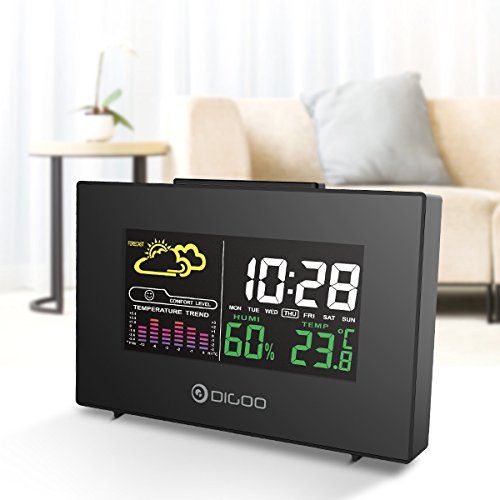
The front display features a color backlit screen showing the current time, day of the week, indoor humidity, indoor temperature, and a weather forecast icon. It also includes a comfort level indicator and a temperature trend graph.
- Saat ve Tarih: Digital display of current time and day.
- Hava Durumu tahmini: Icons indicating predicted weather conditions (e.g., sunny, cloudy, rainy).
- Konfor Seviyesi: Indicates indoor comfort based on temperature and humidity.
- Temperature Trend: Bar graph showing recent temperature changes.
- Nem: yüzdetage display of indoor humidity.
- Sıcaklık: Digital display of indoor temperature (Celsius or Fahrenheit).
Arka Panel
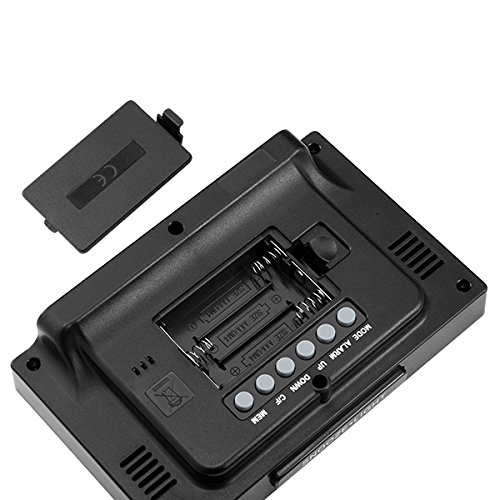
The back of the unit houses the battery compartment and various control buttons for setting the device.
- Pil Bölmesi: Holds 3x AAA batteries for power backup.
- MOD Düğmesi: Used to switch between display modes and enter setting mode.
- Alarm butonu: Used to set and activate/deactivate the alarm.
- YUKARI Düğmesi: Used to increase values during settings or view maximum records.
- AŞAĞI Düğmesi: Used to decrease values during settings or view minimum records.
- °C/°F Düğmesi: Santigrat ve Fahrenheit sıcaklık birimleri arasında geçiş yapar.
- MEM Düğmesi: Eskiden view memory records for temperature and humidity.
Üst Panel
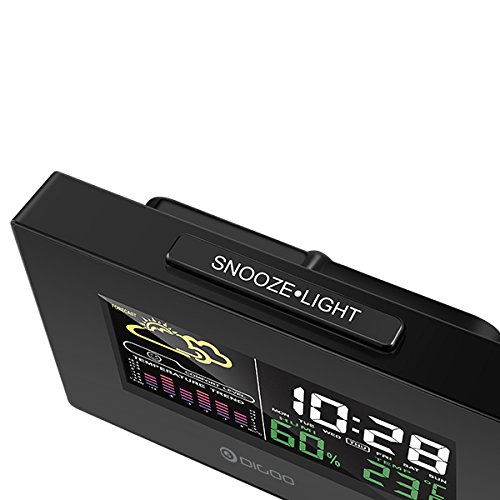
The top of the unit features a single button for snooze and backlight functions.
- SNOOZE·LIGHT Button: Press to activate the backlight or snooze the alarm.
Kurmak
1. Açma
- Pil Montajı: Open the battery compartment cover on the back of the unit. Insert 3x AAA batteries, ensuring correct polarity (+/-). Close the cover. Batteries provide backup power and allow for portability.
- USB Güç Bağlantısı: For continuous power and backlight, connect the provided USB cable to the USB port on the unit and to a compatible USB power adapter (not included) or a computer USB port.
- The display will light up and show default settings.
2. Initial Settings (Time, Date, Unit)
- Zaman Ayarı:
- Basılı tutun MOD button for approximately 3 seconds to enter time setting mode. The hour digit will flash.
- Kullanın UP or AŞAĞI Saati ayarlamak için düğmeler.
- Basmak MOD again to confirm the hour and move to minute setting. The minute digit will flash.
- Kullanın UP or AŞAĞI Dakikayı ayarlamak için düğmeler.
- Basmak MOD again to confirm and move to 12/24 hour format selection.
- Kullanın UP or AŞAĞI 12 saatlik veya 24 saatlik formatı seçmek için düğmeler.
- Basmak MOD Zaman ayarını onaylamak ve çıkmak için.
- Tarih Ayarı:
- Saati ayarladıktan sonra tuşuna basın. MOD again to enter date setting mode. The year will flash.
- Kullanın UP or AŞAĞI yıl ayarlamak için düğmeler.
- Basmak MOD to confirm and move to month setting.
- Kullanın UP or AŞAĞI Ayı ayarlamak için düğmeleri kullanın.
- Basmak MOD to confirm and move to day setting.
- Kullanın UP or AŞAĞI Günü ayarlamak için düğmeler.
- Basmak MOD Tarih ayarını onaylamak ve çıkmak için.
- Sıcaklık Birimi Seçimi:
- Basın °C/°F button on the back of the unit to switch between Celsius (°C) and Fahrenheit (°F) temperature display.
Kullanım Talimatları
1. Alarm Saati Fonksiyonu
- Alarmı Ayarlama:
- Basın ALARM Alarmın geçerli saatini görüntülemek için düğmeye bir kez basın.
- Basılı tutun ALARM button for approximately 3 seconds. The hour digit will flash.
- Kullanın UP or AŞAĞI alarm saatini ayarlamak için düğmeler.
- Basmak ALARM again to confirm the hour and move to minute setting. The minute digit will flash.
- Kullanın UP or AŞAĞI Alarm dakikasını ayarlamak için düğmeler.
- Basmak ALARM Alarm ayarını onaylamak ve çıkmak için.
- Alarmı Etkinleştirme/Devre Dışı Bırakma:
- Normal zaman görüntüleme modundayken, tuşuna basın. ALARM button repeatedly to toggle the alarm ON or OFF. An alarm icon will appear on the display when the alarm is active.
- Erteleme İşlevi:
- Alarm çaldığında, düğmesine basın. ERTELEME·IŞIK button on the top of the unit to activate the snooze function. The alarm will temporarily stop and sound again after a few minutes (typically 5-10 minutes).
- To stop the alarm completely, press any other button on the back panel.
2. Hava Durumu Tahmini
The weather station provides a weather forecast based on internal atmospheric pressure changes. The forecast icons (e.g., sunny, cloudy, rainy) are predictions for the next 12-24 hours and may not always match local weather services, which use more comprehensive data.
- The forecast icon is displayed on the upper left of the screen.
- The device requires a period of stable operation (typically 24 hours) to calibrate and provide accurate forecasts.
3. Sıcaklık ve Nem Göstergesi
- The current indoor temperature and humidity are continuously displayed on the screen.
- Viewing Min/Max Records:
- Basın MEME button once to display the maximum recorded temperature and humidity.
- Basmak MEME again to display the minimum recorded temperature and humidity.
- Basmak MEME a third time to return to current readings.
- To clear the min/max records, press and hold the MEME düğmesine 3 saniye süreyle viewkayıtları inceliyoruz.
4. Arka Işık Kontrolü
- When powered by USB, the backlight will remain on.
- When powered by batteries only, press the ERTELEME·IŞIK button to temporarily activate the backlight for a few seconds.
Bakım
- Temizlik: Wipe the unit with a soft, dry cloth. Do not use abrasive cleaners or solvents. Avoid getting moisture into the unit.
- Pil Değişimi: When the display becomes dim or functions irregularly, replace the 3x AAA batteries in the back compartment. Ensure correct polarity.
- Depolamak: If not using the device for an extended period, remove the batteries to prevent leakage. Store in a cool, dry place.
Sorun giderme
| Sorun | Olası Neden | Çözüm |
|---|---|---|
| Ekran boş veya karanlık. | Low batteries or no power connection. | Replace batteries or connect the USB power cable. |
| Yanlış saat/tarih. | Time/date not set correctly after power loss or initial setup. | Follow the "Initial Settings" section to reset time and date. |
| Weather forecast seems inaccurate. | Device needs calibration time; local conditions may differ from pressure-based forecast. | Allow 24 hours for calibration. Understand that the forecast is based on internal pressure changes. |
| Alarm çalmıyor. | Alarm etkinleştirilmemiş veya ses seviyesi çok düşük (ayarlanabiliyorsa). | Ensure the alarm icon is displayed. Check alarm settings. |
Özellikler
| Modeli: | DG-C3 |
| Bağlantı: | USB (güç için) |
| Güç Kaynağı: | 3x AAA Batteries (not included) or USB Power |
| Özel Özellikler: | Hygrometer, Thermometer, Weather Forecast, Alarm Clock, Color Backlight, Portable |
| Görüntülemek: | Color Backlit LCD |
| Sıcaklık birimi: | °C / °F seçilebilir |
Garanti ve Destek
Garanti bilgileri veya teknik destek için lütfen satın alma sırasında sağlanan belgelere bakın veya satıcınızla iletişime geçin. Satın alma belgenizi saklayın.


