1. Giriş
This manual provides instructions for the installation, operation, and maintenance of the Nexxt Solutions Naxos800 8-Port Fast Ethernet Network Switch. The Naxos800 is an unmanaged compact desktop switch designed for small office/home office (SOHO) environments, student dormitories, and small enterprises, offering reliable network connectivity.
2. Temel Özellikler
- 8 Hızlı Ethernet Bağlantı Noktası: Provides 8 UTP/STP 10/100Mbps ports with auto MDI/MDIX.
- Tak ve Çalıştır: Simple setup requiring no software configuration.
- Yönetilmeyen Anahtar: Operates without requiring complex management interfaces.
- Store-and-Forward Technology: Ensures efficient packet transmission.
- MAC Adresi Öğrenme: Supports auto-learning and aging with a built-in 1000 MAC address table.
- Kompakt Tasarım: Suitable for desktop or wall mounting.
- Enerji Tasarrufu: Düşük güç tüketimi tasarımı.
- Akış Kontrolü: Full duplex and half duplex back pressure flow control.
- Dayanıklılık: Integrated lightning protection and a sturdy metal case.
- Sessiz Çalışma: Fanless design for silent performance.
3. Paket İçeriği
Paketinizin aşağıdaki öğeleri içerdiğini doğrulayın:
- One (1) Nexxt Solutions Naxos800 8-Port Fast Ethernet Switch
- Bir (1) Güç Adaptörü

Image: The Nexxt Solutions Naxos800 switch, its power adapter, and product packaging.
4. Ürün Bittiview

Resim: Ön view of the Naxos800 switch, showing the Nexxt logo and eight green LED indicators for port activity.
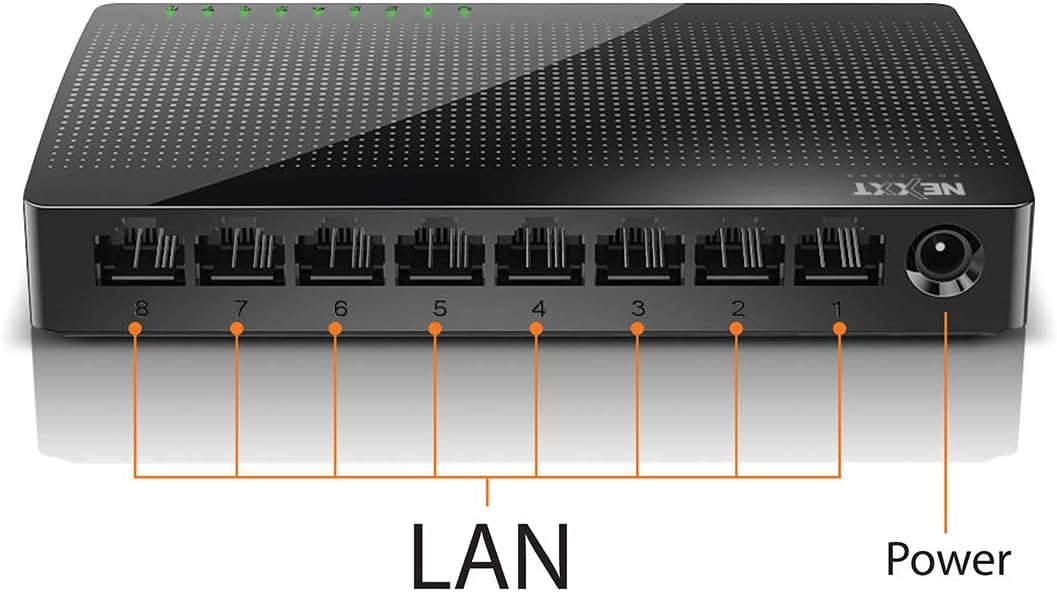
Resim: Arka view of the Naxos800 switch, highlighting the eight LAN ports (numbered 1-8) and the power input port.
LED Göstergeleri
The front panel features LED indicators for each port, providing visual status:
- Yeşil LED (Sürekli Yanıyor): Indicates a stable link connection.
- Yeşil LED (Yanıp Sönüyor): Indicates data activity on the corresponding port.
- LED Kapalı: No link or connection detected.
5. Kurulum ve Kurulum
The Naxos800 switch is designed for simple plug-and-play installation. No software or complex configuration is required.
- Atama: Place the switch on a stable, flat surface or mount it on a wall using appropriate hardware (not included). Ensure adequate ventilation around the device.
- Güce Bağlanın: Connect the provided power adapter to the power input port on the switch and then plug the adapter into a standard electrical outlet. The power LED (if present, or the port LEDs will light up) should illuminate.
- Ağa bağlan:
- Connect your router or modem to any of the 8 LAN ports on the Naxos800 switch using an Ethernet cable.
- Connect your network devices (e.g., computers, gaming consoles, IP cameras, Smart TVs, printers) to the remaining LAN ports on the Naxos800 switch using an Ethernet cable.
- Bağlantıyı Doğrulayın: Once devices are connected, the corresponding LED indicators on the switch's front panel should light up green (solid for link, flashing for activity).

Image: Diagram illustrating a typical network setup. An ADSL or Cable Modem connects to a Router, which then connects to the Naxos800 switch. Various devices like laptops, media players, game consoles, IP cameras, Smart TVs, and IP phones are connected to the Naxos800 switch.
6. Anahtarın Çalıştırılması
The Naxos800 is an unmanaged switch, meaning it operates automatically without user intervention once connected. It functions as an internet splitter, expanding the number of wired network connections available from your router or modem.
- Otomatik Hız Algılama: Each port automatically detects the speed of the connected device (10Mbps or 100Mbps) and adjusts accordingly.
- Otomatik MDI/MDIX: Eliminates the need for crossover cables; the switch automatically detects and corrects for straight-through or crossover cable types.
- Veri İletimi: Data packets are forwarded between connected devices at Fast Ethernet speeds. The store-and-forward architecture ensures data integrity.
7. Bakım
The Naxos800 switch requires minimal maintenance.
- Temizlik: Anahtarın dış yüzeyini temizlemek için yumuşak, kuru bir bez kullanın. Sıvı veya aerosol temizleyiciler kullanmayın.
- Havalandırma: Aşırı ısınmayı önlemek için havalandırma açıklıklarının kapalı olmadığından emin olun.
- Güç Döngüsü: If the device experiences issues, a simple power cycle (unplugging and replugging the power adapter) can often resolve minor problems.
8. Sorun Giderme
If you encounter issues with your Naxos800 switch, refer to the following common problems and solutions:
| Sorun | Olası Neden | Çözüm |
|---|---|---|
| Güç yok / Cihaz açılmıyor. | Güç adaptörü bağlı değil veya arızalı; elektrik prizi çalışmıyor. | Güç adaptörünün anahtara ve çalışan bir elektrik prizine güvenli bir şekilde bağlı olduğundan emin olun. Farklı bir priz deneyin. |
| No link light for a connected device. | Ethernet cable faulty or improperly connected; device not powered on or faulty; incorrect port. |
|
| Yavaş ağ hızları. | Network congestion; faulty cable; device limitations. |
|
9. Özellikler
| Bağlanmak | Değer |
|---|---|
| Model Numarası | ASIDT084U3 |
| Limanlar | 8 x 10/100Mbps Fast Ethernet (UTP/STP) |
| Arka Panel Bant Genişliği | 1.6 Gbps |
| MAC Adresi Tablosu | 1000 giriş |
| Erişim Kontrolü | CDMA |
| Akış Kontrolü | Full duplex and half duplex back pressure |
| Boyutlar (U x G x Y) | 12.4x5.9x2.3 cm |
| Ağırlık | 140 gr |
| Güç Girişi | Harici Güç Adaptörü (dahil) |
Not: Teknik özellikler önceden haber verilmeksizin değiştirilebilir.
10. Garanti ve Destek
The Nexxt Solutions Naxos800 8-Port Fast Ethernet Network Switch comes with a 5 yıllık sınırlı garanti. For warranty claims or technical support, please contact Nexxt Solutions customer service. Refer to the official Nexxt Solutions webEn güncel destek bilgileri ve iletişim detayları için lütfen siteyi ziyaret edin.
Nexxt Solutions is a US company committed to quality and customer service.


