giriiş
Thank you for choosing the ClearClick Retro AM/FM Radio with Bluetooth. This classic wooden vintage-style speaker combines nostalgic aesthetics with modern functionality, allowing you to enjoy both traditional radio broadcasts and contemporary digital audio. This manual provides essential information for setting up, operating, and maintaining your new radio.
Ürün Bittiview
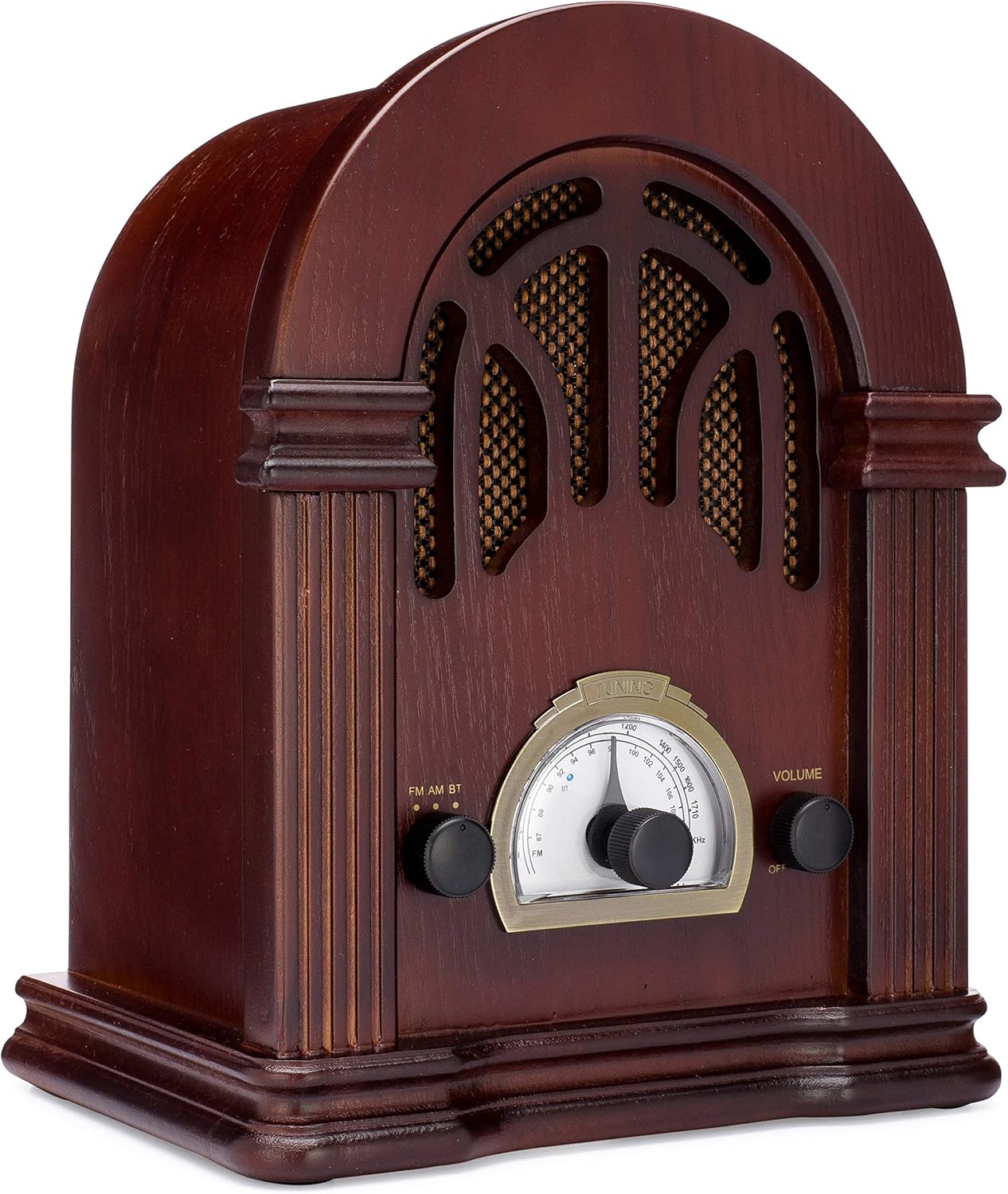
Şekil 1: Ön view of the ClearClick Retro AM/FM Radio, showcasing its classic wooden design and central tuning dial.

Figure 2: Close-up of the tuning dial and control knobs for FM/AM/BT selection and volume.
The ClearClick Retro Radio features a beautiful, handmade wooden exterior, an easy-to-use tuning dial, and dedicated knobs for mode selection and volume control. It is designed to be powered by a standard North American power plug.
Kurmak
- Paketin açılması: Carefully remove the radio from its packaging. Ensure all components, including the power cord, are present.
- Atama: Place the radio on a stable, flat surface away from direct sunlight, heat sources, and excessive moisture.
- Güç Bağlantısı: Insert the included power cord into the AC input on the back of the radio. Plug the other end into a standard North American wall outlet (120V AC, 60Hz).
- Anten Kurulumu: For optimal FM reception, extend the built-in wire antenna fully. For AM reception, the radio utilizes an internal antenna; repositioning the radio may improve signal strength.
Kullanım Talimatları
Güç Açma / Kapatma ve Ses Kontrolü
- To power on the radio, rotate the right-side HACİM knob clockwise until you hear a click.
- Ses seviyesini ayarlamak için döndürmeye devam edin. HACİM topuz.
- Kapatmak için, düğmeyi çevirin. HACİM knob counter-clockwise until it clicks off.
AM/FM Radyo Çalışması
- Rotate the left-side FM AM BT knob to select either FM or AM mod.
- Turn the central AYARLAMA knob to scan for radio stations. The tuning backlight will illuminate in AM/FM mode.
- Ayarla AYARLAMA knob carefully for clear reception.
Bluetooth İşlemi
- Rotate the left-side FM AM BT seçmek için düğme BT mode. The radio will enter Bluetooth pairing mode, indicated by a blue LED.
- Bluetooth özellikli cihazınızda (örneğin akıllı telefon, tablet) kullanılabilir Bluetooth cihazlarını arayın.
- Select "Vintage Radio" or "ClearClick Radio" from the list to pair.
- Once paired, the blue LED will remain solid, and you can play audio from your device through the radio.
- The radio's tuning backlight stays on even in Bluetooth mode (NEW 2019 feature).
Bakım
- Temizlik: Use a soft, dry cloth to wipe the exterior of the radio. Do not use abrasive cleaners or solvents, as they may damage the wooden finish.
- Depolamak: Uzun süre kullanılmadığı zamanlarda radyoyu serin, kuru bir yerde, aşırı sıcaklık ve nemden uzak tutarak saklayın.
- Havalandırma: Ensure the radio has adequate ventilation to prevent overheating. Do not block the ventilation holes on the back.
Sorun giderme
| Sorun | Olası Neden | Çözüm |
|---|---|---|
| Güç yok | Güç kablosu bağlı değil; priz aktif değil. | Ensure power cord is securely plugged into the radio and a working wall outlet. Check if the volume knob is turned on. |
| Zayıf radyo alımı | Sinyal zayıf; anten uzatılmamış. | Fully extend the FM wire antenna. For AM, try repositioning the radio. Adjust the tuning knob slowly. |
| Bluetooth bağlanmıyor | Radio not in BT mode; device too far; device already paired. | Ensure radio is in BT mode. Move your device closer to the radio. Unpair "Vintage Radio" from your device's Bluetooth settings and try pairing again. |
| Bluetooth'tan ses gelmiyor | Volume too low on radio or device. | Increase volume on both the radio and your connected Bluetooth device. |
Özellikler
- Ürün Ölçüleri: 10.5" (Y) x 8" (G) x 6" (D)
- Ürün Ağırlığı: 4.74 pound
- Bağlantı Teknolojisi: Bluetooth
- Ayarlayıcı Teknolojisi: AM, FM (2-Band)
- Güç Kaynağı: Corded Electric (Standard North American Power Plug)
- Dahil Bileşenler: Güç Kablosu
- Suya Dayanıklılık Seviyesi: Suya dayanıklı değil
- Ekran Teknolojisi: LCD (for tuning dial backlight)

Şekil 3: Yan view illustrating the dimensions of the radio.
Garanti ve Destek
The ClearClick Retro AM/FM Radio with Bluetooth comes with a Tam 5 Yıllık Garanti. ClearClick is a USA-Based Small Business committed to providing excellent customer support.
For warranty claims or technical assistance, please refer to the contact information provided with your product packaging or visit the official ClearClick webSite. Garanti geçerliliği için satın alma fişinizi saklayın.
Önemli Güvenlik Bilgileri
Please read and follow all safety instructions provided in the original product packaging. Do not expose the unit to rain or moisture. Do not disassemble the unit; refer all servicing to qualified personnel. Ensure proper ventilation to prevent overheating.


