Propel Zipp Nano 2.0 Drone User Manual
Model: Zipp Nano 2.0
Marka: Propel
1. Giriş
This manual provides essential information for the safe and effective operation of your Propel Zipp Nano 2.0 Drone. Please read this manual thoroughly before operating the drone to ensure proper usage and to prevent damage or injury.
The Propel Zipp Nano 2.0 is a high-performance 2.4 GHz indoor/outdoor drone designed for stable flight and exciting aerial maneuvers. It features a built-in 6-axis gyroscopic chip for stability, multiple speed settings, and the ability to perform 360-degree stunt rolls.
2. Güvenlik Önlemleri
Always prioritize safety when operating the drone. Failure to follow these guidelines may result in injury or damage to the drone or property.
- İnsansız hava aracını insanların, hayvanların veya engellerin yakınında kullanmayın.
- Keep hands, hair, and loose clothing away from rotating propellers.
- Her uçuştan önce drone'un tam şarjlı olduğundan emin olun.
- Şiddetli rüzgarlarda veya olumsuz hava koşullarında uçmayın.
- Supervise children during operation. This product contains small parts and is not suitable for children under 3 years due to choking hazard.
- Do not attempt to modify or repair the drone yourself. Contact customer support for assistance.

Image: Back of the product packaging, highlighting features and a warning about small parts.
3. Paket İçeriği
Paketinizde tüm öğelerin mevcut olduğundan emin olun:
- Propel Zipp Nano 2.0 Drone (Red)
- 2.4 GHz Digital Remote Control
- USB Şarj Kablosu
- Spare Replacement Parts (Propellers)

Image: The Propel Zipp Nano 2.0 Drone and its remote control visible within the clear retail packaging.
4. Kurulum
4.1 Drone Pilinin Şarj Edilmesi
The drone is powered by an internal rechargeable battery. Use the provided USB charging cable to charge the drone.
- USB şarj kablosunun küçük ucunu dronun şarj portuna takın.
- Connect the large end of the USB charging cable to a USB power source (e.g., computer USB port, USB wall adapter).
- USB kablosundaki şarj gösterge ışığı şarj sırasında yanacak ve tamamen şarj olduğunda sönecektir.
- Şarj işlemi genellikle yaklaşık 30-45 dakika sürer. Aşırı şarj etmeyin.
4.2 Uzaktan Kumanda Pillerinin Takılması
The remote control requires 2 "AAA" batteries (not included).
- Uzaktan kumandanın arkasındaki pil bölmesini bulun.
- Pil bölmesinin kapağını açın.
- 2 adet "AAA" pili, doğru kutuplara (+/-) dikkat ederek takın.
- Pil bölmesi kapağını sıkıca kapatın.

Image: The remote control for the Propel Zipp Nano 2.0 Drone, showing its various buttons and joysticks.
4.3 İHA ve Uzaktan Kumandanın Eşleştirilmesi
To establish a connection between the drone and the remote control:
- Uçağı düz, düz bir yüzeye yerleştirin.
- Turn on the drone by sliding the power switch. The drone's LED lights will flash.
- Uzaktan kumandayı açın.
- Sol kumanda kolunu (gaz kolunu) sonuna kadar yukarı itin, sonra da sonuna kadar aşağı çekin.
- The drone's LED lights will turn solid, indicating successful pairing.
5. İHA'nın Çalıştırılması
5.1 Uçuş Kontrolleri
Uzaktan kumandanın düzenini ve işlevlerini iyice öğrenin:
- Sol Kumanda Kolu (Gaz/Yönlendirme):
- Push up to increase altitude (throttle).
- Push down to decrease altitude.
- Drone'u döndürmek (yaw) için sola/sağa itin.
- Sağ Joystick (Eğim/Yuvarlanma):
- Yukarı/aşağı iterek ileri/geri hareket edin (eğim).
- Sola/sağa hareket etmek (yuvarlanmak) için sola/sağa itin.
- Hız Düğmesi: Cycles through 3 different speed settings (slow, medium, high).
- Dublör Düğmesi: Press to initiate 360-degree stunt rolls (see 5.4).
- T-Mode Button: Activates T-Mode for beginner pilots, providing more stable and controlled flight.
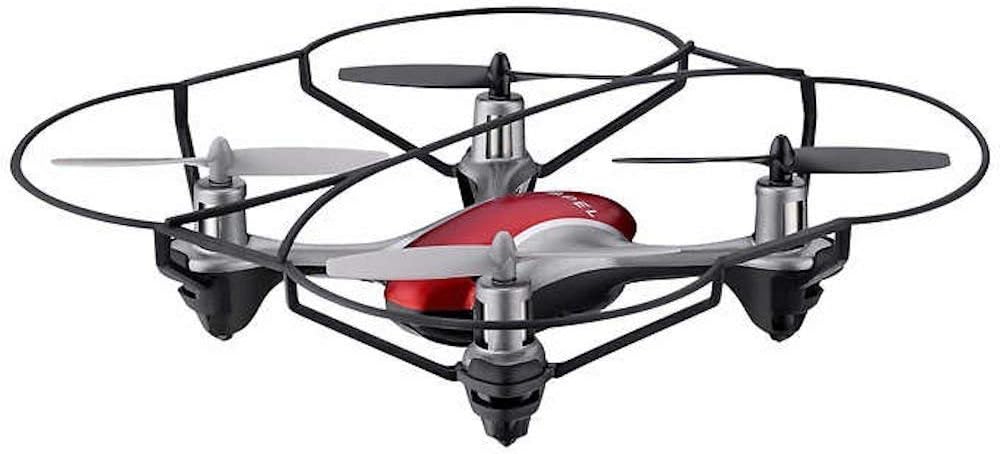
Image: The Propel Zipp Nano 2.0 Drone, showcasing its compact design and propeller guards.
5.2 Kalkış ve İniş
- Çıkarmak: After pairing, slowly push the left joystick (throttle) up to lift off.
- İniş: Slowly pull the left joystick (throttle) down until the drone lands gently.
5.3 Yükseklik Tutma
The Zipp Nano 2.0 features an air pressure sensor that helps lock altitude in mid-air, making it easier to control and hover stably.
5.4 360-Degree Stunt Rolls
To perform a stunt roll:
- Ensure the drone is flying at a sufficient height (at least 6-8 feet).
- Press the dedicated Stunt Button on the remote control.
- Immediately push the right joystick in the desired direction (forward, backward, left, or right) to execute the roll.

Resim: Açılı bir view of the Propel Zipp Nano 2.0 Drone, highlighting its sleek design and protective frame.
6. Bakım
- Temizlik: Use a soft, dry cloth to clean the drone and remote control. Do not use harsh chemicals or water.
- Pervanenin Değiştirilmesi: If propellers become damaged, replace them with the provided spare parts. Carefully remove the damaged propeller and snap the new one into place, ensuring correct orientation.
- Depolamak: When not in use, store the drone and remote control in a cool, dry place away from direct sunlight.
7. Sorun Giderme
| Sorun | Olası Neden | Çözüm |
|---|---|---|
| Drone uzaktan kumandaya yanıt vermiyor. | Not paired, low drone battery, low remote control batteries. | Drone ve uzaktan kumandayı yeniden eşleştirin. Drone pilini şarj edin. Uzaktan kumanda pillerini değiştirin. |
| Drone düzensiz uçuyor veya sürükleniyor. | Düz bir yüzeyde kalibre edilmemiş, pervane hasarlı, şiddetli rüzgar. | Ensure drone is placed on a flat surface for pairing. Check for damaged propellers and replace if necessary. Fly in calm conditions. |
| Drone does not lift off. | Low drone battery, propellers not spinning correctly. | Charge drone battery fully. Check for obstructions around propellers. |
8. Özellikler
| Özellik | Detay |
|---|---|
| Marka | İtmek |
| Model Adı | Propel 2.4 ghz (Zipp Nano 2.0) |
| Bağlantı Teknolojisi | Radyo Frekansı (2.4 GHz) |
| Operasyonel Menzil | 200 feet'e kadar |
| Jiroskop | Built-in 6-axis gyroscopic chip |
| Hız Ayarları | 3 (Slow, Medium, High) |
| Özel Özellikler | 360-degree stunt rolls, Altitude Hold, T-Mode for beginners |
| Malzeme Türü(leri) | Plastic, Carbon Fibre |
| Ürün Boyutları | 13.97x3.81x13.97 cm |
| Ürün Ağırlığı | 453.59 g (1 Pound) |
| Renk | Kırmızı |
| Beceri Seviyesi | Acemi |
9. Garanti ve Destek
Propel offers unlimited replacement parts for one year from the date of purchase. For warranty claims, technical support, or to order replacement parts, please refer to the contact information provided on the product packaging or the official Propel webalan.
Garanti kapsamında satın alma belgenizi satın alma belgeniz olarak saklayın.


