giriiş
The Pure Siesta S6 is a sophisticated DAB/DAB+ and FM alarm clock radio designed to enhance your bedside experience. It features a large, ultra-clear CrystalVue display, impressive audio quality via Bluetooth, and a convenient USB port for charging your devices. This manual provides comprehensive instructions for setting up, operating, and maintaining your Siesta S6.
Temel Özellikler
- Kablosuz Ses Akışı: Use Siesta S6 as a wireless speaker to stream audio content from your smartphone, laptop, or tablet via Bluetooth.
- CrystalVue+ Display: Large, ultra-clear display for optimal readability, with adaptive brightness.
- Siesta Timer: Program a short nap with a single button press.
- Integrated USB Power Port: Keep your phone, tablet, or other devices fully charged by connecting them to the built-in USB port.
- DAB/DAB+ ve FM Radyo: Çok çeşitli dijital ve analog radyo istasyonlarına erişin.
- Çoklu Alarmlar: Set up to three independent alarms with customizable days, sources (tone, last station, preset), and volume.
Kurulum Kılavuzu
Follow these steps to set up your Pure Siesta S6 for the first time.
- Cihazın Paketini Açın: Carefully remove the Siesta S6 from its packaging.
- Gücü bağlayın: Insert the supplied mains adapter into the DC IN port on the back of the unit. Plug the adapter into a wall outlet.
- Anteni Konumlandırın: Uncoil the wire antenna fully for optimal DAB/DAB+ and FM reception. Position it away from other electronic devices.
- İlk Tarama: Upon first power-up, the Siesta S6 will automatically scan for available DAB/DAB+ radio stations and set the clock. This process may take a few minutes.
- Adjust Display Brightness (Optional): The display brightness adjusts automatically. If desired, you can manually adjust this setting via the "Menu" section.

Resim: Arka view of the Siesta S6, highlighting the USB charging port and the power input.

Görüntü: Açılı ön view of the Pure Siesta S6, displaying the time and alarm indicators.
Kullanım Talimatları
This section details the various functions and controls of your Siesta S6.
Kontroller Üzerindeview
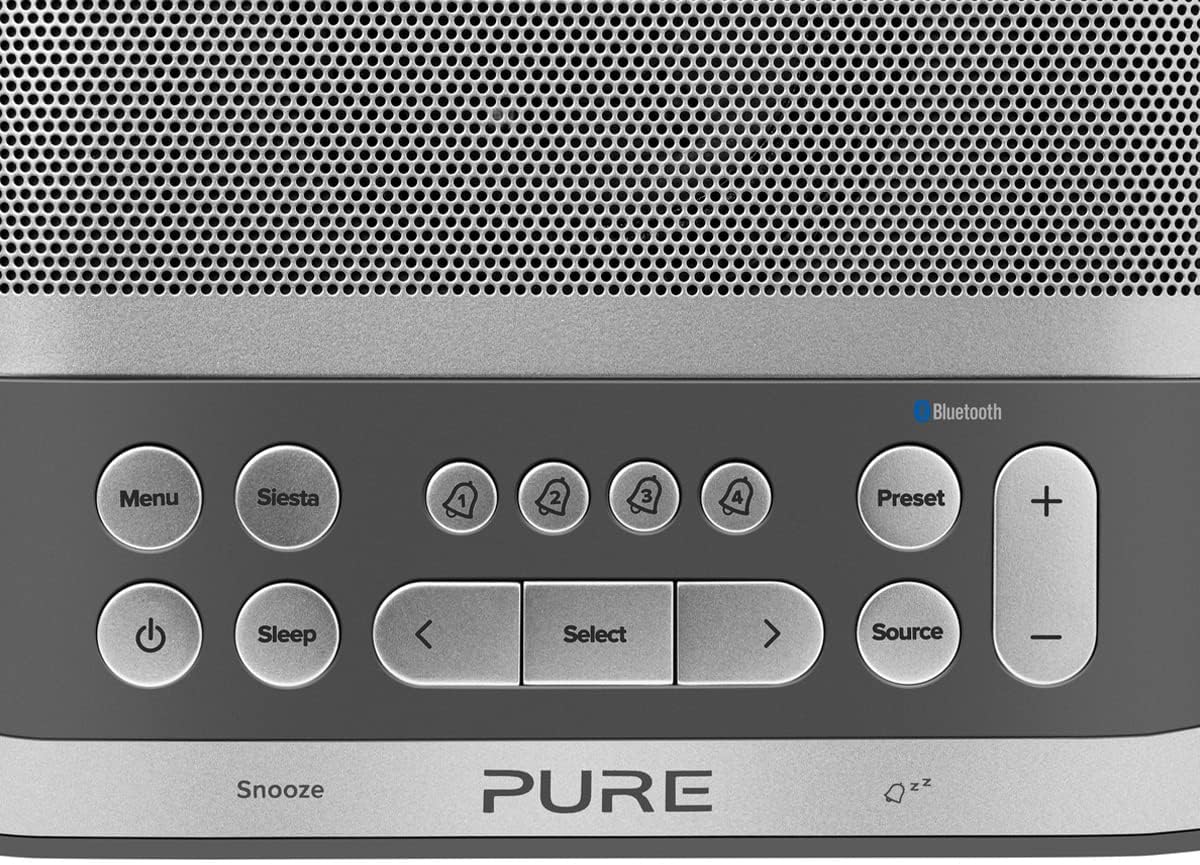
Image: Close-up of the top panel buttons, including Menu, Siesta, Alarm 1-4, Preset, Volume, Power, Sleep, Source, and Navigation buttons.
- Güç düğmesi (●): Üniteyi açmak veya kapatmak için basın.
- Menü Düğmesi: Sistem ayarlarına ve seçeneklerine erişin.
- Siesta Button: Activates the Siesta timer for short naps.
- Alarm Buttons (1, 2, 3, 4): Press to activate/deactivate or configure individual alarms.
- Ön Ayar Düğmesi: Save and recall your favorite radio stations.
- Volume (+/-) Buttons: Ses seviyesini ayarlayın.
- Uyku Düğmesi: Set a sleep timer for the radio to turn off automatically.
- Kaynak Düğmesi: DAB, FM ve Bluetooth modları arasında geçiş yapın.
- Yön tuşları (< Select >): Menülerde gezinin ve seçenekleri belirleyin.
- Snooze Bar: Press to temporarily silence an active alarm.
Radyo Çalışması (DAB/DAB+ ve FM)
- Mod seç: Basın Kaynak button to cycle between DAB and FM radio modes.
- İstasyonları Ayarla:
- - DAB: DAB modunda şunu kullanın: < Ve > buttons to browse available stations. Press Seçme Bir istasyona ayarlamak için
- Dışişleri Bakanı: FM modunda, tuşuna basın. Seçme to auto-scan for the next available station. Use < Ve > ince ayar için.
- Ön Ayarları Kaydet: Bir istasyonu kaydetmek için basılı tutun. Ön ayar buton. Kullanmak < Ve > to choose a preset number, then press Seçme onaylamak için.
- Ön Ayarları Geri Çağır: Kısaca basın Ön ayar buton. Kullanmak < Ve > to select a preset, then press Seçme.
Bluetooth Eşleştirme ve Akış
- Bluetooth Moduna Girin: Basın Kaynak button until "Bluetooth" is displayed. The Siesta S6 will enter pairing mode, indicated by a flashing Bluetooth icon.
- Cihazınızı Eşleştirin: On your smartphone, tablet, or computer, enable Bluetooth and search for "Pure Siesta S6" in the list of available devices. Select it to pair.
- Yayını Başlat: Once paired, you can play audio from your device, and it will stream wirelessly to the Siesta S6.
Alarmları Ayarlama

Image: A hand interacting with the top controls of the Siesta S6, demonstrating alarm setting.
- Alarmı Seçin: Şunlardan birine basın: Alarm (1, 2, 3, or 4) buttons to select an alarm to configure.
- Ayarları Yapılandırın: Kullanın < Ve > buttons to adjust the time, alarm source (DAB, FM, Tone, Last Station), volume, and days of the week (Everyday, Weekdays, Weekends, Once). Press Seçme Her bir ayarı onaylamak için
- Etkinleştir/Devre Dışı Bırak: İlgili düğmeye kısaca basın. Alarm button to toggle the alarm on or off. An active alarm will show its indicator on the display.
- Uyuklama: Alarm çaldığında, tuşuna basın. Kestirmek bar to temporarily silence it. The alarm will sound again after the snooze period.
- Alarmı Durdur: To turn off a sounding alarm completely, press the Güç düğme.
Using the Siesta Timer
The Siesta timer allows you to set a short nap timer.
- Etkinleştir: Basın Siesta düğme.
- Süreyi Ayarla: Kullanın < Ve > İstenilen uyku süresini ayarlamak için düğmeler (örneğin, 5, 10, 15 dakika).
- Onaylamak: Basmak Seçme to start the Siesta timer. The display will show the countdown.
USB Şarj
The USB port on the back of the Siesta S6 can be used to charge your mobile devices.
- Connect your device's USB charging cable to the USB port on the Siesta S6.
- Ensure the Siesta S6 is powered on and connected to mains electricity.
- Şarj işlemi otomatik olarak başlayacaktır.
Bakım
Proper care will ensure the longevity of your Siesta S6.
- Temizlik: Cihazı yumuşak, kuru ve tüy bırakmayan bir bezle silin. Aşındırıcı temizleyiciler, cilalar veya çözücüler kullanmayın.
- Atama: Cihazı doğrudan güneş ışığına, ısı kaynaklarının yakınına veya yüksek nem ve tozlu ortamlara yerleştirmekten kaçının.
- Havalandırma: Aşırı ısınmayı önlemek için ünitenin etrafında yeterli havalandırma olduğundan emin olun. Havalandırma açıklıklarını kapatmayın.
Sorun giderme
If you encounter issues with your Siesta S6, refer to the following common problems and solutions.
| Sorun | Çözüm |
|---|---|
| Güç Yok | Güç adaptörünün hem cihaza hem de çalışan bir duvar prizine güvenli bir şekilde bağlı olduğundan emin olun. |
| Zayıf Radyo Alımı | Fully extend and reposition the wire antenna. Try moving the unit to a different location, away from other electronic devices that may cause interference. Perform a full scan for DAB stations. |
| Bluetooth Bağlanmıyor | Ensure the Siesta S6 is in Bluetooth pairing mode (flashing icon). Make sure Bluetooth is enabled on your device and it is within range. Try unpairing and re-pairing the device. |
| Alarm Çalmıyor | Verify that the alarm is activated (indicator on display). Check the alarm volume setting. Ensure the alarm time is correctly set. |
| Display Too Dim/Bright | Access the Menu settings to adjust the display brightness or toggle the automatic brightness feature. |
Özellikler
| Özellik | Detay |
|---|---|
| Marka | Saf |
| Model Numarası | P149584 |
| Renk | Noir (Siyah) |
| Ürün Türü | Dijital Çalar Saatli Radyo |
| Ekran Boyutu | 3.9 inç |
| Bağlantı | Bluetooth |
| Özel Özellikler | Alarm, Siesta Timer, USB Charging Port |
| Uyumlu Cihazlar | Cep Telefonu, Tablet |
| Güç Kaynağı | Şebekeyle Çalışan |
| Ürün Boyutları | 14.6L x 7H centimeters |
Garanti ve Destek
Pure products are designed and manufactured to the highest standards. For warranty information and technical support, please refer to the warranty card included with your product or visit the official Pure webSite. Satın alma belgenizi garanti talepleriniz için saklayın.
For further assistance, you may also contact Pure customer service through their official channels.


