1. Giriş
The iCarsoft LR V1.0 is a professional and powerful vehicle fault diagnostic tool specifically designed for Land Rover and Jaguar vehicles. It offers comprehensive system diagnostics, including reading and clearing Diagnostic Trouble Codes (DTCs), displaying live data, and performing various service functions such as Oil Reset and Steering Angle Sensor (SAS) Calibration. This manual provides detailed instructions to help you effectively use your device.

Image: The iCarsoft LR V1.0 diagnostic tool with its retail packaging, highlighting key features like 100+ systems diagnosis, full OBD2/EOBD modes, SAS reset, Oil reset, and Battery test.
2. Güvenlik Bilgileri
Always observe the following safety precautions when operating the iCarsoft LR V1.0 to prevent personal injury or damage to the vehicle or the device:
- Perform automotive tests in a safe environment.
- ANSI standartlarına uygun güvenlik göz koruması kullanın.
- Giysileri, saçları, elleri, aletleri, test ekipmanını vb. tüm hareketli veya sıcak motor parçalarından uzak tutun.
- Aracı iyi havalandırılan bir çalışma alanında çalıştırın; egzoz gazları zehirlidir.
- Tahrik tekerleklerinin önüne takoz koyun ve test sürüşleri sırasında aracı asla gözetimsiz bırakmayın.
- Be extremely cautious when working around the ignition coil, distributor cap, ignition wires, and spark plugs. These components create hazardous voltagMotor çalışırken.
- Yakınlarda benzin/kimyasal/elektrik yangınları için uygun bir yangın söndürücü bulundurun.
- Kontak açıkken veya motor çalışırken herhangi bir test ekipmanı bağlamayın veya bağlantısını kesmeyin.
3. Paket İçeriği
Paketinizde tüm öğelerin mevcut olduğundan emin olun:
- iCarsoft LR V1.0 Main Unit
- OBD-II Connection Cable
- USB Kablosu (güncellemeler için)
- Kullanıcı Kılavuzu
- Depolama Kasası
4. Ürün Bittiview
The iCarsoft LR V1.0 features a color LCD display, a robust keypad for navigation, and an integrated OBD-II connector cable. The device is designed for ease of use with an intuitive menu structure.
Cihaz Düzeni:
- LCD Ekran: Shows test results and menu options.
- Fonksiyon Düğmeleri: Diagnostics, Service, Voltage, OBDII/EOBD, Review, DTC Lookup, Setup, Help, About.
- Yön tuşları: Up, Down, Left, Right, Enter, Back.
- OBD-II Connector: Aracın Veri Bağlantı Konnektörüne (DLC) bağlanır.
5. Kurulum ve İlk Kullanım
5.1 Araca Bağlantı
- Aracın 16 pinli Veri Bağlantı Konnektörünü (DLC) bulun. Bu genellikle sürücü tarafındaki gösterge panelinin altında bulunur.
- Aracın kontak anahtarını 'AÇIK' konumuna getirin (motor kapalı).
- Plug the OBD-II connector cable from the iCarsoft LR V1.0 into the vehicle's DLC. The device will power on automatically.
5.2 Checking Vehicle Compatibility
While the LR V1.0 supports a wide range of Land Rover and Jaguar models, it is recommended to verify compatibility for specific models and functions on the official iCarsoft website. Software updates may be required for newer models or enhanced features.

Image: A guide illustrating two methods to check vehicle compatibility on the iCarsoft official website, involving selecting the car brand, model, and year.
6. Kullanım Talimatları
6.1 Sistem Tanılaması
The LR V1.0 provides in-depth diagnostics for nearly all vehicle systems, including Engine, Transmission, ABS, SRS (Airbag), Air Suspension, BCM (Body Control Module), HVAC (Air Conditioning), and many more. This allows for comprehensive fault detection.
- Ana menüden 'Teşhis'i seçin.
- Choose your vehicle make (Land Rover or Jaguar).
- Select the specific vehicle model and year.
- The tool will establish communication and allow you to select 'Auto Scan' for a full system scan or manually select a specific control module.
- Read Diagnostic Trouble Codes (DTCs) and view onların tanımları.
- Clear DTCs after repairs have been made.
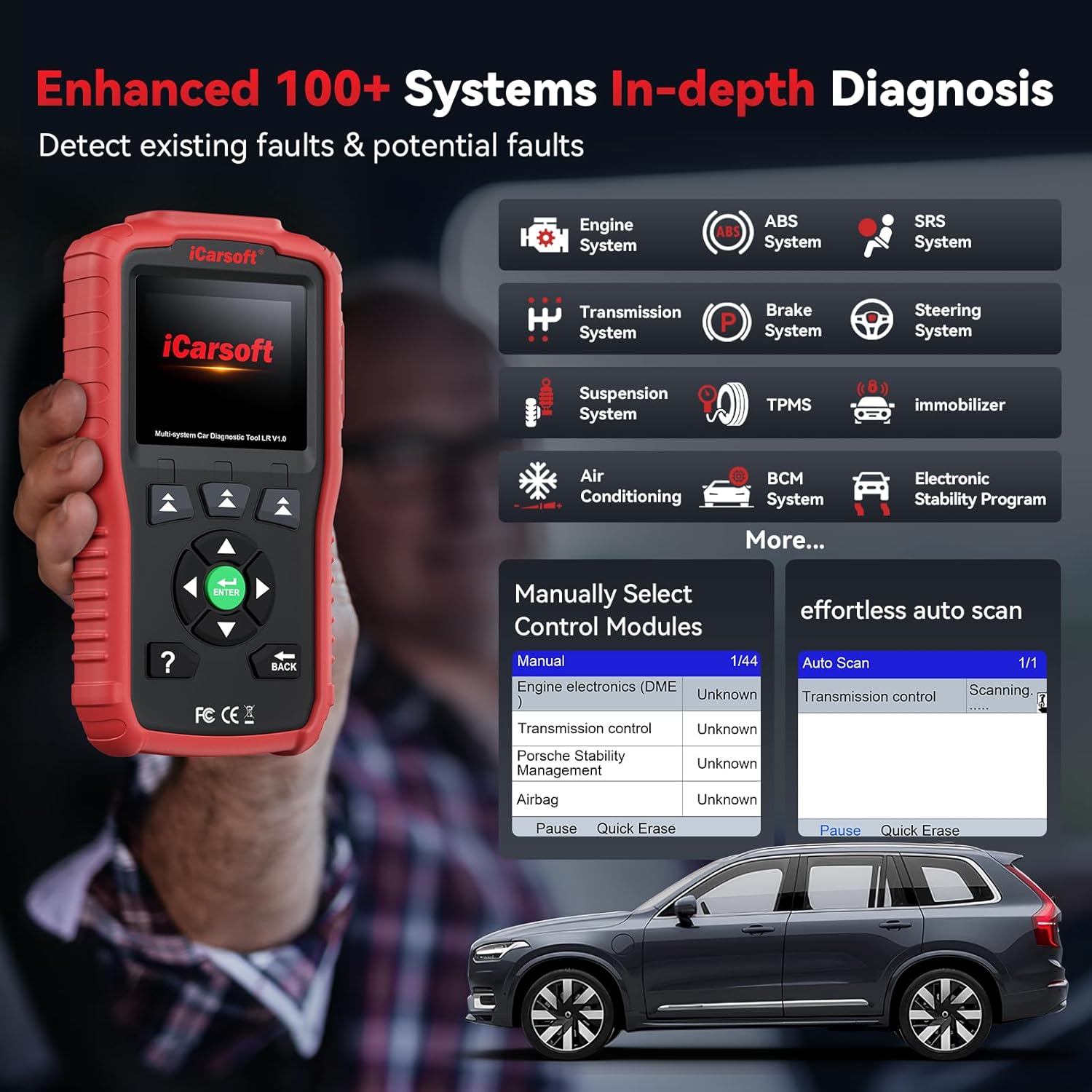
Image: The iCarsoft LR V1.0 displaying an 'Enhanced 100+ Systems In-depth Diagnosis' screen, showing various vehicle systems like Engine, ABS, SRS, Transmission, and more.
6.2 Canlı Veri Akışı
Monitor real-time data from various sensors and components within the vehicle's ECUs. This feature is crucial for identifying intermittent problems and verifying repairs.
- After selecting a system in 'Diagnostics', choose 'Live Data'.
- Select the parameters you wish to monitor.
- View data in numerical or graphical format. The LR V1.0 supports over 118 live data parameters.

Image: The iCarsoft LR V1.0 showing a '118+ Graphical & Easy to Read Live Data Monitor' screen, with detailed data for fuel system status, calculated load value, engine coolant temperature, and graphical waveforms.
6.3 Özel Sıfırlama Fonksiyonları
The LR V1.0 includes essential service functions for routine maintenance.
- Oil Light/Service Reset: Resets the oil service light after an oil change, ensuring the vehicle's maintenance schedule is accurately tracked.
- Steering Angle Sensor (SAS) Calibration: Calibrates the steering angle sensor, which is vital for vehicle stability control and safety systems, especially after steering component replacement or alignment.

Image: The iCarsoft LR V1.0 highlighting two commonly used reset functions: Oil Light/Service Reset and Steering Angle Sensor (SAS) Calibration, with illustrative icons.
6.4 Batarya Testi
Monitor your vehicle's battery health to prevent unexpected breakdowns. The battery test function checks the current system situation and indicates if the battery is working correctly, needs replacement, or is at a low voltage.
- Ana menüden 'Vol' seçeneğini seçin.tage'.
- Follow the on-screen prompts to perform the battery test.
- The device will display the battery voltage and a judgment of its condition (e.g., Normal, Too Low, Too High).
6.5 DTC Lookup and Freeze Frame Data
The tool includes a built-in DTC library to help you understand fault codes without external resources. Freeze Frame Data captures a snapshot of vehicle operating conditions at the moment a fault code was set, aiding in diagnosis.
- DTC Arama: Select 'DTC Lookup' from the main menu, enter the code, and view onun tanımı.
- Çerçeveyi Dondur: Ne zaman viewing DTCs, an option to view 'Freeze Frame' data will be available if recorded.
7. Bakım
7.1 Cihaz Bakımı
- Cihazı temiz ve kuru tutun. Yumuşak kullanın, damp dış yüzeyini silmek için kullanılan bez.
- Cihazı aşırı sıcaklıklara, neme veya doğrudan güneş ışığına maruz bırakmaktan kaçının.
- Cihazı kullanılmadığı zamanlarda koruyucu kılıfında saklayın.
7.2 Yazılım Güncellemeleri
The iCarsoft LR V1.0 offers lifetime free software updates to ensure compatibility with new vehicle models and to add new features. Regularly check for updates on the official iCarsoft webalan.
- Download the update tool from the iCarsoft webalan.
- Connect the LR V1.0 to your computer using the provided USB cable.
- Follow the instructions provided by the update tool to install the latest software.
8. Sorun Giderme
If you encounter issues while using the iCarsoft LR V1.0, refer to the following common problems and solutions:
- Cihaz açılmıyor: Ensure the OBD-II cable is securely connected to the vehicle's DLC and the vehicle's ignition is in the 'ON' position. Check the vehicle's battery voltage.
- İletişim hatası: Verify the ignition is on and the cable connection is secure. Ensure the vehicle is compatible with the tool. Try updating the software to the latest version.
- Unable to read/clear faults: This can occur if the vehicle's system has been recently updated by the manufacturer. Perform a software update on your LR V1.0. If the issue persists, contact iCarsoft technical support.
- Ekran dondu: Disconnect the device from the vehicle and reconnect it. If the issue persists, perform a software update.

Image: A vehicle dashboard with various warning lights (Engine, ABS, Airbag) illuminated, indicating that the iCarsoft LR V1.0 can help diagnose and clear these fault indicators after repairs.
9. Özellikler
| Özellik | Detay |
|---|---|
| Marka | iCarsoft |
| Örnek | LR V 1.0 |
| Ürün Ağırlığı | 1.46 pound |
| Paket Boyutları | 9.29 x 5.55 x 2.68 inç |
| İşletim Sistemi | WIN PE (Professional Automotive Inspection OS) |
| Otomotiv Uyum Türü | Universal Fit (for specified Land Rover/Jaguar models) |
| UPC | 850030851840 |
| Desteklenen Protokoller | CAN, ISO9141, KWP2000, J1850 VPW, J1850 PWM |
Key Differences (LR V1.0 Enhance Version vs. Older Versions):
- Diller: 5+ languages supported (older versions typically 4).
- Bakım Hizmeti: Includes 2 reset services (Oil & SAS), older versions may not.
- Diagnostic System: 100+ systems and subsystems diagnosis (ABS, Engine, SRS, SAS, Transmission, Brake, Suspension, TPMS, BCM, etc.), older versions often only 4 systems or engine only.
- Canlı Veri Akışı: 118+ graphical and text data, older versions less than 10 data points (text only).
- Abonelik: No subscription fee, older versions may require annual subscription.
- Garanti: Lifetime free hardware repair (express fee not free), 1-year warranty.
- Free Update: Lifetime free updates.
10. Garanti ve Destek
iCarsoft is committed to providing reliable products and excellent customer service.
- Garanti: The iCarsoft LR V1.0 comes with a 1-year warranty. Additionally, lifetime free hardware repair is offered (shipping fees may apply).
- Yazılım Güncellemeleri: Enjoy lifetime free software updates to ensure your tool remains current with the latest vehicle models and diagnostic capabilities.
- Teknik Destek: 24/7 professional technical support is available to assist with any questions or issues regarding the usage of your device. Please feel free to reach out to the iCarsoft support team.

Image: An illustration of iCarsoft's commitment to lifetime services, including lifetime free updates, lifetime free hardware maintenance, a 1-year warranty, and readily available technical support.


