1. Giriş
Satın aldığınız için teşekkür ederizasing the Genius GX Wired Gaming Keyboard, Scorpion K220. This manual provides detailed instructions for setting up, operating, and maintaining your new gaming keyboard. Designed for PC gaming, the Scorpion K220 features a sleek design, compact construction, and vibrant backlighting for an enhanced gaming experience.

Şekil 1.1: Ön view of the Genius GX Wired Gaming Keyboard Scorpion K220, showcasing its design and colorful backlighting.
2. Güvenlik Bilgileri
Please read the following safety precautions carefully before using the device to ensure optimal performance and prevent damage.
- Klavyeyi suya veya diğer sıvılara maruz bırakmayın.
- Avoid extreme temperatures (hot or cold) and high humidity.
- Klavyeyi sökmeye veya üzerinde değişiklik yapmaya çalışmayın. Bu, garantiyi geçersiz kılacaktır.
- Klavyeyi güçlü manyetik alanlardan uzak tutun.
- Use only a dry, soft cloth for cleaning.
- Ensure the USB cable is not pinched or damaged during setup and use.
3. Paket İçeriği
Paketin içinde tüm öğelerin mevcut olduğundan emin olun:
- Genius GX Wired Gaming Keyboard (Scorpion K220)
- Kullanım Kılavuzu (bu belge)
4. Kurulum
4.1 Klavyenin Bağlanması
The Scorpion K220 keyboard uses a standard USB connection for compatibility with PCs and Laptops. No additional drivers are typically required for basic functionality.
- Bilgisayarınızda (PC veya Dizüstü) kullanılabilir bir USB portu bulun.
- Carefully insert the USB connector of the Scorpion K220 keyboard into the USB port.
- İşletim sisteminiz gerekli sürücüleri otomatik olarak algılayıp yüklemelidir. Bu işlem birkaç dakika sürebilir.
- Once installation is complete, the keyboard will be ready for use. The backlighting should illuminate.

Figure 4.1: The Genius GX Wired Gaming Keyboard Scorpion K220, ready for connection to a PC or laptop via its integrated USB cable.
5. Kullanım Talimatları
5.1 Temel Klavye İşlevleri
The Scorpion K220 functions as a standard QWERTY keyboard. All standard keys (alphanumeric, function keys, navigation keys, and numeric keypad) operate as expected.
5.2 Arka Işık Kontrolü
The Scorpion K220 features vibrant backlighting to enhance your gaming and typing experience. The backlighting is always on when the keyboard is connected and powered.
- Parlaklık Ayarı: Look for dedicated keys or key combinations (often Fn + Scroll Lock or similar) to adjust backlight brightness. Refer to the keyboard's key legends for specific controls.
- Aydınlatma Modları: Some models may offer different lighting effects or static color modes. Experiment with function key combinations (e.g., Fn + F1-F12 or dedicated lighting keys) to cycle through available modes.
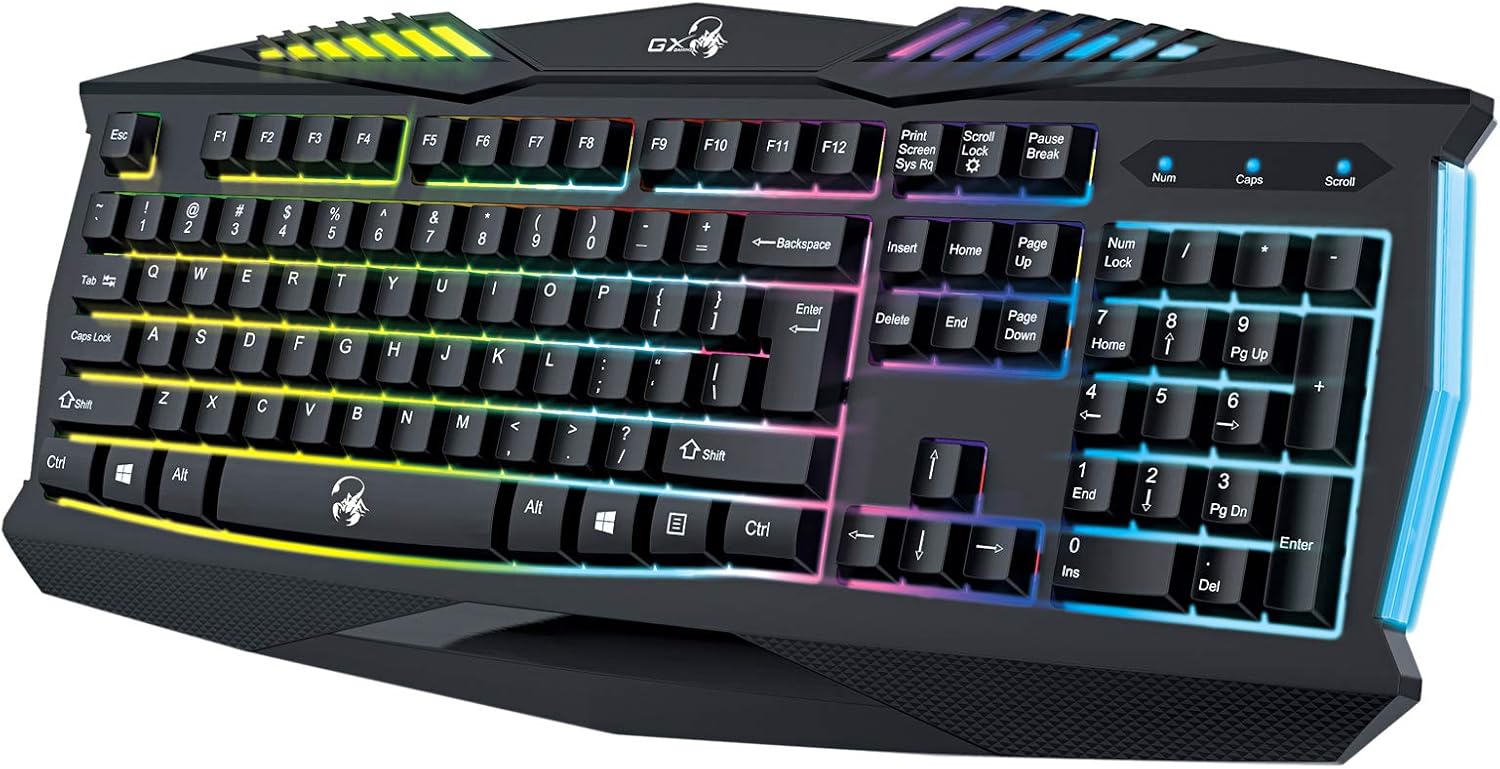
Şekil 5.1: Yakın çekim view of the Genius GX Wired Gaming Keyboard Scorpion K220, highlighting the illuminated keys and vibrant backlighting.
5.3 Oyun Özellikleri
The Scorpion K220 is designed for gaming with a responsive membrane switch type and a comfortable layout. While it does not feature programmable macro keys, its robust design and anti-ghosting capabilities (where applicable) ensure reliable performance during intense gaming sessions.
6. Bakım
Doğru bakım, klavyenizin uzun ömürlü olmasını ve optimum performans göstermesini sağlar.
- Temizlik:
- Temizlemeden önce klavyeyi bilgisayarınızdan ayırın.
- Use a soft, dry, lint-free cloth to wipe down the surface of the keyboard.
- Tuşlar arasındaki toz ve pislikleri temizlemek için basınçlı hava kullanın.
- Sert kimyasallar, aşındırıcı temizleyiciler veya çözücüler kullanmayın.
- Depolamak: Uzun süre kullanılmayacaksa klavyeyi serin, kuru ve doğrudan güneş ışığından ve aşırı sıcaklıklardan uzak bir yerde saklayın.
7. Sorun Giderme
If you encounter issues with your Scorpion K220 keyboard, refer to the table below for common problems and solutions.
| Sorun | Olası Neden | Çözüm |
|---|---|---|
| Klavye yanıt vermiyor | Gevşek USB bağlantısı, arızalı USB portu, sürücü sorunu. |
|
| Arka aydınlatma çalışmıyor | Keyboard not powered, specific lighting mode selected. |
|
| Tuşlar yapışkan veya tepkisiz | Dirt or debris under the keys. |
|
8. Özellikler
Detailed technical specifications for the Genius GX Wired Gaming Keyboard Scorpion K220:
| Özellik | Detay |
|---|---|
| Marka | Dahi |
| Model Numarası | K220 |
| Ürün Boyutları | 23x49x4 cm |
| Ürün Ağırlığı | 980 gr |
| Üretici | Dahi |
| Güç Kaynağı | Kablolu Elektrik |
| Piller Dahil | HAYIR |
| Uyumlu Cihazlar | PC, Dizüstü Bilgisayar |
| Bağlantı Teknolojisi | USB |
| Klavye Açıklaması | Oyun |
| Özel Özellikler | Arkadan aydınlatmalı |
| Malzeme | Karışık Malzemeler |
| Anahtar Türü | Membran |
| Klavye Düzeni | Q klavye |
| El Yönelimi | İki elini de kullanabilen |
9. Garanti ve Destek
Genius products are manufactured to the highest quality standards. For information regarding warranty coverage, technical support, or service, please refer to the warranty card included with your product or visit the official Genius webalan.
For further assistance, you may contact Genius customer support through their official channels. Please have your product model number (K220) and purchase details ready when contacting support.
Resmi Webalan: www.geniusnet.com


