giriiş
This manual provides comprehensive instructions for the setup, operation, and maintenance of your Thomson WHP5327 Wireless TV Headphones. Designed for comfortable, high-quality audio listening from various sources like TVs, Hi-Fi systems, smartphones, tablets, and laptops, these over-ear headphones offer a wireless range of up to 20 meters and come with a convenient charging station.
Güvenlik Bilgileri
Ürünü kullanmadan önce lütfen tüm güvenlik talimatlarını dikkatlice okuyun. Bu kılavuzu ileride başvurmak üzere saklayın.
- Do not expose the headphones or charging station to extreme temperatures, humidity, or direct sunlight.
- Cihazı düşürmekten veya güçlü darbelere maruz bırakmaktan kaçının.
- Ürünü sökmeye veya üzerinde değişiklik yapmaya çalışmayın. Bu, garantiyi geçersiz kılar.
- Yalnızca sağlanan güç adaptörünü ve kabloları kullanın.
- Uzun süre yüksek ses seviyesinde dinlemek işitme hasarına neden olabilir. Ses seviyesini rahat edeceğiniz bir düzeye ayarlayın.
- Çocukların erişemeyeceği yerde saklayınız.
Paket İçeriği
Paketin içinde tüm öğelerin mevcut olduğundan emin olun:
- 1x Thomson WHP5327 Wireless TV Headphones
- 1x Charging Station / Transmitter
- 1x Güç Adaptörü
- 2x Rechargeable Batteries (AA)
- 3x Audio Cables (e.g., 3.5mm Jack, RCA)
- 2x Audio Adapters (e.g., 6.3mm adapter)
- 1x Kullanım Kılavuzu
Ürün Bittiview
Familiarize yourself with the components of your wireless headphone system.
Kulaklıklar

Resim: Yan view of the Thomson WHP5327 headphones, highlighting the integrated volume control and power button on the earcup.
- Ayarlanabilir Kafa Bandı: Rahat bir kullanım için.
- Yastıklı Kulaklıklar: Provide comfort during extended listening sessions.
- Ses Kontrolü: Integrated on the earcup for easy adjustment.
- Güç Düğmesi/Göstergesi: Kulaklıkları açıp kapatmak ve durumunu göstermek için.
- Şarj Kişileri: Located on the bottom of the headband for charging on the station.
- 3.5 mm Ses Jakı: For optional wired connection to devices (cable may be required).
Şarj İstasyonu / Verici
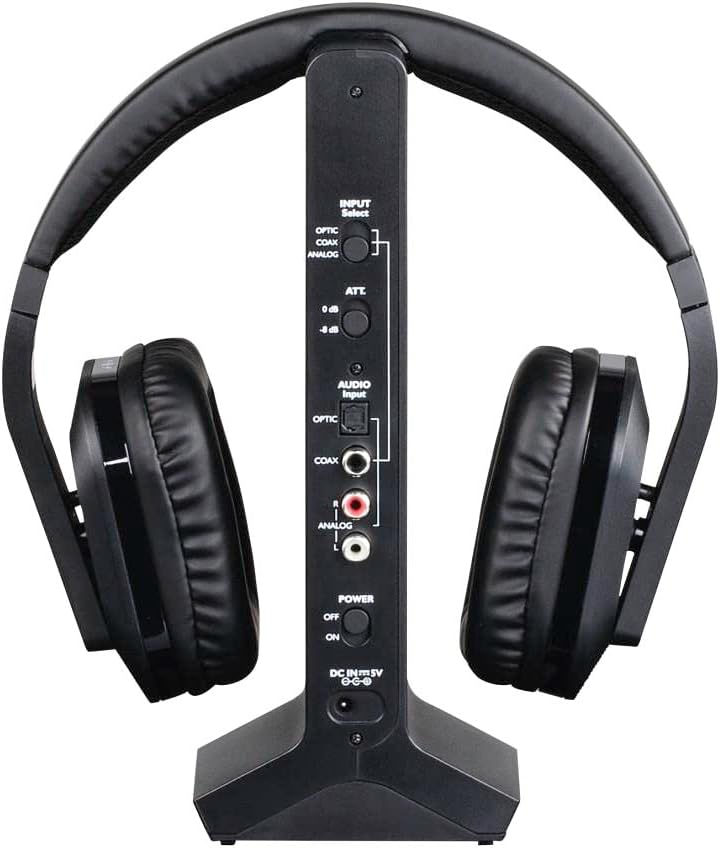
Resim: Arka view of the Thomson WHP5327 charging station, displaying the various audio input ports (Optical, Coaxial, Analog) and power connection.
- Headphone Cradle: For storing and charging the headphones.
- Şarj göstergesi: Light indicating charging status.
- Güç Göstergesi: Light indicating the station is powered on.
- Giriş Seçim Anahtarı: To choose between Optical, Coaxial, or Analog audio inputs.
- Ses Giriş Portları: Optical, Coaxial, and Analog (RCA) inputs for connecting to audio sources.
- Power Input (DC IN 5V): Güç adaptörünü bağlamak için.
- Güç düğmesi: To turn the charging station on/off.
Kurmak
1. Kulaklıkları Şarj Etme
- Insert the provided rechargeable AA batteries into the headphone earcups, ensuring correct polarity.
- Connect the power adapter to the "DC IN 5V" port on the charging station and plug it into a wall outlet. The Power indicator on the station will light up.
- Place the headphones onto the charging station. Ensure the charging contacts align. The "CHARGE" indicator on the station will light up, indicating charging is in progress.
- Allow approximately 8 hours for the initial full charge. Subsequent charges may take less time.

Image: The Thomson WHP5327 headphones resting on their charging station, ready for use or charging.
2. Connecting the Charging Station to an Audio Source
The charging station acts as the transmitter. Choose the appropriate connection method for your audio source (TV, Hi-Fi, etc.).
- Optical Digital Audio (Recommended for TVs):
Connect an optical audio cable (not always included, check package contents) from your TV's "Optical Out" or "Digital Audio Out (Optical)" port to the "OPTIC" input on the charging station. Set the "INPUT Select" switch on the station to "OPTIC".
- Koaksiyel Dijital Ses:
Connect a coaxial audio cable from your audio source's "Coaxial Out" port to the "COAX" input on the charging station. Set the "INPUT Select" switch on the station to "COAX".
- Analog Audio (RCA or 3.5mm Jack):
Use the provided RCA audio cable to connect your audio source's "Audio Out" (red and white RCA jacks) to the "ANALOG" RCA inputs on the charging station. If your source has a 3.5mm headphone jack, use the provided 3.5mm to RCA adapter cable. Set the "INPUT Select" switch on the station to "ANALOG".
Ensure the power switch on the charging station is set to "ON" after connecting the audio source.
Kullanım Talimatları
Açma/Kapatma
- To turn on the headphones, press and hold the Power button on the earcup until the indicator light illuminates.
- To turn off the headphones, press and hold the Power button again until the indicator light turns off.
Ses Kontrolü
Adjust the listening volume using the integrated volume control dial/buttons located on the earcup of the headphones.

Image: A person comfortably wearing the Thomson WHP5327 headphones while watching television, demonstrating typical usage.
Otomatik Kapanma
The transmitter and headphones feature an automatic shut-off function. If no audio signal is detected for approximately 5 minutes, both the transmitter and headphones will automatically power down to conserve battery life.
kablosuz Menzil
The Thomson WHP5327 headphones offer a wireless range of up to 20 meters (approximately 65 feet) from the charging station/transmitter. Optimal range may vary depending on environmental factors such as walls, obstacles, and interference from other wireless devices.

Image: A diagram illustrating the wireless range between the headphones and the base unit, indicating a typical operational distance of 10-15 meters.
Kablolu Bağlantı (İsteğe Bağlı)
While primarily designed for wireless use, the WHP5327 headphones can also be used with a wired connection. Connect a 3.5mm audio cable (not always included) from your audio source (e.g., smartphone, tablet, laptop) to the 3.5mm audio jack on the headphone earcup. This allows for direct audio playback without the need for the charging station/transmitter.

Image: A person using the Thomson WHP5327 headphones connected via a cable to a smartphone, demonstrating the optional wired listening mode.
Bakım
- Temizlik: Use a soft, dry cloth to clean the headphones and charging station. Do not use liquid cleaners or abrasive materials.
- Pil Değişimi: The headphones use rechargeable AA batteries. If the battery life significantly decreases, replace them with new rechargeable AA batteries of the same type and capacity. Ensure correct polarity when inserting.
- Depolamak: When not in use, store the headphones on the charging station to keep them charged and ready. If storing for an extended period, ensure batteries are fully charged and store in a cool, dry place.
Sorun giderme
| Sorun | Olası Neden | Çözüm |
|---|---|---|
| Kulaklıktan ses gelmiyor. | Headphones not turned on or not charged. Transmitter not powered or not connected to audio source. Incorrect input selected on transmitter. Ses kaynağının sesi çok düşük veya sessiz. | Ensure headphones are charged and turned on. Check power connection to transmitter and ensure it's ON. Verify audio cable connection from source to transmitter. Select correct input (Optical, Coaxial, Analog) on transmitter. Increase volume on audio source and headphones. |
| Ses bozuk veya kesintili. | Aralık dışı. Diğer kablosuz cihazlardan kaynaklanan parazit. Kulaklıkların pili azaldı. | Vericiye daha da yaklaşın. Move transmitter away from other electronic devices (Wi-Fi routers, cordless phones). Kulaklıkları şarj edin. |
| Kulaklık şarj olmuyor. | Headphones not properly seated on charging station. Şarj istasyonuna elektrik verilmiyor. Arızalı piller. | Ensure headphones are correctly placed on the station, making good contact. Check power adapter connection and wall outlet. Piller artık şarj tutmuyorsa değiştirin. |
| Automatic shut-off occurs too quickly. | No audio signal or very low audio signal from source. | Increase the volume output from your audio source (e.g., TV). |
Özellikler
| Özellik | Detay |
|---|---|
| Örnek | WHP5327 |
| Tip | Over-Ear, Circum-Aural, Wireless |
| Renk | Siyah |
| Malzeme | Plastik |
| Bulaşma | Radyo Frekansı (RF) |
| Taşıyıcı Frekansı | 2400 MHz |
| Frekans Tepkisi | 20 Hz - 22 kHz |
| Empedans | 24 Ω |
| Hassasiyet | 120 dB |
| Sinyal-Gürültü Oranı | 80 dB |
| Distortion Rate (max.) | %1 |
| kablosuz Menzil | 20 m'ye (65 ft) kadar |
| Battery Life (average volume) | 8 saate kadar |
| Güç Kaynağı | 2x AA Rechargeable Batteries (included) |
| Ses Girişleri (Verici) | Optical, Coaxial, Analog (RCA) |
| Ağırlık | 1.44 pound (yaklaşık 0.65 kg) |
Garanti ve Destek
Thomson products are designed and manufactured to the highest quality standards. This product is covered by a limited warranty against defects in materials and workmanship. For detailed warranty terms and conditions, please refer to the warranty card included in your package or visit the official Thomson webalan.
For technical support, troubleshooting assistance, or spare parts inquiries, please contact Thomson customer service. Contact information can typically be found on the product packaging or the official Thomson support webalan.
Garanti talepleri için lütfen satın alma belgenizi saklayın.


