1. Giriş
This manual provides detailed instructions for the setup, operation, and maintenance of your OMBAR Gaming Keyboard, Model OM-K617. Please read this manual thoroughly before using the product to ensure proper functionality and longevity.
2. Paket İçeriği
Aşağıda listelenen tüm öğelerin paketinizde bulunduğunu doğrulayın:
- OMBAR Gaming Keyboard (Model OM-K617)
- Entegre USB Kablosu
3. Kurulum
The OMBAR Gaming Keyboard is a plug-and-play device, requiring no additional driver installation for basic functionality.
- Connect the integrated USB cable from the keyboard to an available USB port on your computer.
- The operating system will automatically detect and install the necessary drivers.
- The keyboard's LED backlighting will illuminate upon successful connection.
4. Özellikler
4.1. Temel Özellikler
- 104 Anti-Ghosting Tuşu: Ensures accurate registration of multiple simultaneous key presses, crucial for gaming.
- 8 Multimedya Kısayol Tuşu: Dedicated keys for quick access to common functions.
- Ergonomik Bilek Desteği: Integrated design to provide comfort during extended use.
- LED Arka Aydınlatma: Customizable backlighting with multiple colors and modes.
- Dayanıklı Yapı: Made from ABS plastic for durability.
- Mekanik Anahtarlar: Provides tactile feedback for precise key presses.
4.2. Tuş Düzeni ve Fonksiyonları
The keyboard features a standard 104-key layout with several enhancements for user convenience.
- Enlarged Enter Key: Designed for easier access.
- Extended Spacebar: Contributes to reduced hand fatigue during prolonged typing or gaming.
Dedicated Multimedia Hotkeys:
Located above the function keys, these hotkeys provide instant control over various applications and media playback.
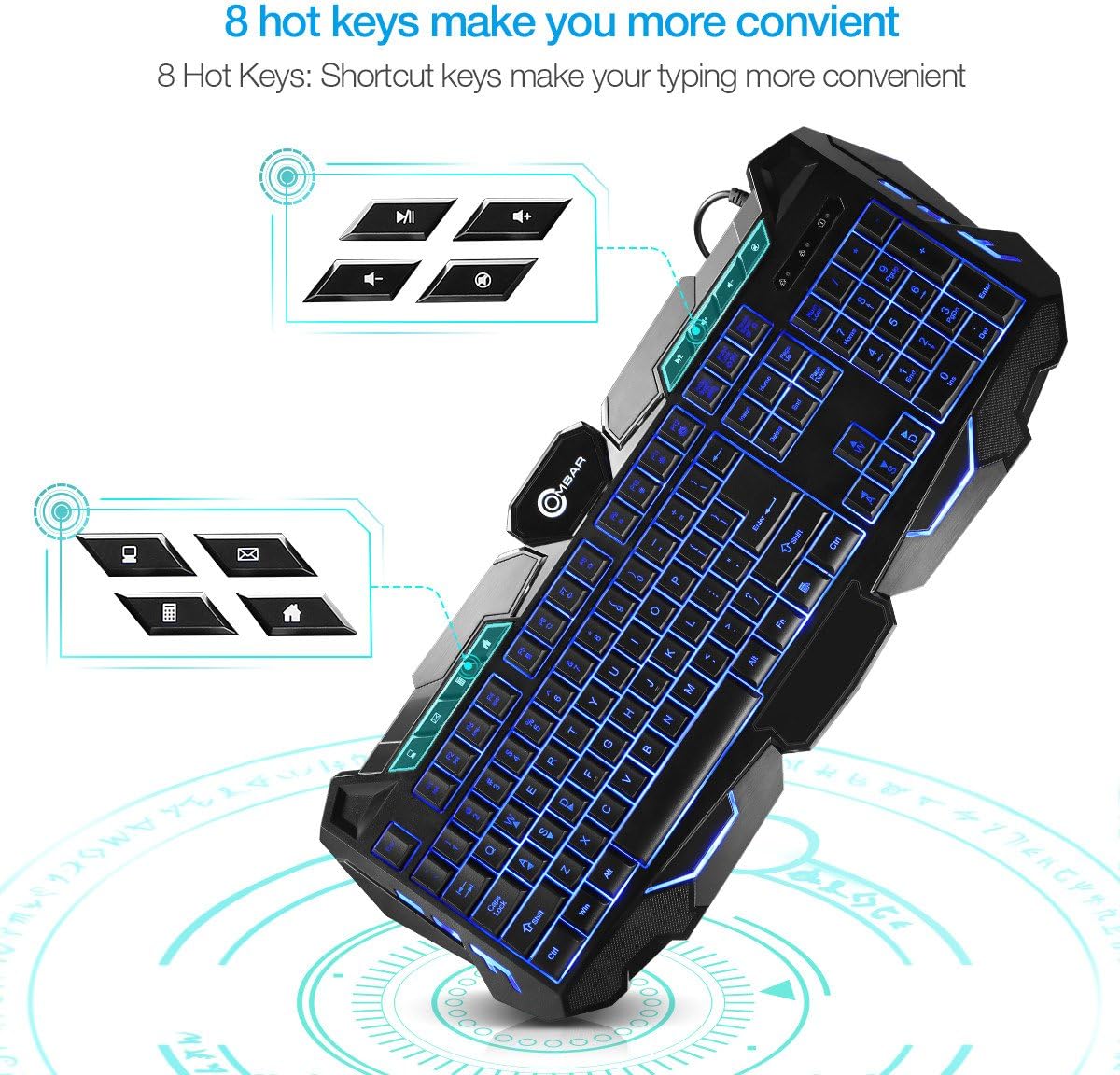
Image: Close-up of the OMBAR Gaming Keyboard highlighting the dedicated multimedia hotkeys. These keys allow quick access to functions like opening file explorer, email, calculator, web browser, controlling media playback (play/pause, volume up/down), and muting audio.
- File Kaşif: Opens your computer's file tarayıcı.
- E-posta: Launches your default email client.
- Hesaplama: Opens the system calculator.
- Web Tarayıcı: Opens your default internet browser.
- Oynat/Duraklat: Medya oynatmayı kontrol eder.
- Sesi Aç/Kapat: Sistem ses seviyesini ayarlar.
- Sesini kapatmak: Sesi kapatıp açar.
Function (Fn) Key Combinations:
Tutun Fn key and press the corresponding F tuşu for additional functions:
- Fn+F1: Önceki Parça
- Fn+F2: Sonraki Parça
- Fn+F3: Decrease Report Rate (RPS-)
- Fn+F4: Increase Report Rate (RPS+)
- Fn+F5: Hesap Makinesini Aç
- Fn+F6: Sayfayı Yenile
- Fn+F7: Back Page (Web Tarayıcı)
- Fn+F8: Forward Page (Web Tarayıcı)
- Fn+F9: Set Backlight Brightness to 20%
- Fn+F10: Set Backlight Brightness to 60%
- Fn+F11: Set Backlight Brightness to 100%
- Fn+F12: Activate Gaming Mode (disables Windows key to prevent accidental interruptions during gameplay).

Image: The OMBAR Gaming Keyboard with blue backlighting, illustrating the Fn key and the Print Screen key, which when pressed together activate Gaming Mode.
5. Kullanım Talimatları
5.1. LED Backlighting Control
The keyboard features three backlight colors (Red, Blue, Purple) and two lighting modes (Static and Breathing).

Image: A visual representation of the OMBAR Gaming Keyboard's three available LED backlight colors: red, blue, and purple.
- Renkleri Değiştirme: Basın Ampul key (usually located near the F12 key or Scroll Lock) to cycle through Red, Blue, and Purple backlight colors.
- Modları Değiştirme: Basın Fn + Light Bulb key to switch between Static (constant light) and Breathing (pulsating light) modes.
- Parlaklığın Ayarlanması: Kullanmak Fn + F9 (%20), Fn + F10 (60%), and Fn + F11 (100%) to adjust backlight intensity.
- Turning Off Backlighting: Continue cycling through brightness levels or modes until the lights turn off, or use a specific Fn combination if available.
5.2. Genel Kullanım
The keyboard is designed for both gaming and general office tasks. Its anti-ghosting feature ensures that all key presses are registered accurately, even during intense gaming sessions.
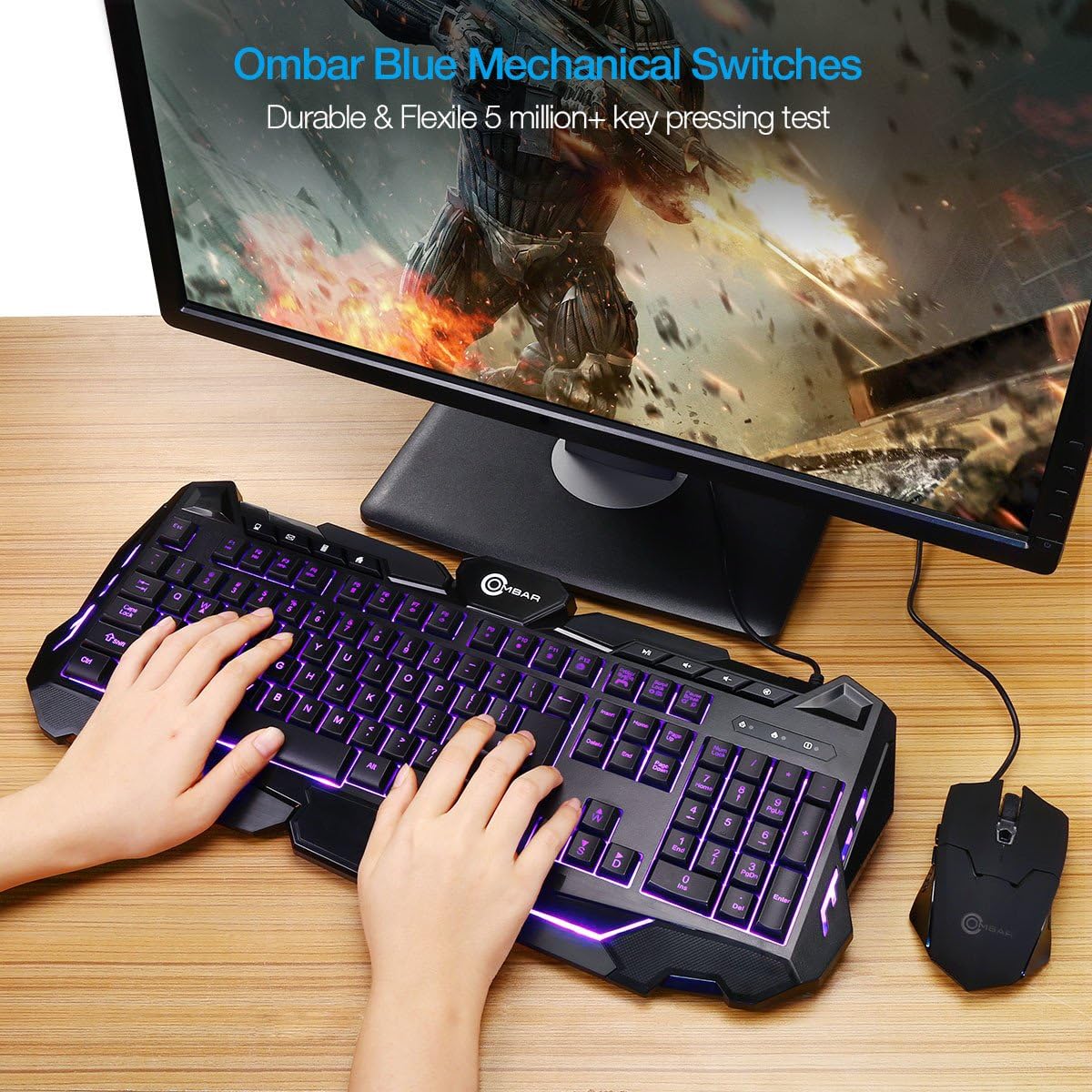
Image: A user actively typing on the OMBAR Gaming Keyboard, showcasing its purple LED backlighting in a typical desktop setup with a monitor and mouse.
For optimal performance, ensure the keyboard is connected directly to a USB port on your computer rather than through a USB hub, especially for gaming.
6. Bakım
- Temizlik: Use a soft, dry cloth to wipe the surface of the keyboard. For deeper cleaning, use compressed air to remove dust and debris from between the keys. Avoid using harsh chemicals or abrasive materials.
- Dökülmeler: In case of liquid spills, immediately disconnect the keyboard from your computer. Turn it upside down to drain any liquid and allow it to dry completely before reconnecting.
- Depolamak: Uzun süre kullanılmayacaksa klavyeyi serin, kuru ve doğrudan güneş ışığından ve aşırı sıcaklıklardan uzak bir yerde saklayın.
7. Sorun Giderme
If you encounter any issues with your OMBAR Gaming Keyboard, please refer to the following common solutions:
- Klavye Yanıt Vermiyor:
- USB kablosunun hem klavyeye hem de bilgisayara güvenli bir şekilde bağlandığından emin olun.
- Klavyeyi bilgisayarınızdaki farklı bir USB portuna bağlamayı deneyin.
- Bilgisayarınızı yeniden başlatın.
- Arka Aydınlatma Çalışmıyor:
- Basın Ampul key to cycle through colors and modes.
- Kullanmak Fn + F9/F10/F11 Parlaklığı ayarlamak için
- Keys Not Registering or Repeating:
- Clean the affected keys with compressed air to remove any debris.
- Herhangi bir yazılım çakışmasının olmadığından emin olun.
- Compatibility with KVM Switches:
Note that this keyboard may not function correctly when connected through certain KVM (Keyboard, Video, Mouse) switches. For optimal performance, especially in gaming, direct connection to the PC is recommended.
8. Özellikler
| Marka | OMBAR |
| Model Numarası | OM-K617 |
| Bağlantı Teknolojisi | USB |
| Klavye Açıklaması | Oyun |
| Özel Özellikler | Backlit, Ergonomic, Wrist Rest |
| Malzeme | Plastik (ABS) |
| Ürün Ağırlığı | 2.2 pound |
| Paket Boyutları | 19.8 x 9.25 x 1.5 inç |
| Uyumlu Cihazlar | Oyun Konsolu, PC |
| Anahtar Türü | Mekanik |
9. Resmi Ürün Videosu
Video: An official product video demonstrating the OMBAR Gaming Keyboard's features, including its build quality, key layout, multimedia hotkeys, LED backlighting options (red, blue, purple, static, breathing), and performance during gameplay. The video also provides a sound test of the keys.
10. Garanti ve Destek
For warranty information or technical support, please refer to the documentation provided with your purchase or contact OMBAR customer service through their official webalan. Garanti talepleri için satın alma makbuzunuzu saklayın.