1. Giriş
This manual provides essential instructions for the safe and effective use of your Accessory USA 5V AC DC Adapter. This power supply is designed to provide reliable power to the XtremeMac IPU-MDK-11 Charging Audio Dock. Please read this manual thoroughly before using the product.
2. Güvenlik Bilgileri
Güvenliğiniz bizim için çok önemlidir. Lütfen aşağıdaki önlemlere uyun:
- Uyumluluk: Ensure this adapter is compatible with your device (XtremeMac IPU-MDK-11 Charging Audio Dock) before connecting. Incorrect voltage or current can damage your device.
- Koruma Özellikleri: This adapter is equipped with Over Voltage Protection (OVP), Over Current Protection (OCP), and Short Circuit Protection (SCP) to safeguard your devices.
- Çevre: Use the adapter in a dry, indoor environment. Avoid exposure to moisture, extreme temperatures, or direct sunlight.
- İşleme: Do not drop, disassemble, or attempt to repair the adapter. Refer servicing to qualified personnel.
- Kablolar: Ensure cables are not pinched, walked on, or otherwise damaged. Replace damaged cables immediately.
- Havalandırma: Do not cover the adapter during use, as this may lead to overheating.
3. Paket İçeriği
Paketinizin aşağıdaki öğeyi içerdiğini doğrulayın:
- 1 x Accessory USA 5V AC DC Adapter
4. Kurulum
Follow these steps to set up your AC DC adapter:
- Adaptörü inceleyin: Before use, visually inspect the adapter and its cable for any signs of damage. Do not use if damaged.
- Cihaza Bağlan: Plug the DC output connector of the adapter into the power input port of your XtremeMac IPU-MDK-11 Charging Audio Dock. Ensure a secure connection.
- Güç Çıkışına Bağlan: Plug the AC input plug of the adapter into a standard wall power outlet.
- Gücü Doğrulayın: Once connected, your XtremeMac IPU-MDK-11 Charging Audio Dock should receive power. Check for any indicator lights on your dock to confirm.
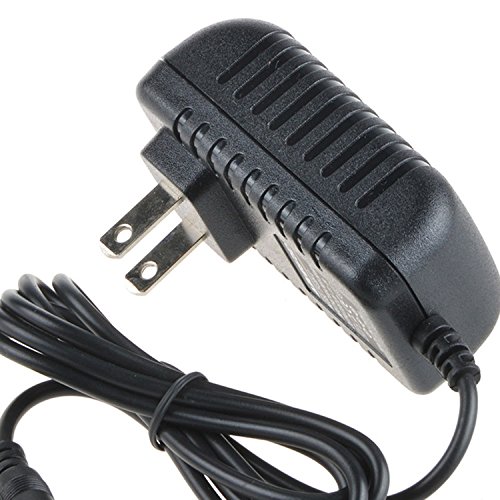
Image 1: The Accessory USA 5V AC DC Adapter. The adapter features a standard AC plug for wall outlets and a DC connector for the device.
5. Çalıştırma
The adapter operates automatically once connected. It converts the AC power from your wall outlet to the required 5V DC power for your XtremeMac IPU-MDK-11 Charging Audio Dock. No user intervention is required during operation.
- Ensure the adapter is always plugged into a functional power outlet.
- Adaptörü uzun süre kullanılmayacaksa elektrik prizinden çıkarın.
6. Bakım
Proper maintenance ensures the longevity and safe operation of your adapter:
- Temizlik: Disconnect the adapter from both the power outlet and your device before cleaning. Use a soft, dry cloth to wipe the exterior. Do not use liquid cleaners or aerosols.
- Depolamak: Store the adapter in a cool, dry place away from direct sunlight and moisture when not in use. Avoid wrapping the cable too tightly around the adapter.
- Denetleme: Periodically check the adapter and its cable for any signs of wear, cuts, or damage. If damage is found, discontinue use and replace the adapter.
7. Sorun Giderme
If you encounter issues with your adapter, try the following steps:
- Cihaza Güç Gelmiyor:
- Ensure the adapter is securely plugged into both the wall outlet and the XtremeMac IPU-MDK-11 dock.
- Duvar prizinin çalışır durumda olduğunu doğrulamak için başka bir cihazla test edin.
- Check the adapter cable for any visible damage.
- Cihaz Şarj Olmuyor:
- Confirm that the XtremeMac IPU-MDK-11 dock itself is functioning correctly.
- Verify that the adapter's specifications (5V DC output) match the requirements of your dock.
- Aşırı Isınma:
- Adaptörün yeterli havalandırmaya sahip olduğundan ve üzerinin örtülmediğinden emin olun.
- Aşırı ısınma devam ederse, kullanmayı bırakın ve destek ekibiyle iletişime geçin.
Bu adımlar sorunu çözmezse lütfen müşteri desteğiyle iletişime geçin.
8. Özellikler
| Özellik | Şartname |
|---|---|
| Ürün Türü | AC DC Adaptörü |
| Giriş Voltage | AC 100-240V |
| Çıkış Hacmitage | Doğru Akım 5V |
| Uyumluluk | XtremeMac IPU-MDK-11 Charging Audio Dock |
| Sertifikalar | CE / FCC / RoHS |
| Koruma | OVP, OCP, SCP |
| ASIN | B072J3QBVS |
| UPC | 650234670083 |
9. Garanti ve Destek
Accessory USA products are manufactured to high quality standards. For warranty information or technical support, please refer to the documentation provided with your purchase or contact your retailer. Keep your purchase receipt as proof of purchase.


