Ürün Bittiview
The Extech MG320 is a versatile instrument combining a portable 20GΩ/1000V insulation tester with a True RMS multimeter. It is designed for professionals needing to perform insulation resistance measurements and general electrical troubleshooting.
Key features include Polarization Index (PI) and Dielectric Absorption Ratio (DAR) modes, a programmable timer for test duration, and a comparator function for setting custom pass/fail criteria. The device offers 5 test voltage ranges and includes high voltage and overload indication for safety. It is rated CAT IV 600V for enhanced safety.
The MG320 allows for manual storage and recall of up to 99 readings, making it suitable for field use where data logging is required. It comes complete with test leads, an alligator clip, 6 AA batteries, and a soft carrying case.

Şekil 1: Ön view of the Extech MG320 Insulation Tester, showing the display, function dial, and input terminals.
Güvenlik Bilgileri
Always adhere to local and national safety codes. Use personal protective equipment (PPE) as required. Ensure the device is in good working condition before use. Do not attempt to measure voltagBelirtilen maksimum değerleri aşan akımlar veya yükler.
- CAT IV 600V Safety Rating: This instrument is designed for measurements at the source of the low-voltagElektrik sayaçları ve birincil aşırı akım koruma cihazları gibi kurulumlar.
- Inspect test leads for damage before each use.
- Hasarlı görünüyorsa veya kutusu açıksa sayacı çalıştırmayın.
- Always disconnect power to the circuit under test before making connections for resistance or continuity measurements.
- Yüksek volümlülüğe dikkat edintage during insulation tests.
Kurmak
Pil Kurulumu
The Extech MG320 requires 6 AA batteries for operation. To install or replace batteries:
- Sayacın KAPALI olduğundan emin olun.
- Ünitenin arkasındaki pil bölmesini bulun.
- Pil bölmesi kapağını açmak için tornavida kullanın.
- Insert 6 AA batteries, observing correct polarity (+/-).
- Pil bölmesi kapağını yerine takın ve vidayla sabitleyin.
Test Uçlarını Bağlama
Connect the red test lead to the VΩ input terminal and the black test lead to the COM input terminal for most measurements. For insulation tests, connect the red lead to the V INSULATION terminal and the black lead to the EARTH terminal.
Kullanım Talimatları
Yalıtım Direnci Ölçümü
The MG320 offers 5 test voltage ranges for insulation resistance. Always ensure the circuit under test is de-energized before performing insulation tests.
- Turn the rotary switch to one of the INSULATION TEST voltage ranges (50V, 100V, 250V, 500V, 1000V).
- Connect the test leads to the circuit or component to be tested.
- Basın TEST button to initiate the insulation test. The display will show the resistance value.
- Serbest bırak TEST button to stop the test.
True RMS Multimeter Functions
The MG320 also functions as a True RMS multimeter for various electrical measurements.
- Cilttage Ölçümü (AC/DC): Turn the rotary switch to the V~ (AC) or V- (DC) position. Connect test leads in parallel with the circuit.
- Direnç Ölçümü (Ω): Turn the rotary switch to the Ω position. Ensure the circuit is de-energized. Connect test leads across the component.
- Süreklilik Testi: Turn the rotary switch to the continuity position. A built-in buzzer will sound if continuity is detected.
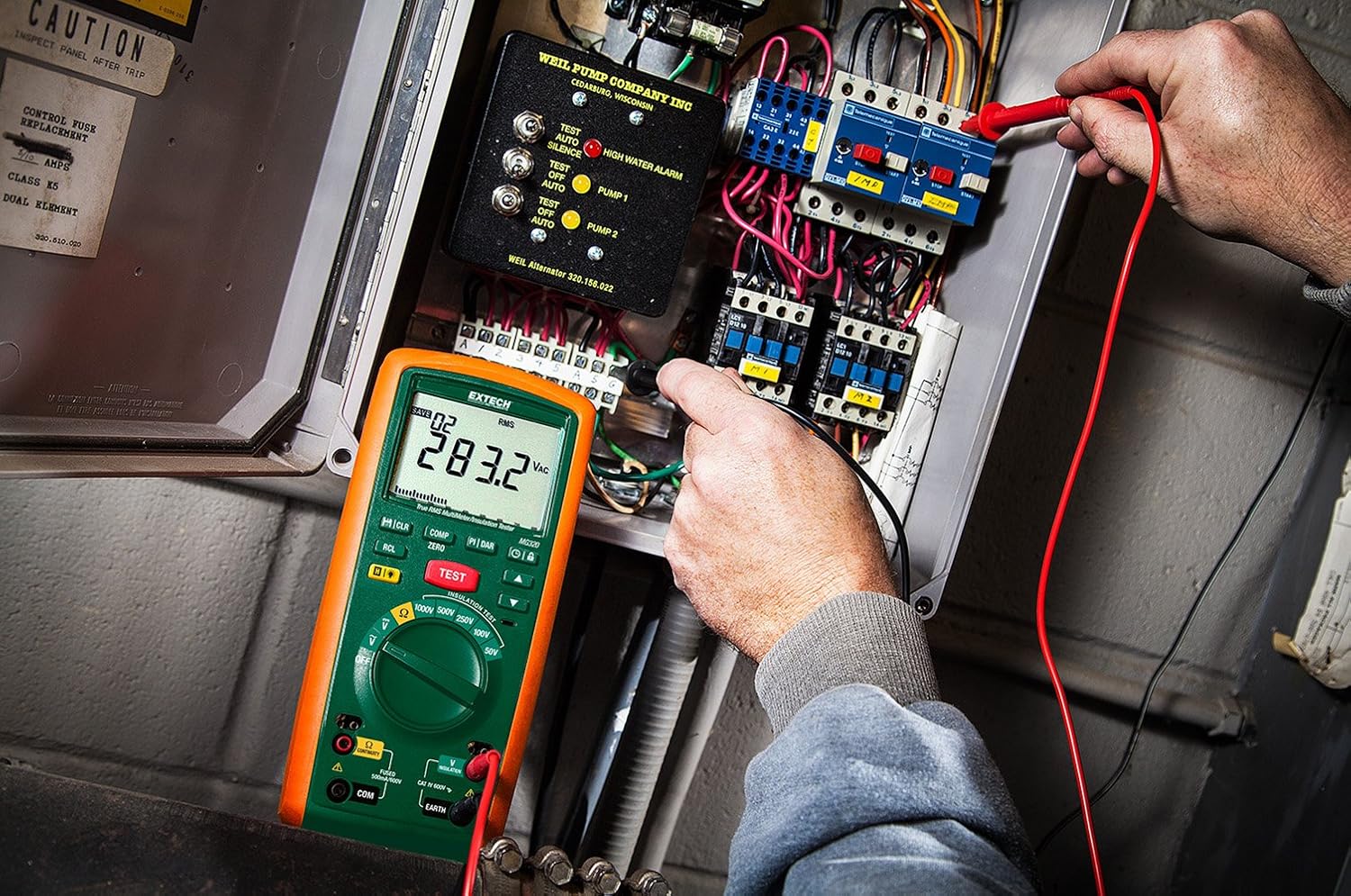
Figure 2: An electrician using the Extech MG320 to perform measurements within an electrical panel, demonstrating its application in industrial settings.

Figure 3: A technician conducting tests on industrial piping using the Extech MG320, highlighting its use in maintenance and troubleshooting.
Bakım
Temizlik
Wipe the meter with a dry, clean cloth. Do not use abrasives or solvents. Keep the display clean for optimal readability.
Pil Değişimi
Doğru ölçümler sağlamak için ekranda düşük pil göstergesi göründüğünde pilleri değiştirin. Ayrıntılı talimatlar için Kurulum bölümündeki "Pil Takma" kısmına bakın.
Depolamak
If the meter is not used for an extended period, remove the batteries to prevent leakage and damage. Store the device in a cool, dry place, away from direct sunlight and extreme temperatures.
Sorun giderme
| Sorun | Olası Neden | Çözüm |
|---|---|---|
| Sayaç açılmıyor. | Piller bitmiş veya yanlış takılmış. | Pil kutuplarını kontrol edin; pilleri değiştirin. |
| Hatalı okumalar. | Low battery, incorrect function selected, damaged test leads. | Replace batteries, verify function setting, inspect and replace test leads if damaged. |
| "OL" or Overload displayed. | Ölçüm, ölçüm cihazının ölçüm aralığını aşıyor. | Select a higher range or ensure the measurement is within the meter’s capabilities. |
Özellikler
| Şartname | Detay |
|---|---|
| Marka | Ekstech |
| Örnek | MG320 |
| İzolasyon Direnci Aralığı | Up to 20 GΩ |
| Test Hacmitages | 50V, 100V, 250V, 500V, 1000V |
| Multimetre Tipi | Gerçek RMS |
| Güvenlik Derecelendirmesi | KAT IV 600V |
| Güç Kaynağı | 6 x AA Pil (dahil) |
| Ürün Ağırlığı | 1.2 Pound (yaklaşık 0.54 kg) |
| Boyutlar (U x G x Y) | 4 x 9 x 2.5 inç (yaklaşık 10.16 x 22.86 x 6.35 cm) |
| Dahil Bileşenler | Test leads, alligator clip, 6 AA batteries, soft case |
Garanti ve Destek
For warranty information and technical support, please refer to the official Extech website or contact Extech customer service directly. Keep your purchase receipt as proof of purchase for warranty claims.
Extech Contact Information:
- Webalan: www.extech.com
- Destek: Şuna bakın: webBölgesel destek irtibat kişileri için site.


