1. Giriş ve Üzeriview
The Ewent EW7012 USB 3.1 Gen1 Docking Station provides a convenient and efficient solution for connecting 2.5-inch and 3.5-inch SATA hard disk drives (HDDs) or solid-state drives (SSDs) to your computer via a USB port. This docking station is ideal for quick data transfers, backups, and accessing data from multiple drives without needing to install them internally. It supports SuperSpeed USB 3.1 Gen1 (USB 3.0) for high-speed data transfer and is backward compatible with USB 2.0.

Şekil 1: Ön view of the Ewent EW7012 USB 3.1 Gen1 Docking Station with its blue LED indicator.
2. Kutuda Neler Var?
Lütfen paket içeriğini kontrol ederek tüm öğelerin mevcut olduğundan emin olun:
- Ewent EW7012 USB 3.1 Gen1 Docking Station
- USB 3.1 Gen1 (USB 3.0) Cable
- AC Güç Adaptörü
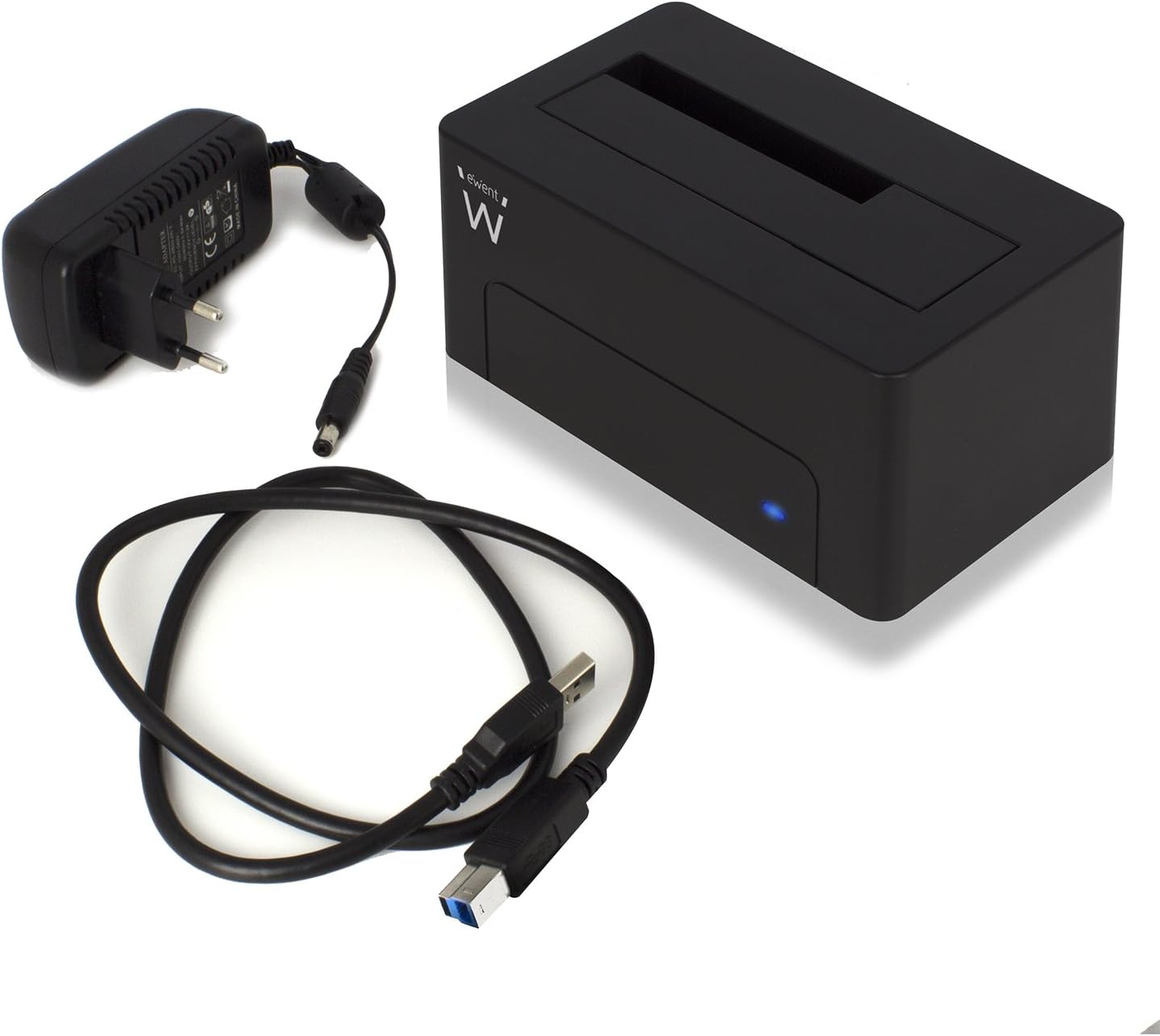
Figure 2: The Ewent EW7012 docking station, USB 3.1 Gen1 cable, and AC power adapter included in the package.
3. Özellikler
- Evrensel Uyumluluk: Supports both 2.5-inch and 3.5-inch SATA I/II/III HDDs and SSDs.
- Süper Hızlı Veri Aktarımı: Equipped with USB 3.1 Gen1 (USB 3.0) interface, offering data transfer rates up to 5 Gbps.
- Geriye Dönük Uyumluluk: Fully compatible with USB 2.0 ports, though at USB 2.0 speeds.
- Tak ve Çalıştır: Çoğu işletim sistemi için sürücü kurulumuna gerek yoktur.
- LED Göstergesi: A blue LED light indicates power status and data activity.
- Kompakt Tasarım: Space-saving and portable, with dimensions of approximately 4.92 x 2.91 x 2.24 inches.
- Harici Güç Kaynağı: Includes an AC adapter for stable power delivery to the drive.
4. Kurulum Kılavuzu
- Gücü bağlayın: Plug the AC power adapter into the "POWER" port on the back of the docking station. Connect the other end of the adapter to a wall outlet.
- Bilgisayara Bağlan: Connect one end of the supplied USB 3.1 Gen1 cable to the "USB 3.1" port on the back of the docking station. Connect the other end of the USB cable to an available USB port on your computer. For optimal performance, use a USB 3.0 or USB 3.1 port.
- Sabit Diski Takın: Gently slide your 2.5-inch or 3.5-inch SATA HDD/SSD into the top slot of the docking station, ensuring the SATA connectors align properly. Apply gentle pressure until the drive is fully seated.
- Güç Açık: Flip the "ON/OFF" switch on the back of the docking station to the "ON" position. The blue LED indicator on the front will illuminate, indicating the device is powered on.

Şekil 3: Arka view of the docking station showing the USB 3.1 port, power input, and ON/OFF switch.

Figure 4: A 3.5-inch hard drive being inserted into the docking station.
5. Kullanım Talimatları
Once the docking station is set up and powered on, your operating system should automatically detect the connected hard drive. The blue LED on the front will blink during data transfer activity.
- Verilere Erişim: The connected drive will appear as a removable disk in your computer's file explorer (e.g., "This PC" on Windows, "Finder" on macOS). You can then access, copy, or move fileTıpkı diğer depolama aygıtlarında olduğu gibi.
- Veri Yedekleme: The docking station is ideal for creating backups of your valuable photos, videos, and files. Simply drag and drop files to and from the docked drive.
- Removing a Drive: Before removing a drive, always safely eject it from your operating system to prevent data corruption. On Windows, use the "Safely Remove Hardware and Eject Media" icon in the system tray. On macOS, drag the drive icon to the Trash or use the Eject button in Finder. Once safely ejected, gently pull the drive out of the docking station.

Figure 5: A hard drive fully inserted into the docking station, ready for use. Note the QR code on the drive for additional information: http://qr.wdc.com/wdred
6. Bakım
To ensure the longevity and optimal performance of your Ewent EW7012 docking station, follow these simple maintenance guidelines:
- Temizlik: Use a soft, dry, lint-free cloth to clean the exterior of the docking station. Do not use liquid cleaners or aerosols.
- Depolamak: Kullanılmadığı zaman, yerleştirme istasyonunu doğrudan güneş ışığından ve aşırı sıcaklıklardan uzak, serin ve kuru bir yerde saklayın.
- İşleme: Cihazı dikkatli kullanın. Düşürmeyin veya sert darbelere maruz bırakmayın.
- Havalandırma: Ensure the docking station is placed in an area with adequate ventilation to prevent overheating, especially during prolonged use.
7. Sorun Giderme
| Sorun | Olası Neden | Çözüm |
|---|---|---|
| Sürücü bilgisayar tarafından algılanmadı. |
|
|
| Yavaş veri aktarım hızları. |
|
|
| Blue LED not illuminating. |
|
|
8. Özellikler
| Model Numarası | EW7012 |
| Marka | Ewent |
| Uyumlu Sürücü Türleri | 2.5-inch and 3.5-inch SATA I/II/III HDD/SSD |
| Maksimum Depolama Kapasitesi | Up to 4 TB (as per listed specifications) |
| Arayüz | USB 3.1 Gen1 (USB 3.0) |
| Veri Aktarım Hızı | 5 Gbps'ye kadar (USB 3.1 Gen1) |
| Malzeme | Plastik |
| Renk | Siyah |
| Ürün Boyutları (U x G x Y) | 4.92 x 2.91 x 2.24 inç (12.5 x 7.4 x 5.7 cm) |
| Ürün Ağırlığı | 8.7 ons (248 gram) |
| Güç Kaynağı | AC Adaptörü (dahil) |
| İşletim Sistemi Uyumluluğu | Windows, macOS, Linux (Tak ve Çalıştır) |
9. Garanti ve Destek
The Ewent EW7012 USB 3.1 Gen1 Docking Station comes with a 5 yıllık garantiBu sayede kalitesi ve dayanıklılığı konusunda gönül rahatlığı sağlanır.
For technical support, product information, or warranty claims, please visit the official Ewent webalan:

Figure 6: Product packaging highlighting the 5-year warranty and website adresi.


