giriiş
Satın aldığınız için teşekkür ederizasing the Trevi RR 501 BT Portable Bluetooth, USB, SD, MP3 Stereo Boombox. This manual provides essential information for the safe and efficient use of your new device. Please read these instructions carefully before operating the unit and retain them for future reference.
Güvenlik Bilgileri
- Bu cihazı yağmura veya neme maruz bırakmayın.
- Havalandırma açıklıklarını kapatmayın.
- Güç kablosunun sıkışmadığından veya üzerine basılmadığından emin olun.
- Sadece üretici tarafından belirtilen aparatları/aksesuarları kullanın.
- Şimşekli fırtınalar sırasında veya uzun süre kullanılmadığında cihazın fişini çekin.
- Tüm bakımları yetkili servis personeline yaptırın.
- Üniteyi açmayın.asing; İçerisinde kullanıcının müdahale edebileceği herhangi bir parça bulunmamaktadır.
Paket İçeriği
Lütfen paketinizde aşağıdaki öğelerin bulunduğundan emin olun:
- Trevi RR 501 BT Boombox Unit
- AC Güç Kablosu
- Kullanım Kılavuzu (bu belge)
Ürün Bittiview
Familiarize yourself with the main components of your Trevi RR 501 BT Boombox.
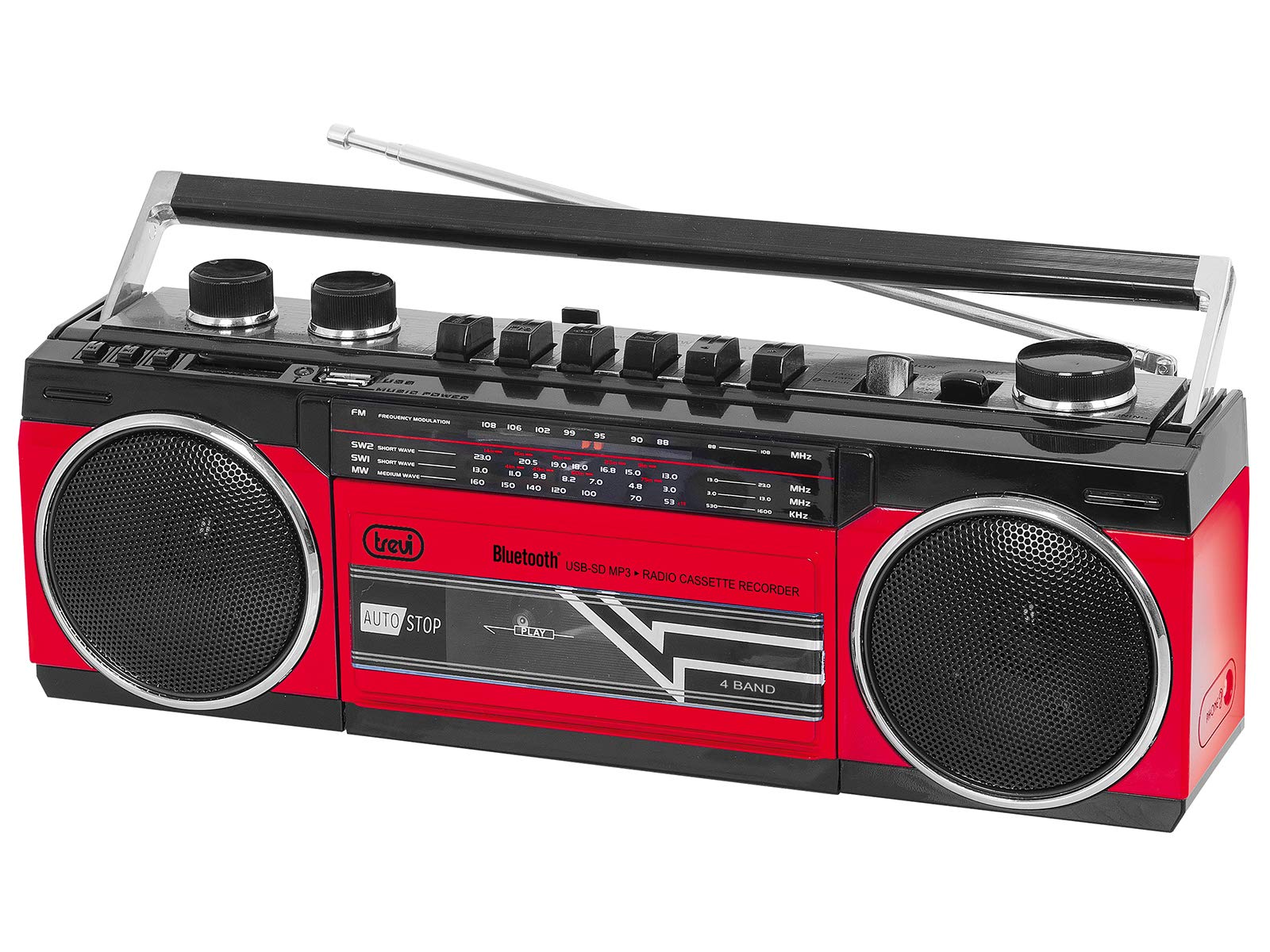
Şekil 1: Ön view of the Trevi RR 501 BT Boombox, showing the dual speakers, control panel, and cassette deck.

Şekil 2: Açılı view of the Trevi RR 501 BT Boombox, highlighting the side profile ve idare edin.
Temel Bileşenler:
- Konuşmacılar: Two integrated stereo speakers.
- Kontrol Paneli: Buttons for playback, mode selection, and tuning.
- Ses Düğmesi: Ses çıkış seviyesini ayarlar.
- Ayar Düğmesi: For radio frequency selection.
- Mod Seçici: Switches between Radio, Bluetooth, USB, SD, and Cassette modes.
- Kaset Destesi: For playing and recording audio cassettes.
- USB Bağlantı Noktası: USB flash bellekten oynatma için.
- SD Kart Yuvası: SD karttan oynatma için.
- Anten: FM radyo alımı için teleskopik anten.
- Güç Girişi: AC güç kablosunu bağlamak için.
- Pil Bölmesi: (Located on the bottom/rear) For optional battery operation.
Kurmak
Güç Bağlantısı:
- AC Gücü: Insert the AC power cable into the AC input jack on the back of the unit, then plug the other end into a standard wall outlet.
- Pil Gücü (İsteğe Bağlı): Open the battery compartment cover (usually on the bottom or rear). Insert the required number of D-size batteries (not included), ensuring correct polarity (+/-). Close the compartment cover securely.
Note: When using AC power, batteries are automatically disconnected. Remove batteries if the unit will not be used for an extended period.
Kullanım Talimatları
Açma/Kapatma:
To turn the unit on, rotate the Ses Düğmesi clockwise until you hear a click. To turn off, rotate the Ses Düğmesi counter-clockwise until it clicks off.
Radio Operation (FM):
- Üniteyi açın.
- Ayarla Mod Seçici to "RADIO".
- En iyi sinyal alımı için teleskopik anteni uzatın.
- Döndür Ayar Düğmesi to select your desired FM station.
- Ayarla Ses Düğmesi Tercih ettiğiniz dinleme seviyesine göre.
Bluetooth Bağlantısı:
- Üniteyi açın.
- Ayarla Mod Seçici to "BT" (Bluetooth). The unit will enter pairing mode, indicated by a flashing LED.
- Bluetooth özellikli cihazınızda (örneğin, akıllı telefon, tablet) Bluetooth'u etkinleştirin ve kullanılabilir cihazları arayın.
- Select "Trevi RR 501 BT" from the list of devices.
- Once paired, the LED indicator will stop flashing and remain solid. You can now play audio from your device through the boombox.
USB/SD Oynatma:
- Üniteyi açın.
- USB flash sürücüyü sürücüye takın USB Bağlantı Noktası veya bir SD kartı takın SD Kart Yuvası. Ensure the media contains MP3 audio files.
- Ayarla Mod Seçici to "USB/SD". The unit will automatically begin playing the first compatible audio file.
- Use the playback control buttons (e.g., Play/Pause, Next, Previous) on the unit to manage your audio.
Kaset Oynatma:
- Üniteyi açın.
- Basın DUR/ÇIKAR button on the cassette deck to open the cassette compartment.
- Insert an audio cassette with the open edge facing upwards and the tape side facing you. Close the compartment door.
- Ayarla Mod Seçici to "TAPE".
- Basın OYNAMAK oynatmayı başlatmak için düğmesine basın.
- Kullanın GERİ SARMA Ve HIZLI İLERLEME Bant üzerinde gezinmek için düğmeler.
- Basmak DUR/ÇIKAR to stop playback and open the compartment.
Kaset Kaydı:
- Insert a blank cassette into the cassette deck.
- Select the desired audio source (Radio, Bluetooth, USB, SD) using the Mod Seçici.
- Start playback of the source audio.
- Basın KAYIT button (usually red) on the cassette deck. The OYNAMAK Buton da aktif hale gelecek. Kayıt başlayacak.
- Kaydı durdurmak için DUR/ÇIKAR düğme.
Bakım
- Temizlik: Cihazın dış yüzeyini temizlemek için yumuşak, kuru bir bez kullanın. Aşındırıcı temizleyiciler veya çözücüler kullanmayın.
- Kaset Çalar Bakımı: Bant başlıklarını ve sıkıştırma silindirlerini periyodik olarak pamuklu çubukla hafifçe temizleyin.ampİzopropil alkol ile yıkandı.
- Depolamak: When not in use for extended periods, store the unit in a cool, dry place, away from direct sunlight and extreme temperatures. Remove batteries if applicable.
Sorun giderme
| Sorun | Olası Neden | Çözüm |
|---|---|---|
| Güç yok | Güç kablosu bağlı değil; piller bitmiş veya yanlış takılmış. | Check AC power connection; Replace batteries or ensure correct polarity. |
| Zayıf radyo alımı | Anten uzatılmamış; Sinyal zayıf. | Fully extend the telescopic antenna; Reposition the unit for better signal. |
| Bluetooth eşleştirmiyor | Unit not in BT mode; Device too far; Already paired with another device. | Ensure mode is set to BT; Move device closer; Disconnect from other devices. |
| USB/SD oynatılamıyor | Yanlış mod; Uyumsuz file Biçim; Bozuk medya. | Set mode to USB/SD; Ensure files are MP3; Try different USB/SD media. |
| Kaset oynatma sorunları | Cassette inserted incorrectly; Tape heads dirty. | Re-insert cassette correctly; Clean tape heads and pinch rollers. |
Özellikler
| Marka | Aşk |
| Model Numarası | 0RR50102 |
| Bağlantı Teknolojisi | Bluetooth, USB |
| Hoparlör Tipi | Stereo |
| Boyutlar (U x G x Y) | 50 x 50 x 28 santimetre |
| Güç Kaynağı | AC |
| Ürün Ağırlığı | 1.25 Kilogram |
| Çıkış Gücü | 6 Watt |
| Renk | Kırmızı |
| Stil | Geriye Dönük |
Garanti ve Destek
For warranty information and technical support, please refer to the warranty card included with your product or visit the official Trevi website. Information regarding spare parts availability and software updates is not provided in the product specifications.
Herhangi bir garanti talebiniz için lütfen satın alma belgenizi saklayın.


