giriiş
The American Lifetime 8-inch Digital Day Clock is designed to provide clear and easy-to-read time, day, and date information. Its large display and customizable features make it a valuable tool for maintaining daily routines and orientation. This manual will guide you through the setup, operation, and maintenance of your new clock.
Temel Özellikler:
- Dayanıklı Yapı: Built with robust materials for long-lasting use.
- Kolay Okunabilen Ekran: Features a large, clear, high-contrast 8-inch display for optimal visibility, even in low light.
- Basit Kurulum: User-friendly interface with an easy-to-follow manual for quick operation.
- Özelleştirilebilir Alarmlar: Set up to 5 daily alarms for reminders such as medication times or appointments.
- Otomatik Karartma: Adjusts display brightness automatically based on ambient room light.
- Çoklu Dil Desteği: Offers various language and time format options.
- Pil Yedekleme: Internal battery ensures time and date are maintained during power outages, automatically resetting when power returns.
- Ekranı Temizle: Spells out the time, period of the day, full day of the week, month, and date without confusing abbreviations.
Kurmak
Setting up your American Lifetime Digital Day Clock is straightforward. Follow these steps to get started:
- Saati Açın: Saati ve tüm aksesuarlarını ambalajından dikkatlice çıkarın.
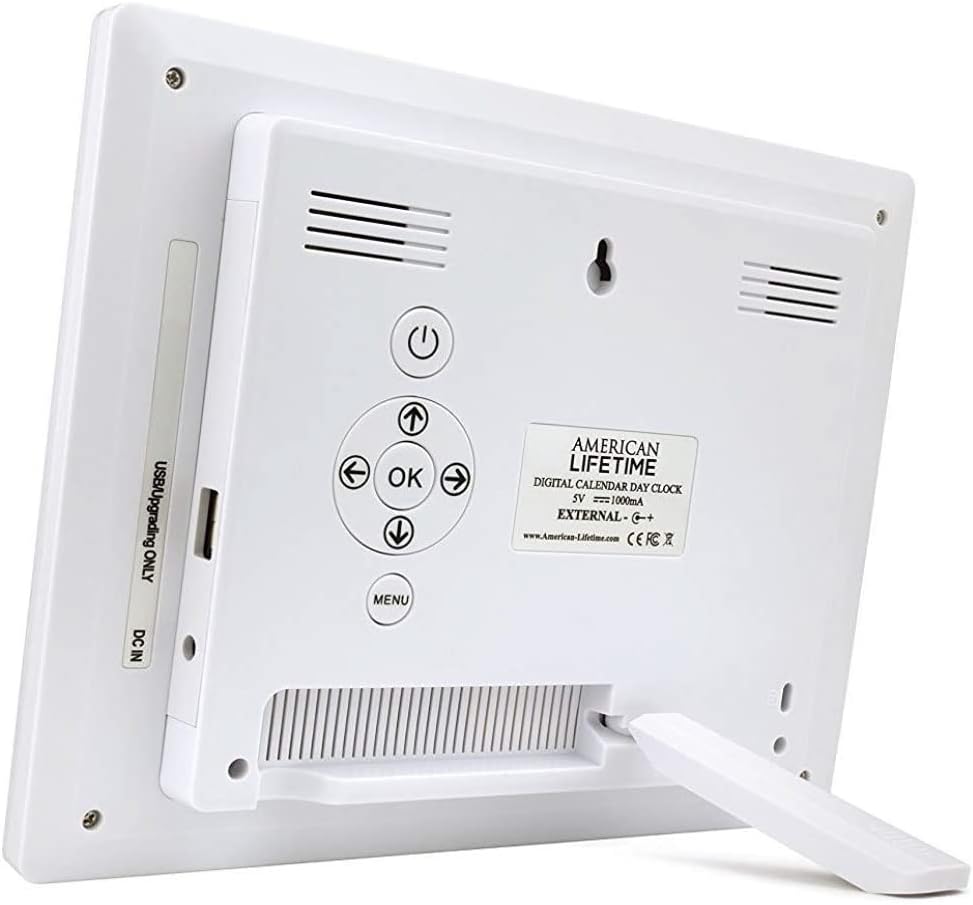
- Standı takın: The clock includes a removable stand that can be inserted into the back for tabletop display. It supports both horizontal and vertical orientations.
- Gücü bağlayın: Plug the provided power adapter into the DC IN port on the back of the clock and then into a standard electrical outlet. The clock will automatically power on and display the current time and date.
- Başlangıç ayarları: Use the control buttons on the back of the clock to navigate the menu and set the correct time, date, time mode (12/24 hour), date mode (Month-Day-Year, Day-Month-Year), and language.

Kullanım Talimatları
Your Digital Day Clock offers several customizable settings to enhance its utility. All adjustments are made using the buttons located on the back of the unit.
Kontrol Düğmeleri:
- Güç Düğmesi: Ekranı açar veya kapatır.
- Tamam Düğmesi: Menüdeki seçimleri onaylar.
- Ok Tuşları (Yukarı/Aşağı/Sol/Sağ): Menü seçenekleri arasında gezinin ve değerleri ayarlayın.
- Menü Düğmesi: Ana ayarlar menüsüne erişim sağlar.
Saat ve Tarih Ayarı:
- Basın Menü Ayarlara girmek için butona tıklayın.
- Kullanın Yukarı/Aşağı arrows to select "Set Time" or "Set Date".
- Basmak OK to enter the setting. Use Sol/Sağ arrows to move between digits/fields and Yukarı/Aşağı arrows to change values.
- Basmak OK to confirm each change.
Customizing Alarms:
The clock supports up to 5 customizable alarms with messages.
- From the main menu, navigate to "Alarm Time 1" through "Alarm Time 5".
- Basmak OK Bir alarm seçmek için
- Set the alarm time and frequency (e.g., daily, weekdays).
- Choose a pre-set message (e.g., "Time to take medication", "Appointment Reminder") or set a custom message if available.
- Ensure the alarm is set to "On" and press OK kaydetmek için.
Diğer ayarlar:
- Zaman Modu: 12 saatlik ve 24 saatlik formatlar arasında geçiş yapın.
- Tarih Modu: Select your preferred date display format (e.g., Month-Day-Year).
- Dil: Choose from multiple language options.
- Show Period Of The Day: Enable or disable the display of "Morning," "Afternoon," "Evening," or "Night."
- Otomatik Karartma: Turn this feature on to allow the clock to automatically adjust its brightness.
Bakım
To ensure the longevity and optimal performance of your Digital Day Clock, follow these simple maintenance guidelines:
- Temizlik: Use a soft, dry cloth to gently wipe the screen and frame. Avoid abrasive cleaners or sprays that could damage the display or finish.
- Atama: Place the clock on a stable, flat surface or mount it securely on a wall. Avoid direct sunlight or extreme temperatures, which can affect performance and display life.
- Güç: Always use the original power adapter provided with the clock.
Sorun giderme
If you encounter any issues with your American Lifetime Digital Day Clock, refer to the following common problems and solutions:
| Sorun | Çözüm |
|---|---|
| Saat açılmıyor. | Ensure the power adapter is securely plugged into both the clock and a working electrical outlet. Try a different outlet. |
| Ekran çok loş veya çok parlak. | Check the "Auto Dimming" setting in the menu. You can turn it off to manually adjust brightness if needed. |
| Saat veya tarih yanlış. | Access the "Set Time" and "Set Date" options in the menu to manually correct the settings. |
| Alarms are not sounding. | Verify that the alarm time is correctly set, the alarm is enabled ("On"), and the volume is not muted. |
Özellikler
- Marka: Amerikan Ömrü
- Model Numarası: H1-HO1A--JB6HDWLAO4
- Renk: Kahverengi
- Görüntüleme Türü: Dijital
- Ürün Ölçüleri: 8.5"G x 6.75"Y
- Güç Kaynağı: Kablolu Elektrik
- Malzeme: Plastik
- Montaj Tipi: Duvara Montaj, Masaüstü
- Özel Özellikler: Alarm, Calendar Display, Auto-Dimming, Multi-Language Support, Battery Backup
- Ürün Ağırlığı: 15.8 ons
- UPC: 728044490976
Garanti ve Destek
American Lifetime stands behind its products. Your Digital Day Clock comes with a 1 yıllık üretici sınırlı garantisi. Additionally, you can return the product for free within the first 30 days of purchase, no questions asked.
For any questions, troubleshooting assistance, or warranty claims, please contact American Lifetime customer service. Our team is dedicated to providing support and ensuring your satisfaction.
Ziyaret edin American Lifetime Store Daha fazla bilgi ve destek kaynakları için.


