1. Giriş
This manual provides essential information for the safe and efficient operation of your DNP DS820A Professional Dye-Sublimation Printer. The DS820A is designed for high-quality photo printing, offering a resolution of 300 x 600 dpi and supporting various print sizes up to 8x32 inches. It features a high-speed print mode, producing 8x10 inch glossy photos in approximately 29.3 seconds, and supports multiple surface options including Glossy, Luster, Matte, and Fine Matte.
Please read this manual thoroughly before using the printer to ensure proper setup, operation, and maintenance.

Şekil 1: Ön açılı view of the DNP DS820A printer.
2. Güvenlik Bilgileri
Yaralanmaları ve yazıcıya zarar gelmesini önlemek için aşağıdaki güvenlik önlemlerine uyun:
- Yazıcıyı her zaman topraklı bir elektrik prizine bağlayın.
- Do not block ventilation openings on the printer. Ensure adequate space around the unit for proper airflow.
- Keep the printer away from water or excessive humidity.
- Yazıcıyı kendiniz sökmeye veya onarmaya çalışmayın. Yetkili servis personeline başvurun.
- Use only DNP-approved media and ribbons.
3. Paket İçeriği
Paketin içinde tüm öğelerin mevcut olduğundan emin olun:
- DNP DS820A Printer Unit
- Güç kablosu
- USB kablosu
- Medya Tepsisi
- Hızlı Başlangıç Kılavuzu ve Dokümantasyon
Media (paper and ribbon) is typically sold separately.
4. Kurulum
4.1 Paketten Çıkarma ve Yerleştirme
- Yazıcıyı ambalajından dikkatlice çıkarın.
- Place the printer on a stable, level surface with sufficient space for ventilation and media loading/unloading.
- Remove all protective tapes and packing materials.
4.2 Yazıcıyı Bağlama
- Güç kablosunu yazıcının güç girişine ve ardından topraklı bir elektrik prizine bağlayın.
- USB kablosunu yazıcının USB portuna ve bilgisayarınıza bağlayın.
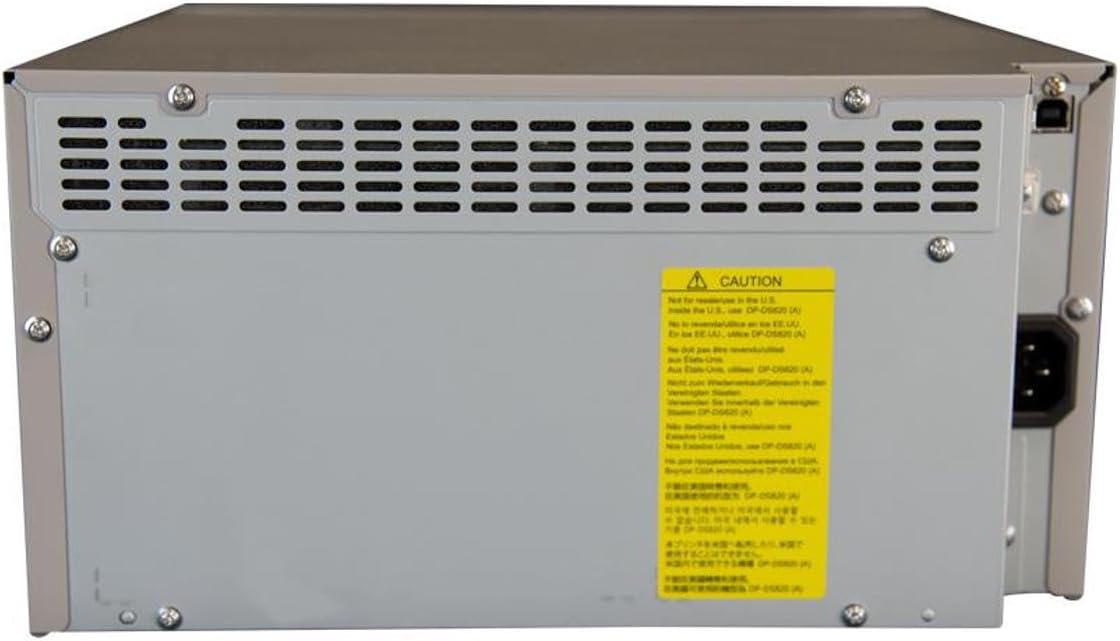
Şekil 2: Arka view of the DNP DS820A, highlighting connectivity ports.
4.3 Sürücü Kurulumu
Install the latest printer drivers from the DNP website. The printer is compatible with Windows and Mac OS X/macOS operating systems.
4.4 Loading Media (Paper and Ribbon)
The DS820A uses a roll-fed media system. Refer to the specific instructions provided with your DNP media for detailed loading procedures. Generally, this involves opening the front panel, inserting the ribbon cassette, and then loading the paper roll into its designated slot.
5. Kullanım Talimatları
5.1 Açma/Kapatma
Locate the power switch on the front or side of the printer. Flip the switch to the 'On' position to power on the printer. To power off, flip the switch to the 'Off' position.
5.2 Gösterge Işığı
The printer features several indicator lights on the front panel to communicate its status:
- GÜÇ: Yazıcının açık olduğunu gösterir.
- BEKLEMEDE: Indicates operational status or standby mode.
- RIBBON: Illuminates when the ribbon needs replacement or is incorrectly installed.
- KAĞIT: Illuminates when paper needs replacement or is incorrectly loaded.
- HATA: Indicates a general error. Refer to the troubleshooting section or driver software for details.

Figure 3: Front control panel with status indicator lights.
5.3 Baskı İşlemi
- Yazıcının açık ve bilgisayarınıza bağlı olduğundan emin olun.
- Yazdırmak istediğiniz resmi veya belgeyi bilgisayarınızda açın.
- Select the DNP DS820A from your printer options.
- Adjust print settings such as print size, resolution (300x600 dpi recommended for color), and surface type (Glossy, Luster, Matte, Fine Matte) in the printer driver settings.
- Initiate the print job. The printer will process and output the photo.
6. Bakım
6.1 Yazıcıyı Temizleme
Düzenli temizlik, baskı kalitesini korumaya ve yazıcının ömrünü uzatmaya yardımcı olur.
- Dış: Dış yüzeyi yumuşak, kuru ve tüy bırakmayan bir bezle silin. Aşındırıcı temizleyiciler veya çözücüler kullanmayın.
- İç mekan: Periodically open the front panel and gently remove any dust or debris from the media path using a soft brush or compressed air.
6.2 Medya Değiştirme
When the RIBBON or PAPER indicator lights illuminate, it's time to replace the respective media. Open the front access panel to replace the ribbon cassette and paper roll according to the instructions provided with the DNP media.
7. Sorun Giderme
Bu bölümde karşılaşabileceğiniz yaygın sorunlar ele alınmaktadır.
| Sorun | Olası Neden | Çözüm |
|---|---|---|
| Yazıcı açılmıyor | Power cable disconnected; Power switch off | Check power cable connection; Ensure power switch is ON. |
| RIBBON light on | Ribbon empty or incorrectly installed | Replace ribbon; Reinstall ribbon correctly. |
| PAPER light on | Paper roll empty or incorrectly loaded | Replace paper roll; Re-load paper correctly. |
| HATA ışığı yanıyor | Genel yazıcı hatası | Turn printer off and on; Check computer for specific error messages; Consult DNP support. |
| Düşük baskı kalitesi | Dirty print head; Incorrect driver settings; Low quality image source | Clean printer interior; Verify print settings (DPI, media type); Use high-resolution images. |
If you encounter issues not covered here, or if solutions do not resolve the problem, contact DNP customer support.
8. Özellikler
| Özellik | Şartname |
|---|---|
| Model Adı | DS820A |
| Baskı Teknolojisi | Boya Süblimasyonu |
| Maksimum Renkli Baskı Çözünürlüğü | 300 x 600 dpi |
| Maksimum Siyah Beyaz Baskı Çözünürlüğü | 300 x 300 dpi or 300 x 600 dpi |
| Desteklenen Medya Boyutları | 5 x 7 inches, 8 x 10 inches, 8 x 12 inches, up to 8 x 32 inches (panoramic) |
| Basılı Medya Türleri | Glossy photo paper, Luster, Matte, Fine Matte |
| Print Speed (8x10 Glossy) | Yaklaşık 29.3 saniye |
| Maksimum Giriş Sayfası Kapasitesi | 250 sheets (depending on media type) |
| Çıktı Sayfası Kapasitesi | 250 sayfa |
| Tepsi Sayısı | 2 |
| Bağlantı Teknolojisi | USB 2.0 |
| Donanım Arayüzü | USB |
| Kontrol Yöntemi | Uygulama |
| Yazıcı Çıktısı | Color; Monochrome |
| Ürün Ağırlığı | 36 pound (16.33 kg) |
| Ürün Boyutları (U x G x Y) | 19.25 x 17.25 x 12 inç (48.9 x 43.8 x 30.5 cm) |
| Üretici | DNP |
| UPC | 650415905867 |
9. Garanti ve Destek
The DNP DS820A printer comes with a full warranty. For specific warranty terms and conditions, please refer to the documentation included with your product or visit the official DNP webalan.
For technical assistance, troubleshooting beyond this manual, or to inquire about service, please contact DNP customer support directly. Contact information can typically be found on the DNP websitenizde veya ürününüzün ambalajında.


