giriiş
This manual provides detailed instructions for the setup, operation, and maintenance of your Hyperkin Knight Premium Controller. Designed for use with PlayStation 3 (PS3), PC, and Mac systems, this controller offers a versatile gaming experience with its ergonomic design and responsive controls. Please read this manual thoroughly before using the product to ensure optimal performance and longevity.
Ürün Özellikleri
- Çift Analog Joystick: Two wide-spectrum analog joysticks for precise control.
- Pressure-Sensitive D-Pad: An eight-way directional pad with pressure sensitivity.
- Pressure-Sensitive Buttons: Four shoulder buttons and four face buttons with pressure sensitivity for nuanced input.
- Geri Bildirimi Zorla: Integrated force feedback for immersive gaming experiences.
- Ana menü tuşu: Dedicated button for system menu access.
- Uzun Kablo: A 6-foot (1.8 meter) cable for flexible positioning.
- Çoklu Platform Uyumluluğu: Compatible with all PS3 models, as well as PC and Mac via USB.
Paket İçeriği
- Hyperkin Knight Premium Controller (White)
- Integrated USB Cable (6 ft.)
Kurulum Talimatları
PlayStation 3'e (PS3) bağlanmak
- Ensure your PS3 console is powered off or in standby mode.
- Locate an available USB port on your PS3 console.
- Plug the USB connector of the Hyperkin Knight Controller into the USB port on your PS3.
- Power on your PS3 console. The controller should be automatically recognized and assigned a player number.
- If the controller does not respond, try a different USB port or restart the console.
PC/Mac'e bağlanma
- PC veya Mac bilgisayarınızda kullanılabilir bir USB bağlantı noktası bulun.
- Plug the USB connector of the Hyperkin Knight Controller into the USB port.
- Your operating system (Windows, macOS) should automatically detect and install the necessary drivers. This process may take a few moments.
- Once installed, the controller will be ready for use with compatible games and applications. You may need to configure controller settings within individual games or system preferences.
- Not: Functionality may vary depending on the operating system and specific game titles.
Kullanım Talimatları
The Hyperkin Knight Premium Controller features a standard layout for intuitive gameplay.
Kontrolör Düzeni

Resim: Üst view of the Hyperkin Knight Premium Controller, showing the D-pad, analog sticks, face buttons, and central buttons.
- D-Pad (Yön Tuşu): Located on the left, used for directional input.
- Sol Analog Çubuk: Below the D-Pad, for precise movement and camera control.
- Sağ Analog Çubuk: On the right side, typically for camera control or aiming.
- Yüz Düğmeleri (Üçgen, Daire, Haç, Kare): On the right, used for actions within games.
- Omuz Düğmeleri (L1, L2, R1, R2): Located on the top edge of the controller, used for various in-game functions.
- SEÇ Düğmesi: Typically used for menu access or specific game functions.
- Başlama butonu: Typically used for pausing games or confirming selections.
- Ana menü tuşu: Central button to access the PS3 XMB (CrossMediaBar) or system menus on PC/Mac.
Güç Geri Bildirimi
The controller features force feedback (rumble) functionality, which provides tactile sensations during gameplay, enhancing immersion. This feature is automatically enabled when supported by the game and system. If you wish to disable it, check your game's or system's controller settings.
Bakım
- Temizlik: Kumandayı silmek için yumuşak, kuru bir bez kullanın. İnatçı kirler için hafifçe kurulayın.ampBezi suyla yıkayın. Sert kimyasallar veya aşındırıcı temizleyiciler kullanmaktan kaçının.
- Depolamak: Kumandayı serin, kuru ve doğrudan güneş ışığından ve aşırı sıcaklıklardan uzak bir yerde saklayın. Hasarı önlemek için kabloyu çok sıkı sarmaktan kaçının.
- Kablo Bakımı: Do not pull the controller by its cable. Always grasp the USB connector when plugging or unplugging.
Sorun giderme
Denetleyici Yanıt Vermiyor
- Bağlantıyı kontrol et: Ensure the USB cable is securely plugged into both the controller and the console/computer.
- Farklı bir USB Portu Deneyin: Connect the controller to another USB port on your system.
- Sistemi Yeniden Başlat: Power cycle your PS3, PC, or Mac.
- Driver Check (PC/Mac): On PC, check Device Manager to see if the controller is recognized and if there are any driver issues. On Mac, check System Information > USB.
Incorrect Button Mapping or Limited Functionality
- Oyun Ayarları: Many games allow for custom controller mapping. Check the in-game settings for controller configuration.
- System Settings (PC/Mac): For PC, some games or emulators may require specific controller configurations or third-party software. For Mac, check System Preferences > Game Controllers (if available) or specific application settings.
- PS3 Uyumluluğu: While compatible with all PS3 models, some older games or specific PS3 system software versions might have unique controller handling. Ensure your PS3 system software is up to date.
Force Feedback Not Working
- Oyun Desteği: Verify that the game you are playing supports force feedback.
- Oyun İçi Ayarlar: Check the game's options menu to ensure force feedback (rumble) is enabled.
- Sistem Ayarları: On PC, ensure rumble is enabled in your controller settings.
Özellikler
| Model Numarası | M07213-WH |
| Uyumluluk | PlayStation 3, PC, Mac (via USB) |
| Kablo Uzunluğu | 6 feet (yaklaşık 1.8 metre) |
| Giriş Türü | Pressure-sensitive buttons and D-pad, dual analog joysticks |
| Geri bildirim | Force Feedback (Rumble) |
| Boyutlar | 2.99 x 7.99 x 7.01 inç (yaklaşık 7.6 x 20.3 x 17.8 cm) |
| Ağırlık | 12.5 ons (yaklaşık 354 gram) |
| Üretici | Hyperkin Inc |
Garanti ve Destek
Garanti bilgileri ve teknik destek için lütfen resmi Hyperkin web sitesine başvurun. webSite üzerinden satın alabilir veya doğrudan müşteri hizmetleriyle iletişime geçebilirsiniz. Satın alma fişinizi, garanti talepleriniz için satın alma belgesi olarak saklayın.
Üretici: Hyperkin Inc
Webalan: www.hyperkin.com (Lütfen resmi siteyi ziyaret edin) web(En güncel destek bilgileri için lütfen siteyi ziyaret edin.)
Ürün Bittiview Görüntüler
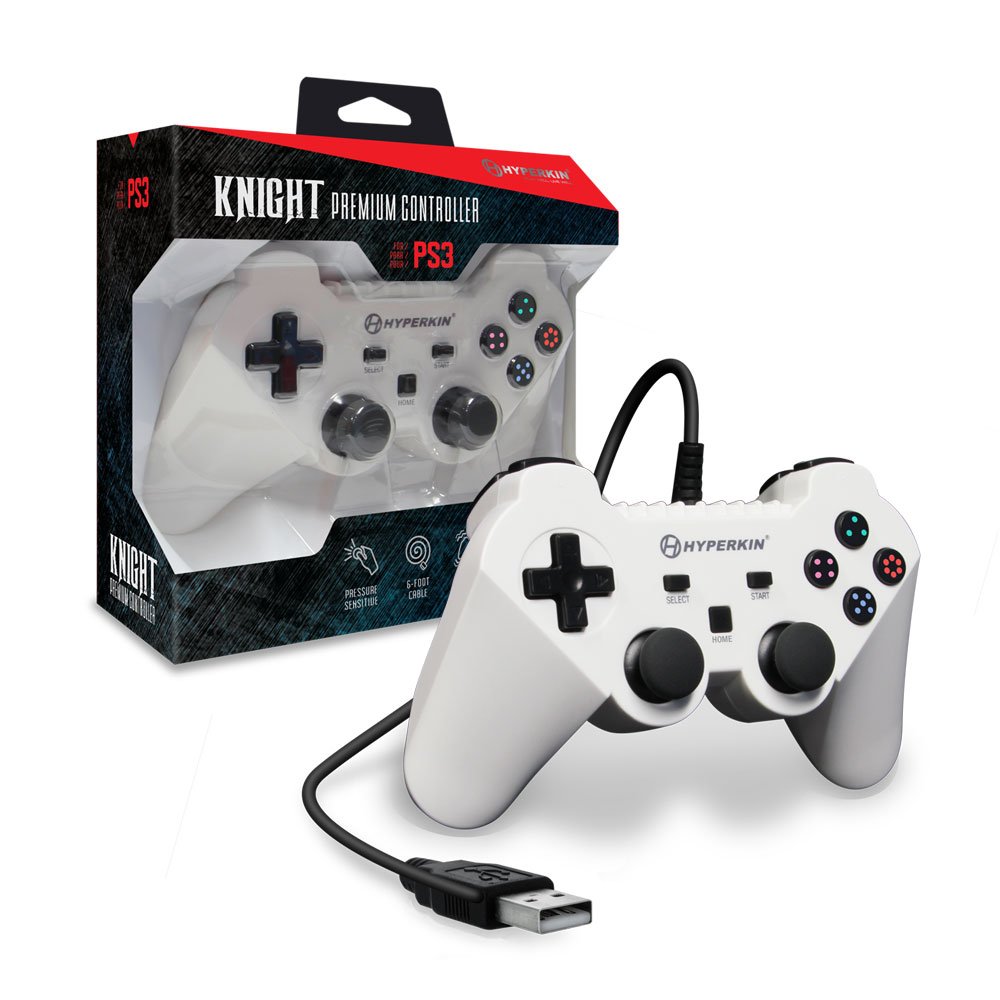
Image: The Hyperkin Knight Premium Controller displayed alongside its retail packaging, highlighting the product's design and branding.

Resim: Yakın çekim view of the Hyperkin Knight Premium Controller's retail box, showcasing temel özellikleri ve tasarım unsurları.

Resim: Açılı bir view of the Hyperkin Knight Premium Controller, emphasizing its ergonomic shape and button placement.


