1. Ürün Bittiview
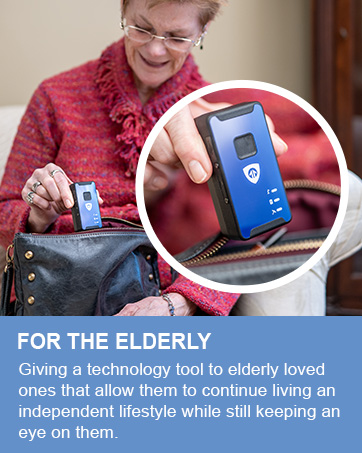
The Brickhouse Spark Nano 7 is a compact and powerful GPS tracking device designed for real-time monitoring of vehicles, assets, and individuals. It offers global 4G LTE cellular coverage, ensuring seamless tracking capabilities wherever you are. Its discreet design and magnetic waterproof case make it versatile for various applications, providing peace of mind through continuous location updates and comprehensive reporting features.


2. Kutuda Neler Var?
- Spark Nano 7.0 GPS Tracker
- Manyetik Kasa
- Duvar şarj cihazı
- Kullanıcı Kılavuzu
- SIM card (included and pre-installed)
3. Kurulum Kılavuzu
- Cihazı Şarj Edin: Before first use, fully charge your Spark Nano 7 using the provided wall charger. Ensure the device is powered off during charging.
- Aboneliğinizi Aktifleştirin: A subscription plan is required for operation. Visit the Brickhouse Security website or contact customer support to activate your preferred plan (Basic, Plus, or Premium).
- Uygulamayı indirin: Download the official Brickhouse Security tracking application from the Apple App Store (for iOS devices) or Google Play Store (for Android devices). The tracking platform is also accessible via any web tarayıcı.
- Giriş yapmak: Use your subscription credentials to log into the mobile app or web platformu.
- Atama: Place the Spark Nano 7 in the desired location. The magnetic waterproof case allows for discreet and secure attachment to vehicles or other assets.

4. Kullanım Talimatları
The Spark Nano 7 provides real-time GPS tracking and a suite of features accessible through the dedicated mobile application or web platformu.
- Gerçek Zamanlı Takip: View the current location of your device on a map with frequent updates. The update frequency depends on your subscription plan (e.g., 60-second or 5-second updates).
- Historical Reports: Access detailed travel logs, including routes taken, speeds, and stops, for a specified period (e.g., 30, 90, or 180 days depending on plan).
- Coğrafi sınırlama: Set up virtual boundaries (geofences) on the map. Receive instant alerts when the tracker enters or exits these predefined areas.
- Hız Uyarıları: Configure alerts to be notified if the device exceeds a set speed limit.
- Access Anywhere: Monitor and manage your tracker from any web browser or through the mobile application on your iOS or Android device.


5. Bakım
- Pil Ömrü: The Spark Nano 7 has a battery life of approximately 8-15 days, depending on usage and tracking frequency settings.
- Şarj: Recharge the device using the provided wall charger when the battery indicator shows low power.
- Su Geçirmez Kılıf: The included magnetic case is waterproof, protecting the device from impact and harsh weather conditions. Ensure the case is properly sealed when used in wet environments.
- Temizlik: Wipe the device and case with a soft, dry cloth. Avoid using harsh chemicals or abrasive materials.
6. Sorun Giderme
- Device Not Tracking: Ensure the device is charged and powered on. Verify that your subscription is active and in good standing. Check for cellular signal in the device's location.
- Yanlış Konum: GPS accuracy can be affected by environmental factors such as dense urban areas, heavy tree cover, or indoor placement. Move the device to an open area for better signal.
- Uygulama Sorunları: If the mobile app is not functioning correctly, try restarting the app, clearing its cache, or reinstalling it. Ensure your smartphone's operating system is up to date.
- Hiçbir uyarı yok: Double-check your alert settings (geofences, speed alerts) within the tracking platform to ensure they are correctly configured and enabled.
7. Özellikler
| Özellik | Detay |
|---|---|
| Ürün Boyutları | 5.5 x 5 x 4.1 inç |
| Ürün Ağırlığı | 1.15 pound |
| Ürün Model Numarası | SNPC |
| Piller | 1 Lityum Polimer pil gereklidir |
| Bağlantı Teknolojisi | Hücresel (4G LTE) |
| Desteklenen Uygulama | Alexa, Web App, iOS, Android |
| Özel Özellik | GPS Tracking Device with Magnetic Case and Extended Battery |
| İlk Mevcut Tarih | 2 Şubat 2017 |

8. Subscription Plans
The Spark Nano 7 requires an active subscription plan to function. Various plans are available to suit different tracking needs, billed annually for the best value. Monthly and quarterly options may also be available.

- Basic Plan: Starting at $17.99/unit/month (billed annually). Includes unlimited cellular data, cloud software, mobile application, 30 days of tracking history, 60-second location updates, 60 SMS alerts, 5 geofences, and North America coverage.
- Plus Plan: Starting at $27.99/unit/month (billed annually). Includes all Basic features plus 90 days of tracking history, 30-second location updates, 200 SMS alerts, 60 geofences, up to 3 user logins, and North America & Europe coverage.
- Premium Plan: Starting at $34.99/unit/month (billed annually). Includes all Plus features plus 180 days of tracking history, 5-second location updates, unlimited SMS alerts, unlimited geofences, unlimited user logins, and worldwide coverage.
No long-term contracts are required, and you can cancel anytime for a hassle-free experience.
9. Garanti ve Destek
The Brickhouse Spark Nano 7 GPS Tracker comes with a lifetime warranty, ensuring long-term reliability and support for your device.
For further assistance, please refer to the official user guides:
Ayrıca ziyaret edebilirsiniz Brickhouse Security Store on Amazon Daha fazla bilgi ve destek kaynakları için.


