1. Giriş
This manual provides comprehensive instructions for the installation, operation, and maintenance of your Mitsubishi NR-MZ033-2 In-Dash Navigation System. Please read this manual thoroughly before using the product to ensure correct operation and to prevent damage.
2. Güvenlik Bilgileri
Observe the following safety precautions to prevent injury or damage to the device.
- Always operate the vehicle safely. Distraction from the navigation system can lead to accidents.
- Do not attempt to install or service the unit yourself. Professional installation is recommended.
- Ensure all wiring is correctly connected to prevent electrical hazards or malfunction.
- Keep the unit free from moisture and extreme temperatures.
- Havalandırma açıklıklarını kapatmayın.
3. Ürün Bittiview
3.1 Temel Özellikler
- 7V type WVGA Monitor for clear display.
- Integrated DVD and CD mechanism for media playback.
- Built-in Bluetooth for connectivity.
- Features a multi-way scroll function for map screen navigation, similar to smartphone operation.
- Supports VICS WIDE for traffic and road information, utilizing FM multi-broadcast transmission.
- Provides a straight-line display from the current location to the destination for clear directional guidance.
- Navigation panel with incurve and outcurve buttons designed for ease of operation.
- Intuitive menu design for straightforward function selection.
3.2 Ürün Görseli
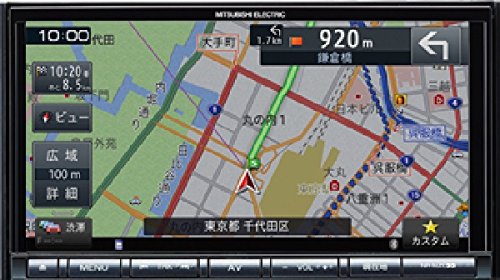
Resim: Ön view of the Mitsubishi NR-MZ033-2 In-Dash Navigation System, showing the 7V WVGA monitor and control buttons.
4. Kurulum
4.1 Kurulum
The Mitsubishi NR-MZ033-2 is designed for in-dash installation. Due to the complexity of vehicle electrical systems, professional installation by a qualified technician is strongly recommended. The product dimensions are approximately 178 mm (W) x 100 mm (H) x 164 mm (D).
4.2 İlk Güç Açma
After installation, turn on your vehicle's ignition. The system should power on automatically. Follow any on-screen prompts for initial setup, such as language selection or time zone settings.
5. Kullanım Talimatları
5.1 Gezinme Fonksiyonları
- Map Screen Navigation: Use the multi-way scroll function on the touch screen to pan and zoom the map.
- Varış Noktası Girişi: Access the navigation menu to input destinations via address, points of interest, or recent history.
- Rota Rehberi: The system provides turn-by-turn directions and a straight-line display to your destination.
- VICS GENELİ: Access real-time traffic and road information through the VICS WIDE feature to optimize your route.
5.2 Media Playback (DVD/CD)
- Disk Takma: Gently insert a DVD or CD into the disc slot. The system will automatically detect and begin playback.
- Kontroller: Use the on-screen touch controls or physical buttons for play, pause, skip, and volume adjustment.
5.3 Bluetooth Bağlantısı
- Bir Cihazı Eşleştirme: Go to the Bluetooth settings menu on the navigation system and enable pairing mode. On your mobile device, search for available Bluetooth devices and select 'NR-MZ033-2'. Follow the on-screen prompts to complete pairing.
- Ses akışı: Once paired, you can stream audio from your mobile device to the navigation system.
5.4 Ekran ve Kontroller
- Dokunmatik Ekran: The 7-inch WVGA monitor is a touch screen interface for most operations.
- Fiziksel Düğmeler: Incurve and outcurve buttons provide tactile control for frequently used functions.
- Menu Layout: The menu system is designed for clarity, allowing quick access to navigation and AV functions.
5.5 Ses Ayarları
Access the audio settings menu to adjust sound parameters. This includes adjusting the sound image position relative to the listening position and fine-tuning sound quality to suit your preferences within the vehicle environment.
6. Bakım
Düzenli bakım, navigasyon sisteminizin optimum performansını ve uzun ömrünü sağlar.
- Ekranın Temizlenmesi: Ekranı nazikçe silmek için yumuşak, tüy bırakmayan bir bez kullanın. İnatçı lekeler için, hafifçe bastırarak silin.ampen the cloth with water or a screen-safe cleaner. Do not use abrasive cleaners.
- Ünitenin Temizlenmesi: Wipe the exterior of the unit with a dry, soft cloth. Avoid using solvents or harsh chemicals.
- Disk Yuvası: Keep the disc slot free from dust and debris. Do not insert foreign objects.
7. Sorun Giderme
Yaygın sorunlar ve olası çözümleri için aşağıdaki tabloya bakın.
| Sorun | Olası Neden | Çözüm |
|---|---|---|
| Güç yok | Incorrect wiring; Blown fuse; Vehicle ignition off | Check wiring connections; Replace fuse; Turn vehicle ignition on |
| GPS sinyali yok | GPS antenna obstructed; Poor satellite reception | Açık olduğundan emin olun view of sky for GPS antenna; Move to an open area |
| Ses yok | Volume too low; Mute activated; Incorrect audio source; Speaker wiring issue | Increase volume; Deactivate mute; Select correct audio source; Check speaker connections |
| Dokunmatik ekran tepkisiz | System freeze; Screen calibration needed | Restart the unit (refer to installation manual for reset procedure); Recalibrate touch screen via settings |
8. Özellikler
| Özellik | Şartname |
|---|---|
| Marka | Mitsubishi |
| Model Adı | NR-MZ033-2 |
| Araç Servis Tipi | Araba |
| Ekran Boyutu | 7 inç |
| Özel Özellikler | VICS/VICS WIDE |
| Bağlantı Teknolojisi | Bluetooth |
| Harita türü | Sokak |
| Çözünürlük | WVGA |
| İnsan Arayüzü Girişi | Düğmeler |
| Kontrol Yöntemi | Dokunmak |
| Ürün Boyutları (G x Y x D) | Yaklaşık. 178 x 100 x 164 mm |
| Piller Dahil | HAYIR |
9. Garanti ve Destek
This product is covered by a manufacturer's warranty. Please refer to the warranty card included with your purchase for specific terms and conditions. For technical support or service inquiries, please contact your authorized Mitsubishi dealer or the customer support provided in your warranty documentation.