1. Giriş
The Sensor Switch NGWY2-GFX nLight Gateway 2 Graphic Touch Screen is a crucial component of the nLight lighting control system. This device acts as a network interface controller, providing a graphic touch screen for intuitive interaction and management of your nLight network. It is designed to integrate seamlessly with other nLight components, enabling comprehensive control over lighting and other connected devices.
Temel Özellikler:
- Part of the nLight System (operates exclusively within nLight environments)
- Designed for use with nLight nGWY2 CTRL Units
- Düşük Hacimtage operation: 60 mA @ 12-24 VAC/VDC
- Requires a separately sold power pack for operation

The product packaging for the Sensor Switch nLight Gateway 2 Graphic Touch Screen. The box displays the 'Sensor Switch' and 'nLight' logos, along with the model number NGWY2 GFX and a barcode (0753573465850).
2. Kurulum ve Kurulum
Proper installation of the NGWY2-GFX is essential for its functionality within the nLight system. This device requires connection to an nLight network and a low-voltage güç kaynağı.
2.1 Paket İçeriği
- NGWY2-GFX nLight Gateway 2 Graphic Touch Screen unit
- Montaj donanımı (varsa)
Not: düşük hacimlitage power pack is required and sold separately. Ensure you have the necessary nLight nGWY2 CTRL units for a complete system.
2.2 Fiziksel Kurulum
- Montaj: Select a suitable location for the NGWY2-GFX, typically a wall or panel, ensuring it is easily accessible for operation and viewing. Use appropriate mounting hardware to secure the unit.
- Ağ bağlantısı: Connect the NGWY2-GFX to your nLight network using standard RJ45 Ethernet cables. The device features two RJ45 ports for network integration.
- Güç Bağlantısı: Düşük hacimliyi bağlayıntage power supply (12-24 VAC/VDC) to the designated power terminals on the unit. Ensure correct polarity if applicable. The device requires 60 mA.
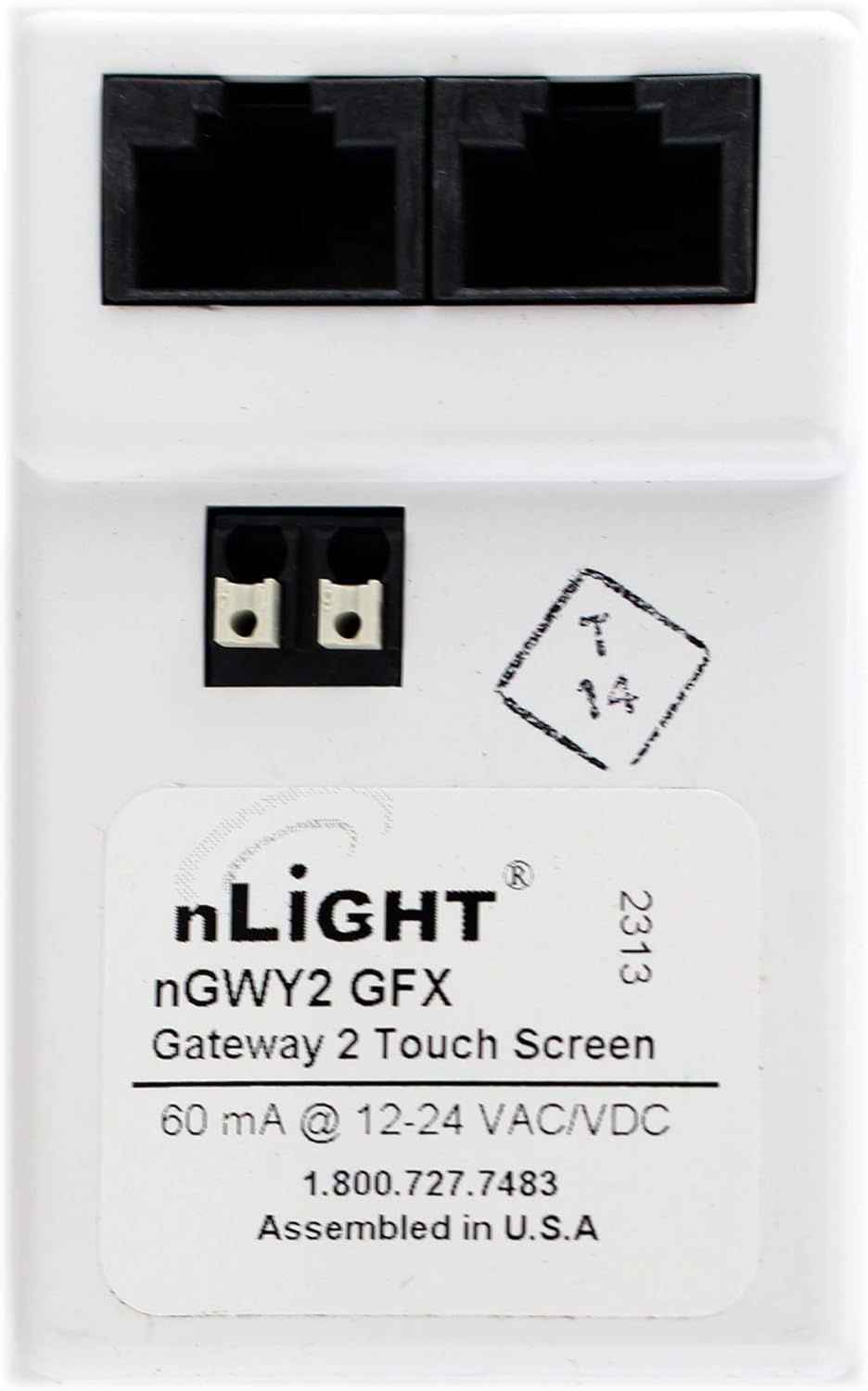
This image displays the back panel of the nLight Gateway 2, highlighting the two RJ45 network ports at the top and the low-voltage power terminals below them. A product label with model number NGWY2 GFX and power specifications (60 mA @ 12-24 VAC/VDC) is visible.
After physical connections are made, power on the connected low-voltage power pack. The device should initialize and display the nLight graphic interface.
3. Operasyon
The NGWY2-GFX provides a graphic touch screen interface for managing your nLight system. Its primary function is to serve as a central point of control and monitoring for various nLight-enabled devices.
3.1 Arayüzde Gezinme
- The touch screen allows for intuitive navigation through menus and settings.
- Specific functionalities, such as scene recall, zone control, and scheduling, are accessed via the graphic interface.
- Refer to the comprehensive nLight system documentation for detailed instructions on configuring and operating specific nLight features through the Gateway 2.
3.2 Sistem Entegrasyonu
As an nLight Gateway, this device facilitates communication between different nLight components and can bridge to other building management systems. It processes commands and relays status information across the network.
4. Bakım
The NGWY2-GFX is designed for reliable, long-term operation with minimal maintenance. Follow these guidelines to ensure optimal performance:
- Temizlik: Use a soft, dry, lint-free cloth to clean the touch screen and exterior surfaces. Avoid abrasive cleaners, solvents, or harsh chemicals, as these can damage the finish or screen.
- Çevre: Cihazın hasar görmesini önlemek için, belirtilen çevresel koşullar (sıcaklık, nem) dahilinde çalıştırıldığından emin olun.
- Donanım Yazılımı Güncellemeleri: Periodically check the Sensor Switch or nLight official webMevcut ürün yazılımı güncellemeleri için siteyi ziyaret edin. Güncelleme işlemleri için verilen talimatları dikkatlice izleyin.
5. Sorun Giderme
If you encounter issues with your NGWY2-GFX, refer to the following common troubleshooting steps:
- Cihaz Açılmıyor:
- Düşük hacimli olduğunu doğrulayıntage power pack is connected and receiving power.
- Check the power connections to the NGWY2-GFX unit for secure contact and correct polarity.
- Ensure the power supply meets the 12-24 VAC/VDC, 60 mA requirement.
- No Communication with nLight System:
- Inspect the RJ45 network cables for secure connections at both the NGWY2-GFX and the nLight network devices.
- Confirm that the nLight nGWY2 CTRL units are properly installed and functioning.
- Consult the nLight system documentation for network configuration and diagnostic tools.
- Dokunmatik Ekran Yanıt Vermiyor:
- Attempt a soft reset by cycling power to the unit (disconnect and reconnect the low-voltage power).
- Ekranın temiz ve herhangi bir engel içermediğinden emin olun.
For persistent issues or advanced troubleshooting, contact Sensor Switch technical support or refer to the official nLight system documentation.
6. Özellikler
| Özellik | Detay |
|---|---|
| Ürün Boyutları | 6 x 6 x 6 inç |
| Ürün Ağırlığı | 1 pound |
| ASIN | B01MCTDD37 |
| Ürün Model Numarası | NGWY2-GFX |
| Güç Gereksinimleri | 60 mA @ 12-24 VAC/VDC |
| Üretici | Sensör Anahtarı |
| İlk Mevcut Tarih | 1 Ocak 2014 |
7. Garanti ve Destek
The Sensor Switch NGWY2-GFX is covered by the manufacturer's standard warranty. Please refer to the warranty documentation provided with your purchase or visit the official Sensor Switch webAyrıntılı şartlar ve koşullar için site.
For technical assistance, product inquiries, or warranty claims, please contact Sensor Switch customer support:
- Telefon: 1.800.727.7483
- Webalan: www.sensorswitch.com (Lütfen güncel resmi bilgileri doğrulayın.) website for Sensor Switch)
When contacting support, please have your product model number (NGWY2-GFX) and any relevant purchase information ready.


