giriiş
The JAM Voice is a versatile portable speaker designed for audio playback via Wi-Fi and Bluetooth connectivity. It integrates with Amazon Alexa Voice Service, allowing for voice commands and interaction. The speaker is rechargeable and can be paired with other JAM Wi-Fi speakers for a multi-room audio experience. Control is managed through the free JAM app.
Paket İçeriği
- JAM Voice Alexa Voice Service Enabled Speaker
- USB Şarj Kablosu
Hoparlör Bittiview

Şekil 1: Açısal ön view of the JAM Voice speaker. This image shows the speaker from a slight angle, highlighting the top grille with the 'jam' logo and the accessible control buttons on the front for volume and playback.

Şekil 2: Doğrudan ön view of the JAM Voice speaker. This image provides a straight-on perspective of the speaker, clearly showing the top grille and the control panel with its buttons.
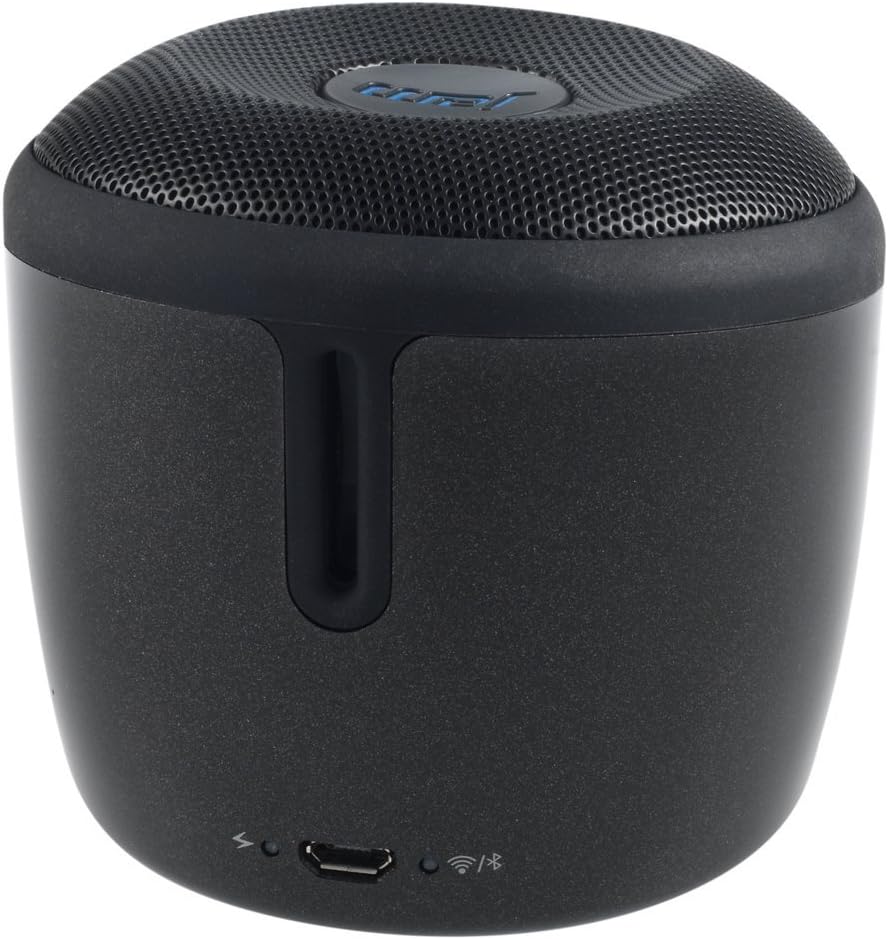
Şekil 3: Arka view of the JAM Voice speaker. This image highlights the back of the speaker, including the micro USB charging port, a power indicator light, a Wi-Fi status indicator, and a Bluetooth status indicator.
Kurmak
1. Hoparlörü Şarj Etme
Before initial use, fully charge the JAM Voice speaker. Connect the supplied USB charging cord to the micro USB port on the back of the speaker and to a USB power source (e.g., computer USB port or USB wall adapter). The charging indicator light will show the charging status. A full charge provides up to 4 hours of playtime.
2. Installing the JAM App
The JAM app is required for Wi-Fi setup and advanced control features. Download the free JAM app from your device's app store (e.g., Apple App Store for iOS or Google Play Store for Android).
3. Wi-Fi Ağ Bağlantısı
- Ensure your JAM Voice speaker is powered on.
- Open the JAM app on your smartphone or tablet.
- Follow the in-app instructions to connect your speaker to your home Wi-Fi network. This process typically involves selecting your Wi-Fi network and entering the password.
- Once connected, the Wi-Fi indicator light on the speaker will illuminate steadily.
4. Bluetooth Eşleştirme
To use the speaker via Bluetooth:
- Eşleştirme modunun başladığını gösteren Bluetooth gösterge ışığı yanıp sönmeye başlayana kadar hoparlör üzerindeki Bluetooth düğmesine basılı tutun.
- On your device (smartphone, tablet, etc.), go to the Bluetooth settings and select "JAM Voice" from the list of available devices.
- Once paired, the Bluetooth indicator light on the speaker will illuminate steadily.
Kullanım Talimatları
1. Güç Açma/Kapatma
Press and hold the power button (location not specified in data, assuming standard placement) for a few seconds to turn the speaker on or off.
2. Amazon Alexa Voice Service
To activate Alexa, tap the designated Alexa button on the speaker. Once activated, you can ask questions or issue commands, such as "What's the weather?" or "Play music." Ensure the speaker is connected to Wi-Fi for Alexa functionality.
3. Music Streaming
- Wi-Fi Üzerinden: Use the JAM app to connect to streaming services like TuneIn, iHeartRadio, Spotify, and Tidal. You can also ask Alexa to stream music from supported services.
- Bluetooth aracılığıyla: Once paired with a device, play audio directly from your device's music library or streaming apps.
4. Çoklu Hoparlör Eşleştirme
The JAM Voice speaker can be paired with other JAM Voice speakers or any speaker in the JAM Wi-Fi lineup for a synchronized audio experience. Use the JAM app to group speakers, adjust individual volumes, or set up stereo sound (left/right channels).
Note: When grouped for multi-room or stereo playback, Alexa voice service may only be active on the designated master speaker.
5. Kontroller
- Hacim: Use the volume buttons on the speaker or control via the JAM app/connected device.
- Playback: Use the play/pause and skip track buttons on the speaker or control via the JAM app/connected device.
Bakım
1. Temizlik
Wipe the speaker with a soft, dry cloth. Do not use liquid cleaners or abrasive materials, as they may damage the finish or internal components. Ensure no moisture enters the ports.
2. Pil Bakımı
To prolong battery life, avoid fully discharging the speaker frequently. Recharge the speaker when the battery is low. If storing the speaker for an extended period, charge it to approximately 50% every few months.
Sorun giderme
| Sorun | Çözüm |
|---|---|
| Hoparlör açılmıyor. | Ensure the speaker is charged. Connect it to a power source using the USB charging cord. |
| Wi-Fi'ye bağlanılamıyor. |
|
| Bluetooth üzerinden eşleştirme yapılamıyor. |
|
| Alexa yanıt vermiyor. |
|
| Hoparlör beklenmedik şekilde kapanıyor. | The speaker may have an auto-off feature to conserve battery. Ensure it is sufficiently charged. If connected to power, check the power source. |
Özellikler
| Model Numarası | HX-P590BK |
| Bağlantı Teknolojisi | Bluetooth, Wi-Fi |
| Ses Çıkışı Modu | Stereo |
| Güç Kaynağı | Pil ile çalışır |
| Oyun Zamanı | 4 saate kadar |
| Kontrol Yöntemi | Ses, Uygulama |
| Boyutlar | 3 x 3 x 3 inç |
| Ürün Ağırlığı | 9.8 ons (0.61 Pound) |
| Dahil Bileşenler | Jam Voice Alexa Voice Service Enabled Speaker, USB Charging Cord |
| Uyumlu Cihazlar | Dizüstü bilgisayar, Akıllı telefon, Tablet, Televizyon |
| Hoparlör Tipi | Taşınabilir |
Garanti Bilgileri
Bu ürün bir Sınırlı Garanti. For detailed information regarding the terms, conditions, and duration of your warranty, please refer to the documentation included with your purchase or visit the official Jam Audio webSite. Satın alma belgenizi garanti talepleriniz için saklayın.
Destek
For further assistance, technical support, or frequently asked questions, please visit the official Jam Audio support website. You may also find helpful resources within the JAM app.
Jam Audio Official Webalan: www.jamaudio.com


