giriiş
The TASCAM MiNiSTUDIO Personal US-32 is a desktop online broadcast studio designed for podcasters, gamers, and online broadcasters. It features a professional-quality audio interface and real-time effects to enhance your audio productions.
This manual provides instructions for setting up, operating, and maintaining your US-32 MiniStudio, along with troubleshooting tips and product specifications.
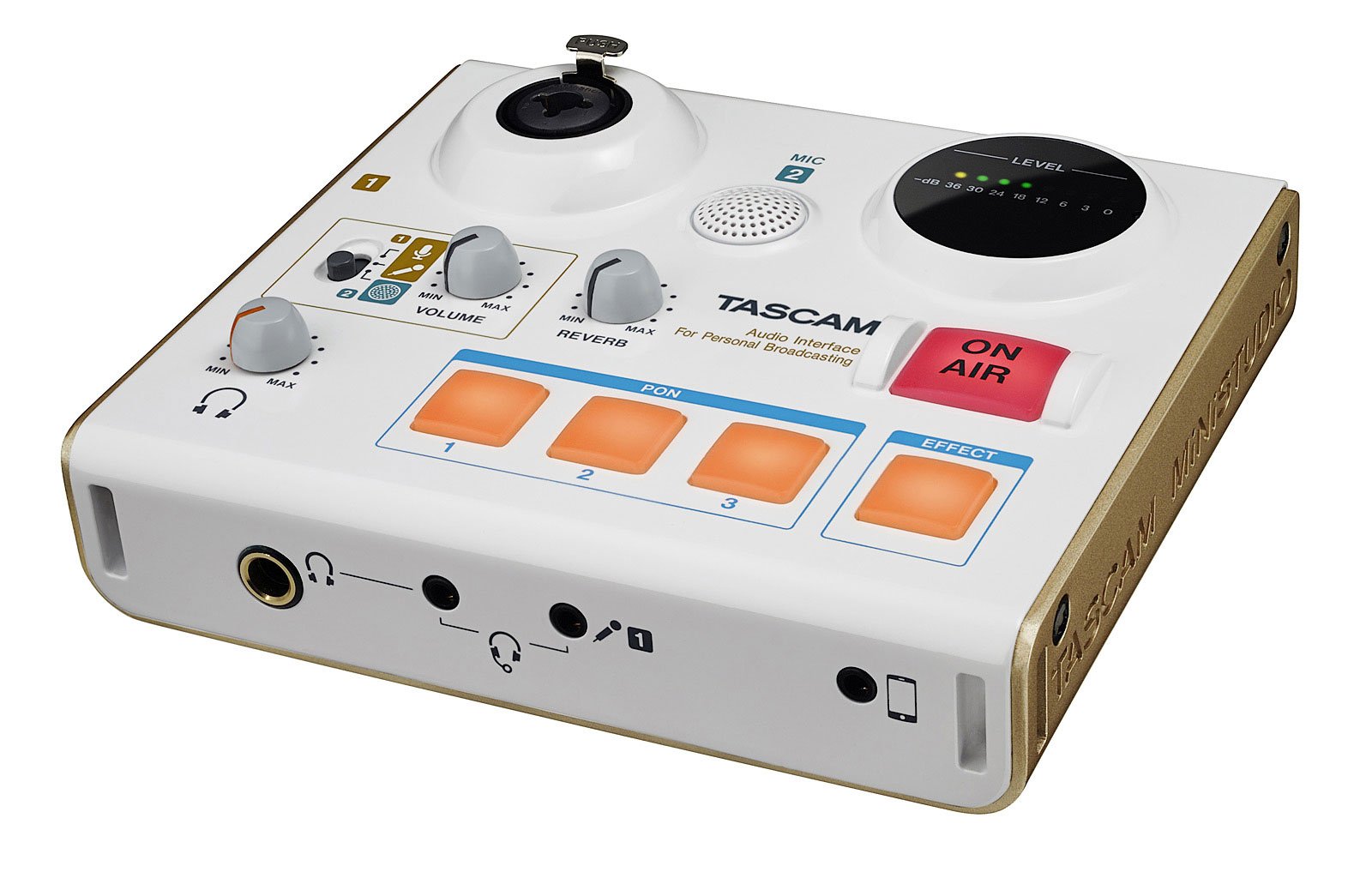
Şekil 1: The Tascam US-32 MiniStudio USB Podcasting Broadcast Audio Interface. This image provides a general overview Cihazın.
Kurmak
Paket İçeriği
Tüm bileşenlerin mevcut olduğunu doğrulayın:
- Tascam US-32 MiniStudio Unit
- USB kablosu
- Kullanım Kılavuzu (bu belge)
Cihazı Bağlama
The US-32 MiniStudio connects to your computer via a USB 2.0 cable. It can be powered by the USB bus or an optional 5V DC adapter for tablet use.
- Connect the USB cable from the US-32 MiniStudio to an available USB port on your computer.
- If using with a tablet or requiring external power, connect a 5V DC power adapter (not included) to the "DC IN 5V" port.
- Ensure the POWER switch on the rear panel is in the "ON" position.

Şekil 2: Rear panel connections of the Tascam US-32 MiniStudio. This image displays the power switch, USB 2.0 port for computer connection, and the DC IN 5V port for external power, typically used with tablets.
Yazılım Kurulumu
Before using the US-32 MiniStudio, install the necessary drivers and control software from the official Tascam website. The device supports ASIO/WDM for Windows and Core Audio for Mac.
- Visit the official Tascam support webalan.
- Locate the drivers and control software for the US-32 MiniStudio.
- Ekranda gösterilen yönergeleri izleyerek yükleyiciyi indirin ve çalıştırın.
- İstendiğinde bilgisayarınızı yeniden başlatın.
Kullanım Talimatları
Microphone Input Options
The US-32 MiniStudio offers versatile microphone input options:
- XLR/TRS Input Jack: For professional microphones, with switchable +48V phantom power for condenser microphones.
- Built-in Condenser Mic: For convenient, immediate use without external microphones.
- 4-pole Mini-jack: For connecting earphone/microphone headsets.
Ensure appropriate input gain is set using the dedicated knob to achieve optimal audio levels without distortion.
PON Sound Effect Buttons
The three assignable PON buttons allow for instant playback of sound effects. The unit comes with pre-loaded effects like bell, buzzer, and applause. You can also customize these buttons with your own .wav or .mp3 audio files using the control software.
- Open the US-32 MiniStudio control software on your computer.
- Navigate to the PON button assignment section.
- Double-click on a button in the software interface to select an audio file (.wav or .mp3) from your computer.
- Once assigned, press the physical PON button on the unit to trigger the sound effect during your broadcast.
Real-time Voice Effects
The US-32 MiniStudio includes real-time voice effects accessible via the control software. These effects can modify your voice with pitch shifts, echo, shortwave radio effects, and studio-quality reverb.
- Access voice effects through the control software.
- Adjust parameters such as pitch, echo depth, and reverb type.
- The "ducking" effect can automatically lower background music when you speak.

Şekil 3: Front panel of the Tascam US-32 MiniStudio. This image highlights the various control knobs for input levels, the three assignable PON sound effect buttons, and the prominent ON AIR button for broadcast control.
"ON AIR" Function
The "ON AIR" button integrates your voice and effects with other audio sources from your computer, such as music or video playback. Pressing this button activates the broadcast mix.
- Ensure all audio sources (microphone, computer audio, effects) are properly configured in the control software.
- Press the "ON AIR" button to begin broadcasting your mixed audio.
Ses İzleme
The US-32 MiniStudio provides two headphone outputs for monitoring: a 1/4" output and a 1/8" output (marked "headset"). Both outputs share a single volume control.

Şekil 4: Tascam US-32 MiniStudio in a typical usage scenario. The device is connected to a laptop, and headphones are plugged in, demonstrating its application in a broadcasting or podcasting setup.
Bakım
To ensure the longevity and optimal performance of your Tascam US-32 MiniStudio, follow these maintenance guidelines:
- Temizlik: Cihazın dış yüzeyini temizlemek için yumuşak, kuru bir bez kullanın. Aşındırıcı temizleyicilerden, çözücülerden veya cilalardan kaçının.
- Depolamak: Cihazı serin, kuru bir yerde, doğrudan güneş ışığından, aşırı sıcaklıklardan ve yüksek nemden uzakta saklayın.
- İşleme: Cihazı dikkatli kullanın. Düşürmeyin veya sert darbelere maruz bırakmayın.
- Havalandırma: Aşırı ısınmayı önlemek için ünitenin etrafında yeterli havalandırma olduğundan emin olun. Havalandırma deliklerini asla kapatmayın.
- Kapat: Always power off the unit and disconnect it from the power source when not in use for extended periods or during electrical storms.
Sorun giderme
If you encounter issues with your US-32 MiniStudio, refer to the following common problems and solutions:
No Sound or Low Audio Output
- Bağlantıları Kontrol Edin: Ensure all cables (USB, microphone, headphones) are securely connected.
- Ses Seviyeleri: Verify that the input gain knobs on the US-32 and the master volume control are turned up. Check software volume settings on your computer.
- Hayali güç: If using a condenser microphone, ensure +48V phantom power is enabled for the XLR input.
- Mikrofon Türü: Some high-end dynamic microphones may require an external preamp for optimal gain, as the built-in preamps might not provide sufficient amplification for all models.
- Yazılım Ayarları: Confirm that the US-32 MiniStudio is selected as the default audio input/output device in your computer's sound settings and your broadcasting software.
Background Noise or Hum
- Topraklama Döngüsü: Try connecting the computer and US-32 to the same power outlet or using a ground loop isolator.
- Kablo Kalitesi: Use high-quality, shielded cables for microphones and other connections.
- Kazanç StagTürkçe: Ensure input gain is set appropriately. Too high gain can amphayat sesi.
- Çevre: Minimize electrical interference from other devices (e.g., fluorescent lights, power adapters).
PON Buttons or Effects Not Working
- Çalışmakta Olan Yazılım: The PON buttons and voice effects require the Tascam control software to be running in the background.
- Atamalar: Verify that sound files are correctly assigned to the PON buttons within the software.
- Default Audio Device: Ensure the US-32 is set as the default audio device, as some effects may route through it.
Device Not Recognized by Computer
- USB Bağlantısı: Try a different USB port or USB cable.
- Sürücüler: Reinstall the latest drivers from the Tascam webalan.
- Güç: Ensure the unit is powered on. If using external power, verify the adapter is working.
- Tekrar başlat: Restart your computer and the US-32 MiniStudio.
Özellikler
| Özellik | Şartname |
|---|---|
| Model Numarası | ABD-32 |
| Ürün Ağırlığı | 13.4 ons |
| Ürün Boyutları | 5.11 x 5.9 x 1.57 inç |
| Donanım Arayüzü | USB |
| Bağlantı Teknolojisi | USB |
| Kanal Sayısı | 4 |
| Uyumlu Cihazlar | Kişisel Bilgisayar |
| Desteklenen Yazılımlar | ASIO/WDM (for Windows), Core Audio (for Mac) |
| İşletim Sistemi | Windows (and Mac via Core Audio) |
| Cilttage | 48 Volt (fantom güç için) |
| Piller | 6 adet AA pil gerekli |
| İlk Mevcut Tarih | 6 Mayıs 2016 |
Note: While specifications mention "6 AA batteries required," the primary power source for the US-32 is typically USB bus power or an optional 5V DC adapter. Please refer to the official Tascam documentation for definitive power requirements.
Garanti ve Destek
For warranty information, technical support, or service inquiries, please contact Tascam customer support directly or visit their official webSite. Satın alma belgenizi garanti talepleriniz için saklayın.
Tascam Official Webalan: https://tascam.com/us/


