giriiş
Thank you for choosing the Crompton ACGIC - Smart Plus 2000-Watt Portable Induction Cooktop. This manual provides essential information for the safe and efficient operation, maintenance, and troubleshooting of your new appliance. Please read it thoroughly before use and keep it for future reference.
Önemli Güvenlik Talimatları
- Always place the cooktop on a stable, flat, and heat-resistant surface.
- Ocağı suya veya başka bir sıvıya batırmayın.
- Çalışma sırasında ünitenin etrafında uygun havalandırmanın olduğundan emin olun.
- Yalnızca indüksiyonlu ocaklarla uyumlu pişirme kapları kullanın.
- Çocukların erişemeyeceği yerde saklayınız.
- Cihazı kullanmadığınız zamanlarda ve temizlemeden önce fişini çekin.
- Güç kablosu veya fişi hasarlıysa çalıştırmayın.
Ürün Bittiview
The Crompton ACGIC - Smart Plus is a portable induction cooktop designed for efficient and safe cooking. It features a feather touch control panel and a 4-digit LED display for ease of use.
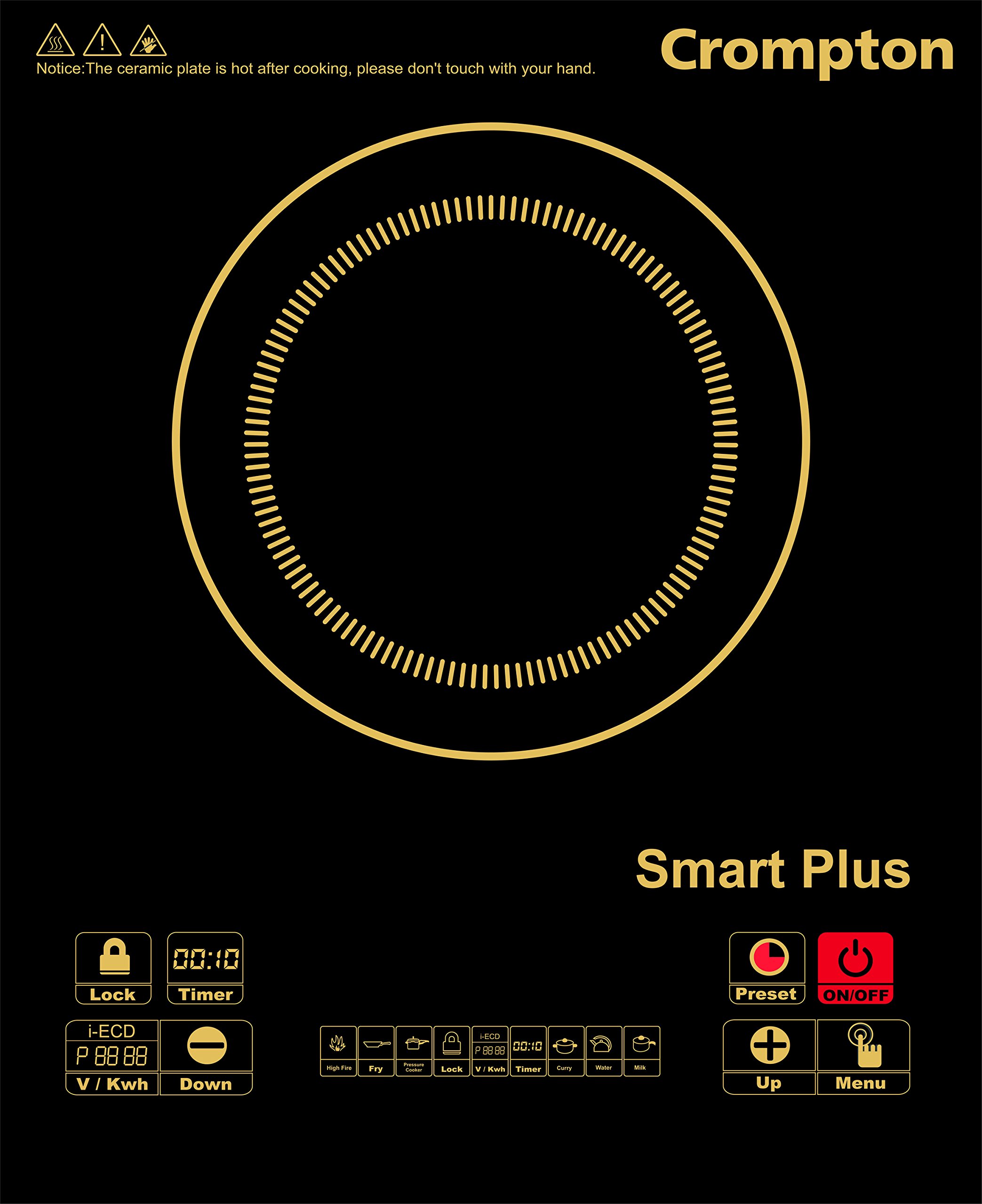
Resim: Ön view of the Crompton ACGIC - Smart Plus Induction Cooktop, showcasing its sleek chrome black design and control panel.
Temel Bileşenler:
- Pişirme Yüzeyi: Glass-ceramic plate where cookware is placed.
- Kontrol Paneli: Feather touch buttons for power, temperature, timer, and other functions.
- LED ekran: 4-digit display showing power level, temperature, or timer.
- Havalandırma fanı: Located at the bottom/rear for cooling internal components.
- Güç Kablosu: Elektrik prizine bağlanmak için.
Kurmak
- Paketin açılması: Carefully remove the induction cooktop from its packaging. Retain the packaging for future storage or transport.
- Atama: Place the cooktop on a dry, stable, non-metallic, and heat-resistant surface. Ensure there is at least 10-15 cm of clear space around all sides for adequate ventilation. Do not place near heat sources or on metallic surfaces that could interfere with induction.
- Güç Bağlantısı: Plug the power cord into a standard 220-240V AC, 50Hz electrical outlet. Ensure the outlet is properly grounded and can support a 2000-watt appliance.
- İlk Temizlik: Before first use, wipe the glass cooking surface with a soft, damp Kumaş.
Kullanım Talimatları
Uyumlu Pişirme Kapları
Induction cooktops require cookware made of ferromagnetic material. Look for cookware with a flat bottom and a symbol indicating compatibility with induction hobs. Examples include cast iron, enameled iron, stainless steel with a magnetic base, or induction-specific cookware.
Temel İşlemler
- Place suitable cookware containing food or liquid centrally on the cooking surface.
- Plug the cooktop into a power outlet. The unit will beep once, and the LED display may show "OFF" or a similar standby indicator.
- Dokunun "AÇIK/KAPALI" button to power on the cooktop. The display will light up, and the fan will start.
- Select your desired cooking function or power level using the control panel buttons (e.g., "Heat", "Fry", "Boil", or "+" / "-" for power adjustment). The 4-digit LED display will show the selected power level or temperature.
- To set a timer, touch the "Timer" button and use the "+" / "-" buttons to adjust the cooking duration. The cooktop will automatically switch off once the timer expires.
- To switch off the cooktop, touch the "AÇIK/KAPALI" button again. The fan may continue to run for a short period to cool down the unit.
- Unplug the cooktop from the power outlet after use.
Intelligent Energy Consumption Display
This model features an intelligent energy consumption display. After each operation, the display will show the energy consumed, allowing you to monitor your power usage.
Bakım ve Özen
- Yüzeyin Temizlenmesi: After the cooktop has cooled down completely, wipe the glass cooking surface with a soft, damp cloth and mild detergent. For stubborn stains, use a non-abrasive ceramic hob cleaner. Do not use abrasive pads or harsh chemicals.
- Vücudun Temizlenmesi: Wipe the exterior body with a soft, damp Kumaş. Havalandırma açıklıklarından su girmesine izin vermeyin.
- Havalandırma: Ensure the ventilation openings are free from dust and debris. Use a soft brush or vacuum cleaner to gently clean them if necessary.
- Depolamak: When not in use for extended periods, ensure the cooktop is clean and dry. Store it in a cool, dry place, preferably in its original packaging.
- Daldırmayın: Never immerse the cooktop in water or any other liquid for cleaning.
Sorun giderme
If you encounter any issues with your Crompton Induction Cooktop, please refer to the table below before contacting customer service.
| Hata Kodu | Sorun Nedeni | Aksiyon |
|---|---|---|
| E0 | No Pot or wrong placing of Pot | Place induction-compatible cooking utensils on the glass top. If the error persists, contact Customer Care. |
| E1 | Giriş kaynağı hacmitage 120V'nin altında | Check power supply. The unit will resume normal operation once the power supply returns to the normal voltage aralığı. |
| E2 | Giriş kaynağı hacmitage 270V'den fazla | Check power supply. The unit will resume normal operation once the power supply returns to the normal voltage aralığı. |
| E3 | Glass Sensor Open Circuit | Müşteri Hizmetleri ile iletişime geçin. |
| E4 | Glass Sensor Short Circuit | Müşteri Hizmetleri ile iletişime geçin. |
| E5 | IGBT Sensörü Açık Devre | Müşteri Hizmetleri ile iletişime geçin. |
| E6 | IGBT Sensor Short Circuit | Müşteri Hizmetleri ile iletişime geçin. |
| E7 | Fan çalışmıyor | Müşteri Hizmetleri ile iletişime geçin. |
| E8 | Hardware Problem. Connection open of Coil, Main PCB | Müşteri Hizmetleri ile iletişime geçin. |
| E9 | Glass Temperature high / Pot Empty | Add ingredients to the cooking pot. If the error persists, contact Customer Care. |
Özellikler
| Marka | Crompton |
| Örnek | ACGIC - Smart Plus |
| Güç | 2000 Watt |
| Kurulum Türü | Tezgah Üstü |
| Isıtma Elemanlarının Sayısı | 1 |
| Renk | Krom Siyah |
| Kontrol Konsolu | Dokunmak |
| Ürün Ağırlığı | 1 kilo 500 gr |
| Ürün Boyutları (LxWxY) | 28 x 37 x 7.5 Santimetre |
Garanti ve Destek
Your Crompton ACGIC - Smart Plus Induction Cooktop comes with a 1 yıllık garanti on the product from the date of purchase. Please retain your purchase receipt as proof of warranty.
For technical assistance, service requests, or any queries not covered in this manual, please contact Crompton Customer Care.
Müşteri Hizmetleri Numarası: 18004190505
You can also visit the official Crompton webDaha fazla bilgi ve destek kaynakları için siteyi ziyaret edin.