giriiş
The C2G 40914 Compact Amplifier için tasarlanmıştır amplify dynamic microphone or stereo audio signals, providing 15 Watts of power per channel to a sound reinforcement system. This amplifier features a discreet installation and remote control capability via an included wall plate. It is suitable for various audio setups requiring compact amplification and external volume management.
Kutuda Neler Var?
Lütfen kurulum işlemine başlamadan önce tüm bileşenlerin mevcut olduğundan emin olun:
- Kompakt Ampcankurtaran
- Decorator Volume Control Wall Plate
- Ön Panel Kapağı
- Güç Adaptörü
- Bracket Mounting Screws 6-32 (25mm) qty. 2
- Wall Plate Mounting Screw M3.5 (8mm) qty. 3
- Kullanıcı Kılavuzu
Ürün Bittiview
Kendinizi şu konularla tanıştırın: amplifier and wall plate components.

Şekil 1: Ön view of the C2G 40914 Compact Amplifier. This image displays the local volume control knob, power indicator LED, 1/4 inch microphone input, 3.5mm auxiliary input, and input select switch.

Şekil 2: Arka view of the C2G 40914 Compact Ampkaldırıcı. Bu view shows the speaker output terminals (L+, L-, R+, R-), the remote volume control port (RJ45), and the DC 12V power input.

Şekil 3: Decorator Volume Control Wall Plate and face plate cover. The wall plate features a rotary volume knob and a power indicator LED.
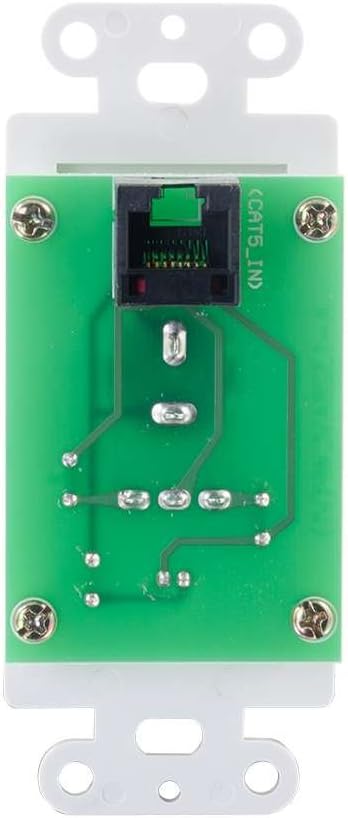
Şekil 4: Arka view of the Decorator Volume Control Wall Plate, showing the RJ45 connector for remote communication with the ampcankurtaran.
Kurmak
-
Montajı Ampkaldırıcı:
The amplifier includes a built-in mounting bracket. Secure the amplifier to a suitable surface using the provided 6-32 (25mm) mounting screws. Ensure adequate ventilation around the unit.
-
Hoparlörleri Bağlama:
Connect your passive speakers to the speaker output terminals on the rear of the amplifier (L+, L-, R+, R-). Ensure correct polarity (+ to + and - to -) for each speaker channel. The amplifier provides 15 watts per channel.
-
Ses Kaynaklarını Bağlama:
- Mikrofon Girişi: Connect a dynamic microphone to the 1/4 inch MIC IN jack on the front panel.
- Yardımcı Giriş: Connect an audio source (e.g., smartphone, media player) to the 3.5mm AUX IN jack on the front panel.
-
Connecting the Remote Wall Plate:
Install the Decorator Volume Control Wall Plate in a standard wall box. Connect a Cat5e/Cat6 cable (not included) from the RJ45 port on the rear of the wall plate to the REMOTE port (RJ45) on the rear of the amplifier. Secure the wall plate with the provided M3.5 (8mm) screws and attach the face plate cover.
-
Güçlendirme Ampkaldırıcı:
Connect the included power adapter to the DC 12V input on the rear of the amplifier, then plug the adapter into a standard AC power outlet. The power indicator LED on the amplifier and wall plate will illuminate.
Kullanım Talimatları
-
Güç Açma/Kapatma:
The amplifier powers on automatically when connected to power. The power indicator LED on both the amplifier and the wall plate will light up.
-
Giriş Seçimi:
Kullanın GİRİŞ SEÇİMİ switch on the front panel of the amplifier to choose between the MIC IN and AUX IN audio sources.
-
Ses Kontrolü:
The amplifier offers both local and remote volume control options:
- Local Volume: Adjust the rotary knob labeled HACİM ön panelinde ampcankurtaran.
- Remote Volume: Adjust the rotary knob labeled HACİM on the Decorator Volume Control Wall Plate.
Kullanın SES SEVİYESİ SEÇİMİ aç amplifier to determine whether the local or remote volume control is active. Set to 'LOCAL' to use the amplifier's knob, or 'REMOTE' to use the wall plate's knob.
-
Mikrofon Kullanımı:
When MIC IN is selected, speak into the connected dynamic microphone. Adjust the volume using the selected volume control (local or remote) to achieve the desired output level.
Bakım
- Tut amplifier and wall plate clean by wiping with a soft, dry cloth.
- Avoid using liquid cleaners or aerosol sprays, which may damage the unit.
- Ortamın uygun şekilde havalandırılmasını sağlayın. ampAşırı ısınmayı önlemek için lifier.
- Cihazı aşırı neme veya aşırı sıcaklıklara maruz bırakmayın.
Sorun giderme
If you encounter issues with your C2G 40914 Compact Amplifier, please refer to the following common solutions:
-
Ses Çıkışı Yok:
- Ensure the power adapter is securely connected and the power indicator LEDs are lit.
- Verify that speakers are correctly wired to the amplifier's output terminals with correct polarity.
- Şunu kontrol edin: GİRİŞ SEÇİMİ switch is set to the correct source (MIC or AUX).
- Şunu onaylayın: SES SEVİYESİ SEÇİMİ switch is set to the active volume control (LOCAL or REMOTE) and that the volume knob is turned up.
- Test with a different audio source or microphone to rule out source device issues.
-
Remote Volume Control Not Working:
- Ensure the Cat5e/Cat6 cable connecting the wall plate to the amplifier is securely plugged into both RJ45 ports.
- Şunu doğrulayın: SES SEVİYESİ SEÇİMİ aç amplifier is set to 'REMOTE'.
- Check the wall plate's power indicator LED to ensure it is receiving power.
-
Bozuk Ses:
- Reduce the volume level on both the amplifier/wall plate and the audio source device.
- Hoparlör empedansının eşleştiğinden emin olun. amplifier's requirements (typically 4-8 ohms).
- Tüm kablo bağlantılarında gevşeklik veya hasar olup olmadığını kontrol edin.
Özellikler
| Özellik | Detay |
|---|---|
| Ürün Boyutları | 1.95 x 1.3 x 4.05 inç (U x G x Y) |
| Ürün Ağırlığı | 1 pound |
| Model Numarası | 40914 |
| Çıkış Gücü | 15 Watts per channel (30W total) |
| Giriş Konnektörleri | 1/4 inch Dynamic Microphone, 3.5mm Stereo Audio Line Level |
| Çıkış Konnektörleri | Speaker Terminals (L+, L-, R+, R-) |
| Uzaktan kumanda | RJ45 for external volume control wall plate |
| Güç Kaynağı | DC 12V (Power Adapter included) |
| Uyumlu Cihazlar | Konuşmacılar |
| Renk | Siyah |
Garanti ve Destek
The C2G 40914 Compact Amplifier is thoroughly inspected and tested to ensure quality and comes with a warranty for your complete satisfaction. For specific warranty terms and conditions, please refer to the documentation included with your purchase or visit the official C2G webalan.
Teknik destek, sorun giderme yardımı veya diğer sorularınız için lütfen şu adresi ziyaret edin: C2G Store veya resmi destek kanalları aracılığıyla.


