giriiş
Satın aldığınız için teşekkür ederizasing the VILTROX JY-680Ch Flash Speedlite. This high-performance flash unit is designed for Canon DSLR cameras, offering advanced features such as High-Speed Sync (HSS), ETTL/TTL automatic flash, and a powerful Guide Number of GN58. This manual provides detailed instructions for proper setup, operation, maintenance, and troubleshooting to ensure optimal performance and longevity of your device.
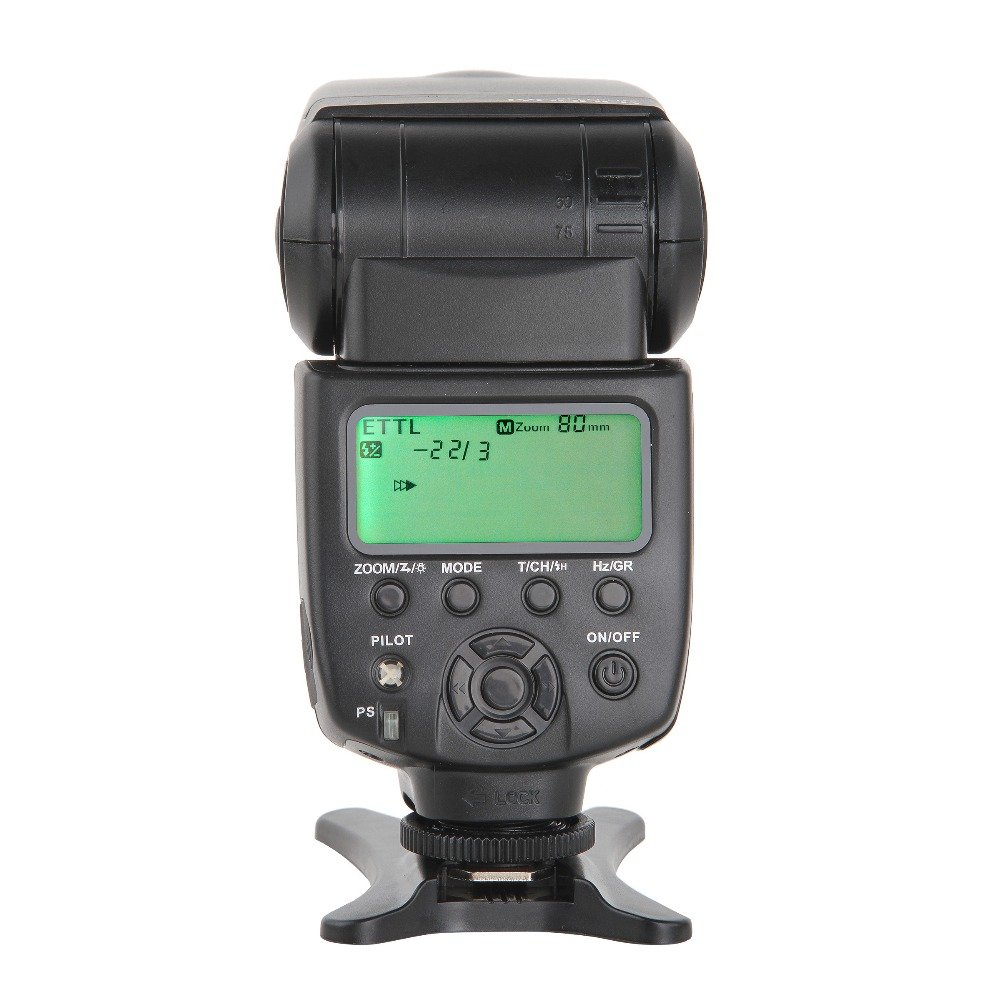
Figure 1: VILTROX JY-680Ch Flash Speedlite main unit.
1. Kurulum
1.1 Pil Kurulumu
The VILTROX JY-680Ch Flash Speedlite requires 4 AA batteries (not included).
- Flaş ünitesinin yan tarafındaki pil bölmesini bulun.
- Pil bölmesi kapağını kaydırarak açın.
- Bölmenin içinde gösterildiği gibi kutupların (+/-) doğru olmasına dikkat ederek 4 adet AA pil takın.
- Pil bölmesi kapağını sıkıca kapatın.
1.2 Kameraya Montaj
The flash unit features a hot shoe mount for secure attachment to your Canon DSLR camera.
- Ensure both the camera and flash are powered off.
- Flaşın flaş yuvası ayağını kameranın flaş yuvasına takın.
- Rotate the locking ring on the flash unit clockwise until it is securely tightened. Do not overtighten.

Figure 2: Flash unit mounted on a Canon DSLR camera.

Figure 3: Detail of the hot shoe mount and locking ring.
1.3 İlk Güç Açma
After mounting the flash and installing batteries, power on the unit.
- Basılı tutun AÇIK/KAPALI button on the flash unit until the LCD screen illuminates.
- The flash will perform a self-test and display the current settings.
2. Kullanım Talimatları
2.1 Kontrol Paneli Üstüview
The control panel features an LCD screen and several buttons for adjusting flash settings.

Figure 4: Control panel with LCD and function buttons.
- ZOOM/Z/☀: Adjusts zoom level or enters zoom setting.
- MOD: Cycles through flash modes (TTL, M, Multi).
- T/CH/★: Sets wireless channel/group or enters custom function settings.
- Hz/GR: Sets stroboscopic frequency (Hz) in Multi mode or group in wireless mode.
- PİLOT: Test flash button.
- AÇIK/KAPALI: Power on/off button.
- PS: Power Save switch.
- Yön Pedi: Navigates menus and adjusts values.
2.2 Flaş Modu
Basın MOD button to switch between the following flash modes:
- ETTL/TTL Mode: Automatic flash exposure control. The flash output is automatically adjusted based on the camera's metering system.
- Manual (M) Mode: Allows manual control over flash output power (1/1 to 1/128). Use the directional pad to adjust power levels.
- Çoklu (Stroboskopik) Mod: Fires a series of rapid flashes during a single exposure, ideal for capturing multiple movements of a subject. Adjust frequency (Hz) and number of flashes using the Hz/GR button and directional pad.
2.3 Yüksek Hızlı Senkronizasyon (HSS)
The JY-680Ch supports High-Speed Sync (HSS) up to 1/8000 second, allowing you to use flash at shutter speeds faster than your camera's native sync speed. This is useful for freezing fast action or using wide apertures in bright conditions.
- Enable HSS through your camera's flash control menu or the flash unit's custom functions, if applicable. Refer to your camera's manual for specific instructions.
2.4 Auto/Manual Zooming
The flash head can automatically or manually adjust its zoom position to match the focal length of your lens, optimizing light coverage.
- Otomatik Yakınlaştırma: In TTL mode, the flash will automatically adjust its zoom position (24-105mm) to match the lens's focal length.
- Manuel Yakınlaştırma: Basın ZOOM/Z/☀ button and use the directional pad to manually set the zoom position (e.g., 24mm, 35mm, 50mm, 70mm, 80mm, 105mm).
2.5 Wireless Flash System (Master/Slave)
The JY-680Ch supports Canon's optical wireless flash system, allowing it to function as both a master and slave unit.
- Ana Mod: When mounted on a camera, the flash can control other compatible slave flash units. Use the T/CH/★ Ve Hz/GR buttons to set groups and channels.
- Köle Modu: The flash can be triggered wirelessly by a master flash or camera's built-in flash. Set the flash to slave mode and match the channel/group settings with the master unit.
2.6 PC Synchronous Interface
The flash unit includes a 2.5mm PC synchronous interface for connecting to cameras or external triggers that support PC sync.
- Connect a 2.5mm PC sync cable (not included) from the flash unit to your camera's PC sync terminal or an external trigger.
- This allows for synchronized flash firing, especially useful in studio setups or with older camera models.
2.7 Exposure Lock (FEL)
The flash supports Flash Exposure Lock (FEL) for both on-camera and wireless TTL modes. This feature allows you to lock the flash exposure for a specific part of your scene, then recompose and shoot.
- Refer to your Canon camera's manual for instructions on how to activate FEL. Typically, this involves pressing a dedicated FEL button on your camera.
3. Bakım
3.1 Temizlik
- Use a soft, dry cloth to clean the flash unit's exterior.
- İnatçı kirler için hafifçeampBezi su veya hafif bir temizleme solüsyonuyla ıslatın, ardından hemen kurulayın.
- Do not use strong solvents or abrasive cleaners.
- Flaş yuvasının temas noktalarını temiz ve kalıntılardan arındırılmış halde tutun.
3.2 Depolama
- Flaş uzun süre kullanılmayacaksa, sızıntıyı önlemek için pilleri çıkarın.
- Flaş cihazını serin, kuru bir yerde, doğrudan güneş ışığından ve aşırı sıcaklıklardan uzakta saklayın.
- Use the included mini stand or a protective case to prevent damage.
3.3 Pil Bakımı
- Daima yeni ve yüksek kaliteli AA piller kullanın.
- Eski ve yeni pilleri veya farklı pil türlerini karıştırmayın.
- Kullanılmış pilleri yerel düzenlemelere uygun şekilde sorumlu bir şekilde atın.
4. Sorun Giderme
| Sorun | Olası Neden | Çözüm |
|---|---|---|
| Flaş açılmıyor. |
|
|
| Flaş çalışmıyor. |
|
|
| Flash exposure is incorrect. |
|
|
| Wireless flash not working. |
|
|
Note: The flash unit features a temperature test (high-temperature alarm) to prevent overheating. If the alarm activates, allow the flash to cool down before further use.
5. Özellikler
| Özellik | Detay |
|---|---|
| Örnek | JY-680Ch |
| Rehber Numarası | GN58 (ISO 100, 105mm) |
| Flaş Modları | ETTL/TTL, Manual (M), Multi (Stroboscopic) |
| Yüksek Hızlı Senkronizasyon (HSS) | 1/8000 saniyeye kadar |
| Zoom aralığı | Auto and Manual (24-105mm) |
| Kablosuz İşlev | Canon optical wireless system (Master/Slave) |
| PC Senkronizasyon Bağlantı Noktası | 2.5mm |
| Güç Kaynağı | 4 x AA pil (dahil değildir) |
| Boyutlar (UxGxY) | 21.6 x 8.6 x 7.1 cm (yaklaşık) |
| Ağırlık | 363 gr (piller hariç) |
| Uyumlu Montajlar | Canon Hot Shoe |
6. Garanti ve Destek
VILTROX products are designed for reliability and performance. This product is covered by a limited warranty against defects in materials and workmanship. Please refer to the warranty card included with your purchase for specific terms and conditions, including the warranty period and coverage details.
For technical support, service, or inquiries regarding your VILTROX JY-680Ch Flash Speedlite, please contact VILTROX customer service through their official webÜrünü satın aldığınız site veya perakendeci.
Çevrimiçi Kaynaklar: For the latest information, firmware updates, and additional support, visit the official VILTROX webalan: www.viltrox.com


