1. Giriş
The Datavideo HRS-30 is a versatile portable recorder and integrated 10.1-inch monitor designed for professional field recording and playback applications. This device supports both HD and SD video equipment, accepting signals via HD/SD-SDI inputs. It is compatible with various video formats including 1080i, 720p, 576i, and 480i.
The HRS-30 offers flexible recording formats, including MPEG-II Long-GOP or intra-frame (i-frame) with 4:2:2 color sampling. Recorded files are stored in the MXF/OP1A format, ensuring compatibility with a wide range of Non-Linear Editing (NLE) systems and playout solutions. Storage is facilitated by a removable caddy, compatible with standard 2.5-inch HDD and SSD drives.
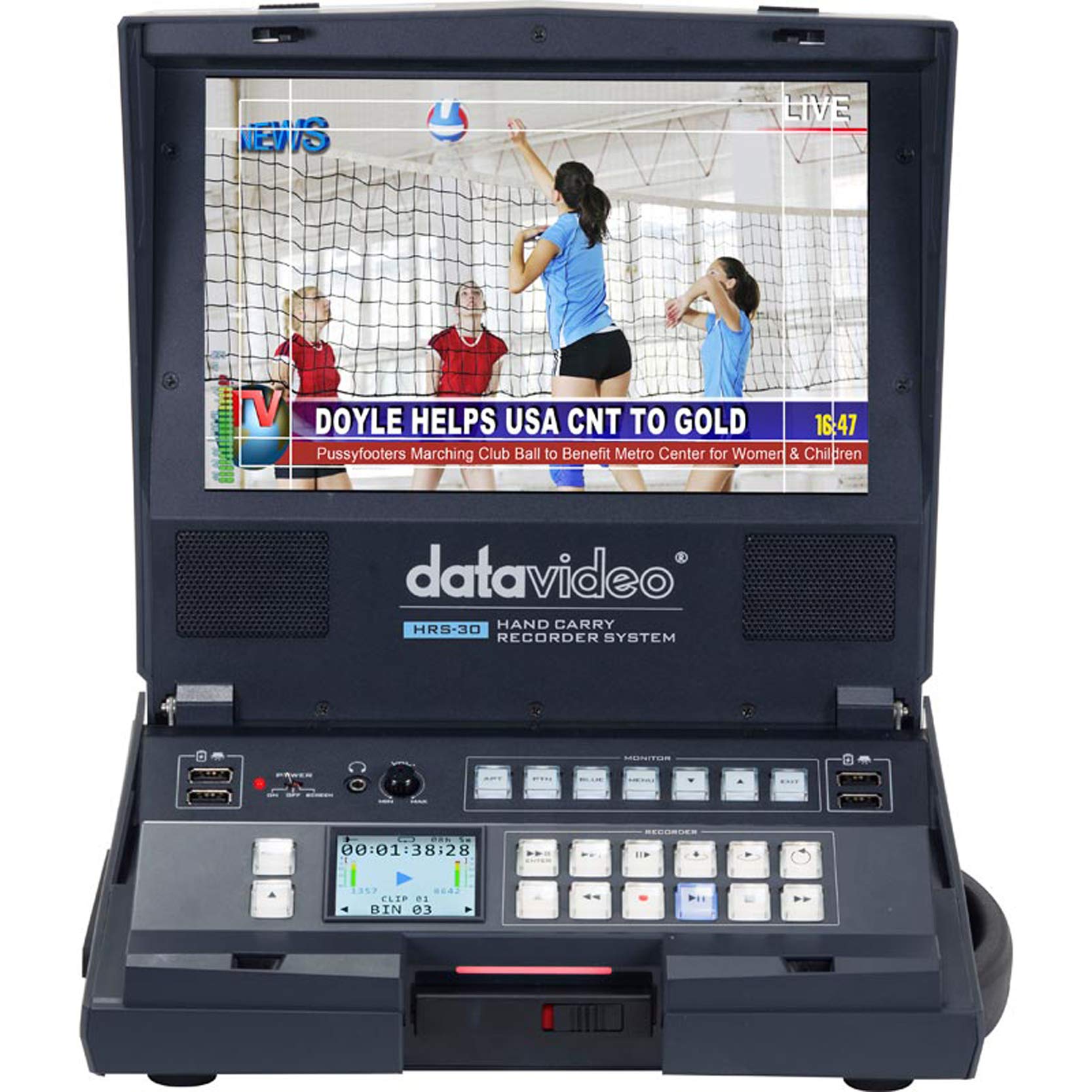
Şekil 1.1: Ön view of the Datavideo HRS-30 Portable Recorder Monitor, showing the integrated screen and control interface.
2. Güvenlik Bilgileri
Please read and understand all safety instructions before operating the HRS-30. Failure to follow these instructions may result in electric shock, fire, or damage to the unit.
- Güç Kaynağı: Yalnızca belirtilen güç adaptörünü kullanın ve ses seviyesinin doğru ayarlandığından emin olun.tage ünitenin gereksinimlerine uygundur.
- Havalandırma: Havalandırma açıklıklarını kapatmayın. Aşırı ısınmayı önlemek için ünitenin etrafında yeterli hava akışı olduğundan emin olun.
- Su ve Nem: Cihazı yağmura, neme maruz bırakmayın veya suya batırmayın.
- Servis: Bu ürüne kendiniz servis vermeye çalışmayın. Tüm servis işlemleri için kalifiye servis personeline başvurun.
- Atama: Cihazı sabit ve düz bir yüzeye yerleştirin. Doğrudan güneş ışığına veya ısı kaynaklarının yakınına koymaktan kaçının.
3. Paket İçeriği
Paketin içindeki tüm ürünlerin eksiksiz olduğundan emin olun. Herhangi bir ürün eksik veya hasarlıysa, derhal satıcınızla iletişime geçin.
- Datavideo HRS-30 Portable Recorder Monitor Unit
- Güç Adaptörü
- Removable Caddy for 2.5" HDD/SSD
- Kullanım Kılavuzu (bu belge)
- Additional accessories as specified by your retailer
4. Kurulum
Follow these steps to set up your HRS-30 unit for operation.
4.1 Installing Storage Media
- Ensure the HRS-30 is powered off.
- Locate the removable caddy slot on the unit.
- Insert a compatible 2.5-inch HDD or SSD into the removable caddy.
- Slide the caddy with the installed drive into the HRS-30's caddy slot until it clicks securely into place.
4.2 Gücün Bağlanması
- Connect the power adapter to the DC IN 12V port on the rear of the HRS-30.
- Güç adaptörünü uygun bir elektrik prizine takın.
- Press the POWER switch on the rear panel to turn on the unit.
4.3 Video ve Ses Bağlantıları
The HRS-30 supports various input and output connections. Refer to the rear panel diagram for port locations.
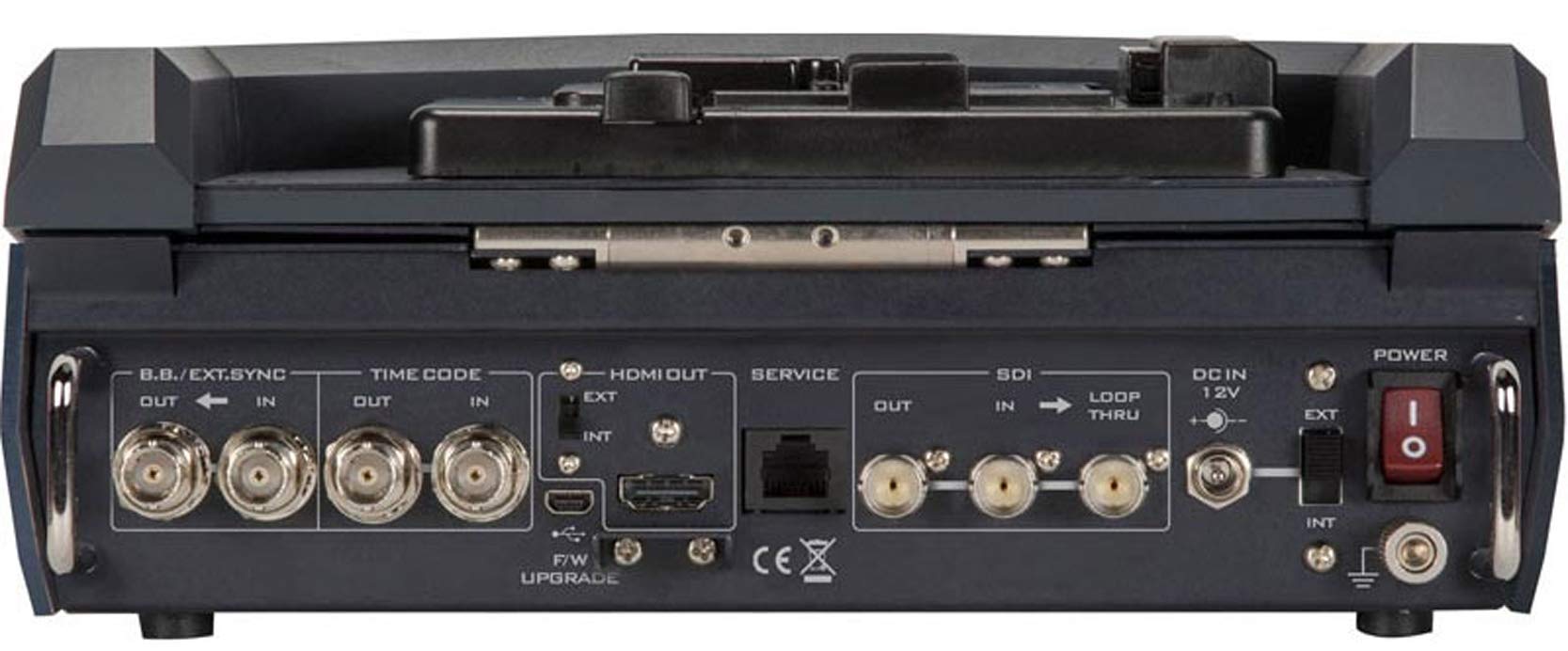
Figure 4.1: Rear panel connections of the Datavideo HRS-30, including SDI, HDMI, Timecode, and Power inputs/outputs.
- SDI Girişi: Connect your HD/SD-SDI video source to the SDI IN port. The unit also features an SDI LOOP THRU for connecting to another device.
- HDMI Çıkışı: Connect an external monitor or display to the HDMI OUT port for video monitoring.
- Zaman kodu: Use the TIME CODE IN/OUT ports for external timecode synchronization.
- BB/EXT.SYNC: Connect Black Burst or external sync signals to the BB/EXT.SYNC IN/OUT ports.
- Servis Limanı: Ürün yazılımı güncellemeleri ve bakımı için.
5. Kullanım Talimatları
This section details the basic operation of the HRS-30 for recording and playback.
5.1 Cihazın Açılması ve İlk Ekran
- Ensure all necessary connections are made and the storage caddy is installed.
- Arka paneldeki GÜÇ düğmesini 'AÇIK' konumuna getirin.
- The integrated 10.1-inch monitor will display the boot-up sequence, followed by the live video input or the last recorded clip.
5.2 Video Kaydetme
The HRS-30 records video from HD/SD-SDI sources in various formats.
- Girişi Seçin: Use the control panel buttons to select the desired SDI input source.
- Monitör Girişi: Verify the incoming video signal on the integrated monitor.
- Kaydı Başlat: Basın KAYIT button on the control panel to begin recording. The recording indicator will illuminate.
- Kaydı Durdur: Basın DURMAK button to end the recording. The recording indicator will turn off.
The HRS-30 supports recording in MPEG-II Long-GOP or intra-frame (i-frame) with 4:2:2 color sampling, producing MXF/OP1A files.
5.3 Oynatma
Yırttıview recorded content:
- Access Playback Mode: Use the navigation buttons to enter playback mode.
- Klip Seçin: Browse through your recorded clips using the navigation controls.
- Oynatmayı Başlat: Basın OYNAMAK button to start playback of the selected clip.
- Oynatmayı Kontrol Et: Kullanın DURAKLAT, FFW (Hızlı İleri Sarma) ve YENİDEN (Rewind) buttons to control playback.
5.4 Menü Navigasyonu
The HRS-30 features an on-screen menu system for configuring settings such as video format, recording quality, audio settings, and system preferences. Use the MENU button and directional arrows to navigate, and the ENTER button to confirm selections.
6. Bakım
Proper maintenance ensures the longevity and optimal performance of your HRS-30.
- Temizlik: Use a soft, dry cloth to clean the exterior of the unit. For the screen, use a specialized screen cleaning solution and a microfiber cloth. Do not use abrasive cleaners or solvents.
- Depolamak: When not in use, store the HRS-30 in a cool, dry place, away from direct sunlight and extreme temperatures.
- Donanım Yazılımı Güncellemeleri: Periodically check the Datavideo website for firmware updates to ensure your unit has the latest features and bug fixes. Follow the instructions provided with the firmware update carefully.
7. Sorun Giderme
This section addresses common issues you might encounter with the HRS-30.
| Sorun | Olası Neden | Çözüm |
|---|---|---|
| Ünite açılmıyor | No power, faulty adapter, power switch off | Check power cable connection, verify power outlet, ensure power switch is ON. |
| No video on screen | Incorrect input selected, no signal from source, faulty cable | Select correct input, check video source, replace SDI/HDMI cable. |
| Kayıt yapılamıyor | No storage media, full storage, media error | Ensure caddy with drive is installed, check available storage space, format or replace drive if necessary. |
| Playback issues | Yozlaşmış file, incompatible format | Try playing another clip. Ensure recorded files bozuk değil. |
8. Özellikler
Detailed technical specifications for the Datavideo HRS-30.
- Modeli: HRS-30
- Görünür Ekran Köşegeni: 10 inç / 26 cm
- Ürün Ölçüleri: 10.83 x 10.24 x 3.94 inç (27.5 x 26 x 10 cm)
- Ürün Ağırlığı: 7.92 pound (3.6 kg)
- Video Girişleri: HD/SD-SDI
- Görüntü Çıkışları: HDMI, SDI Loop Thru
- Desteklenen Video Formatları: 1080i, 720p, 576i, 480i
- Kayıt Formatları: MPEG-II Long-GOP, Intra-frame (i-frame) with 4:2:2 color sampdil
- File Biçim: MXF/OP1A
- Depolama Ortamı: Removable caddy for 2.5" HDD & SSD drives
- Üretici: veri videosu
- İlk Mevcut Tarih: 23 Mart 2016
9. Garanti ve Destek
For warranty information and technical support, please refer to the official Datavideo website or contact your authorized Datavideo dealer. Keep your purchase receipt as proof of purchase for warranty claims.


