1. Giriş
The GAMDIAS Hermes GKB3000 is a mechanical gaming keyboard designed for enhanced durability and performance. It features GAMDIAS Certified Blue Switches with a 50 million actuation lifecycle, a 7-color spectrum backlight with 14 lighting effects, and various functional keys for an optimized gaming and typing experience. This manual provides instructions for setting up, operating, and maintaining your keyboard.
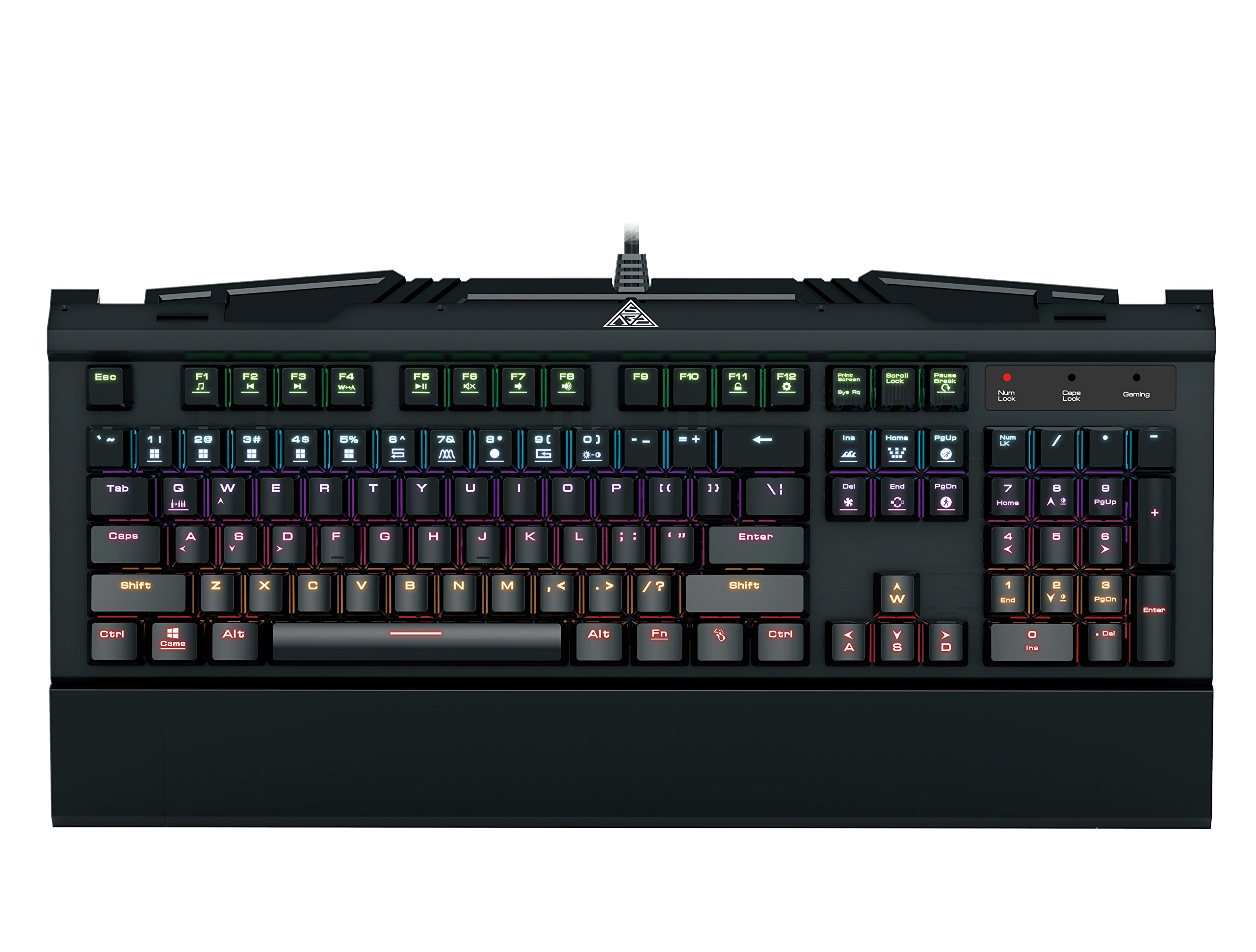
Image 1.1: The GAMDIAS Hermes GKB3000 Mechanical Gaming Keyboard. This image displays the full keyboard with its key layout and design, highlighting its compact yet robust build.
2. Paket İçeriği
Lütfen paketi açtıktan sonra tüm ürünlerin eksiksiz ve hasarsız olduğundan emin olmak için içeriğini kontrol edin.
- GAMDIAS Hermes GKB3000 Mechanical Gaming Keyboard
- Kullanım Kılavuzu (bu belge)
3. Kurulum
Follow these steps to set up your GAMDIAS Hermes GKB3000 keyboard:
- Klavyeyi Paketinden Çıkarın: Klavyeyi ambalajından dikkatlice çıkarın.
- Bilgisayara Bağlan: Plug the USB-A connector of the keyboard cable into an available USB port on your computer.
- Sürücü Kurulumu: The keyboard is plug-and-play. Your operating system (e.g., Windows) will automatically detect and install the necessary drivers. No additional software installation is typically required for basic functionality.
- Atama: Place the keyboard on a stable, flat surface for comfortable use.
4. Kullanım Talimatları
4.1. Aydınlatma Efektleri
The Hermes GKB3000 features a 7-color spectrum backlight with 14 sets of lighting effects. These include 9 preset effects and 5 customizable patterns.
- Anahtarlama Etkileri: Use the dedicated function keys (often combined with the Fn key) to cycle through the preset lighting effects. Refer to the keyboard's keycap legends for specific combinations.
- Efektleri Özelleştirme: The keyboard supports 5 customizable lighting patterns. Instructions for programming these patterns are typically found in the full software suite available for download from the GAMDIAS website, if applicable.
- Parlaklık Ayarı: Adjust backlight brightness using designated function key combinations.
4.2. Multimedia Control Keys
Access multimedia functions quickly using the dedicated multimedia control keys, often activated by holding the Fn F tuşlarıyla (F1-F12) birlikte kullanılan tuş.
- Ses Kontrolü: Increase, decrease, or mute audio.
- Medya Oynatma: Oynat/duraklat, durdur, önceki parça, sonraki parça.
- Diğer Fonksiyonlar: May include opening default browser, email client, or calculator.
4.3. Special Gaming Functions
- WASD-Arrow Key Swap: This feature allows you to swap the functionality of the WASD keys with the arrow keys. This is useful for certain games or user preferences. Activate this function using a specific Fn key combination (e.g., Fn + W).
- Consecutive Attack Mode: This mode enhances rapid key input for gaming. Refer to the keyboard's specific documentation or GAMDIAS software for activation and configuration details.
- Klavye Kilidi: Temporarily disable the keyboard input to prevent accidental presses. Activate using a Fn tuş kombinasyonu.
- Windows Key Disable: Prevent accidental presses of the Windows key during gaming, which can minimize your game. Activate using a Fn key combination (e.g., Fn + Win key).
- N-Anahtar Geçişi: The GKB3000 supports N-key rollover, meaning multiple keys can be pressed simultaneously without ghosting or missed inputs. This ensures accurate and responsive commands during intense gaming sessions.
5. Bakım
Doğru bakım, klavyenizin uzun ömürlü olmasını ve optimum performans göstermesini sağlar.
- Temizlik:
- Temizlemeden önce klavyeyi bilgisayarınızdan ayırın.
- Yumuşak, tiftiksiz bir bez kullanın ve hafifçe kurulayın.ampYüzeyi silmek için su veya hafif bir temizleme solüsyonu kullanın.
- Tuşlar arasındaki toz ve pislikleri temizlemek için basınçlı hava kullanın.
- Sert kimyasallar, aşındırıcı temizleyiciler veya çözücüler kullanmaktan kaçının.
- Depolamak: Uzun süre kullanılmayacaksa klavyeyi serin, kuru ve doğrudan güneş ışığından ve aşırı sıcaklıklardan uzak bir yerde saklayın.
- İşleme: Avoid dropping the keyboard or exposing it to excessive force, as this can damage the mechanical switches or internal components.
6. Sorun Giderme
If you encounter issues with your GAMDIAS Hermes GKB3000 keyboard, refer to the following common solutions:
| Sorun | Olası Çözüm |
|---|---|
| Klavye yanıt vermiyor. |
|
| Arka ışık çalışmıyor veya loş. |
|
| Bazı tuşlar çalışmıyor. |
|
| WASD keys are acting as arrow keys. |
|
If the problem persists after trying these solutions, please contact GAMDIAS customer support for further assistance.
7. Özellikler
The following are the technical specifications for the GAMDIAS Hermes GKB3000 Mechanical Gaming Keyboard:
| Özellik | Detay |
|---|---|
| Marka | GAMDİAS |
| Model Numarası | GKB3000 |
| Anahtar Türü | GAMDIAS Certified Mechanical Blue Switches |
| Actuation Lifecycle | 50 Milyon Tuş Vuruşu |
| Arka aydınlatma | 7-Color Spectrum, 14 Lighting Effects (9 preset, 5 customizable) |
| Anti-Ghosting | N-Anahtar Devirme |
| Bağlantı | USB-A |
| İşletim Sistemi | Pencereler |
| Ürün Ağırlığı | 2.42 pound (yaklaşık 1.1 kg) |
| Ürün Boyutları (UxGxY) | 18.8 x 10.5 x 2 inç (yaklaşık 47.75 x 26.67 x 5.08 cm) |
| Malzeme | Plastic with Elegant Metal Plate Design |
8. Garanti ve Destek
GAMDIAS products are manufactured to the highest quality standards. For information regarding warranty coverage, terms, and conditions, please refer to the warranty card included with your product or visit the official GAMDIAS webalan.
For technical support, troubleshooting assistance, or any product-related inquiries, please contact GAMDIAS customer support through their official website veya ürün ambalajınızda yer alan iletişim bilgileri.
GAMDIAS Official Webalan: www.gamdias.com


