giriiş
The Electro-Harmonix Lester K is a stereo rotary speaker emulator pedal designed to replicate the classic sound of a rotating speaker cabinet. It features tube-style overdrive, adjustable fast and slow modes, and fine-tunable speaker balance, offering a lush and realistic sound for both stereo and mono inputs.
Kurmak
To set up your Lester K pedal, follow these steps:
- Güç Bağlantısı: Connect the included 9.6V power adapter to the 9V power jack on the pedal. Ensure the power source is stable.
- Ses Girişi: Connect your instrument (e.g., guitar, keyboard) to the MONO/L INPUT jack using a standard 1/4-inch instrument cable. For stereo input, connect the right channel to the R INPUT jack.
- Ses Çıkışı: Connect the MONO/L OUTPUT jack to your amplifier or audio interface. For stereo output, connect the right channel to the R OUTPUT jack.
- Atama: Position the pedal on a flat, stable surface, such as a pedalboard, ensuring easy access to footswitches and controls.
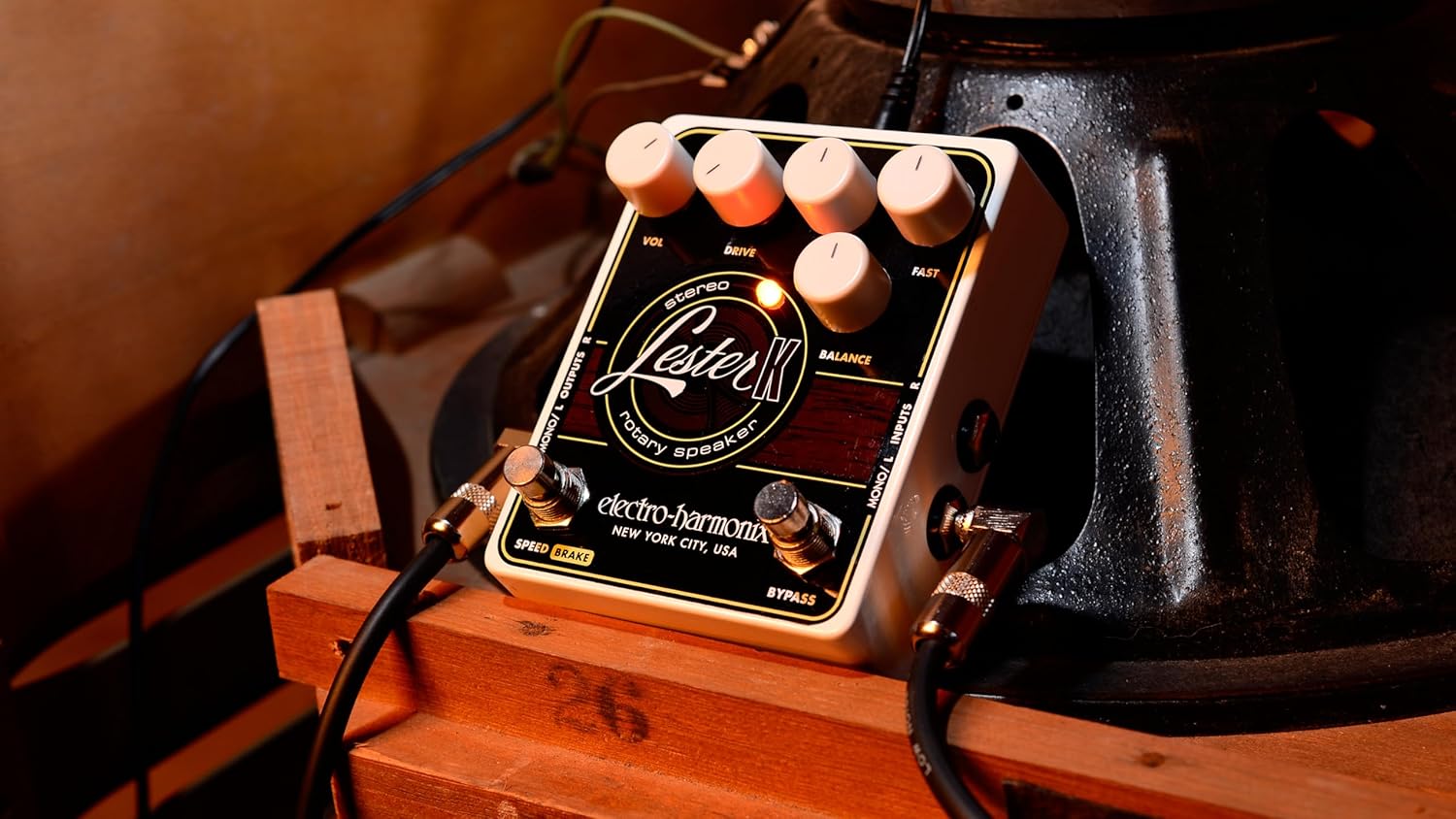
Image: The Lester K pedal connected to audio cables, showing its compact size and input/output jacks.
İşletim Kontrolleri
The Lester K features several controls to shape your rotary speaker sound:
- VOL (Hacim): This knob controls the overall output level of the pedal. Adjust it to match the volume of your bypassed signal or to boost your sound.
- SÜRÜCÜ: This control adjusts the amount of tube-emulated overdrive. Turn it clockwise for more grit and saturation, replicating the sound of an overdriven tube ampcankurtaran.
- YAVAŞ: This knob sets the speed of the rotary effect when in the slow mode.
- HIZLI: This knob sets the speed of the rotary effect when in the fast mode.
- DENGE: This control fine-tunes the balance between the emulated horn and bass rotor elements of the rotary speaker effect. Adjust to achieve your desired tonal character.
- SPEED/BRAKE Footswitch: Toggles between the adjustable slow and fast rotary speeds. Holding this footswitch down engages the brake, gradually slowing the rotation to a stop.
- BYPASS Ayak Pedalı: Engages or disengages the Lester K effect. When bypassed, the pedal provides a true bypass signal.

Resim: Net view of the Lester K's control layout, including the VOL, DRIVE, SLOW, FAST, and BALANCE knobs, and the SPEED/BRAKE and BYPASS footswitches.
Kullanım İpuçları
The Lester K is versatile and can enhance various instruments and styles:
- Organ Sounds: The Lester K excels at emulating classic rotary speaker effects for organ sounds, providing a rich, swirling texture. Experiment with different SLOW and FAST settings to achieve the desired modulation speed.
- Synth Sounds: For percussive synth sounds, the Lester K can add depth and movement. Combining it with a compressor/sustainer pedal, such as the Electro-Harmonix Soul Preacher, can further enhance the percussive attack and sustain.
- Aşırı hız: Utilize the DRIVE knob to introduce a warm, tube-like overdrive, adding character to your rotary sound. This can range from subtle warmth to aggressive distortion.
- Speed Transitions: The SPEED/BRAKE footswitch allows for dynamic transitions between slow and fast rotary speeds, or a gradual stop, mimicking the mechanical acceleration and deceleration of a physical rotary speaker.
Video: This demonstration showcases the Electro-Harmonix Lester K Stereo Rotary Speaker Pedal's capabilities with a keyboard. It illustrates the transition between slow and fast rotary speeds, the effect of the tube-emulated overdrive, and how the pedal can be used to enhance both organ and synth sounds, including a combination with the Soul Preacher compressor/sustainer pedal. The video also briefly mentions the Lester G model, which includes a built-in compressor and adjustable speed control for advanced users.
Bakım
To ensure the longevity and optimal performance of your Lester K pedal:
- Temizlik: Pedalların dış yüzeyini temizlemek için yumuşak, kuru bir bez kullanın. Aşındırıcı temizleyicilerden veya çözücülerden kaçının.
- Depolamak: Pedalı kuru bir ortamda, aşırı sıcaklık ve nemden uzak tutarak saklayın.
- Bağlantılar: Tüm kablo bağlantılarının sıkılığını ve aşınma durumunu periyodik olarak kontrol edin. Gevşek bağlantılar sinyal kaybına veya gürültüye yol açabilir.
- Güç Kaynağı: Always use the specified 9.6V power supply to prevent damage to the unit.
Sorun giderme
If you encounter issues with your Lester K pedal, consider the following:
- Ses Yok: Check all audio cables and power connections. Ensure the pedal is receiving power (LEDs should illuminate). Verify that the BYPASS footswitch is engaged.
- Zayıf veya Bozuk Ses: Check the VOL and DRIVE knob settings. Ensure your instrument's output and amplifier's input levels are appropriate.
- No Rotary Effect: Confirm the SPEED/BRAKE footswitch is not in the 'Brake' position. Adjust the SLOW and FAST knobs to ensure they are not set to minimum.
- İstenmeyen Gürültü: Ensure all cables are properly shielded and connected. Try using a different power outlet or power supply to rule out electrical interference.
Özellikler
| Ürün Ağırlığı | 14.1 ons (0.4 Kilogram) |
| Ürün Boyutları | 7.25 x 6.2 x 3.25 inç (5.75"U x 4.75"G x 2.5"Y) |
| Güç Kaynağı | Kablolu Elektrik (9V) |
| Sinyal Biçimi | Analog |
| Bağlayıcı Türü | Fıçı Krikosu |
Garanti ve Destek
The Electro-Harmonix Lester K pedal comes with a power supply and an instruction manual. For warranty information, technical support, or service inquiries, please refer to the official Electro-Harmonix webSitelerini ziyaret edin veya doğrudan müşteri hizmetleriyle iletişime geçin. Garanti geçerliliği için satın alma fişinizi saklayın.


