1. Giriş
The Simplex 4099-9005 is an addressable manual pull station designed for use with compatible Simplex fire alarm control panels. This dual-action device requires two distinct operations to activate, reducing the likelihood of accidental activation. It is an integral component of a comprehensive fire detection and alarm system, providing a manual means for occupants to initiate an alarm in the event of a fire or other emergency.
2. Güvenlik Bilgileri
Önemli Güvenlik Talimatları:
- Installation, testing, and maintenance of this device must be performed by qualified personnel in accordance with all applicable national and local codes, standards, and the manufacturer's instructions.
- İp çekme istasyonunu takmadan, bakımını yapmadan veya sökmeden önce yangın alarm kontrol paneline giden elektriği daima kesin.
- Ensure all wiring connections are secure and comply with wiring diagrams and local electrical codes.
- Do not paint over the device, as this may impair its functionality or visibility.
- This device is intended for fire alarm signaling only. Misuse may result in false alarms or system damage.
3. Ürün Bittiview
The Simplex 4099-9005 is a red, dual-action manual pull station. Its addressable nature allows the fire alarm control panel to identify the exact location of the activated station. The dual-action design requires a two-step process for activation: first, pushing in a bar, and then pulling down a handle.
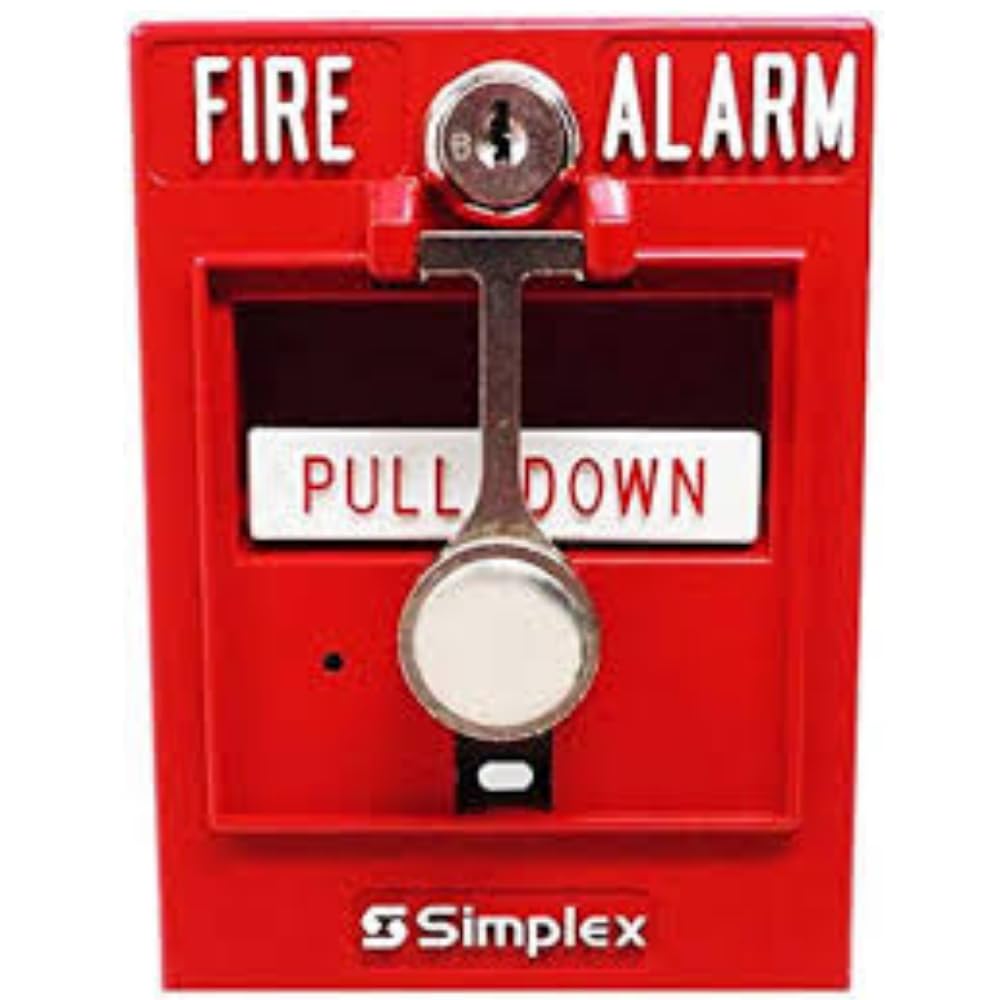
Şekil 1: Ön view of the Simplex 4099-9005 Addressable Manual Pull Station. This image displays the primary components including the 'FIRE ALARM' text, the 'PUSH BAR' mechanism, and the 'PULL HANDLE' for activation.
4. Kurulum
Proper installation is crucial for the reliable operation of the manual pull station.
4.1 Montaj
- Mount the pull station on a standard single-gang electrical box or a compatible surface-mount box.
- Ensure the mounting location complies with local fire codes regarding height and accessibility.
- Secure the pull station firmly to the mounting box using appropriate screws.
4.2 Kablolama
- Connect the pull station to the addressable signaling line circuit (SLC) of the fire alarm control panel. Refer to the specific wiring diagrams provided with your Simplex fire alarm control panel for correct connections.
- Ensure proper polarity for all connections.
- All wiring must be installed in accordance with NFPA 70 (National Electrical Code) and NFPA 72 (National Fire Alarm and Signaling Code).
4.3 Adres Ayarı
The 4099-9005 is an addressable device. Before connecting to the SLC, set the unique address for the pull station using the appropriate Simplex programming tool or DIP switches, as specified in the device's technical documentation. Each device on the SLC must have a unique address.

Şekil 2: Yan view of the Simplex 4099-9005 Addressable Manual Pull Station. This image illustrates the depth of the unit and provides a perspective on its mounting configuration.
5. Operasyon
5.1 Alarmın Etkinleştirilmesi
In the event of a fire or emergency, follow these steps to activate the manual pull station:
- İçeri itin: Firmly push the bar labeled "PUSH BAR" on the front of the station.
- Aşağı çek: Once the bar is pushed in, pull down the handle labeled "PULL HANDLE" until it latches in the down position.
Activation will send an alarm signal to the fire alarm control panel, initiating the building's alarm sequence.
5.2 Çekme İstasyonunun Sıfırlanması
After an alarm has been activated and the emergency resolved, the pull station must be reset. The Simplex 4099-9005 requires a B-Key for resetting.
- Insert B-Key: Locate the keyhole on the front of the pull station. Insert the B-Key into the keyhole.
- Anahtar Teslim: Turn the B-Key clockwise or counter-clockwise (depending on the specific mechanism) to release the latched handle.
- Kapağı Kapat: Return the handle to its original, unactivated position and close the front cover.
- Remove B-Key: Remove the B-Key.
The B-Key is considered a tool for maintenance and resetting, not a consumable item. If additional B-Keys are required, they can be ordered using PID: 252-019.
6. Bakım
Düzenli bakım, Simplex 4099-9005 çekme istasyonunuzun güvenilirliğinin devamlılığını sağlar.
- Görsel Muayene: İtme istasyonunda herhangi bir fiziksel hasar belirtisi olup olmadığını periyodik olarak kontrol edin.ampering, or obstructions. Ensure the device is clean and clearly visible.
- Fonksiyonel Test: Test the pull station's operation according to NFPA 72 and local authority having jurisdiction (AHJ) requirements. This typically involves activating the station and verifying that an alarm signal is received at the fire alarm control panel. Always reset the station immediately after testing.
- Temizlik: Clean the exterior of the pull station with a soft, dry cloth. Do not use abrasive cleaners or solvents.
- B-Key Management: Keep B-Keys secure and accessible only to authorized personnel for resetting and maintenance purposes.
7. Sorun Giderme
If you encounter issues with your Simplex 4099-9005 pull station, consider the following:
- Station Not Activating:
- Ensure the dual-action steps (push in, then pull down) are performed correctly.
- Check for any physical obstructions preventing the handle from moving freely.
- No Alarm at FACP After Activation:
- Verify wiring connections to the SLC are secure and correct.
- Confirm the pull station's address is correctly set and unique on the SLC.
- Check the fire alarm control panel for any trouble signals related to the SLC or the specific address of the pull station.
- Station Not Resetting:
- Ensure the B-Key is fully inserted and turned correctly.
- Inspect the internal mechanism for damage or debris that might prevent resetting.
- Yanlış alarm:
- Investigate if the station was accidentally activated or tampile birlikte.
- Ensure the station is properly reset after any activation.
For persistent issues, contact a qualified fire alarm technician.
8. Özellikler
| Özellik | Şartname |
|---|---|
| Marka | SİMPLEKS |
| Model Numarası | 4099-9005 |
| Stil | Emniyet |
| Güç Kaynağı | Manuel |
| Ürün Ağırlığı | 3.53 ons (100 Gram) |
| Alarm Türü | Audible (via FACP) |
| Malzeme | Glass (referring to break-glass type, though this model is dual-action) |
| Ürün Boyutları | 1 x 3.4 x 5 inç |
| UPC | 643485652991 |
| Parça Numarası | S4099-9005 |
| Piller Gerekli | HAYIR |
9. Garanti Bilgileri
Specific warranty details for the Simplex 4099-9005 Addressable Manual Pull Station are typically provided at the point of purchase or can be obtained directly from Simplex or an authorized distributor. Please retain your proof of purchase for warranty claims. For detailed warranty terms and conditions, refer to the official Simplex documentation or contact their customer service.
10. Müşteri Desteği
For technical assistance, installation queries, or service requests, please contact your authorized Simplex dealer or a certified fire alarm technician. Ensure you have the product model number (4099-9005) and any relevant system information available when seeking support.


