giriiş
This manual provides comprehensive instructions for the operation and maintenance of your ONN X5 HiFi Music Player. Please read this manual thoroughly before using the device to ensure proper functionality and to maximize your listening experience. The ONN X5 is designed to deliver high-fidelity audio playback in a compact and user-friendly format.
Ürün Bittiview
The ONN X5 is a portable HiFi music player featuring a 2.0-inch TFT screen and an aluminum alloy shell. It supports a wide range of audio formats, including lossless files, and offers expandable storage via a MicroSD card.
Temel Özellikler:
- Yüksek Kaliteli Ses: Supports WAV, FLAC, ALAC, APE, OGG lossless formats, and high-definition music up to 24Bit/192 KHz.
- Görüntülemek: 2.0-inch TFT screen (176x220 pixels) for clear navigation and information display.
- Depolamak: 8GB internal memory, expandable up to 32GB with a MicroSD/TF card.
- Dayanıklı Tasarım: Lightweight aluminum alloy body (60g) for enhanced durability and reduced external interference noise.
- Kullanıcı Arayüzü: Intuitive key-based operation.
- Ek Özellikler: FM Radio support.
- Pil: High-capacity rechargeable lithium polymer battery.
- Çoklu Dil Desteği: English, Russian, Korean, German, Japanese, Polish, Indonesian, Chinese.
Cihaz Düzeni:

Resim: Ön view of the ONN X5 HiFi Music Player, showing its display and control buttons. The screen displays track information, audio quality (e.g., 24BIT, 88HHZ), and playback status.

Resim: Yan view of the ONN X5 HiFi Music Player, illustrating the location of the MicroSD card slot on the right side of the device.

Resim: Ön ve arka view of the ONN X5 HiFi Music Player. The back panel shows the model number "X5" and branding information.
Kurmak
1. Cihazı Şarj Etme:
- Connect the ONN X5 to a power source using the provided USB cable.
- Ekrandaki pil göstergesi şarj durumunu gösterecektir.
- A full charge is recommended before first use. The device uses a high-capacity rechargeable lithium polymer battery.
2. Inserting a MicroSD/TF Card:
- Locate the MicroSD/TF card slot on the side of the player.
- Uyumlu bir MicroSD/TF kartı (en fazla 32 GB) yerine oturana kadar yuvaya yavaşça yerleştirin.
- Ensure the card is inserted correctly to avoid damage.

Image: Contents of the ONN X5 package, showing the player, USB charging cable, and other accessories. This illustrates the components available for setup.
3. Müzik Aktarımı Files:
- Connect the ONN X5 to your computer using the USB cable.
- The device will appear as a removable storage drive.
- İstediğiniz sesi sürükleyip bırakın. files (MP3, WMA, APE, FLAC, WAV, ALAC, OGG) into the player's internal storage or the MicroSD card.
- USB kablosunu çıkarmadan önce cihazı bilgisayarınızdan güvenli bir şekilde çıkarın.
Kullanım Talimatları
Güç Açma/Kapatma:
- To power on, press and hold the power button (usually marked with a universal power symbol) until the screen illuminates.
- Kapatmak için cihaz kapanana kadar güç düğmesini basılı tutun.
Navigasyon:
The ONN X5 uses physical buttons for navigation. Refer to the device layout for button identification.
- ses seviyesi: Sesi ayarlar.
- M (Menü): Menülere erişir ve seçimleri onaylar.
- Ok Düğmeleri (< / >): Navigate through menus, select tracks, or fast forward/rewind during playback.
- Güç Düğmesi: Also functions as a play/pause button during music playback.
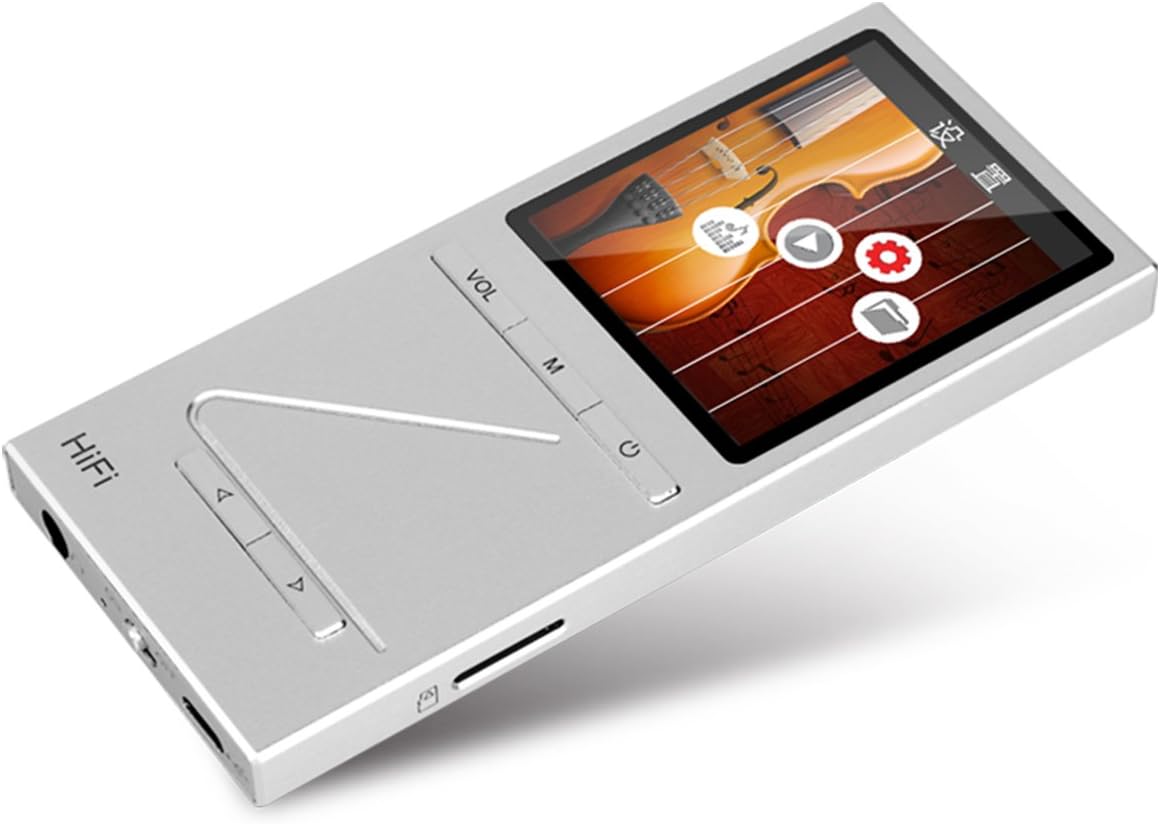
Resim: Açısal view of the ONN X5 HiFi Music Player, showing the screen with various menu icons, indicating the user interface for navigation.
Müzik Çalma:
- From the main menu, navigate to "Music" or "Files ".
- Browse through your folders and select a track to play.
- Press the Power/Play button to start or pause playback.
- Use the arrow buttons to skip tracks or fast forward/rewind.
- Adjust volume using the VOL button.
FM Radyo:
- Ana menüden "FM Radyo" seçeneğine gidin.
- Use the navigation buttons to scan for stations or manually tune to a frequency.
- Ensure headphones are connected as they often act as the antenna for FM radio.
Dil Ayarları:
Cihaz birden fazla dili desteklemektedir. Dili değiştirmek için:
- Go to "Settings" from the main menu.
- Select "Language" and choose your preferred language from the list (English, Russian, Korean, German, Japanese, Polish, Indonesian, Chinese).
Bakım
- Temizlik: Cihazı temizlemek için yumuşak, kuru bir bez kullanın. Sıvı temizleyicilerden veya aşındırıcı malzemelerden kaçının.
- Depolamak: Oynatıcıyı serin, kuru bir yerde, doğrudan güneş ışığından ve aşırı sıcaklıklardan uzakta saklayın.
- Pil Bakım: Pil ömrünü uzatmak için, pili sık sık tamamen boşaltmaktan kaçının. Cihazı uzun süre kullanmasanız bile düzenli olarak şarj edin.
- Etkiden Kaçının: The aluminum alloy shell provides durability, but avoid dropping the device or subjecting it to strong impacts.
- Suya Maruz Kalma: Bu cihaz su geçirmez değildir. Suya veya yüksek neme maruz bırakmaktan kaçının.
Sorun giderme
Cihaz Açılmıyor:
- Pilin şarjlı olduğundan emin olun. Cihazı bir güç kaynağına bağlayın ve tekrar açmayı denemeden önce en az 30 dakika şarj olmasını bekleyin.
- Try performing a hard reset (if applicable, refer to manufacturer's specific instructions for hard reset, usually involves holding power button for an extended period).
Ses Yok:
- Ses seviyesini kontrol edin ve sessiz modda olmadığından emin olun.
- Verify that headphones or external speakers are properly connected.
- Test with different headphones or audio output devices.
- Sesi sağlayın file is not corrupted or in an unsupported format.
Aktarılamıyor Files:
- USB kablosunun hem oynatıcıya hem de bilgisayara güvenli bir şekilde bağlı olduğundan emin olun.
- Bilgisayarınızdaki farklı bir USB bağlantı noktasını veya farklı bir USB kablosunu deneyin.
- Verify that the device is recognized by your computer as a removable drive.
- Check if the MicroSD card is properly inserted and not full.
Ekran Yanıt Vermiyor / Donmuş:
- Yeniden başlatmayı zorlamak için güç düğmesini yaklaşık 10-15 saniye basılı tutun.
- If the issue persists, ensure the battery is charged.
Özellikler
| Özellik | Detay |
|---|---|
| Model Numarası | X5 |
| Marka | ONN |
| Ekran Boyutu | 2.0 Inches TFT (176x220 PIXEL) |
| Dahili Bellek | 8 GB |
| Genişletilebilir Depolama | MicroSD/TF card up to 32 GB |
| Desteklenen Ses Biçimleri | APE, FLAC, ALAC, WAV, WMA, OGG, MP3 (up to 24Bit/192 KHz) |
| Bağlantı Teknolojisi | Aux, USB |
| Özel Özellik | FM Radyo |
| Pil | 1 Lithium Ion battery required (High-capacity rechargeable lithium polymer) |
| Ürün Ağırlığı | 7 ons (yaklaşık 0.2 Kilogram) |
| Paket Boyutları | 6.21 x 4.7 x 1.2 inç |
| Üretici | SZTZWY |
Garanti ve Destek
For detailed warranty information, please refer to the warranty card included with your purchase or visit the official ONN product support website. For technical assistance or further inquiries, please contact ONN customer support through their official channels.


