giriiş
This manual provides detailed instructions for setting up, operating, and maintaining your Logitech M275 Wireless USB Mouse. Please read this guide thoroughly to ensure optimal performance and longevity of your device. The Logitech M275 mouse is designed for comfortable use with its contoured shape and offers reliable wireless connectivity.

Resim: Yukarıdan aşağıya view of the Logitech M275 Wireless Mouse, showcasing its black finish and central scroll wheel.
Kurmak
Follow these steps to set up your Logitech M275 Wireless USB Mouse:
- Pili Takın:
- Farenin alt tarafındaki pil bölmesini bulun.
- Pil bölmesinin kapağını açın.
- Insert one AA battery, ensuring correct polarity (+/-). The mouse includes one AA battery.
- Pil bölmesi kapağını sıkıca kapatın.
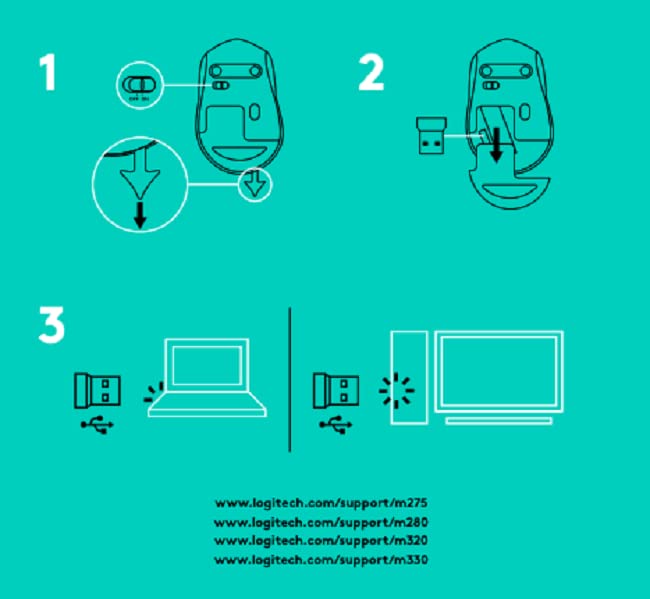
Resim: Alt view of the Logitech M275 Wireless Mouse, showing the ON/OFF switch, battery compartment, and optical sensor.
- USB Alıcısını bağlayın:
- Locate the tiny USB Nano Receiver, typically stored inside the battery compartment or packaged separately.
- USB Nano Alıcıyı bilgisayarınızdaki kullanılabilir bir USB bağlantı noktasına takın.
- Bilgisayarınız gerekli sürücüleri otomatik olarak algılayıp yüklemelidir.

Image: Close-up of the Logitech Nano Receiver plugged into a laptop's USB port, indicating successful connection.
- Fareyi Açın:
- Slide the ON/OFF switch on the underside of the mouse to the 'ON' position.
- Fare artık kullanıma hazırdır.

Image: A diagram showing the three steps for setting up the mouse: 1) Insert battery, 2) Insert receiver into mouse for storage, 3) Plug receiver into computer's USB port.
Kullanım Talimatları
The Logitech M275 Wireless USB Mouse offers intuitive control for your computer:
- Temel Fonksiyonlar:
- Sol tık: Primary button for selecting items, opening links, etc.
- Sağ tık: Bağlam menüleri ve ek seçenekler için ikincil düğme.
- Kaydırma tekerleği: Roll up or down to navigate documents and web pages. The scroll wheel also functions as a clickable middle button.
- Gelişmiş Optik Sensör: The mouse utilizes a Logitech Advanced Optical Sensor for smooth and precise cursor control on various surfaces.
- Pil Ömrü Göstergesi: A small LED light on the mouse indicates battery status. It typically glows green briefly when powered on if the battery is good. A red light indicates that the battery is low and needs replacement. The mouse is designed for an 18-month battery life, which may vary based on usage.

Resim: Üst view of the Logitech M275 Wireless Mouse, highlighting its ergonomic design and indicating an 18-month battery life.
Bakım
Doğru bakım, farenizin uzun ömürlü olmasını ve performansını garanti eder:
- Pil Değişimi: When the battery indicator light turns red, replace the AA battery. Follow the steps outlined in the 'Install the Battery' section under Setup.
- Fareyi Temizleme:
- Temizlemeden önce fareyi kapatın.
- Yumuşak, tiftiksiz bir bez kullanın ve hafifçe kurulayın.ampFarenin yüzeyini silmek için su veya hafif bir temizleme solüsyonu kullanın.
- Sert kimyasallar veya aşındırıcı malzemeler kullanmaktan kaçının.
- Sıvıların farenin iç bileşenlerine girmesine izin vermeyin.
Sorun giderme
If you encounter issues with your Logitech M275 mouse, refer to the following common solutions:
- No Cursor Movement or Intermittent Connection:
- Farenin açık olduğundan emin olun.
- Check the battery. Replace it if the indicator light is red or if the mouse is unresponsive.
- USB Nano Alıcının bilgisayarınızdaki çalışan bir USB bağlantı noktasına güvenli bir şekilde takılı olduğundan emin olun. Farklı bir USB bağlantı noktası deneyin.
- Menzil sorunlarını elemek için fareyi USB alıcısına daha yakın bir yere taşıyın.
- Avoid using the mouse on highly reflective or transparent surfaces. A mouse pad is recommended for optimal tracking.
- Lagging or Unresponsive Cursor:
- Interference from other wireless devices can affect performance. Try moving other wireless devices away from the mouse and receiver.
- Bilgisayarınızın işletim sisteminin güncel olduğundan emin olun.
- Mouse Not Detected by Computer:
- Bilgisayarınızı yeniden başlatın.
- Try plugging the USB Nano Receiver into a different USB port.
- If you have other Logitech devices, ensure the M275 receiver is the correct one for this mouse, as it is not a Unifying receiver.
Özellikler
| Özellik | Detay |
|---|---|
| Marka | Logitech |
| Model Numarası | M275 |
| Bağlantı Teknolojisi | USB Kablosuz |
| Hareket Algılama Teknolojisi | Optik |
| Renk | Siyah |
| Güç Kaynağı | Pille Çalışır (1 adet AA pil) |
| Ortalama Pil Ömrü | 18 Ay |
| Donanım Platformu | PC |
| İşletim Sistemi Uyumluluğu | Linux, Windows 7, Windows XP |
| Ürün Ağırlığı | 100 gr |
| Ürün Boyutları | 21x7.6x15.2 cm |
| Dahil Bileşenler | Wireless Mouse, Nano Receiver, 1 AA battery, User Documentation |
Garanti ve Destek
- Garanti: The Logitech M275 Wireless USB Mouse comes with a 1-year warranty. Please retain your proof of purchase for warranty claims.
- Müşteri Desteği: For technical assistance or warranty inquiries, please contact Logitech Customer Care.
- Logitech India Customer Care:
- Ücretsiz Numara: 1800 572 4730
- Opening Time: 9:00 AM to 6:00 PM (Monday to Friday)
- Note: Weekends & National Holidays closed.


